

Telegram Group Chats
When a Telegram account is connected to Flowlu, the Communications module receives not only private conversations but also group chats. You can read group conversations in Flowlu, reply to messages, and link chats to CRM records.
How to Enable Group Chats
Open your Telegram integration settings and enable Receive Group Chats. Until this setting is enabled, group chats will not appear in Flowlu, including private groups that an employee is added to.
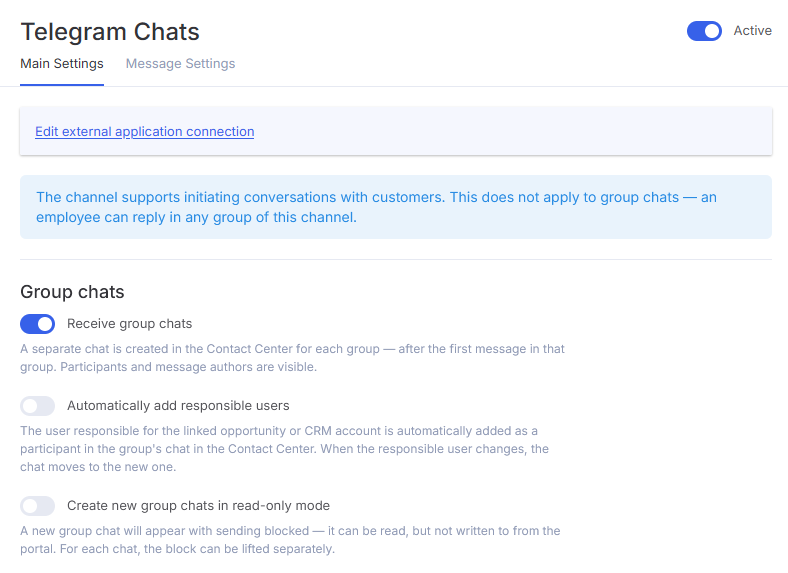
Only Communications module administrator can modify these settings.
Note: Once enabled, all groups associated with the connected Telegram account will start appearing in Flowlu as soon as a new message is received in them. Their conversations will become accessible to employees who have access to the channel. If you don't want a particular group to appear, you can disable it later.
There is no need to connect groups manually. A separate chat is automatically created for each group the connected account belongs to, as soon as the first message is received.
The chat name matches the group's name in Telegram and is automatically updated if the group is renamed.
If several connected employees belong to the same group, only one chat will be created and shared across the team. There will be no duplicate chats or messages.
What Group Chats Look Like
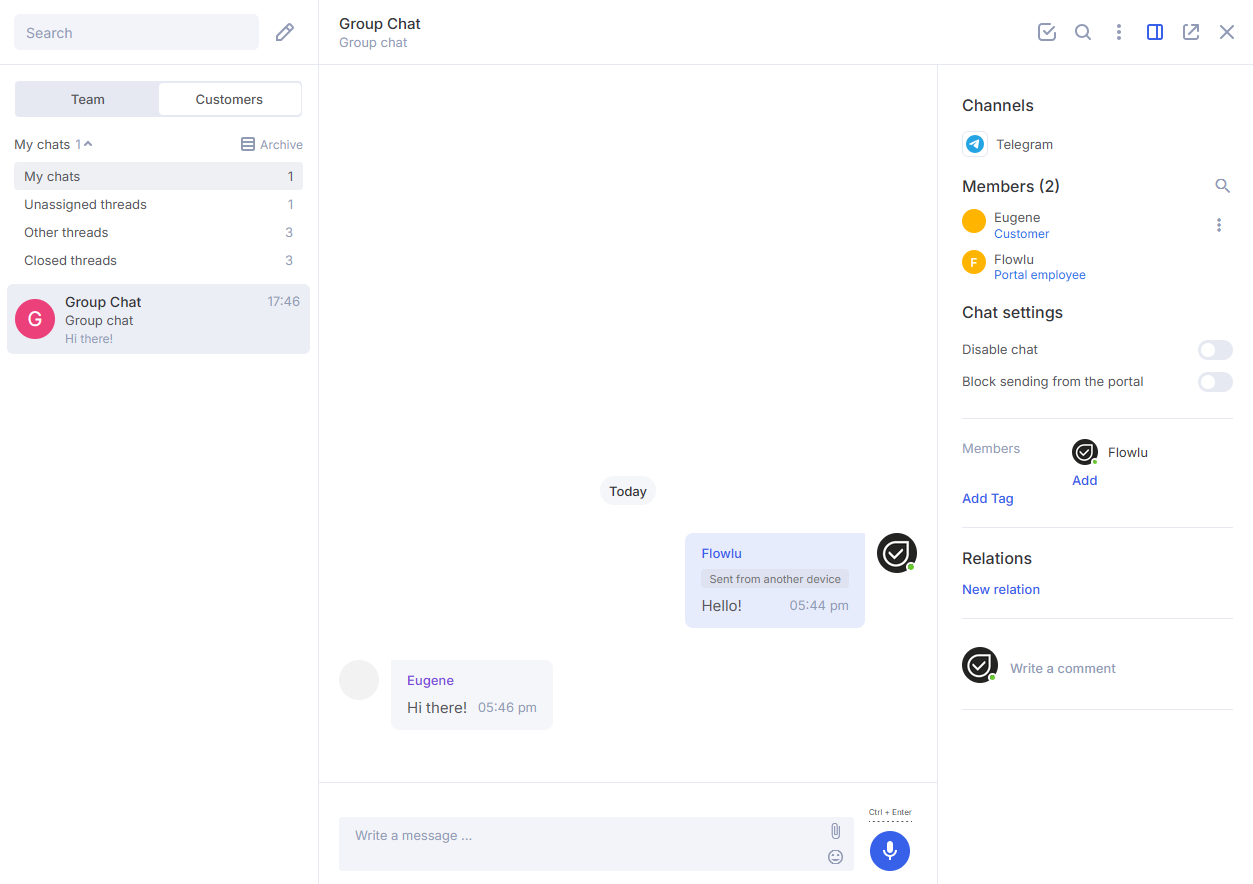
- Message authors. Each message displays its author's name, highlighted in a distinct color. Your messages appear on the right, while messages from other participants appear on the left.
- Group events. You can see who joined or left the group and when the group name was changed.
- Topics. In Telegram supergroups with topics enabled, you can see which topic a message belongs to. The topic that will receive your reply is displayed next to the message input field. You can change it before sending a message. You cannot create new topics in Flowlu, but you can reply in existing ones.
- Participants. The chat sidebar contains a list of participants, including employees and external users. The list is updated automatically as conversations and group events occur. No manual refresh is required.
- Unread messages. The unread message counter is updated for all chat participants.
Who Can Send Messages to a Group
- Employees with access to Communications can send messages. They do not need to be members of the Telegram group chat.
- In Telegram, messages are sent from the personal account of the employee who wrote them. This means group members see messages from different individuals rather than from a single company account.
- If an employee does not have their own connected Telegram account, their message will be sent from the account that created the chat in Flowlu.
- You can mention Flowlu employees, but you cannot mention Telegram group participants.
Where to Find Group Chats
- My Chats — groups you are a member of.
- Unassigned threads — groups you are not a member of. Visibility depends on your role.
- Closed threads — closed groups, just like regular chats.
You can find a group by searching for its name or by searching for a linked company/contact who is a participant in the chat.
Group Chat Settings
Channel settings are located in the Telegram channel settings. Only Communications administrator can change them.
- Receive Group Chats — enables group chats in Flowlu. Disabled by default.
- Automatically add responsible users — automatically adds the assignee of a linked deal or company/contact as a participant in the Flowlu chat, but not in the Telegram group. This allows them to view the conversation without being added manually. If the assignee changes, the chat is transferred to the new assignee.
- Create new group chats in read-only mode — new group chats are created with message sending disabled. Employees can read messages but cannot send them from the portal. This restriction can be lifted separately for each chat.
The following settings apply to private chats only:
- Welcome Message
- Auto-Reply
- Manager Queue
- Sales Pipeline
- Lead Source
Individual Chat Settings
Individual chat settings are available in the chat's sidebar:
- Disable Chat — stops incoming messages and blocks outgoing messages. The conversation history is preserved.
- Disable Sending Messages from the Portal — incoming messages are still received and can be read, but nobody can send messages from the account, including administrators. Replies can only be sent directly from Telegram.
Group Chats and CRM
Please note the following:
- Deals and contacts are not created automatically. When a customer sends a message to a group, no new CRM records are created. Only the group participant is added to the chat.
- Conversion is manual. You can convert an external participant into a company/contact using the corresponding button.
- A group chat can be linked to multiple companies/contacts and deals. This is useful because group chats often include customers managed by different employees.
- Chat activity appears in linked CRM records. An activity entry with a link to the chat is added to the activity timeline of linked companies/contacts and deals. Message content is not included, preventing conversations with other customers from appearing in unrelated CRM records.
- Existing contacts are linked automatically. If a group participant is already in your CRM — for example, if they previously contacted an employee via a private message — their CRM record will automatically be linked to the group chat.
Which Telegram Chats Are Supported?
- Private conversations continue to work as usual.
- Regular groups with up to 200 participants are supported in Flowlu.
- Supergroups are also supported. If Telegram converts a regular group into a supergroup, the conversation will continue without interruption, and no duplicate chat will be created. All topics appear in a single message feed.
- Broadcast channels are not currently supported. Support for them is planned for the future.
Important Things to Know
- Messages sent directly from Telegram by an employee appear in Flowlu as customer messages and are added to the CRM activity log. There is no need to reply from Flowlu because the employee has already responded.
- Replying directly to a specific message is not currently supported for either incoming or outgoing messages.
- There is no limit on the number of groups you can connect in Flowlu. The limit is set by Telegram: an account can belong to a maximum of 500 supergroups and channels, or 1,000 with Telegram Premium.
What Happens to a Chat in Different Situations?
- The channel is disconnected — the conversation history is preserved, but no new messages are received and sending messages is disabled.
- The connected account leaves the group or is removed from it — the chat is marked as unavailable, but its conversation history is preserved.
- The group is deleted in Telegram — the conversation history remains in Flowlu, and the chat is marked as unavailable.
- An employee is removed from the account, and their Telegram account was the only connected account — the chat is moved to the archive, and its conversation history is preserved.
