November–December Updates: Workload Reporting, Custom Apps, and Everyday Productivity Improvements

- Balance Your Team’s Workload With Real-Time Visibility
- Build Custom Apps and Integrations Inside Flowlu
- Manage Active Sessions Across All Devices
- Customize System Email Templates to Match Your Brand
- Inline Editing for Faster Updates in Sales and Agile Boards
- Create Tasks Using Your Voice in the Mobile App
- Link Multiple Contacts to a Single Opportunity
- Visualize Task Data With the New Donut Chart Widget
- New Block-Based Text Editor
- Other Improvements
- Bonus: Free Customer Lifetime Value (CLV) Calculator
- What’s Coming Next
The holidays are behind us, and it’s a good moment to reset priorities and look ahead. Over November and December, we shipped a set of updates focused on visibility, control, and speed, so teams can plan work more realistically and spend less time managing the system itself.
Here’s a complete overview of what’s new in Flowlu.
Balance Your Team’s Workload With Real-Time Visibility
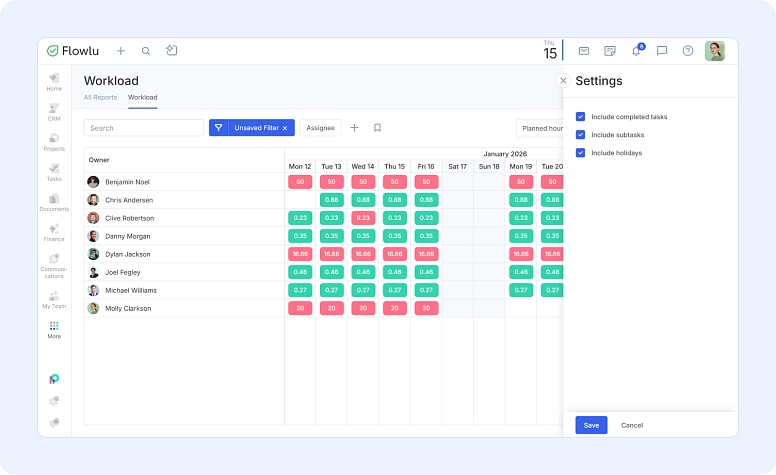
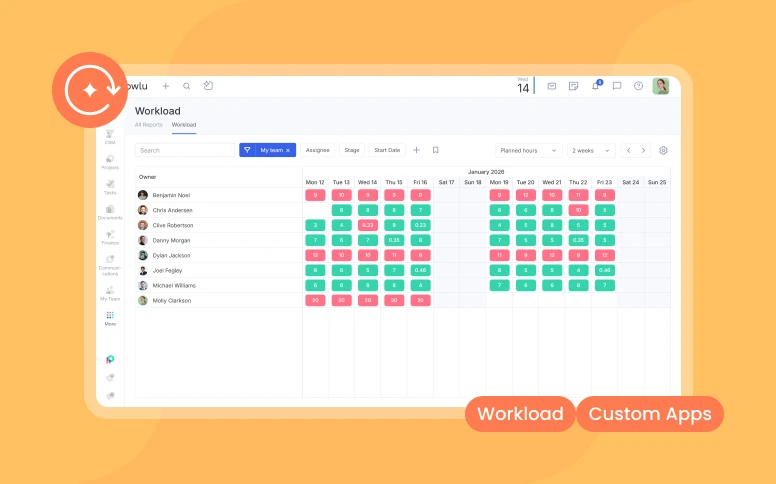
Planning work is only effective when it reflects reality. To help teams spot issues early and distribute work more evenly, we’ve added a Workload Report to the Time Tracker.
The report gives managers a clear view of who’s overloaded, who has capacity, and where plans need adjustment, before burnout or delays appear.
You can use the Workload Report to:
- Identify planning risks early with color-coded indicators that show overloads and underutilization.
- Plan based on how you actually work by viewing workload, either by number of tasks or by planned hours.
- Focus on specific questions using filters for project, status, or assignee.
- Resolve overloads, not just observe them by drilling into an employee’s tasks for any date range and adjusting priorities or timelines.
All workload data lives in a single table and updates automatically as plans change.
Where to find it: Time Tracker → Workload
Access: Employees can see their own workload. Managers and administrators get a team-wide capacity view.
Available on Advanced and Ultimate plans, plus legacy Professional and Enterprise plans.
The report displays planned task time distributed by day. Tasks appear only if deadlines are set.
Build Custom Apps and Integrations Inside Flowlu
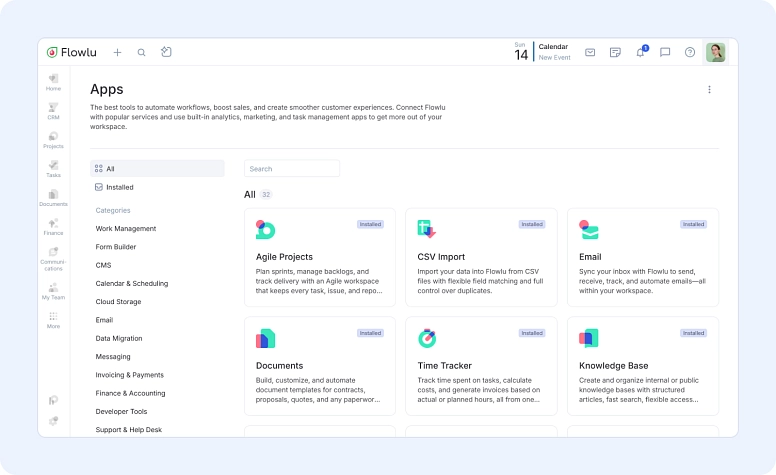
Flowlu now lets you build your own apps directly inside your account. These private apps can be tailored exactly to your workflows, whether you’re integrating internal tools or creating custom utilities for your team.
In the coming weeks, we’ll also open public app submissions and developer partnerships, allowing developers to publish apps to the Flowlu Marketplace.
Updated App Marketplace
We’ve refreshed the Flowlu App Marketplace with:
- Dedicated, detailed pages for each app
- Clear descriptions to help you understand what each app does
- Upcoming public discussion and rating sections for feedback and questions
How to get started:
- Go to Apps
- Open the three-dot menu in the top-right corner
- Select My Apps
- Click Create application
If you plan to build or embed an app, see Help Center → Developer docs & setup guide.
Need help? Contact us at [email protected], we’re happy to assist.
Manage Active Sessions Across All Devices
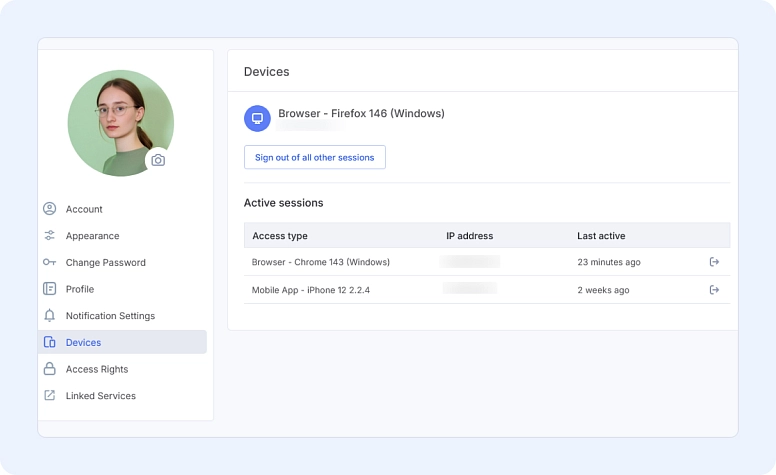
You can now view and control every device logged into your Flowlu account from one place.
With the Session Manager, you can:
- See all devices used to sign in
- End active sessions on other devices at any time
Where to find it: Profile settings → Devices
Customize System Email Templates to Match Your Brand
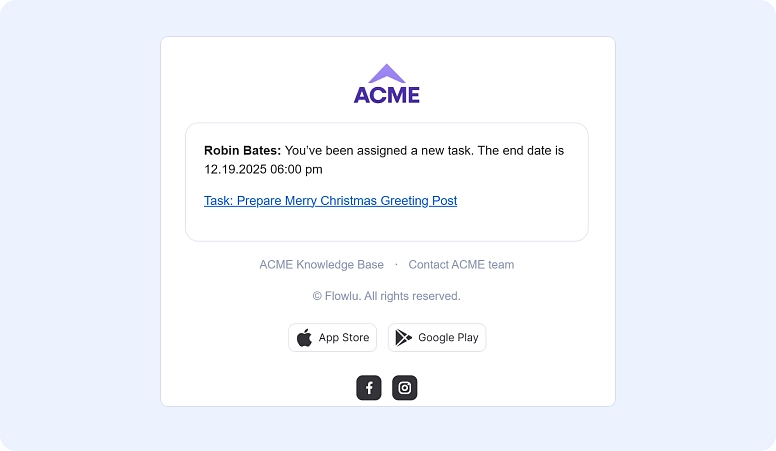
System emails are often the first messages users receive. Now you can make them look intentional and on-brand.
You can customize:
- Button colors
- Header logo
- Footer links (including social media)
- Templates for user invites, password recovery, login emails, notifications, and more
How to set it up: Portal Settings → Branding → System Emails
Available on Advanced and Ultimate plans, plus legacy Professional and Enterprise plans.
Inline Editing for Faster Updates in Sales and Agile Boards
To reduce friction during daily work, we’ve added inline editing where teams need it most.
Sales Opportunities (Kanban)
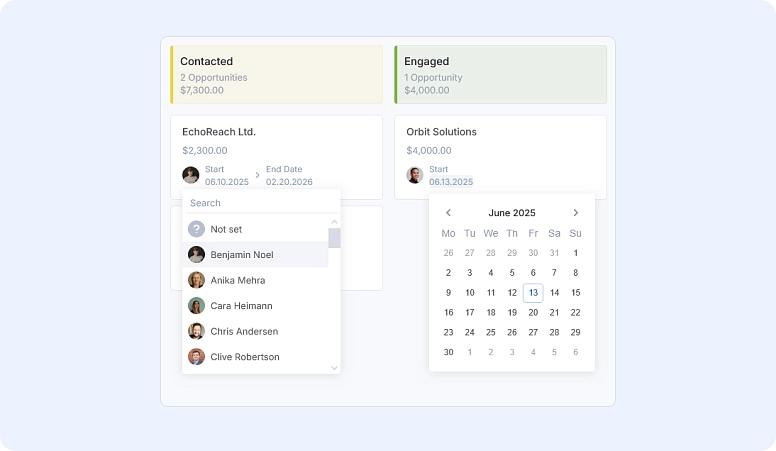
You can now edit:
- Opportunity names
- Dates
- Assignees
—all directly from the board. This makes quick fixes and bulk cleanups much easier.
Agile Projects
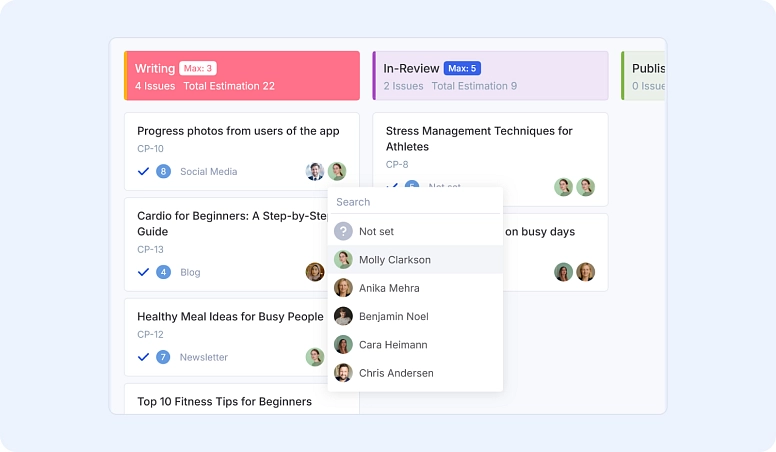
Inline editing is now available on Agile boards. You can update the following fields with a single click:
- Title
- Issue type
- Category
- Assignee
- Reporter
No need to open separate views, small changes stay small.
Create Tasks Using Your Voice in the Mobile App
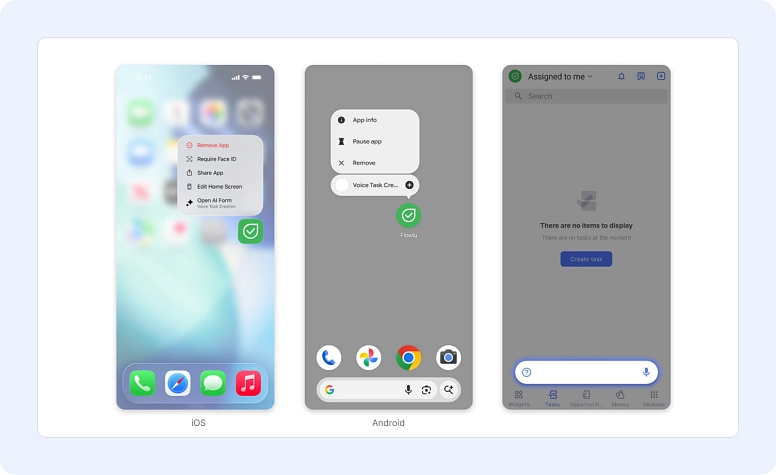
You can now create tasks in the Flowlu mobile app and tablet version using voice commands.
When you follow the recommended structure, Flowlu’s AI turns your voice input into a complete task with:
- Title and description
- Assignee, collaborators, and followers
- Deadline
- Project link
This is designed for quick capture when you’re away from your laptop or switching between conversations, so tasks don’t get lost before they’re written down. Click here to learn more
Link Multiple Contacts to a Single Opportunity
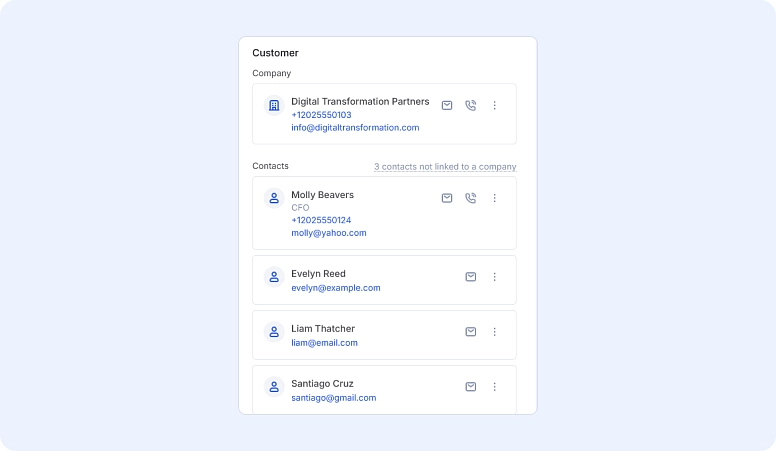
Opportunities often involve more than one person, and not always from the same company. You can now attach multiple contacts to a single opportunity while keeping one primary company.
This is especially useful when working with:
- Consultants and freelancers
- Partners and subcontractors
- Multiple decision-makers or technical contacts
Every contact added to an opportunity automatically brings their emails, calls, and messenger conversations into that opportunity. No more jumping between profiles or forwarding threads.
Adding a contact to an opportunity does not link them to the company. Their profiles remain unchanged, but you can link them later in bulk if needed.
Visualize Task Data With the New Donut Chart Widget
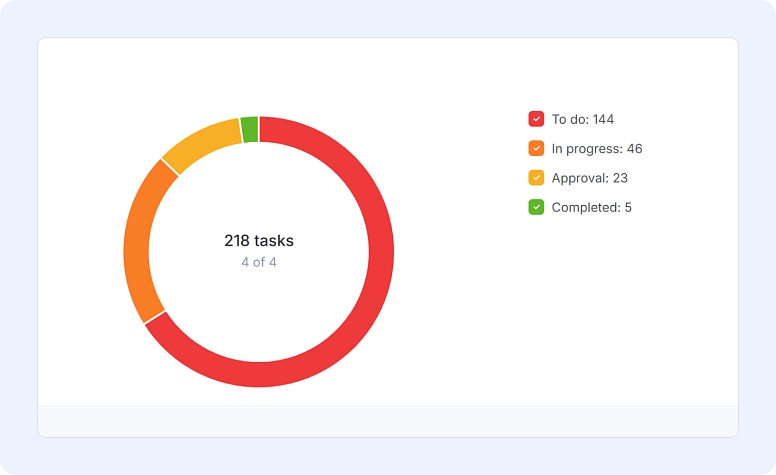
We’ve added a Donut Chart widget to help teams turn task data into clear visual insights.
You can analyze:
- Tasks by stage, status, or priority
- Billable vs. non-billable tasks
- Workload by owner or assignee
- Project workload
- Planned vs. actual time
Metrics available:
- Number of tasks
- Planned time
- Actual time
Click any chart segment to instantly view the tasks inside it, and apply filters (for example, tasks from the current month) for deeper analysis.
New Block-Based Text Editor
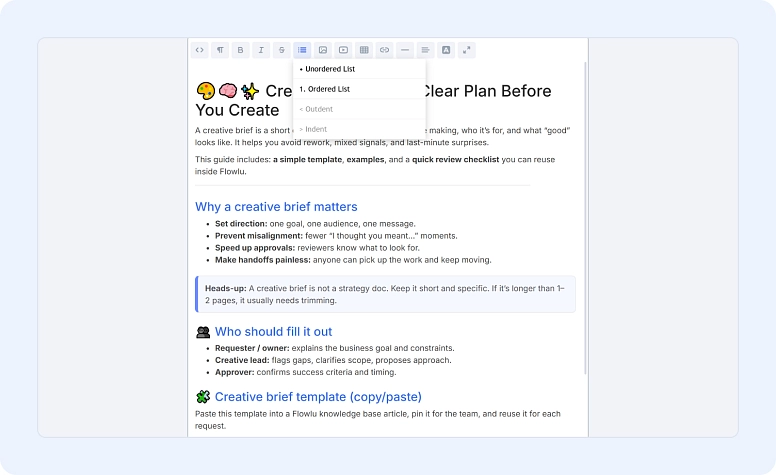
Flowlu’s new editor is now available across:
- Tasks
- Agile
- Calendar
- Groups
- Notes and Comments
- Projects
- CRM
- (Email support coming soon)
Every piece of content is now a block—paragraphs, headings, lists, quotes, or code—so you can:
- Move content easily
- Reformat with one click
- Keep long updates structured and readable
The editor also improves text selection stability and simplifies the toolbar so it’s always accessible.
Other Improvements
- Updated Files section in mobile apps and added them in Groups on your devices
- Batch delete for CRM automation rules
- When copying a project, all task dependencies are now preserved, including blocking dependencies (This feature has moved from beta to full production)
Bonus: Free Customer Lifetime Value (CLV) Calculator
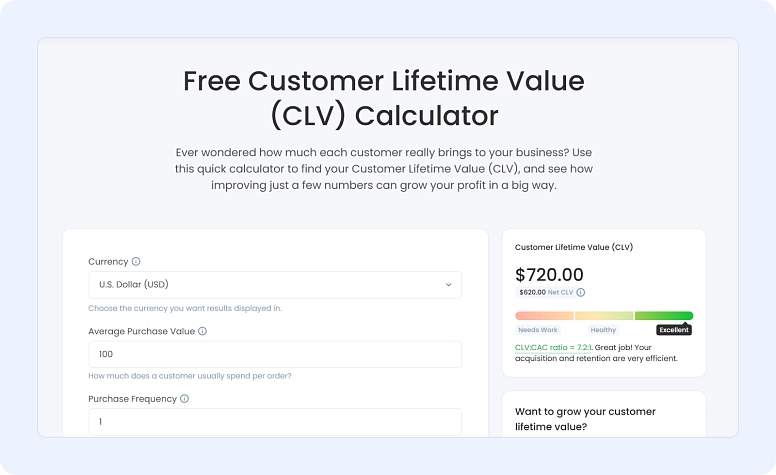
As a small extra, we’ve launched a free Customer Lifetime Value (CLV) calculator on our website.
It helps you quickly estimate how much value a single customer brings to your business over time, and see how changes in retention, pricing, or acquisition costs can impact profitability.
The calculator is completely free, so feel free to check it out and use it whenever you need a quick CLV snapshot.
What’s Coming Next
We’re continuing to improve Flowlu with features that strengthen data quality, transparency, and automation. Next up:
- Required fields for opportunities to keep pipelines consistent and reporting accurate
- App reviews in the Marketplace, so you can leave feedback or ask questions directly on an app or integration page and get responses from the developer.
- CRM automation for messenger-based messages, allowing you to automatically send messages when an opportunity moves to a new pipeline stage.
More updates are on the way.
The workload report gives managers a real-time capacity view that identifies overloaded employees before problems escalate. Instead of reacting to missed deadlines or quality issues, you can see who's swamped based on planned hours or task count, then redistribute work immediately. The color-coded indicators highlight both overloads and underutilization, so you're not just spotting problems—you're discovering unused capacity to balance allocation. You can drill into any employee's tasks for a specific date range and adjust priorities or deadlines without disrupting the entire project timeline.
This feature is available on Advanced and Ultimate plans and works only for tasks with deadlines set, ensuring data accuracy across your team.
Flowlu's new app builder lets you create private custom apps tailored to your workflows directly inside your account. You don't need to hire developers or rely on external integrations for every tool your team uses. The builder is designed for teams that need to connect internal systems or automate processes specific to their operations.
In coming weeks, Flowlu will open the Marketplace for public app submissions and developer partnerships, meaning you'll also have access to community-built solutions. To get started, go to Apps → three-dot menu → My Apps → Create application. The Help Center includes developer docs and setup guides for technical questions.
This approach combines low-code flexibility with the option to submit to a public marketplace, giving teams control without complexity.
Yes. Flowlu's AI voice feature creates complete tasks with title, description, assignee, collaborators, followers, deadline, and project link—all from spoken input. This isn't a basic voice-to-text tool; it structures your speech into task components automatically when you follow the recommended format.
The mobile app voice feature is built for speed: quick capture when you're away from your laptop, in meetings, or switching between conversations. Rather than lose task details to scattered notes or emails, you speak, and Flowlu builds the task with proper metadata attached. The feature is available on the mobile app and tablet version.
Limitations: Voice task creation works best when you articulate key details (who it's assigned to, when it's due, which project), so brief voice memos convert more reliably than rambling spoken notes.