







Best Alternative for Agile Teams and Project Management

- How We Evaluated Jira Alternatives
- Top Jira Alternatives
- Why Look for an Alternative to Jira?
- What Is the Best Jira Alternative?
- Flowlu — A Powerful Jira Alternative
- Jira vs Flowlu: Feature Comparison
- Jira Free Alternatives and Affordable Options
- Other Tools Like Jira
- Why Flowlu Is the Best Jira Alternative

Users often migrate away because of a complicated interface, a steep learning curve, and per‑user pricing that escalates rapidly.
Alternative platforms can offer more intuitive workflows, collaboration tools and lower pricing, especially when projects involve non‑technical teams or require modules beyond software development.
This guide analyzes the leading apps like Jira and proposes the best Jira alternative for Agile teams.
How We Evaluated Jira Alternatives
To help teams choose the best Jira alternative, we evaluated multiple project management tools based on common team scenarios and publicly available info.
We focused on what matters most for Agile teams:
- Ease of use and learning curve
- Agile capabilities (sprints, backlogs, Kanban boards)
- Workflow customization and automation
- Pricing structure and scalability
- Integrations with development and collaboration tools
- Support for cross-department teams such as marketing, sales, and operations
We cross-checked vendor docs with user reviews on platforms such as G2, Capterra, and Reddit.
Top Jira Alternatives
Here are some of the most popular Jira alternatives used by Agile teams today.
|
Tool |
Best for |
Free plan |
Pricing approach |
|
Flowlu |
Agile + CRM + invoicing in one platform (cross-department teams) |
Yes (2 users) |
Per user, simple tiers |
|
ClickUp |
Highly customizable workspace with many views |
Yes |
Per user, tiered |
|
Monday.com |
Visual workflows + automation templates |
Limited |
Per user, tiered (seat minimums) |
|
Asana |
Lightweight work management for mixed teams |
Yes |
Per user, tiered |
|
Trello |
Simple Kanban boards and quick adoption |
Yes |
Per user, tiered |
|
ProofHub |
Flat pricing with unlimited users |
No free plan (trial) |
Flat monthly fee |
|
Hive |
Collaboration + proofing + native communication |
No (trial) |
Per user, tiered |
|
Businessmap |
Scaling Agile/OKRs across larger orgs |
No (trial) |
Team-based pricing |
Why Look for an Alternative to Jira?
Common Limitations of Jira Software
There are recurring pains that lead teams to seek an alternative:
- Many note that the interface of Atlassian’s product is“confusing and overwhelming”.
- Mastering the tool requires significant time investment and technical expertise.
- Software assigns one owner per issue, which can make shared ownership more complicated.
- The product was designed for development pros, so non-technical departments like marketing or HR struggle to adapt it to their workflow.
When Jira Becomes Complex for Teams
Complexity isn’t limited to the interface:
- The search and filtering system is unintuitive and cross-team collaboration is greatly hampered by the product’s technical focus.
- Customizing the software to suit specific processes often requires third-party plug-ins and developer time, which many businesses simply do not have to spare.
- As team scale, maintaining custom workflows inside the application becomes arduous because each new project demands additional setup.
If your team includes stakeholders from sales, marketing or finance, an alternative to Jira with collaboration may provide a smoother experience.
Pricing per User and Scaling Challenges
The per‑user pricing of Atlassian’s solution can become expensive as the number of users increases.
The pricing depends on the number of users; a team of 20 people pays $9.05 per user per month, or $2,250 annually, while larger teams of 110 pay $8.92 per user per month, or $16,500 annually, for the Standard plan.
Although the tool now offers a free plan for up to ten users, any additional users will incur instant charges.
If you pay annually, you’re forced to buy “user blocks”. Let’s say you have 26 users, you still have to pay for the full 50-seat user block, effectively paying for seats you aren’t using.
Many free or flat-rate apps offer better value for scaling teams.
|
Jira Standard Plan Pricing |
|||
|
Team size |
Monthly per user rate |
Annual block price |
Effective cost (per user/month) |
|
1 – 10 |
$0 |
$0 |
$0 (Free) |
|
15 |
$9.05 |
$1,350 |
$7.50 |
|
25 |
$9.05 |
$2,250 |
$7.50 |
|
26 |
$9.05 |
$4,550 |
$14.58 |
|
50 |
$9.05 |
$4,550 |
$7.58 |
Note: Atlassian’s Standard plan pricing is based on the number of users and is documented on the official Jira pricing page.
What Is the Best Jira Alternative?
Key Features to Look for in Tools Like Jira
When choosing the best alternative, think about what set of capabilities effective project management software should provide for your specific case.
- Full Agile and Scrum support (Kanban boards, sprints, backlogs).
- Flexible task management with dependencies.
- Built-in communication (chat, notes, and comments).
- Advanced reporting and time tracking.
- Cross-platform access (Web, Mac, Windows, iOS, and Android).
- Seamless integrations with Slack, GitHub, and Google Workspace.
Agile Project Management Without Complexity
An effective alternative should let teams adopt Agile methodologies without layers of complexity.
It’s important to have flexible project layouts and Kanban views that allow users to toggle between boards and lists with a single click.
Alternative tools should also provide chat, note‑taking and proofing for streamlined collaboration.
In practice, this means choosing apps like Jira that offer sprints, backlogs, task prioritization and time tracking while remaining intuitive for all users.
Flowlu — A Powerful Jira Alternative

Flowlu is an all‑in‑one platform that combines Agile project management, CRM, invoicing, financial management and knowledge base features.
It stands out among programs like Jira because it unifies tools for sales and operations with a project management suite.
Flowlu is used by agencies, IT teams, and service companies that need both project management and client management in the same system.
What’s included:
- Agile Project Management: Sprints, backlogs, and Kanban boards.
- Built-in CRM: Manage sales pipelines and contact history.
- Financial Suite: Professional invoicing and expense tracking.
- Knowledge Base: Centralize company documentation and SOPs.
- Time Tracking: Log billable hours directly within project tasks.
- Client Portals: Collaborative spaces for external stakeholders.
Below are the core modules that make Flowlu a compelling alternative to Jira.
Agile Project and Task Management
In Flowlu, all planning, scheduling and project management functions are seamlessly integrated, bringing everyone onto the same page.
The platform provides multiple customizable project boards to work on different deliverables simultaneously and lets managers create backlogs of tasks, bugs, user stories, or other custom items.
With project issues tracking, teams can mark bugs, suggest improvements and communicate to resolve problems quickly.
Each task can include descriptions, files, comments, subtasks, and have multiple assignees, enabling transparent collaboration for internal and client‑facing projects.
Kanban Boards, Workflows, and Custom Fields
Flowlu supports Kanban boards, Gantt charts, sprints and backlogs.
Its “Project Workflows” feature allows you to create similar projects with a predefined pattern of stages, milestones and tasks, so repetitive operations don’t need to be built from scratch.
You can also generate custom lists with your own fields to manage any type of information (contracts, passwords, equipment, etc.).
These custom lists function as database tables, letting users filter and sort data.
Compared with the complex setup of Atlassian’s product, Flowlu lets you customize workflows and fields without third‑party plugins or coding.
Time Tracking and Reporting
Effective time tracking is essential for projects, billing and resource planning.
Flowlu enables team members to log billable hours easily; timesheets are stored inside each project task and can be integrated directly with invoicing.
Project performance dashboards give a real‑time overview of progress, milestones, budgets and both estimated and spent time.
This built‑in reporting removes the need for external apps or spreadsheets to calculate project health.
Built‑in CRM and Business Tools
One reason Flowlu is a top alternative is its CRM and sales automation.
Flowlu’s CRM lets you organize contacts, log communications, manage deals and track sales pipelines in the same system.
You can customize pipelines, fields and automation rules to match your sales process and create tasks or projects from won opportunities.
The CRM offers real‑time insights into conversion rates and team performance via dashboards.
Because these features are fully integrated with project management, invoices and tasks, Flowlu eliminates the need for software like Jira plus a separate CRM.
Easy Setup and User‑Friendly Interface
Flowlu is designed for fast adoption.
It offers guided onboarding and a knowledge base to help new users get started.
Security is built in via TLS encryption and role‑based access control.
Compared with the steep learning curve and complex customization of Atlassian’s tool, Flowlu’s intuitive UI allows both technical and non‑technical teams to configure dashboards, workflows and templates without developer assistance.
The free plan and 7-day trial makes it easy to test the platform, while Essential and Advanced plans provide more features and users at competitive rates.
Jira vs Flowlu: Feature Comparison
|
Feature |
Jira |
Flowlu |
|
Agile boards |
✅ |
✅ |
|
CRM |
❌ |
✅ |
|
Invoicing |
❌ |
✅ |
|
Knowledge base |
❌ |
✅ |
|
Client portals |
❌ |
✅ |
|
Ease of setup |
Medium |
Easy |
Agile Features and Workflow Flexibility
The Atlassian product is built for software development with extensive configuration options and a large marketplace of add‑ons. It supports Scrum and Kanban, integrates with development tools and enables custom fields.
However, user reviews observe that its search system and filtering can be unintuitive, and setting up custom workflows often requires plug‑ins and specialist knowledge.
Flowlu offers Agile boards, task backlogs, Gantt charts and sprint planning out of the box. Its workflow designer allows you to create stages, statuses and automations without coding.
Because it also includes CRM, finance and knowledge base modules, Flowlu can support cross‑departmental projects, not just software development.
Pricing per User per Month
Flowlu’s pricing is straightforward.
The free plan includes two users with project and task management, CRM, invoices and estimates.
The Essential plan costs about $9 per user per month and adds Gantt charts, sprints, recurring tasks and more.
The Advanced plan costs $17 per user per month and introduces sales automations, multiple workflows, portfolio management and advanced financial tracking.
Atlassian’s Standard plan starts around $9.05 per user per month with 250 GB of storage, and its Premium plan costs about $18.30 per user per month.
While the entry‑level pricing is similar, the vendor charges additional fees as you add more users and requires separate subscriptions for modules.
Flowlu’s tiered plans remain affordable even as projects and users grow.
Free Plan Comparison
The free plan of Atlassian’s project management solution supports up to ten users with core project management features and limited storage.
Flowlu’s free plan allows two users, but it includes CRM, invoicing, Kanban and list views, and even basic finance and collaboration features.
For small teams that need an integrated CRM and financial management along with project management, Flowlu’s free plan delivers more value.
If you outgrow the two‑user limit, the Essential plan provides unlimited projects and a rich feature set for less than the Atlassian Premium plan.
Which Tool Is Better for Growing Teams?
Atlassian’s solution excels in environments where software development is the primary focus and where an organization can dedicate administrators to manage workflows and integrate add‑ons.
Its market‑leading status and broad marketplace mean it can be configured to support complex DevOps pipelines.
For growing teams looking for an all‑in‑one platform, including sales, finance, knowledge base and client collaboration, Flowlu is a more comprehensive choice.
It offers integrated CRM, time tracking, invoicing, task management and reporting in a single tool, saving on costs and reducing context switching.
For cross‑functional teams (marketing, sales, IT and HR), Flowlu’s unified environment fosters better collaboration and transparency.

Jira Free Alternatives and Affordable Options
Best Free Jira Alternatives for Small Teams
If your organization needs free project management software for fewer than ten users, several apps like Jira provide robust features without cost.
- Trello offers flexible Kanban boards with drag‑and‑drop cards and integrations with time‑tracking tools like Harvest.
- ClickUp’s free plan includes tasks, time tracking, docs and numerous templates.
- Asana allows unlimited tasks, boards and deadlines on its free plan, making it a strong choice for general projects.
- ProofHub provides a flat pricing model rather than per‑user fees—its unlimited user plan makes it cost‑effective for small teams seeking an alternative.
Other options include Backlog by Nulab, which combines issue tracking and project planning, and Miro, which emphasizes visual collaboration with an infinite canvas and two‑way integration with the Atlassian platform.
These Jira free alternatives demonstrate that you don’t need to overspend to equip your team with powerful software.
Each option offers a unique set of features, from task boards and collaboration tools to integrations and custom templates, that can help your team manage projects efficiently.
Cheap Alternatives to Jira for Startups
Startups often outgrow free plans but still need cost‑effective tools.
- Monday.com offers workflow automation and templates with plans starting at around $8 per user per month.
- ClickUp’s paid plans begin at about $5 per user per month and include advanced features like goal tracking and automations.
- Hive provides multiple project layouts, chat and proofing, and its Teams plan starts at $12 per user per month.
- Zoho Projects, another similar tool, integrates with other Zoho apps and starts at about $14 for 12 users.
- Flowlu’s Essential plan at $9 per user per month offers CRM, Kanban boards, Gantt charts, recurring tasks, invoicing and time tracking, making it one of the most affordable programs like Jira that combines project management with business operations.
Other Tools Like Jira
ClickUp
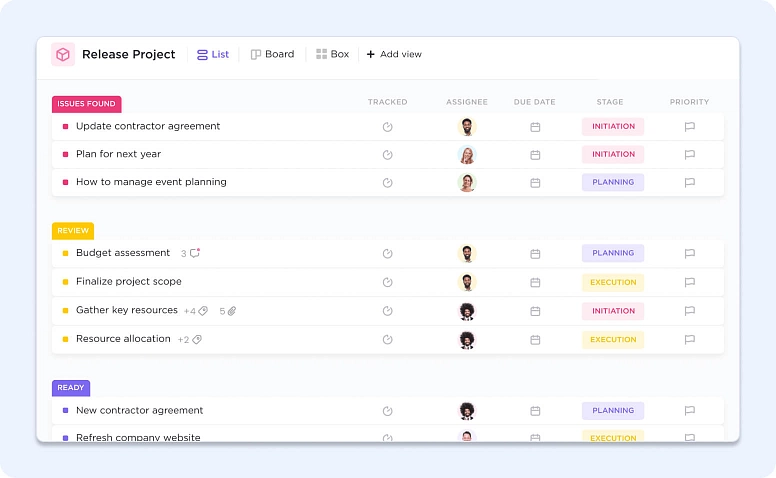
ClickUp markets itself as a highly customizable project management tool with deep task management features and AI‑enabled productivity. It also offers backlogs, sprint planning tools, and custom fields for agile workflows.
ClickUp emphasizes multiple views (list, board, Gantt, calendar) and deep integration with apps like Jira, making it a popular choice for teams that want flexibility.
Pricing: ClickUp offers a Free Forever plan, while paid plans start with the Unlimited plan at $7 per user/month when billed annually.
Monday.com

Monday.com is known for workflow automation and user‑friendly design.
It lets teams build project boards using templates, automate recurring tasks, and integrate with Slack, Google Drive and Outlook.
Pricing: Monday offers a limited free plan, and paid plans start with the Basic plan at $9 per user per month (billed annually) with a minimum of three users per account.
ProofHub
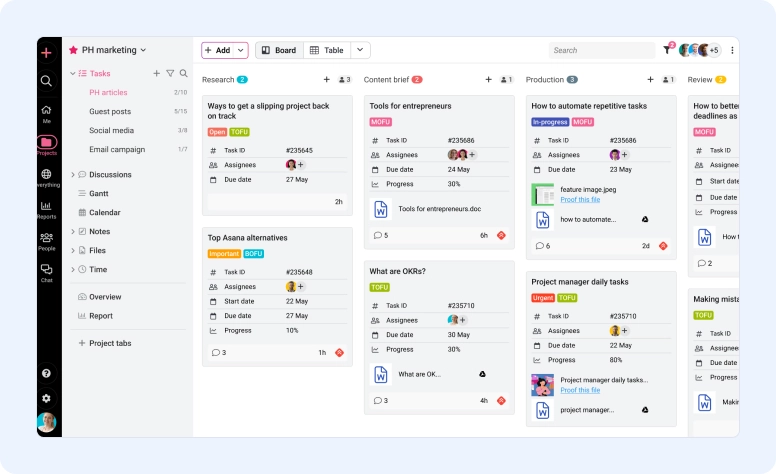
ProofHub positions itself as an all‑in‑one project planning platform with flat pricing and unlimited users.
It combines chat, discussions, Gantt charts, Kanban boards, calendar view, custom roles, notes and file storage in one tool.
ProofHub’s emphasis on simplicity and collaboration makes it suitable for diverse teams; however, it lacks an integrated CRM, which Flowlu provides.
Pricing: ProofHub uses flat pricing with unlimited users, starting at $45 per month when billed annually for the Essential plan.
Hive

Hive promotes a democratic project management system built through user feedback.
It offers native email integration, proofing, and chat. And supports time-tracking and estimates for sprint planning.
The tool's AI assistant, HiveMind, can automate repetitive work.
Pricing: Hive’s paid plans start at around $5 per user per month, with higher tiers adding automation and advanced collaboration features.
Businessmap

Businessmap focuses on scaling Agile methodologies across entire organizations rather than just individual teams.
The platform features interactive Kanban boards, OKRs, and customizable workflows designed to identify bottlenecks and track work progress in real-time.
It provides advanced analytics and forecasting tools, making it a sophisticated option for managers who need to optimize throughput and predictability.
Pricing: Businessmap plans generally start at around $149 per month for a team of 15 users, with higher tiers offering advanced analytics and enterprise Agile features.
Why Flowlu Is the Best Jira Alternative
More Than Agile — All‑in‑One Business Platform
Flowlu goes beyond agile project management.
In addition to tasks, time tracking, sprints and Kanban boards, it provides invoicing, financial management, CRM, knowledge base, mind maps and client portals.
This unified platform lets sales, marketing, support and management teams work in one environment, eliminating data silos.
Whereas Jira requires third‑party integrations to add CRM or invoicing, Flowlu includes everything natively.
For your team, the software also offers built‑in features like custom templates for projects, automation rules and collaboration spaces so that every department, from business development to marketing, can tailor the system to its needs without learning to code.
Custom Workflows Without Developer Setup
Flowlu’s workflow designer and custom lists allow you to build processes tailored to your business without writing code.
You can define stages, statuses and automations for deals, tasks or projects and reuse these templates across the organization.
Teams can also design additional features such as approval workflows, meeting agendas and HR onboarding processes using the same visual tools.
This approach contrasts with Jira, where extensive customization often demands plug‑ins or scripting.
With Flowlu’s extensive features, every team can build processes that suit its work style, from design reviews to software development sprints and beyond.
Start Free and Scale as You Grow
Flowlu’s free plan lets you experiment with two users and includes core CRM, project management, task tracking, Kanban and list views, invoicing and collaboration.
As your team grows, you can upgrade to Essential ($9 per user per month) or Advanced ($17 per user per month) plans.
Because the platform bundles CRM, finance and knowledge base features, the total cost remains lower than purchasing separate apps like Jira plus additional systems for sales and invoicing.
With a simple onboarding and a user‑friendly interface, Flowlu ensures a smooth transition for any team.
This flexible pricing model means your team has the necessary tools to manage tasks, milestones and client projects from the very first month, without worrying about hidden fees.
These features ensure your team can adopt the software quickly and focus on delivering value instead of configuring add‑ons.
Many tools like Jira support agile methodologies. Flowlu, ClickUp and Monday.com stand out because they combine Agile project management with easy setup, integrated collaboration and fair pricing.
Flowlu is particularly compelling because it unifies CRM, invoicing and knowledge base features alongside project management, making it a comprehensive alternative to Jira.
Yes. Several Jira free alternatives exist. Trello, ClickUp and Asana offer free plans with boards, tasks and collaboration.
Flowlu also provides a free plan for two users that includes CRM, task management, time tracking and invoicing.
ProofHub’s flat pricing also makes it affordable for small teams.
Most modern apps like Jira are web‑based and provide native apps for Mac, Windows, Android and iOS.
Flowlu is accessible via web browser on any operating system and on Android and iOS via a mobile app, while ClickUp, Monday.com and Asana offer desktop and mobile apps.
Asana and ClickUp offer limited offline functionality on their mobile apps, allowing you to create or edit tasks without an internet connection.
Flowlu is primarily cloud‑based, so a network connection is required, but data is synced securely across devices once you’re online.
Evaluate how each tool handles project management, task assignment, time tracking, reporting, collaboration and integration capabilities.
A good Jira alternative should support Agile methodologies, offer an intuitive interface, provide custom workflows and templates, integrate with your existing software, and scale economically with your team.
Flowlu hits the basics and adds a CRM, invoicing and knowledge base modules.
