Best Approval Workflow Software: 12 Platforms for Faster Signs-off

- What Is Approval Workflow Software?
- Advantages of Approval Workflow Software
- Key Features of the Best Approval Workflow Software
- 12 Best Approval Workflow Software Platforms
- Quick Comparison
- What to Consider When Choosing Approval Workflow Software
- 5 Challenges Your Choice Prevent
- Boost Your Business with the Best Solution

Managing growing client interaction manually creates an unproductive reality: the team is constantly stumbling through piles of email, misplacing documents, and waiting for hours—or even days—for managerial signatures. But every company can fix this in just a few clicks. It doesn’t just sound promising—it is indeed.
In our article, we examined 12 platforms that help companies reduce file reviews to a few automated steps. Learn a simple and affordable solution and quit the manual management of your documentation.
What Is Approval Workflow Software?
To get rid of the slow and inconvenient process of sign-offs, many developers offer digital solutions—apps or web platforms—that automate and manage workflow steps for document review and validation.
This software provides flexible settings and customization for different business needs, allowing users to set rules for notifications, distribution, record-keeping, saving, and reporting.
How It Works
Such a program functions according to the automation rules set by the system administrator.
For example, when you create a document, the approval application performs the following operations:
- Submit your file into the system
- Define who should sign the document, in what order, and by what date
- Monitor the progress of confirmations
- Send notifications when deadlines are approaching
- Store the document and record progress for reporting
Thanks to automation, the entire sign-off process becomes well-organized and fast. It minimizes mistakes and allows every participant to view the steps clearly and conveniently.
Advantages of Approval Workflow Software
Manual documentation management in business is becoming obsolete. That’s why companies that want to boost productivity and revenue streamline their operations through digital solutions.
A good solution that considers all a company’s specific needs and the uniqueness of its operations brings the following advantages:
Reduce Approval Time
With well-organized and self-managed task sequences, routine activities speed up. This promptness affects overall business success.
Provide Real-Time Visibility Into All Operations
This feature enables immediate responses when changes or issues arise.
Minimize Mistakes
Not only do systems reduce human error, but they also prevent processes from moving forward when an error is detected. When issues are fixed at the very beginning, operations run smoothly.
Reduce Business Costs
This follows directly from the previous point. Almost every mistake—especially in financial systems—results in additional costs. When faults are minimized, your budget remains protected.
Secure Data and Business Reputation
When a system keeps records and stores logs, you always have documented proof to demonstrate compliance and reliability.
Key Features of the Best Approval Workflow Software
Investigating various solutions, we pay attention to the following functionality, which indicates that the system truly helps companies complete their work faster in a convenient and high-quality way:
- Flexible settings. Good products offer many customization options, so each business can build a convenient process based on the unique peculiarities of an industry or team interaction. For example, support for parallel or multi-stage approvals.
- Notifications. This is a basic requirement for a system that should send documents to specific approvers and warn them when the signing deadline is approaching. For example, pending action alerts or deadline tracking.
- Various automation rules. You can complete more operations in less time if the system allows multiple conditions to move tasks forward. For example, request type criteria, priority, or department.
- Security with role-based permissions. The system administrator should be able to define access levels—for example, determining who can edit documents and who is allowed only to view them.
- Change tracking. Ideally, this includes real-time monitoring. Many solutions can also offer widgets that update instantly to track approval statuses or stages.
- History log. Recording progress provides valuable information for reporting and further analysis. For example, the platform records who confirmed specific documents and when.
- Reporting. Collected data provides insights for improvement—for example, approval duration, workload, and compliance metrics.
- Integrations. If you already use a CRM or ERP, it’s important that the workflow software can function smoothly within it.
- User-friendly interface. With this condition, people can start working immediately instead of spending time learning features or installing the system.
Optional but also useful features (often available in more advanced solutions):
- Mobile access
- Conditional logic
- Dashboards
- Audit tools
12 Best Approval Workflow Software Platforms
With a clear list of proper characteristics, we’ve found solutions worth trying. Many of them offer validation functionality within complex processes—for example, as part of CRM, task tracking, projects, or finance management.
Our choice is based on the high user ratings and popularity of these solutions. All of the reviewed digital products not only offer extensive opportunities to manage business operations, but also provide a clear and organized workspace to ensure a convenient and seamless experience with a system.
#1. Flowlu
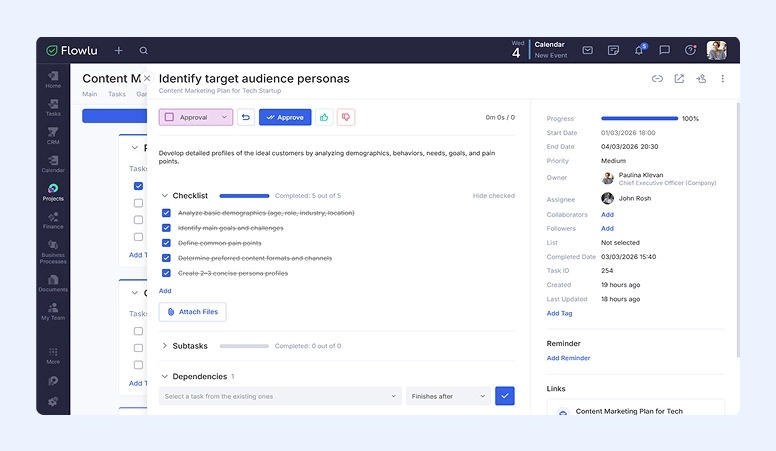
Best for: Small–mid teams wanting all-in-one business management.
Unlike standalone tools that operate in isolation, Flowlu embeds approval processes directly into projects, tasks, finance, and CRM operations.
This all-in-one format brings the advantages of flexibility and versatility.
For convenient task streamlining, Flowlu developers designed a separate Business Process module. It connects all areas (or, technically, all modules) of your business. Here, you can define your own steps with the stages you need and the automated actions you want to include. Apart from typical rules like “Notification” or “Move,” users can set advanced options such as “Approve or Reject,” “Request Information,” or “Get Familiar with Information.”
With Flowlu, you don’t need to search for additional software or integrate third-party apps. Right within multiple modules (tasks, projects, finance, etc.), managers can experience the convenience of automated rules that turn confirmation into a fast and reliable action.
Specialized capabilities:
- Multiple rules tied to documents and tasks
- Notifications when actions are pending or deadlines are approaching
- Role-based management for project and document sign-offs
- Invoice approval before sending emails
- Document storage and logging for reporting and compliance
- Client portal for immediate interaction and customer’s confirmation
Pros:
- Wide range of integrations
- Real-time progress tracking with widgets on a customizable dashboard
- Mobile access
- Easy-to-use
Cons:
-
No dedicated approval management tools
-
No detailed confirmation history log
Pricings: Free for solo users or groups of two. Team plans start at $9 per member per month. Free trials are available on all plans.

#2. Wrike
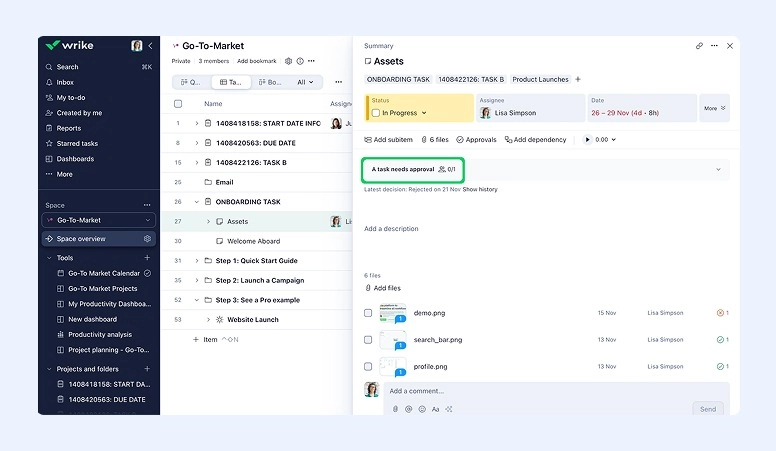
Best for: Teams needing task, file and project approvals.
This popular project management system offers convenient features with automated rules.
Wrike is a suitable solution for groups that need confirmation tied closely to tasks, files, or creative reviews.
Specialized capabilities:
- Sign-off requests for tasks, files, and proofs
- Roles for approvers and reviewers
- Comments and status markers for progress tracking
- Notifications when document reviews are requested or completed
- Record decision details
Pros:
- Convenient project management features
- Multiple rules, including AI suggestions
- Wide range of integrations
- Transparent validation status
Cons:
-
Limited conditional acceptance logic
Pricing: Free for personal use. Team plans start at $10 per user per month. Wrike also offers a 14-day trial.
#3. Monday.com
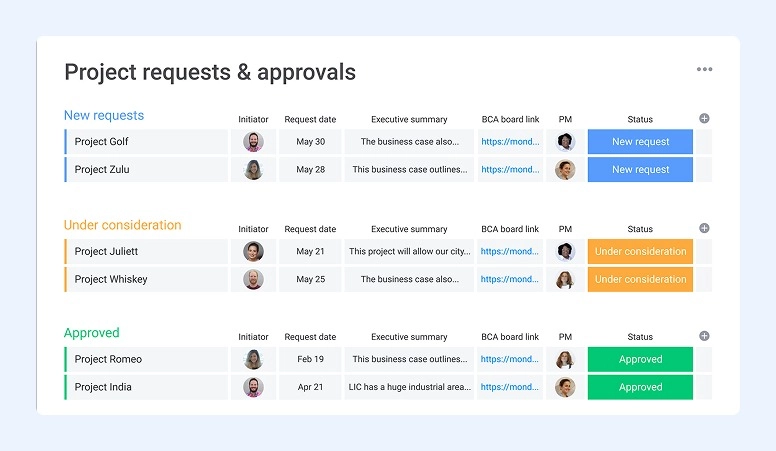
Best for: Business needing simple workflow management.
Another platform that includes approval-related capabilities as part of its broader automation and process management system..
Monday.com helps companies track progress on tasks and projects with convenient AI-powered tools.
Specialized capabilities:
- Simple, no-code settings for various needs
- Workflow status tracking
- Assignment of approvers
- Sequential or parallel sign-off stages
- Notifications for pending or completed acceptance
- Logs of past actions
- Real-time collaboration for quick corrections
Pros:
- Wide range of automation features
- Visual representation of processes requiring confirmation
- Extensive integrations with other products
Cons:
- Settings can be complicated for new accounts
- Multi-stage approvals may require additional apps
Pricing: Free for up to two users. Team plans start with the Basic plan at $9 per member per month.
#4. Moxo
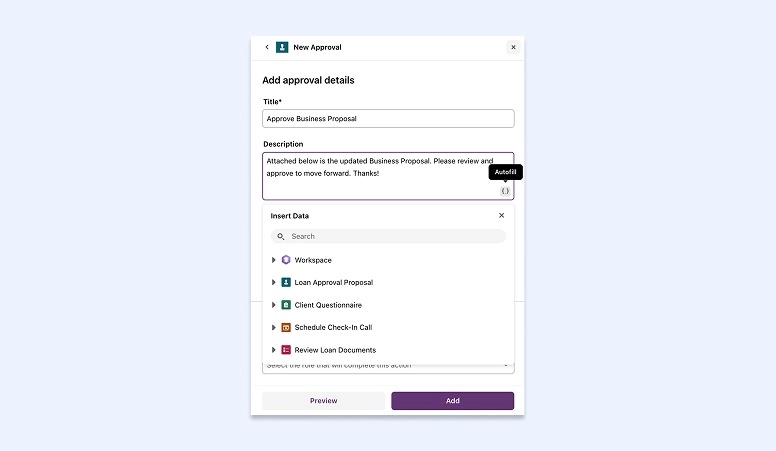
Best for: Companies that deal with sensitive documents. Finance, legal, consulting—just to name a few industries that trust the system.
Moxo is described by its developers as an ideal choice for external approval workflows.
The system is a valuable solution for teams that want to collaborate not only within company departments, but also with third-party organizations.
To achieve this, Moxo combines secure collaboration tools with convenient operations management.
Specialized capabilities:
- Easy-to-create approval chains
- Client portal for external participants
- Reminders and smart rules
- History logs for each comment or action
Pros:
- Strong security for sensitive documents
- Integrated development environment (IDE) support
- External collaboration capabilities
- Powerful automation features
Cons:
- Can be complicated for beginners
- Pricing may be high for small groups
Pricing: Not publicly listed on the website. To get detailed information, you need to contact Moxo directly.
#5. Ziflow
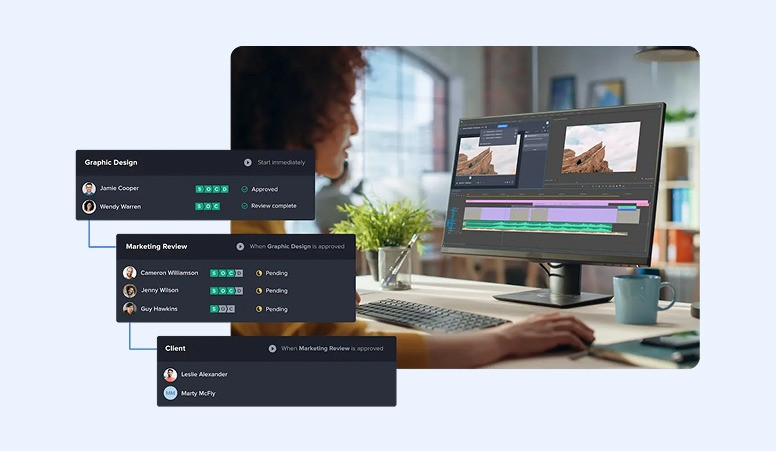
Best for: Creative teams and marketing agencies.
Specifically elaborated for content production, this platform simplifies workflow for creatives. The system is powered by AI to streamline high-volume reviews and maintain brand standards.
In its functionality, Ziflow provides a convenient workspace to check and edit content when creating videos, designs, and other materials.
Specialized capabilities:
- Parallel or sequential approvals
- At-a-glance comparison of old and new versions of created materials
- Real-time commenting for immediate feedback
- Support for different media types and formats
- Status tracking
- Timing notifications
Pros:
- Well-organized workflow for fast review and editing
- Centralized feedback
- Robust system for collaboration between employees and clients
Cons:
- Small groups and freelancers may find the solution too expensive
- Building complex work operations may take a long time
Pricing: If you use it for personal needs or your team has only two people, you can use the system for free. Monthly subscriptions for larger groups start at $199.
#6. HighRadius
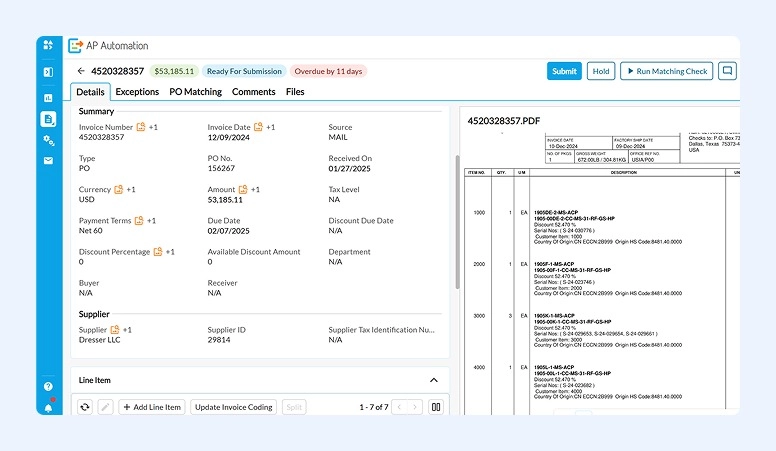
Best for: Teams that have complex finance systems and heavy invoice workloads.
HighRadius is a powerful, enterprise-oriented solution for finance departments. Document sign-offs are powered by machine learning technologies and robotic process automation (RPA).
All review and sign-off features are developed as part of accounts payable (AP) automation. So, although the system isn’t a fully dedicated approval tool, users can access many useful functions within the platform’s modules, particularly in invoice management.
Specialized capabilities:
- AI-assisted routing of tasks
- Multiple levels of validation based on employee roles
- Automated actions
- Real-time notifications
- Logging of authorization steps
- Analytics dashboards for visibility
Pros:
- Strong integration with ERP systems
- Extensive opportunities for finance streamlining
- AI-powered functionality
Cons:
- Can be difficult to set up and time-consuming to customize
- Not well-suited for small teams
Pricing: Not published on the official website.
#7. Microsoft Power Automate
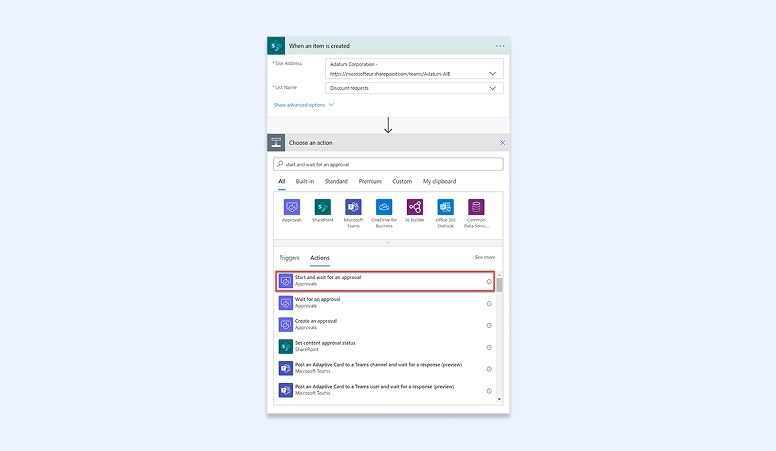
Best for: Companies that are already using the Microsoft ecosystem or organizations that manage complex workflows and want to scale automation.
This cloud-based platform is not a separate approval product, but its sign-off functionality is created as a central part of routine optimization flows.
Microsoft Power Automate lets companies create complex reviews with low-code requirements.
Specialized capabilities:
- Single‑ or multi‑level review paths (choose department, role, or type of content)
- Variable response actions
- Reminders and alerts
- Tracking acceptance steps and logging them for audit
- Rich template library
- Drag-and-drop builder
Pros:
- Fast and clear integration with other products in the ecosystem
- Many opportunities for customization
Cons:
- Complex logic may be difficult for newcomers, especially non‑Microsoft users
- Less intuitive interface
Pricing: Microsoft offers a 30-day free trial. After that, the minimum plan starts at $15 per user per month.
#8. Jotform
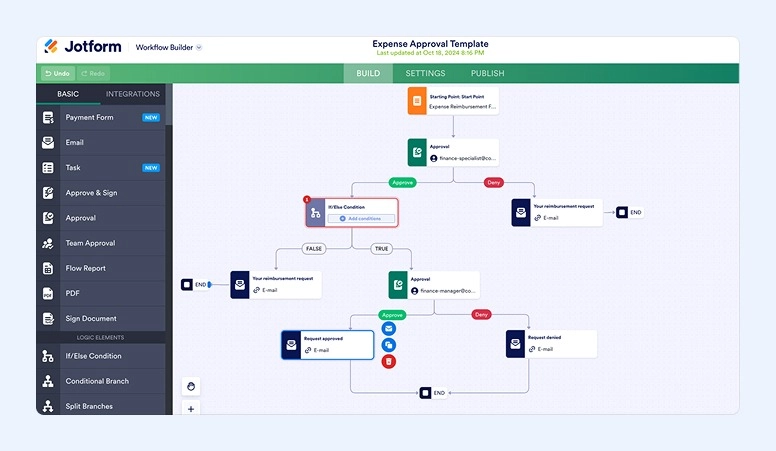
Best for: Small and mid-sized teams that are looking for simple solutions to handle internal operations. No-code workflow builder and simple implementation are a priority.
Jotform is friendly software to medium-sized businesses. Although you won’t find deep enterprise modeling here, the system’s kit of features is sufficient to manage routine financial confirmation procedures and sign-offs in other fields.
Specialized capabilities:
- Drag-and-drop workflow builder
- Conditional logic
- Rules for notifications of approvers
- Email reminders
- Track activity history, status, and results
Pros:
- Flexible, no-code customized workspace
- Mobile support
- Real-time visibility
- Free to start
Cons:
- The free plan has limits on the number of submissions
- Complex scenarios require additional options, available only in the more expensive plans
Pricing: You can use the Starter plan for free, but the cheapest paid plan—Bronze—starts at approximately $34 per month.
#9. Asana
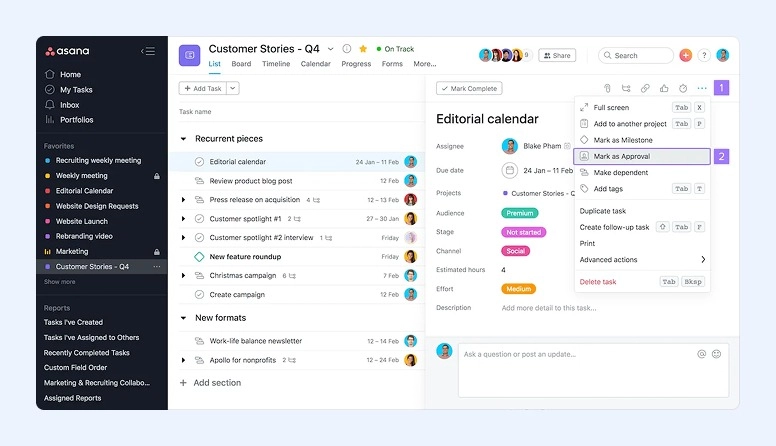
Best for: Teams of all sizes that want to automate tasks and control workflow from centralized systems.
As this platform offers many features for managing your business from all angles, it has become one of the most common choices for advanced companies. Although Asana positions itself as a solution for teams of all sizes. So, startups can also set it up to plan, track, and deliver everyday operations.
Specialized capabilities:
- Numerous rules for automation and one-click sign-offs
- Proofing tools to annotate work directly within a task
- Strong real-time collaboration
- Templates for common task types
- Multiple workflow structures
- Blockers to prevent operations from proceeding without required action
Pros:
- Clear interface
- Flexible workflow views
- Wide integration opportunities
- Centralized communication
Cons:
- Most approval functions are only available in paid plans
- May be too expensive for small teams
- Some users report the system requires a strong internet connection and performs poorly offline
Pricing: You can use Asana for free for personal use. The Starter plan costs €10.99 per user per month if billed annually.
#10. AvidXchange
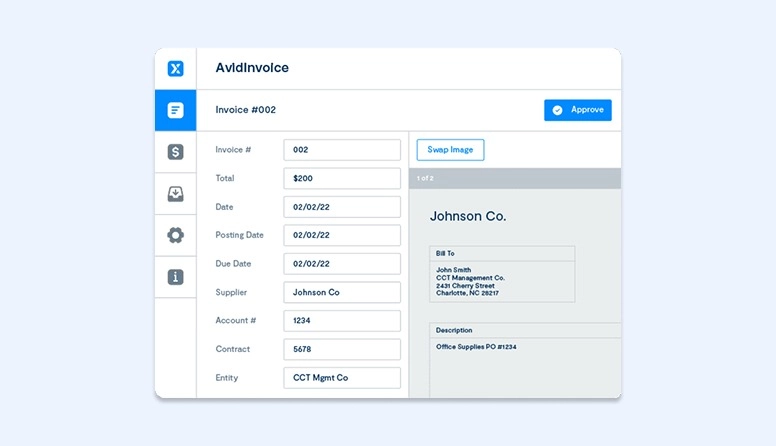
Best for: Mid‑ and large finance teams who want to build a multi-level approval system.
Another AP solution designed to organize financial operations by reducing manual tasks. The software offers optimization of the entire authorization chain—from invoice capture to sign-off payments.
This platform is built to create a transparent workflow, where all specialists can monitor and improve document confirmations in real time.
Specialized capabilities:
- Configurable multi‑step approval sequences
- Many rules and customizations
- Dashboards for immediate visibility of transaction status
- Detailed logs
Pros:
- Synchronization with ERP and integration with electronic payments
- Easily customizable workflows
- Centralized database for all invoices
Cons:
- No standard trial
- Pricing is high
Pricing: Not publicly listed in fixed tiers. It depends on invoice volume, workflow complexity, and required services.
#11. Basware
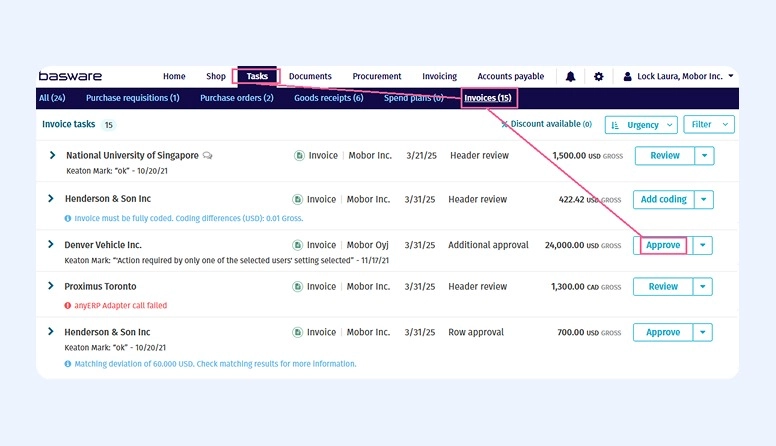
Best for: Mid‑ and large teams that want to build a purchase-to-pay (P2P) self-operating infrastructure.
Basware was developed as a comprehensive AP platform whose main features focus on digitizing invoice approval and purchase orders (POs). It offers not just basic sign-offs but also comprehensive capabilities to manage multi-location finance operations.
Developers ensure that with Basware implementation, users can achieve the highest levels of automation.
Specialized capabilities:
- Strong and varied options for tasks streamlining
- Workflow engine
- Constantly updated visibility of progress with cash-flow metrics
- Financial controls and reporting
- Audit log
- Many invoice templates, including international formats
Pros:
- System covers the whole P2P lifecycle
- Easy integration with existing systems
- Great analytical features
- Mobile version
Cons:
- Complex interface
- High cost
- Mobile capabilities are weaker than desktop ones
Pricing: There is no list on the website; to get details, you have to speak with the Basware team.
#12. Process Street
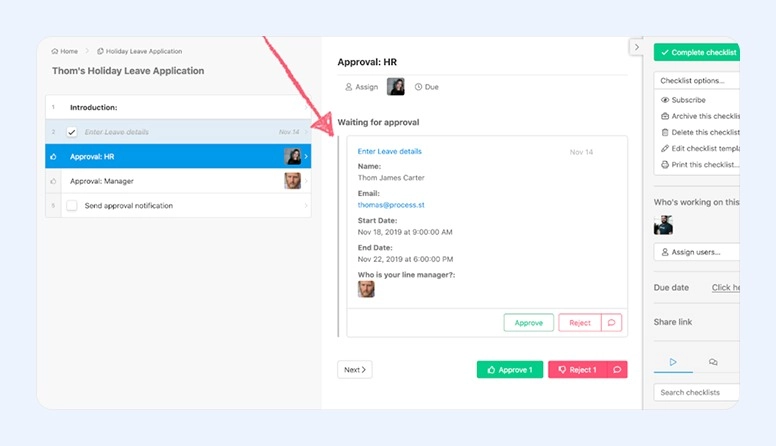
Best for: It’s convenient for teams of all sizes, from small businesses to enterprises.
Process Street is a user-friendly solution that does not require coding skills to build strong workflow automation. Specialists from different departments with many repeated operations appreciate the platform’s usability. It’s not only suitable for budgeting tasks but also for optimizing activities related to onboarding, client workflows, and more.
Specialized capabilities:
- No-code drag-and-drop workflow building
- Notifications
- Dynamic step paths
- Recurring checklists
- Comments for instant communication
- Dashboards with real-time updates
Pros:
- AI support
- Simple and clear interface
- Flexible settings
- Wide integration with useful apps
- Easy to adapt to growing teams
Cons:
- Limited offline access
- Pricing may seem high
Pricings: To know the price, the official site recommends contacting sales.
Quick Comparison
|
# |
Software |
Best For |
Key Features |
Pros |
Cons |
Pricing |
|
1 |
Flowlu |
Small–mid teams wanting all-in-one management |
Embedded approval workflows, Business Process module, role-based sign-offs, client portal |
Wide integrations, real-time tracking, mobile access |
No dedicated tool, no detailed log |
Free 1–2 users; Team $9/user/mo |
|
2 |
Wrike |
Teams needing task/file/project approvals |
Task/file/proof sign-offs, roles, notifications, decision logging |
Automation rules, integrations, transparent validation |
Limited conditional acceptance logic |
Free personal; Team $10/user/mo |
|
3 |
Monday.com |
Simple workflow automation |
No-code automations, sequential/parallel approvals, logs, AI tools |
Visual workflows, wide automation, integrations |
Automations complex for new users |
Free 2 users; Basic $9/user/mo |
|
4 |
Moxo |
Teams handling sensitive documents |
Approval chains, client portal, reminders, history logs |
Strong security, external collaboration |
High pricing, can be complicated for beginners |
Contact sales |
|
5 |
Ziflow |
Creative teams / marketing agencies |
Parallel/sequential approvals, version comparison, real-time commenting |
Fast review/editing, centralized feedback |
Expensive for small teams, complex workflows |
Free 2 users; Team $199/mo |
|
6 |
HighRadius |
Finance teams with complex invoices |
AI workflow routing, multi-level validation, real-time notifications |
ERP integration, accounting automation, AI-powered |
Difficult setup, not ideal for small teams |
Contact sales |
|
7 |
Microsoft Power Automate |
Teams in Microsoft ecosystem |
Multi-level authorizations, reminders, logging, templates |
Fast integration, customizable |
Complex logic, less intuitive for non-MS users |
30-day trial; $15/user/mo |
|
8 |
Jotform |
Small–mid teams needing simple workflows |
Drag-and-drop builder, conditional logic, email reminders |
No-code, mobile support, real-time visibility |
Free plan limits, complex scenarios need higher plan |
Starter free; Bronze ~$34/mo |
|
9 |
Asana |
Teams needing centralized workflow |
Automation rules, proofing, templates, blockers |
Flexible, integrations, user-friendly |
Paid plans needed for approvals, internet-dependent |
Free personal; Starter €10.99/user/mo |
|
10 |
AvidXchange |
Mid–large finance teams |
Multi-step approvals, dashboards, logs |
Customizable workflows, ERP/payment integration |
High pricing, no standard trial |
Contact sales |
|
11 |
Basware |
Mid–large teams needing P2P automation |
Invoice/PO approvals, workflow engine, audit log |
Full P2P lifecycle, analytics, mobile |
Complex interface, high cost |
Contact sales |
|
12 |
Process Street |
Teams of all sizes |
No-code workflow building, recurring checklists, dashboards |
AI support, flexible, wide integrations |
Limited offline access, pricing may be high |
Contact sales |
What to Consider When Choosing Approval Workflow Software
We advise using our checklist to help you focus on the essential parameters that will suit your unique needs.
Team Size
Developers usually specify what their product is ideal for.
If you’re a solopreneur or manage a small- to mid-sized team, check that the system has simple-to-implement settings and a user-friendly interface. Don’t rush for advanced features—there is a high probability you will only waste your time and money.
Business Processes
Consider and make a list of your most frequently repeated operations. These are the processes your future solution needs to support.
If you are often stuck in billing approvals, choose a finance-dedicated platform. If the main bottleneck appears in task or project sign-offs, implement comprehensive solutions that offer authorizations across multiple operations and business modules.
Compliance Needs
If your industry or organization requires strict audit trails, regulatory compliance, or detailed reporting, prioritize software with strong governance, tracking, and documentation capabilities.
Pricing
Pay attention to different pricing models. Most developers offer subscriptions based on the number of users. There are also monthly and annual plans. Compare offers carefully and make sure they align with your budget.
If pricing is not listed on the official website, it is quite possible that the product has a high cost.
Implementation Effort
Determine how much time you are ready to spend learning the system’s functions. Also, make sure you have enough technical support to implement the solution. Some platforms offer enterprise-level tools that require professional skills.
5 Challenges Your Choice Prevent
With the right solution in hand, entrepreneurs notice they no longer encounter:
#1. Delays in Invoice or Task Approval
With strict deadlines set by system administrators, there is no more waiting for managerial sign-offs. Companies see that hours and days previously lost are now spent on productive work.
#2. Constant Mistakes
Before approval software, human errors were inevitable and could trigger a chain of problems. With automated management, tasks do not proceed until mistakes are corrected.
#3. Lack of Visibility
Without real-time monitoring, tasks could run incorrectly until completion. Previously, there was no way to correct faults early, forcing employees to redo entire steps.
#4. Low Document Compliance
Manual workloads often result in missing documentation or non-compliance with tax laws, discount policies, or other requirements. When these rules are set in the system, employees cannot overlook them.
#5. Higher Cost of Routine Processes
Even if a specialist performs their work perfectly, manual touchpoints increase the risk of errors. This is especially true for repetitive tasks with many details to consider. The more time spent manually, the higher the labor costs.
Boost Your Business with the Best Solution
When you run a business in a modern environment and want to achieve real profit, always look for technical solutions to improve and optimize your routine. Although manual methods still work, at certain stages of development you may notice they become inefficient.
Digital progress grows every day, reflecting the high demand for tools that can handle routine operations automatically. Make your company part of this progress by identifying the processes where you usually get stuck.
With long waiting for approvals you can consider implementing a dedicated tool in your existing ERP or CRM. But if you want all the tools to live in a unified space, test comprehensive solutions.
The all-in-one format does not necessarily mean you must spend days setting up the system and weeks learning its functionality. Developers always strive to make their products as user-friendly as possible.
For example, the Flowlu system typically takes only a few hours to start using. It offers smoothly integrated features for task approvals, project management, and financial operations. When creating invoices, you can customize your documents or use ready-made templates. Once work is completed, the system logs history, allows immediate comments, and tracks the status: paid, void, partially paid, overpaid, or pending. You can also send reminders to clients via convenient communication channels such as email or social networks.
With Flowlu, your interactions with clients—from first contact to invoice payment—are fast, accurate, and error-free.

People often choose all-in-one solutions such as Wrike, Flowlu, Monday.com, or Microsoft Power Automate.
Integration support is not a standard feature and varies depending on the vendor, plan, and technical complexity. However, most enterprise-grade solutions offer ERP integration
The timeline depends on the software you choose:
- Simple tools usually require only a few hours to start working.
- Enterprise solutions can take a few weeks or even a month.
- Highly customized systems may take more than two months to implement.