Pros and Cons of All-in-One Platforms vs. Specialized Best-of-Breed Tools

- Highlights:
- What are all-in-one platforms?
- What are best-of-breed tools?
- All-in-one platforms vs best-of-breed tools: key differences
- Pros of all-in-one platforms
- What are some of the drawbacks of all-in-one platforms?
- Pros of best-of-breed tools
- What are some of the drawbacks of best-of-breed tools?
- So … which do I choose? All-in-one solutions or best-of-breed?
- Wrap up

We’re officially in the digital transformation era. Every modern business wants a unified database and a technology stack that streamlines operations.
But in a marketplace that’s flooded with cloud solutions, knowing which technologies to pick for your business isn’t always straightforward.
Do you adopt CRM systems? A Headless CMS? Customer engagement tools?
Do you use all-in-one tools, specialized (“best-of-breed”) tools, or a hybrid solution?
We may not be able to tell you which specific tools to pick for your business (everyone has different needs!). But we can walk you through some of the advantages and disadvantages of all-in-one solutions versus specialized tools.
Let’s take a closer look at these two main tool types — as well as their pros and cons.
Highlights:
- All-in-one solutions are convenient because they house your operations data and workflows in one place.
- Best-of-breed tools offer depth, risk distribution, and modular flexibility.
- With all-in-one solutions, you’re locked into a vendor. That’s helpful for managing data and reporting, but it doesn’t provide modular flexibility.
- With best-of-breed solutions, you need integrations to connect all of your workflows and data. This can add up in the long run. (Not to mention the cost of all of those tools!)
- When thinking about which option to choose, consider a hybrid setup. That’s where you have one main central platform for most of your operations — and integrations or separate tools for specialized functions that need deeper features or flexibility.
What are all-in-one platforms?
It’s in the name: All-in-one platforms are technology tools that bundle multiple business functions into a single system. Instead of juggling separate apps, you work inside one connected environment.
The goal is tech stack simplicity and centralization. Data lives in one place, and teams use the same interface.
For example, an internal communications platform is an all-in-one suite that keeps team messaging, documents, and workflows in one place. This setup reduces communication tool sprawl and limits data silos. Workflows connect naturally without relying on constant integrations, which makes day-to-day management easier.
Platforms like Flowlu, Zoho One, and HubSpot combine multiple business functions inside a single system.
A team might use one platform to manage CRM records, client projects, invoices, internal tasks, and documentation. Instead of switching between separate tools for each function, teams work inside one connected workspace.
What are best-of-breed tools?
Best-of-breed tools are specialized software solutions designed to do one job extremely well.
Instead of bundling many functions into a single platform, each tool focuses on a specific business need. Examples include payroll systems, performance management tools, and partner contribution management software.
For instance, a company might use Salesforce for CRM, Asana for project management, Stripe for payments, and Intercom for customer support.
Each tool specializes in one function. The tradeoff is that teams need integrations to connect data and workflows across these systems.
All-in-one platforms vs best-of-breed tools: key differences
The main difference between all-in-one platforms and best-of-breed tools comes down to how your technology stack is structured and managed.
|
Category |
All-in-One Platforms |
Best-of-Breed Tools |
|
Structure |
One platform manages multiple business functions |
Multiple specialized tools connected together |
|
Setup |
Faster to implement |
Requires integrations between tools |
|
Feature depth |
Broad functionality across many areas |
Deep functionality in specific areas |
|
Vendor management |
One vendor and subscription |
Multiple vendors and contracts |
|
Flexibility |
Moderate flexibility |
High flexibility |
|
Data management |
Centralized data in one system |
Data spread across multiple tools |
Both approaches can work well depending on your business size, workflows, and operational priorities.
Pros of all-in-one platforms
Here’s what to keep in mind when thinking about implementing an all-in-one technology strategy. Why use all-in-one platforms?
Some of the top pros of using all-in-one platforms include:
Pro: Operations and data live in one central platform
With an all-in-one platform, your processes, reporting, and records live in a central hub. This reduces data silos, improves visibility, and makes collaboration smoother because everyone works from the same source of truth.
For instance, Flowlu is a unified business platform designed to help teams manage everything from client projects to internal processes in one place.

Pro: Simpler team adoption and training
New employees and managers only need to learn one main tool during onboarding. This shortens the ramp-up period, reduces confusion, and helps new hires become productive faster.
Existing teams also spend less time switching between systems. This makes managing day-to-day work more seamless.
Pro: Single vendor and subscription
With all-in-one tech tools, you work with one main vendor, not several.
This means you have one contract, one bill, and one support channel. This simplifies your tech tool budgeting and reduces admin work. And when issues come up, your team knows exactly who to contact.
Pro: Better cross-team coordination
When projects, finances, client data, and internal processes are connected within one platform, teams see how their work impacts others.
This visibility can help prevent duplication, missed handoffs, and communication gaps.
What are some of the drawbacks of all-in-one platforms?
Some drawbacks to keep in mind about all-in-one platforms include:
Con: They may lack deep, specialized functionality
While an all-in-one suite ensures that your data flows naturally between modules, it often doesn’t offer the deep, specialized functionality that power users need to gain a competitive edge.
This is a critical consideration. For example, when evaluating strategic portfolio management tools, a specialized SPM platform can offer advanced scenario modeling and real-time ROI forecasting that integrated suites often lack.
Con: Security breaches and cybersecurity attacks can risk your entire operations
Another primary concern with all-in-one platforms is the risk of a single point of failure. If an attacker gains access to one module, they may inherently have access to the entire suite of business data.
Specialized tools, while requiring more integration effort, often give you more granular control over specific functions and data silos.
For organizations prioritizing a “Zero Trust” architecture, implementing specialized ringfencing solutions is becoming a standard, best-of-breed approach for isolating applications and preventing lateral movement. (So a breach in one area can’t spread across the rest of the network.)
Con: Vendor lock-in
When most of your operations run on a single platform, switching tools becomes harder. Your data, workflows, and team habits are tied to that system.
If pricing changes, features fall short, or support declines, moving to another solution can be time-consuming and expensive.
This dependency limits your flexibility and can make long-term decisions feel constrained.
And even if you like a tool, it may not always scale with your business — forcing you to rethink your tech stack sooner than you expected.
Pros of best-of-breed tools
Why use best-of-breed tools? Some of the top pros of using best-of-breed tools include:
Pro: Depth and niche expertise
The main advantage here is depth. Each tool is built to excel at one specific function, so you get a customized solution. Teams get advanced features tailored to their exact use cases, which can improve their efficiency, accuracy, and outcomes.
You’re not limited by the compromises that may come with all-in-one platforms.
Pro: Risk is distributed
Your operations don’t stop if one tool has problems. Teams can keep working in other systems while the issue is resolved. This reduces downtime and limits the impact of technical failures on your business.
Pro: Modular flexibility
Best-of-breed tools let you build a tech stack that fits your exact needs.
You can add specialized tools for certain teams or projects, replace underperforming apps, and experiment with new solutions without disrupting your entire system.
Need top-tier project management? Pick one tool. Need specialized analytics? Pick another.
This modular approach keeps your operations agile. You can mix and match tools that fit your team’s changing needs perfectly.
Pro: Faster innovation and updates
Specialized vendors often release updates and new features faster because they focus on one area. Your teams can take advantage of the latest capabilities without waiting for a larger platform to roll out broad updates.
What are some of the drawbacks of best-of-breed tools?
Some drawbacks to keep in mind about best-of-breed tools include:
Con: You need integrations for data and workflows to connect
Companies that use a best-of-breed approach build their tech stack by selecting top performers in each category. The tradeoff is that these tools must be integrated so data and workflows can move between systems.
(Since each tool does one thing, they don’t automatically talk to each other.)
If you don’t integrate them, work gets duplicated, data gets messy, and decisions slow down. This leads to relentless data silos and reporting challenges.
Con: You need to manually manage and track vendors, integrations, and data consistency across platforms
With multiple best-of-breed tools, someone has to keep track of all of those vendors, subscriptions, and contracts.
You also need to monitor integrations and ensure data remains consistent across platforms. This adds ongoing work and coordination that wouldn’t exist with a single all-in-one platform.
Con: Higher cost in the long run
Unless you’re careful about which tools you pick, and only pick a few, costs can add up quickly. Each specialized tool comes with its own subscription, maintenance, and sometimes integration fees.
Over time, these expenses can exceed what you’d pay for a single all-in-one platform.
So … which do I choose? All-in-one solutions or best-of-breed?
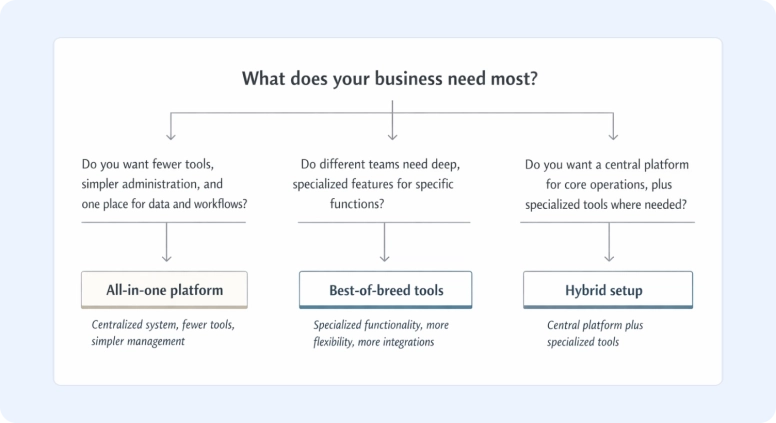
For many businesses, the answer isn’t strictly one or the other.
A common approach is to use a central platform for core operations, while integrating specialized tools where deeper functionality is required. This hybrid model combines the simplicity of an all-in-one system with the flexibility of best-of-breed tools.
In practice, the central platform acts as the operational hub for your business. It manages workflows, projects, client data, and day-to-day operations, while integrations extend functionality where needed.
Instead of forcing one platform to handle everything, you let it coordinate core processes and add specialized tools where advanced capabilities matter most.
This approach creates a balanced tech stack—centralized enough to stay organized, but flexible enough to support specialized workflows.
For example, a services company might use Flowlu as its central platform for CRM, project management, client communication, and invoicing.
If the marketing team needs advanced automation, they might still use a specialized tool like HubSpot or ActiveCampaign.
This setup keeps operational data in one place while still allowing teams to adopt specialized tools when needed.
Wrap up
Deciding between all-in-one platforms and best-of-breed tools comes down to the tradeoff between simplicity and specialization.
All-in-one platforms consolidate your data, workflows, and operations into a single hub. They reduce vendor management, streamline onboarding, and make cross-team collaboration easier. The downside is limited depth in specialized functions and vendor lock-in.
Best-of-breed tools provide deep functionality, modular flexibility, and distributed risk. But they require careful integration and ongoing vendor management and can become costly at scale.
Again, a hybrid approach often gives you balance. That’s one central operational hub for core operations, supplemented with specialized tools when advanced capabilities are required.
Your best bet? Evaluate your specific business processes, team needs, and long-term goals. Then choose the approach that aligns with how you work today and scales with where you want to go.
If you’re looking for a platform that can serve as your operational hub, Flowlu provides CRM, project management, finance, and collaboration in a single workspace.

To decide whether your business should use all-in-one platforms or best-of-breed tools, consider your workflows and operational needs.
Choose all-in-one platforms, like Flowlu, if you want a centralized hub, simplify vendor management, and reduce data silos. Pick best-of-breed tools if you need advanced features, modular flexibility, or specialized functionality in key areas.
Yes, you can combine both approaches.
A hybrid solution works well for many businesses. That’s when you use a main business platform for core operations and integrate best-of-breed tools for specialized needs. Make sure to also have proper integrations to prevent data silos and keep your workflows smooth.
Some hidden costs of best-of-breed tools come from subscriptions, integration setup, vendor management, and training. Each additional tool adds complexity. Over time, these expenses may surpass the use of a single all-in-one platform.
Generally, yes, all-in-one platforms are less flexible than best-of-breed tools.
All-in-one platforms offer broad capabilities but limited modular flexibility. If your team needs niche features, the platform may not scale without adding extra tools or workarounds
To keep data and workflows connected across multiple best-of-breed tools, you need strong integrations and a governance strategy.
Standardize your workflows, monitor data consistency, and clarify which tool handles which function. Without this, data silos and workflow disruptions can slow your operations.
Some all-in-one platforms can handle regulated industries. Many enterprise-grade all-in-one platforms include compliance and security features. But specialized, best-of-breed tools can give you greater control over audit trails, sensitive data, and industry-specific regulations.
You can minimize vendor lock-in by choosing an all-in-one platform with open APIs and strong integration capabilities. This lets you connect best-of-breed tools as needed and ensures your business platform can evolve without forcing a full platform switch.