Billable vs Non-Billable Hours: How to Track Them Effectively


Long story short, not all our working hours are billable. Everyone also performs non-billable activities. During this, we take care of tasks that are not directly paid but that keep our businesses running.
Even though the distinction between the two types may seem easy, reality shows that it can sometimes be quite hard. Hopefully, by the end of this article, it’ll be clearer.
What Are Billable and Non-Billable Hours?
To start, it’s important that you understand the difference between billable vs non-billable hours.

What Are Billable Hours?
It can be described as the time you spend working directly for a client and that can be invoiced. This work includes everything that the customer authorized you to do, and that is usually written on retainers, proposals, and contracts, or even was talked through during a verbal agreement.
To ensure that the work you do will be paid, it needs to deliver specific and direct value to the client’s needs or project.
Some of the most common types include:
- Consultations and meetings with clients
- Analysis and research
- Building software
- Creating designs
- Producing marketing materials
- Writing reports
- Communication with clients via messaging platforms or email
- Training sessions
- Presentations
- Iterations and revisions
What Are Non-Billable Hours?
It’s the time you spend working on tasks that allow you to run your business and cannot be directly invoiced to clients.
Even though they are necessary for operations, they don’t generate revenues.
While all businesses have this type of hours, it is crucial that you maintain them at a reasonable level.
Some of the most common include:
- Administrative routine such as general office management, filing, entry, expense reporting, and invoicing.
- Internal meetings .
- Performance reviews.
- Department check-ins.
- Skill development, attending conferences, getting certifications, or training .
- Sales meetings, writing proposals, marketing activities, networking events, and attending conferences for lead generation.
- General research, like exploring new methodologies, staying on top of current trends, or reading industry publications.
- Internal projects such as improving processes, developing new marketing materials, upgrading systems, or building internal tools.
- Training new hires or onboarding.
The Gray Area
Even though the difference between billable and non-billable hours may seem pretty evident, there is always a gray area, and, in some circumstances, the classification may depend on both the contract terms and context.
#1. Travel Time
This depends on both industry norms and contract terms. While some companies may bill 100% when they visit clients, others may bill only 50%, and a third may not charge anything. A general practice is to bill travel time at 50–75% of standard hourly rate.
#2. Email Communication
Communication is key in any business. However, not all emails written and sent should count as paid activity.
When you’re sending a scheduling email, a quick check-in, or a simple pleasantry, these shouldn’t be considered paid work. On the other hand, detailed emails that include substantive responses, analysis, or research should be.
#3. Revisions
You need to look at the scope of the project to determine what is billable and what is not. The research that is included in the scope is, obviously, billable. On the other hand, any revisions that are made because of misunderstandings or errors of your team shouldn’t be billed.
#4. Account Management
It’s important to maintain regular contact with your clients. However, not everything may be included in billable hours.
If you’re just checking in without a business agenda, it shouldn’t be charged. But all planning sessions or relationship-building sessions focused on the customer should be.
#5. Research
It will only be billable if the research is directly related to deliverables.
Why the Distinction Matters
A clear understanding helps:
- Increase profitability. You don’t just seem busy—activities really bring in money.
- Allocate resources. It saves your budget and effort—they go in the right direction.
- Improve processes. Everyone in the company knows which tasks are a priority.
- Set realistic prices. Specialists receive fair compensation.
Why Tracking Billable vs Non-Billable Hours Is Crucial
This distinction is very important since it has implications both in terms of operations and finances for your business.
#1. Revenue Accuracy
You want to make sure that you only bill your clients for the actual agreements, or you may be destroying their trust in you. While it may not seem like much, just misclassifying 2 hours per week per employee in a 10-person firm costs $104,000 annually at $100/hour billing rates.
Keep in mind that both under-billing and over-billing can be damaging. With the first, you’ll be leaving money on the table, and with the second, you’ll be charging for non-billable activities, which may lead to disputes, non-payment, and even lost relationships.

Accurate classification protects both your revenue and your reputation.
#2. Impact on Profitability and Project Pricing
As a company owner, you need to know how profitable you are in all different areas. This is why it’s so important to separate billable hours from non-billable hours not only per client, but also per project and per specialist.
When you make this analysis, you’ll know which clients are the most profitable, the services that generate the best margins, and the people who maintain the highest utilization.
#3. Better Project Planning and Budgeting
Understanding this difference also helps you with planning.
Let’s say that your team averages 65% utilization. With this data, you know they have approximately 26 chargeable hours available per 40-hour week. As you can easily understand, this information will be useful when you need to hire someone or make any decision related to workload management and project staffing.
When a new project comes in requiring 200 billable hours over 4 weeks, you can calculate exactly how many specialists you need based on their average utilization rates.
To make planning clearer and more structured, it can be helpful to use tools like Flowlu. It allows you to organize workloads, track capacity, and keep everything visible for the team.

#4. Optimizing Team Workload and Productivity
There are many metrics that allow you to measure staff productivity. You can use the utilization rate to identify the top-performing person, the ones who need support, and also those who are spending excessive efforts on non-chargeable assignments.
Let’s say that a professional consistently at 85% utilization is highly productive. Someone at 45% needs investigation—do they lack client work, spend too much effort on admin, or have efficiency issues? The data surfaces conversations that improve performance.
#5. Improving Client Trust and Transparency
When you have a detailed log that allows you to separate both types, you’ll be creating transparency, which leads to more trust from your clients. You can be sure that people will like to see exactly what they are paying for.
In case of questions regarding an invoice, you can easily show the detailed work that was completed.
7 Common Mistakes in Time Tracking
Keeping track of activities isn’t easy even for experienced professional services firms. However, there are 5 most common pitfalls and their solutions:
1. Not Tracking Small Tasks
If you use software or tools to measure only chargeable minutes, you won’t have any idea where the rest of your effort goes.
Imagine that someone logs 25 hours, but you don’t keep track of the other 15 hours they worked. Therefore, you can’t identify inefficiencies or excessive administrative burden.
Make sure that you track all moments. In addition, you should create specific categories such as Training, Business Development, Admin, Internal Meetings, and PTO.
2. Inconsistent Classification
When you don’t categorize the same or identical activity in the corresponding category, you’ll get inconsistencies, and you won’t be able to make any comparisons.
You should create a detailed policy document with different cases covering common scenarios. Also make sure that you train all employees on classification standards during onboarding and provide annual refresher training.
3. Rounding Up Too Aggressively
While rounding work is natural, you need to make sure that you don’t do it aggressively.
If you decide to round to the nearest half-hour or hour for all actions, this will inflate your invoices, and your client’s trust will fall. What would you say if you were a customer and you were charged 30 minutes for a 12-minute phone call?
You should log activities in 6-minute (0.1 hour) or 15-minute (0.25 hour) increments to bill fairly and accurately. Fair billing builds trust that leads to long-term relationships and referrals.
4. Billing for Fixing Your Own Mistakes
You should never bill for the actions your team spends on their project due to any misunderstandings, errors, or rework caused by your own specialists. If your colleagues don't understand what needs to be done and it takes 8 hours to figure it out, these 8 hours should never be billed to the client.
Just be honest about mistakes. You should let the client know how much effort your team spends on corrections caused by their own mistakes and that this work won’t be billed. You may also use this data for process improvements and identify training. Clients will like to know they aren’t billed for your mistake.
5. Not Communicating Expectations
Sometimes, clients are surprised by invoices because they simply don’t understand which activities are paid and which are not. If nothing was said before, they may be wondering why they were charged with 3 hours of “email communication”.
You should clearly state all billable activities in your proposal or contract. Make sure that you include what will be billed and what won’t be. When you set expectations upfront, your clients will know what to expect.
6. Failing to Analyze Time Tracking Data
Avoid overthinking or misunderstanding whether something is paid or not. Taking 10 minutes to decide on a 5-minute activity should be avoided at all costs.
You need to create a simple decision system with consistent and easy-to-follow rules that eliminates unnecessary or wrong thinking. Examples: “All emails over 10 minutes are chargeable. Under 10 minutes is not.” Or “First draft is paid. Fixing our errors is not.”
7. Using Inefficient Tracking Methods
No one says your memory is a bad tool for remembering things. But it is poor at recalling details accurately. Of course, you may take notes or even fill in spreadsheets, but these methods can become overwhelming over time.
Try dedicated tools like time trackers. They log your activity automatically and keep records in one place—making everything more convenient and secure.
Practical Tips for Effective Time Tracking
When you’re looking to know more about how to track billable hours vs non-billable hours, you need to use the right tools, clear processes, and consistent discipline.
#1. The Right Tools
While it’s ok to use a spreadsheet if you’re a freelancer, when you have a team, you need to use more advanced tools. You just can’t allow manual tracking since this can lead to administrative headaches, inconsistent categorization, and forgotten hours.
The tools that you should use need to include certain features, such as:
- Clear categorization
- Project and task-level tracking
- Utilization report
- Invoice integration
- Mobile apps
- Approval workflows
- Timer functionality
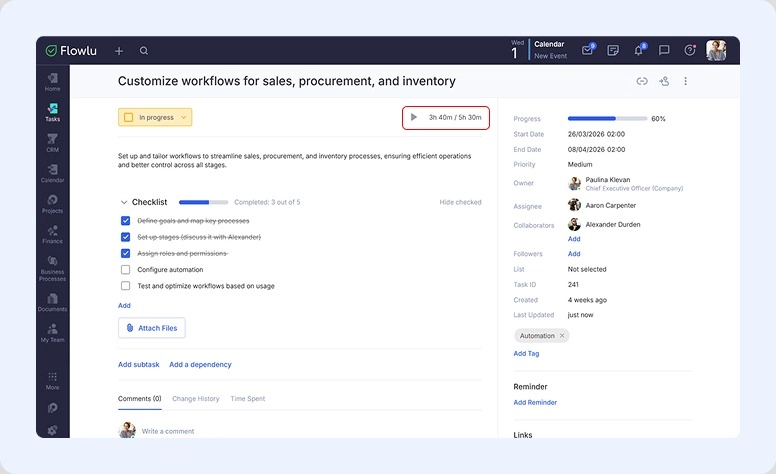
In Flowlu, you can track how long your staff takes to complete their tasks. As an owner, you may set an estimated time, while the assignee can track time spent.
#2. Set Up Your Time Tracking Structure
It’s crucial to have a proper setup for both clean data and accurate reporting. This means that you should take the time to structure a well-thought-out system:
- Define the categories for each type of time
- Create projects (each client has at least one), add different tasks, and define how you’ll invoice them.
- Establish tracking policies that should detail when to track, the rounding rules you’ll use, the minimum charged increment: 6 minutes (0.1 hour) or 15 minutes (0.25 hour), description requirements, and approval requirements.
- Train your colleagues to comply with the system you developed.
To create an invoice, you can use free tools. For example, Flowlu’s Free Invoice Generator & Maker.
#3. Daily Tracking Best Practices
-
Time should always be tracked on the same day the work is performed.
You just can’t wait to remember what you did on Monday when it’s already Friday.
-
Use timers when an operation takes more than 30 minutes.
You will be eliminating guesswork.
-
Add brief descriptions to all time entries.
This is important because you won’t remember what “Client meeting” means some days from now.
-
Review and categorize entries daily.
Just 5 minutes at the end of the day will make sure that you have proper categorization and that you have no errors.
#4. Weekly Review Process
You should take 15 minutes all Friday afternoon to review the past week’s time entries. You need to make sure that:
- All entries are properly categorized
- All project codes are accurate
- All descriptions are meaningful
- There aren’t any missing entries for the operations performed.
- The total time tracked matches approximately with your work week.
Notice that you should calculate the weekly utilization rate to help you identify patterns and adjust behaviour.
For example, if you hit 82% utilization, this is great. However, if you’re at 58%, you need to investigate why and address it quickly.
Don’t forget to submit for approval if this is required by your process.
How to Optimize Your Billable vs Non-Billable Ratio
When you’re looking to improve your utilization ratio, it doesn't mean that you need to work more. Instead, you need to act smarter. Below are some strategies that will help you reduce non-profitable hours and capture paid time more accurately:
#1. Decrease Administrative Burden
Just think that if your team spends 8 hours a week on invoicing, expense reports, and timesheets, that represents 20% of their capacity consumed only by admin work. And, as you already know, each moment spent on administrative work is an hour that isn’t spent on billable client work. This means that you need to use automation.
#2. Optimize Meeting Culture
There’s no question that internal meetings are necessary. But don’t you have an excessive number of these meetings?

The truth is that they add up pretty quickly, and you may not have even noticed it. Just think of all the weekly all-hands meetings, daily standups, monthly reviews, quarterly planning sessions, one-on-ones, and team syncs.
Besides the different types of meetings, you should also think of the time each one takes. In most cases, it can be substantially reduced.
#3. Batch Non-Billable Work
One of the things that makes your employees lose a lot of attention and productivity is that they are constantly switching between two types of work.
They may be completing a task for a client’s project, and they keep checking their email every 30 minutes or so. Every time they switch, they lose focus, and each action will take more effort.
#4. Improve Proposal Success Rates
When you write a proposal that isn’t accepted, it represents between 10 and 40 non-billable hours on average that were invested with a zero return.
While your proposals won’t always be accepted, you need to increase your win ratio. This implies looking for the best qualifying opportunities only, reusing proposal templates, and component libraries.
#5. Track Time in Real-Time
You just can’t rely on your memory to keep track of operations. Instead, you need to do it as it happens. You should turn on the timer when you start and stop it when you’re done.
#6. Train on Billable vs Non-Billable Classification
You want to make sure that you train everyone with specific cases. Regular entry reviews with coaching correct misclassification patterns early.
#7. Set Utilization Targets by Role
When you do this, you will create accountability and visibility.
For example, individual contributors should target 75-80%; senior managers might target 65-70% because they have more internal responsibilities; and partners might target 50-60% because they drive business development.
These rates should be reviewed monthly to detect problems fast.
If someone has consistently 50%, but his target is 75%, you can take a closer look and determine the barriers to billable activities and remove them. It may be a simple need for training or a skill that is lacking. Maybe the time spent on admin work needs to be delegated.
#8. Manage Client Communication and Onboarding Efficiently
Ideally prepare a guide with clear and structured rules for interaction. It prevents staff from misunderstandings and mistakes.
#9. Consider Outsourcing Non-Core Activities
Tasks such as administrative support, data entry, or basic operations take up a large part of the daily routine. Think about delegating all of these to an external specialist. This gives you more space to focus on important issues.
Every Hour Matters
The distinction between both types isn’t only semantics; it’s the difference between a profitable business and one that struggles despite working long hours.
It’s important to keep in mind that every hour matters. Track everything, categorize each activity properly, and keep evaluating and improving your system.
Increasing billable utilization from 65% to 80% doesn’t happen overnight. It requires systematic changes: automating admin work, optimizing meeting culture, improving proposal win rates, tracking in real-time, training team members, setting targets, and auditing your client mix. Each improvement compounds with others.
To get such a comprehensive review, it would be better to consider complex systems for workflow management.
For example, with Flowlu you can reduce manual operations for many tasks: creating opportunities, sending emails, approving the results, and more. Also it helps you understand which activities require more time to spend on. It not only helps to establish an honest estimation of work and send clear invoices to customers but also saves your employees from burnout.

The first is the time you spend working directly on client tasks that you can invoice.
The second are hours that include internal or support activities like admin work, marketing, and training that you can’t charge to a client
Tracking both gives you a full picture of how your time is spent. It helps you:
- Understand true profitability
- Set accurate pricing
- Identify inefficiencies
- Improve time management
These activities include:
- Invoicing and bookkeeping
- Internal meetings
- Marketing and sales efforts
- Learning and professional development
However, some roles may partially bill activities like meetings depending on previous agreements.
Yes, in some cases. For example:
- Client-specific research or planning
- Meetings requested by the client
- Revisions within scope
The key is whether the work directly benefits a customer and is agreed upon in advance.