ERP Software Examples: What These Systems Look Like in Practice


ERP systems are powerful tools designed to help growing businesses manage complexity across departments. Do you need to handle complex operations? Or simply optimize your processes and workflows? This system can help standardize processes, centralize data, and improve operational visibility.
What Is ERP?
It’s software that includes many features to help you manage your entire business. From manufacturing to human resources, finance, supply chain. Some of them even integrate customer relationship management (CRM).
This kind of tool gives you a place where you can find not only all the information regarding your business but also delivers the tools that allow you to automate or optimize your business processes. ERP systems centralize data management, which allows you to optimize resource allocation, reduce costs, save time, and improve decision-making.
What ERP Improves for Each Business Size
As we already mentioned above, such systems are tailored to fit businesses of all sizes. So, let’s take a look at how each type of business can make better use of this tool.
Large Enterprises
A large enterprise deals with many supply chains that span multiple departments. The use of ERP software will give them the control and efficiency they need through automation, comprehensive reporting, and advanced analytics.
Mid-Sized Companies
This type of company already has some complexity but doesn’t need all the extensive capabilities that larger companies require. These companies can benefit from ERP systems by enhancing supply chain management, improving financial management, and optimizing resource planning.
Small Businesses
The truth is that even small businesses can benefit from this platform. They can use them to enhance customer service, automate routine tasks, or improve inventory management.
How ERP Supports Different Departments
If you’re still wondering whether your business will actually benefit from it, just take a look at some use cases by function:
#1. Manufacturing
This kind usually includes maintenance management, quality control, and production planning. It increases production efficiency and helps reduce waste.
#2. Finance
The use of this type of software in the fi nancial department ensures not only accurate financial reporting but also precise budgeting and accounting. As you can easily see, this guarantees that your company remains compliant with regulations and gives you greater financial control.
#3. Customer Relationship Management (CRM)
By centralizing customer data, this solution helps you improve your customer service, sales processes, and targeted marketing.
#4. Supply Chain Management
By using dedicated software in this department, companies improve their relationships with suppliers and optimize inventory levels. As you can easily see, this leads to increased efficiency and lower costs.
#5. Human Resources
There are many things that can be improved in the HR department. For example, you will notice that some processes take less time and become more efficient. These include your recruitment process, payroll management, and even employee performance tracking.
5 Benefits of ERP Software
While we are certain that you are already aware of many benefits, here are the most important ones:
1. Saving Costs
The solution can truly save costs in multiple ways.
For example, when you streamline processes such as inventory management, reporting, and data handling through automation, you consequently reduce manual intervention, minimize errors and mistakes, and, at the same time, cut costs and inefficiencies.
With this system, all your data is centralized. You can use the software to lower maintenance costs and consolidate your IT systems, reducing expenses both in the short and long term.
2. Increasing Productivity
A platform is a great way to increase productivity in the different departments of your business.
After all, these systems:
- Automate routine tasks, allowing employees to focus on more important and strategic operations
- Can integrate the different business processes, which will allow you to streamline workflows.
3. Improving Collaboration
When your business uses an ERP system, you’ll have a centralized database. This means that your internal team collaboration will be improved. No matter if different employees work outside the office or in different departments.
For example, let’s say you’re taking a look at the budgeting process. This implies that different departments—marketing, operations, and finance—need to be a part of the one process. Since they all can access data, it will be easier and faster to complete the task.
4. Using Automation
Different tasks can be easily automated, preventing errors and mistakes while also saving time and money.
For example, if you automate order processing, you will streamline operations and improve customer satisfaction at the same time.
5. Being Compliant
More than ever, it’s important for businesses to remain compliant with laws and legislation. And ERPs can be a great help here. Let’s say that you have a food manufacturing business.
When you start using a system, you can keep track of your suppliers and the origins of raw material, control the production processes, and ensure allergen labeling and quality standards.
In addition to this, the platform usually automates compliance report generation. It includes sanitation measures, quality control, and production practices that are required by the industry.
ERP Deployment Models Explained
Depending on your business needs and preferences, the deployment of such systems may vary. Here are the key deployment options:
#1. On-Premise ERP
These systems are installed and managed locally, in your company. Here are their main advantages:
- Full Ownership and Data Governance: With an on-premise solution, organizations maintain complete authority over their software environment and stored data. This level of control is especially important for companies operating under strict security policies or regulatory standards.
- Extensive Tailoring Capabilities: The solutions can be significantly adapted to align with unique operational workflows, industry demands, and specific business requirements.
#2. Hybrid ERP
These solutions are a combination of both cloud-based and on-premise approaches. This means you’ll be able to use some functionalities on-premises and access others through the cloud. The main advantages of this deployment include:
- Selective Deployment Options: Organizations can decide which system components remain on local servers and which are delivered through the cloud, tailoring the setup to match operational priorities and strategic goals.
- Balanced Cost Strategy: By placing non-essential processes in the cloud while retaining critical or sensitive information on-site, companies can optimize spending and allocate resources more efficiently.
- Step-by-Step Cloud Adoption: A hybrid model enables businesses to move toward cloud solutions progressively, avoiding a sudden replacement of existing systems and minimizing disruption to daily operations.
#3. Cloud-Based ERP
These platforms are hosted on the vendor’s servers and can be accessed online. The main advantages include:
- Adaptability and Growth Potential: You can expand or adjust cloud-based systems according to the company’s changing requirements. This type is especially suitable for businesses that are scaling rapidly or experiencing variable workloads.
- Reduced Initial Investment: Because the service provider handles the infrastructure and system maintenance, companies avoid large hardware purchases and IT upkeep expenses. The subscription payment structure also allows for more predictable and manageable budgeting.
- Access from Anywhere: With an internet connection, users can log into the system from any location. This supports remote work, enhances team collaboration, and connects offices or employees working in different regions.
Additionally, you may also find:
- General-purpose: They help to manage a broad range of business processes. There are a lot of modules and tools there. But they often take a long time to start using.
- Industry-specific: They’re designed to cover the needs of the concrete industry, for example, engineering, healthcare, IT, etc.
- Modular: Offers different modules that users can install separately or together, depending on business needs.
- All-in-one: These are comprehensive solutions that provide all the essential tools to manage your company. Users can find modules to handle each business process: CRM, projects, finances, and more.
Core ERP Modules
When you decide to use such a system, you’ll see that it comes with different modules. Each of them helps you with specific functions or departments.
Companies can use multiple modules. In fact, the more you use it, the more unified the system becomes, since all your organization’s data is centralized in one place.
Here are some examples of the different modules available:
Supply Chain Management
Main functions include procurement, order processing, logistics, inventory management, and supplier management.
Project Management
Core functions consist of time tracking, risk management, resource allocation, project costing, and project planning.
Human Resources
Primary functions include benefits administration, employee records, recruitment, performance management, and payroll.
CRM (Customer Relationship Management)
The module provides customer service management, sales tracking, customer data management, and marketing campaigns.
Financial Management
Main features include financial reporting, fixed assets management, general ledger, and accounts payable and receivable.
Sales & Distribution
Here, companies can run distribution management, pricing, sales order processing, sales forecasting, and promotions.
Manufacturing
The module allows quality control, production planning, bill of materials, shop floor management, and scheduling.
Procurement
From here, users monitor contract management, supplier evaluation, purchase order management, and procurement analytics.
Top ERP Solutions Overview
Here are some key examples of ERP system software used by businesses today.
|
# |
ERP Type |
Solution |
Key Features |
Pros |
Cons |
|
1 |
Cloud |
Flowlu |
10+ modules for projects, CRM, finance, docs; real-time collaboration |
All-in-one; Easy-to-use; Customizable |
Limited language support; Mobile app limits |
|
2 |
Enterprise |
Microsoft Dynamics 365 |
Cloud apps for CRM, sales, finance, operations |
Unifies CRM & ERP; AI-driven |
Steep learning curve; Overwhelming for new users |
|
3 |
SMB |
SAP Business One |
Sales, CRM, inventory, finance; mobile access |
Unified functions; Real-time reporting |
Expensive; Interface can be complex |
|
4 |
Industry-Specific |
RealSTEEL |
Metal/steel industry; production, inventory, project mgmt |
Industry-specific; Real-time insights |
Dependent on Business Central; Learning curve |
|
5 |
On-Premise |
Cetec ERP |
Manufacturing quoting, CRM, inventory, QA |
Browser-based; Adaptable |
Complex processes need extra setup |
|
6 |
Cloud/Enterprise |
Oracle NetSuite |
Finance, supply chain, HR, e-commerce; real-time insights |
Automates processes; Centralized mgmt |
Custom reports challenging; Integration complexity |
|
7 |
Cloud/Enterprise |
Oracle ERP Cloud |
SCM, HR, finance, project mgmt; automated workflows |
Embedded AI; Unified platform |
Limited integration; Module customization limits |
|
8 |
Cloud/SMB |
Acumatica Cloud |
Projects, inventory, finance, procurement; optional HR & CRM |
Cloud-native; Real-time teamwork |
Frequent updates; Some modules require setup |
The 8 Best ERP Application Software Examples
If you’re wondering what ERP software examples are, here are some of the most widely used platforms for managing business operations.
#1. Cloud
These systems are elaborated for companies of all sizes looking for a reliable and easy-to-use solution in cloud format.
Flowlu
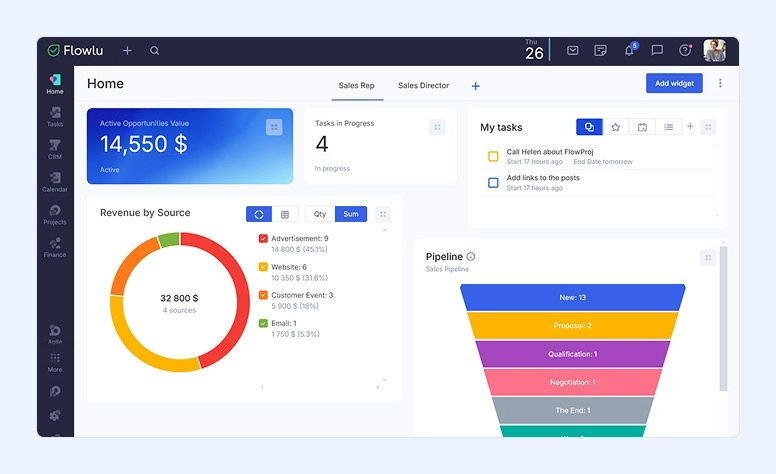
Flowlu is an all-in-one software that offers users more than 10 different modules to manage teams, projects, customer relationships, finance, documentation, and other business processes. Here you’ll find all the essential tools without excessive functions.
Key Features:
- Comprehensive management of opportunities and sales pipelines.
- Overall planning of multiple projects with workflow automation, task tracking, and replanning capabilities.
- Tools for revenue forecasting and cost planning.
- Financial records linked to specific projects.
- More than 20 types of reports across different modules.
- Customizable invoices that can be automated using automation rules.
- Client portal to stay connected with stakeholders, freelancers, or contractors.
- Extensive capabilities for creating, editing, and customizing all types of documents.
- Real-time collaboration via internal chat or comments, or with easy integration of popular external apps.
- Informative visualization of KPIs on the dashboard
Pros:
- A single space for all business processes
- Easy-to-install and easy-to-use modules
- Wide integration with useful tools
- Customization for various industry needs
- Competitive pricing
Cons:
- Limited language support in the interface
- Mobile app feature limitations

#2. Enterprise
These solutions offer many tools to deliver multiple functions across different business areas.
Microsoft Dynamics 365
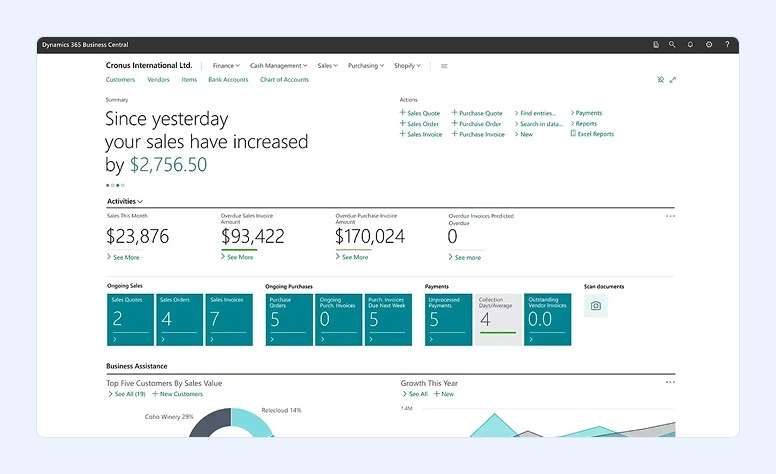
Based on the cloud, Microsoft Dynamics 365 can help businesses in many areas, including customer relationships, sales, operations, and finance.
While it comes with 14 different applications, you need to pick the ones you want.
Key Features:
- Monitor liquidity and identify financial patterns using sophisticated cash flow forecasting tools.
- Use built-in self-service analytics to support smarter decision-making, combining data from Dynamics 365 applications and external systems.
- Bring together information from Dynamics 365, Microsoft 365, and third-party apps to create a unified and intelligent data environment.
- Streamline financial operations by automating routine processes and organizing tasks through role-based dashboards integrated with Microsoft 365.
- Stay compliant with local tax laws through a customizable tax configuration system and adaptable calculation formulas.
- Operate confidently on a global scale with support for dozens of countries and languages, plus access to Microsoft AppSource solutions covering hundreds of additional regions.
Pros:
- Unifies CRM and ERP functionalities within a single ecosystem.
- Offers AI-driven capabilities across sales, finance, customer service, and supply chain management.
- Improves organizational alignment by connecting people, workflows, and data.
- Allows industry-specific customization through partner extensions and add-on applications.
Cons:
- Noticeable learning curve, particularly for those unfamiliar with CRM platforms. Setup and customization can be technical and may require external expertise.
- The extensive functionality can be overwhelming for new users
- The interface may not feel intuitive or may be somewhat outdated.
#3. SMB
If you install these solutions on your own servers, you’ll get full control over your data and the system itself.
SAP Business One
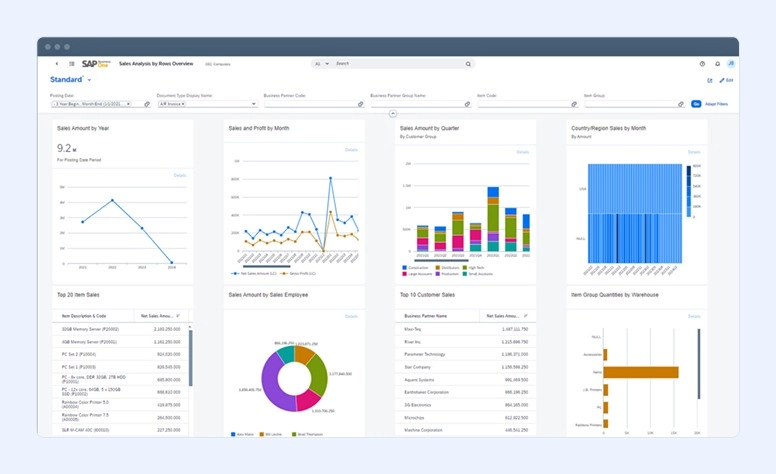
SAP Business One is especially designed for small and mid-sized businesses. It comes with sales, CRM, inventory, and financial features. In addition, you can monitor all your business operations in real time.
Key Features:
- Simplifies core financial operations by automating routine accounting activities, including general ledger postings and accounts payable/receivable management.
- Produces tailored financial statements and audit-ready reports to support strategic planning and compliance requirements.
- Oversees the full sales cycle, from opportunity management to order fulfillment and long-term customer engagement.
- Consolidates essential customer information into a single, centralized database for improved visibility and relationship management.
- Streamlines purchasing workflows with automated requisitions, purchase order processing, and returns handling.
- Provides dynamic dashboards and visual reports that track key performance indicators and operational metrics.
- Enables mobile access via iOS and Android devices, allowing users to manage leads, monitor inventory, review accounts, and process orders on the go.
Pros:
- Brings together finance, procurement, inventory control, sales, and CRM functions within a unified environment.
- Offers real-time reporting and analytics to support informed, data-driven business decisions.
- Integrates with SAP HANA to enhance system speed, data processing capabilities, and overall performance.
- Includes embedded business intelligence tools for monitoring performance and identifying operational trends.
Cons:
- Requires formal licensing and professional implementation.
- Can be expensive, particularly for smaller businesses, and may involve significant investment in training and deployment.
- Some users find the interface complex and less intuitive.
#4. Industry-Specific
Designed to meet the needs of specific industries only.
RealSTEEL
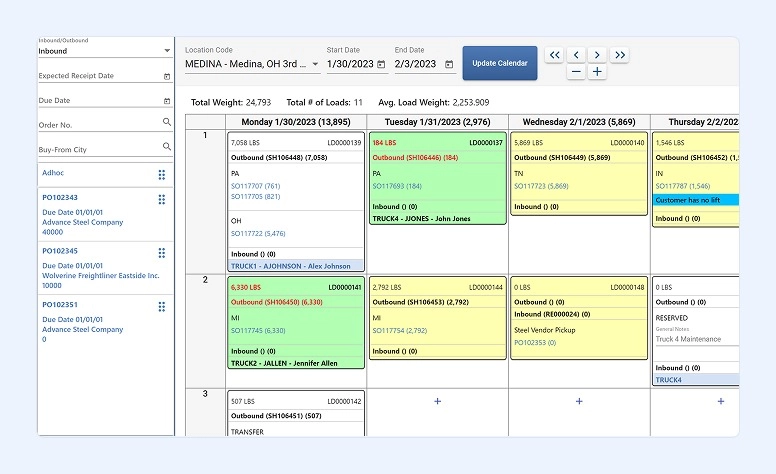
RealSTEEL is especially designed for the metal and steel industries and is built on Microsoft Dynamics 365 Business Central. This cloud-based system includes features such as project management, financial management, inventory control, and more.
Key Features:
- Generates precise quotes.
- Track materials with unlimited physical and dimensional attributes, ensuring accurate inventory control and full traceability.
- Automate production planning and resource scheduling as orders are entered, with real-time adjustments based on capacity and material availability.
- Integrates material flow, outside processing, subcontractor tracking, and supply coordination integrated within one system.
- Provides actionable insights from dashboards and analytics.
- Works seamlessly with Business Central and integrates with tools like SigmaNest, ProNest, AMS Eclipse, and Microsoft 365 apps.
- Manage customer specifications and sales processes alongside manufacturing data for a unified customer-to-production workflow.
Pros:
- Built specifically for the metals and steel industries, delivering unique functionalities.
- Combines front-office (sales/CRM) and back-office (inventory/production) functions in one system based on Microsoft’s ERP backbone.
- Supports business growth without requiring replacement of core systems.
- It delivers real-time insights into orders, stock, and scheduling, helping reduce waste, reduce costly delays, and increase throughput.
- Available on-premise or in the cloud.
Cons:
- Platform Dependency on Business Central.
- Advanced planning may need add-ons.
- Big learning curve.
- While RealSTEEL integrates with various tools, initial setup and synchronization with external systems (e.g., nesting or quality ones) can be time-intensive and require support.
#5. On-Premise
Developed to offer more functionalities than those for small businesses.
Cetec ERP
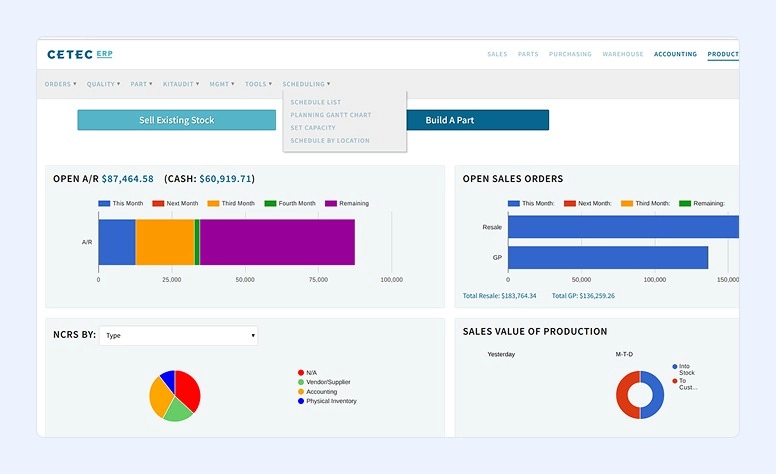
Cetec ERP is another cloud-based platform, and it comes with a wide range of features. These include manufacturing quoting, CRM and sales management, quality assurance, mobile warehousing, inventory management, and others.
Key Features:
- Order tracking and fulfillment
- CRM and sales management
- Inventory management
- Planning and scheduling
- Document management
- Manufacturing quoting
- Custom reporting
- Quality assurance and ISO compliance
Pros:
- Always updated
- Practical interface accessible from your browser
- Adapts to different industries
Cons:
- Highly specialized or complex business processes may require additional configuration effort or workarounds
- Although practical and browser-based, the interface may feel less modern for some users.
#6. Hybrid
Designed to help larger organizations with more complex business operations. They combine several types of ERP.
Cloud/Enterprise Examples
Oracle NetSuite
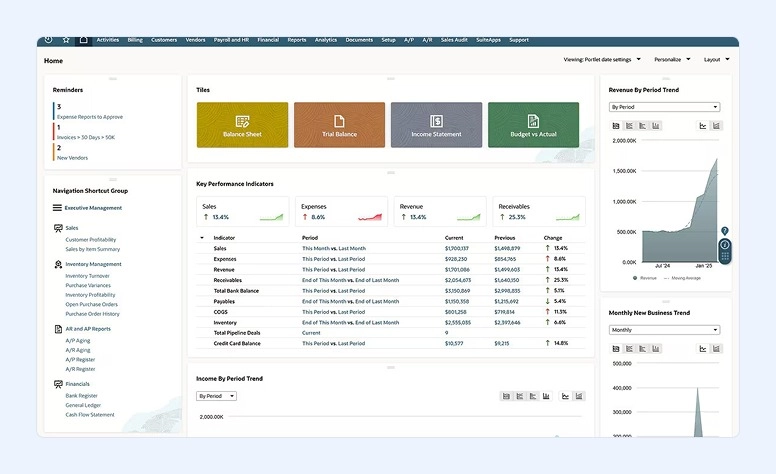
Oracle NetSuite is also based on the cloud. With it, you can easily automate your processes as well as get financial and operational insights in real time.
Key features:
- Consolidates finance, supply chain, manufacturing, human resources, and e-commerce into a single space, eliminating the need to switch between multiple applications.
- Built on a multi-tenant cloud architecture managed by the vendor, ensuring scalability, continuous updates, and system reliability.
- Delivers detailed reporting tools and personalized dashboards based on user roles to support data-driven decisions.
- Offers customization capabilities through SuiteCloud applications and development tools, allowing businesses to adapt the platform to their specific workflows and organizational structures.
Pros:
- Streamlines and automates accounting operations, increasing efficiency and reducing errors in financial processes.
- Provides up-to-date insights into both operational activities and financial results.
- Enables centralized management of multiple subsidiaries, divisions, and legal entities within one system.
- Integrates accounting, inventory control, order management, project tracking, production, supply chain, and warehouse management into a unified platform.
Cons:
- Creating customized reports can be challenging
- Integrations can be technically complex
- Reporting features could offer greater flexibility and customization options.
Oracle ERP Cloud
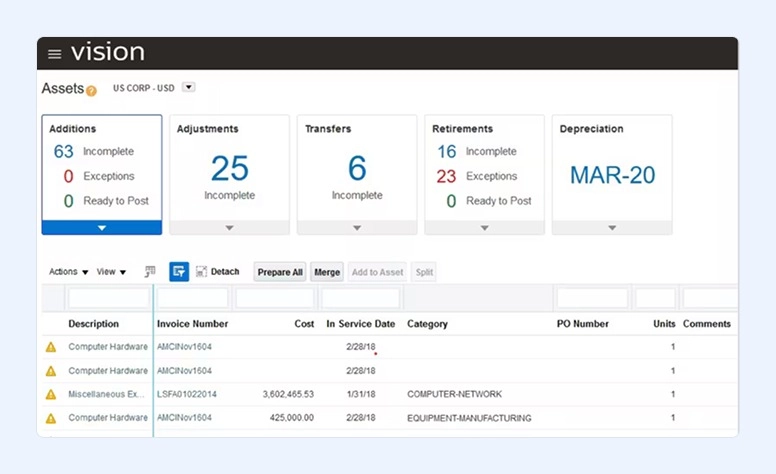
Oracle ERP Cloud is a cloud-based system that offers supply chain management, manufacturing planning, human resources management, and financial management.
Key Features:
- Simplifies financial management by centralizing accounting operations and strengthening overall financial control and visibility.
- Oversees the entire procure-to-pay cycle, connecting purchasing data across departments to ensure smooth and accurate order processing.
- Supports complete project management, including structured planning, budget supervision, cost tracking, and risk mitigation.
- Increases operational efficiency by automating repetitive tasks and minimizing manual intervention and errors.
Pros:
- Uses embedded AI to streamline finance, procurement, project operations, and compliance-related processes.
- Offers real-time reporting, predictive forecasting, and KPI monitoring through Oracle ERP Analytics.
- Combines financials, supply chain management, and enterprise performance tools within a unified platform.
- Enhances regulatory adherence with automated audit trails and continuous risk assessment features.
Cons:
- Third-party integration options may be limited.
- Cloud-based support may require full dependence on Oracle.
- Customization options within certain modules can be restricted.
Cloud/SMB
Acumatica Cloud
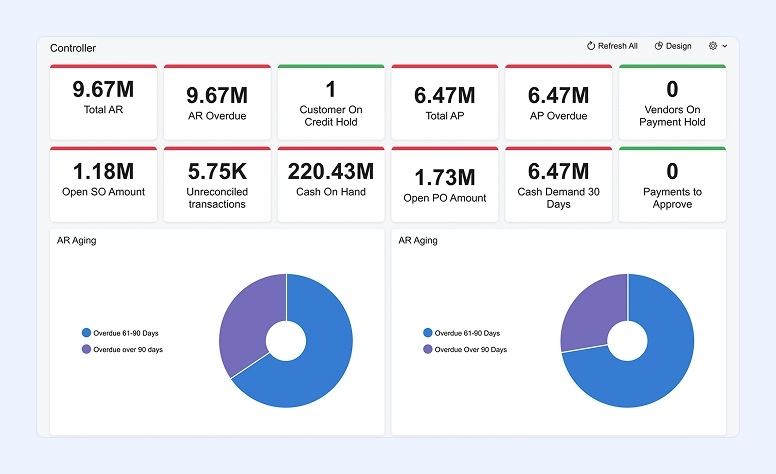
Based on the cloud, the Acumatica Cloud is a tool that offers project management, inventory management, financial support, and procurement. For additional capabilities, it also offers modules such as human resources and CRM.
Key Features:
- Connect online sales channels such as Amazon, Shopify, and BigCommerce directly with Acumatica’s financial and inventory management tools for seamless data synchronization.
- Designed for construction companies, the cloud solution delivers advanced analytics and operational transparency to support informed decision-making.
- Access up-to-date production and financial data in real time, enabling stronger operational control and improved business performance.
- Improve inventory management with adaptable item tracking, lot and serial traceability, and automated replenishment processes.
- Streamline warehouse activities by minimizing manual errors, automating routine tasks, and increasing overall efficiency.
Pros:
- Offers a comprehensive cloud-native ERP platform tailored to the needs of mid-sized organizations.
- Combines financial management, distribution, manufacturing, construction, and retail operations within a unified system.
- Integrates easily with third-party tools and applications through an open ecosystem and marketplace.
- Enables real-time teamwork across departments with integrated, cross-functional workflows.
Cons:
- As the platform continues to evolve with frequent updates, extensive customizations can complicate system upgrades and require additional effort during version transitions.
- Some users report that certain modules—particularly inventory management—can feel less intuitive and may require time and experience to navigate efficiently.
- In some cases, accessing certain features may require enabling multiple modules, which can add complexity to user configuration and licensing.
How to Choose the Right ERP System
After our review, you can easily choose the platform that suits your business perfectly. When considering different options, filter them using the following criteria:
- What company size it suits
- Whether the system is industry-specific or universal
- What deployment options are available
- Which modules the software offers
- What users say about it
- What support the developers provide
- What the pricing is
Many developers offer a demo before you make your final choice. Always take advantage of this opportunity—you can test multiple options and find the perfect solution for your business.
Bottom Line
ERP systems are crucial for businesses of all sizes and of all industries. Ultimately, these tools give business owners control over their entire company in just one place. When all your data is centralized, you reduce costs, enhance team efficiency, and make better decisions.
This software can also help your business maintain compliance and, at the same time, continue growing and improving customer satisfaction.
While many solutions can seem complex, it’s better to start with universal ones that offer simple yet essential tools. For example, by using Flowlu, you get not only a robust ERP but also a CRM platform that helps you manage your business from all angles. At the same time, you don’t need to spend hours learning which tool is for what. This system provides a fast start, allowing you to organize all your operations immediately after setup.

ERP or Enterprise Resource Planning is a tool that helps businesses automate and manage operations using a centralized system.
It integrates different functions or departments of a business into a single platform. This is extremely useful, as teams can make data-driven decisions, streamline workflows, and share information seamlessly.
Using an ERP system has many benefits: it reduces manual tasks, improves efficiency, ensures better control over operations and finances, delivers real-time insights, and enhances collaboration between departments.
ERP systems can be used by businesses of all sizes, particularly those managing complex operations across departments.