January–March Updates: Required Fields, Markdown, New Financial Modules, and More

- Required fields across CRM
- Delete chat messages after sending
- Baseline view in Gantt chart
- Convert existing tasks into templates
- Stacked column charts in Tasks widgets
- Send the WhatsApp messages automatically
- Variables in Project Workflows
- Markdown support across the editor
- Expanded activity tracking in Opportunity Feed
- Improved tables in the editor
- Inline editing in Gantt & Timeline views
- Fixed assets
- Payables & receivables
- Borrowed and issued loans
- API: multiple contacts per opportunity
- Other updates
- Flowlu Recognized by Capterra for Best Value (2026)
- Wrapping up

The first quarter of the year brings a mix of foundational improvements and new capabilities across CRM, Projects, Finance, and collaboration.
This release focuses on three areas: improving data consistency (required fields, expanded activity tracking), making day-to-day work faster (inline editing, templates, editor upgrades), and adding more structure to financial management (fixed assets, payables and receivables, loans).
You’ll also see updates to automation, reporting, and integrations, along with a range of smaller improvements that make Flowlu easier to adapt to how your team actually works.
Below is a closer look at what’s changed.
Required fields across CRM
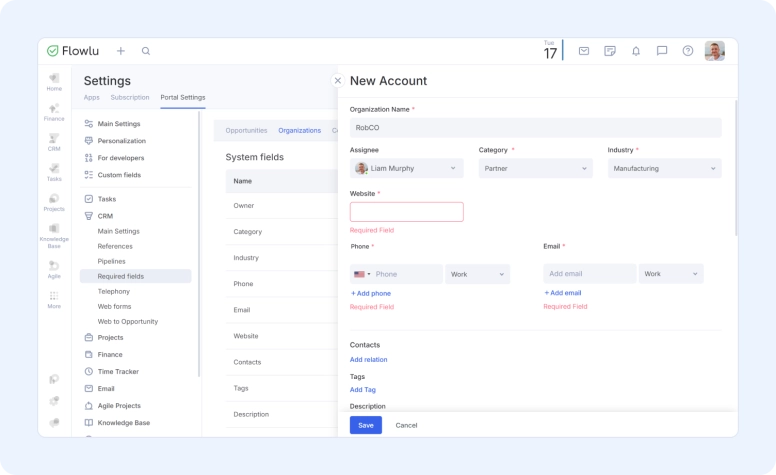
You can now enforce required fields across Opportunities, Contacts, and Organizations to keep your CRM data consistent and complete.
This helps ensure your team captures key information at the right time, whether they’re progressing deals or updating customer records.
What’s new
- Required fields in Opportunities: Set mandatory fields by pipeline and stage. Flowlu checks them when creating, editing, moving opportunities forward, or closing them.
- Required fields for Contacts and Organizations: Ensure important customer data is filled in when records are created or updated.
- Flexible configuration: Apply rules to both system and custom fields, tailored to your process.
- Validation with clear feedback: Missing fields are highlighted, and actions are blocked until required data is added.
How it works
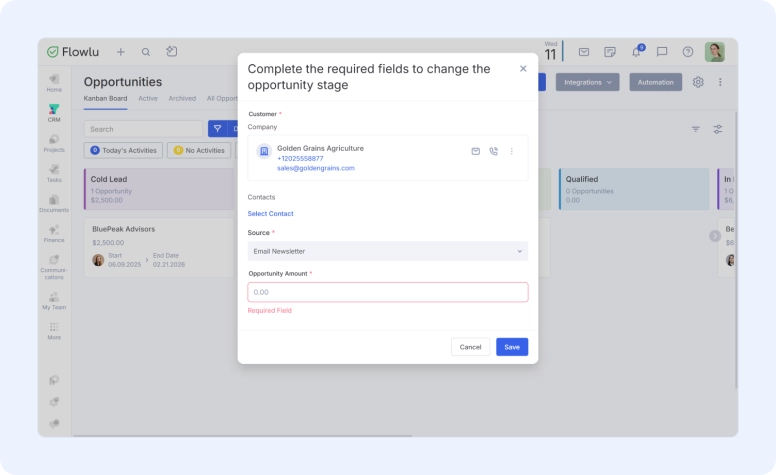
Admins can configure required fields in Portal Settings → CRM → Required Fields.
- For Opportunities: rules can be set per pipeline and stage
- For Contacts and Organizations: validation applies on create and edit
- For existing records: required fields are enforced when updates are made
- Inactive custom fields are excluded from validation
Available on all Premium plans (except legacy Team plan)
This update helps standardize data capture across your CRM and reduces gaps that affect reporting and pipeline visibility.
Full setup instructions are available in the Help Center.
Delete chat messages after sending

Mistakes happen. We’ve added the ability to delete sent messages, giving your team more control over their communication.
How it works:
- Deleting a message clears its text and attachments (all replies are left intact).
- Messages can be deleted within one hour of being sent.
This feature is available in both the desktop and mobile.
For new Flowlu accounts, the option is enabled by default. For existing accounts, the feature is initially disabled but can be toggled on in the module settings.
To set it up, go to Portal Settings → Messenger → Settings and enable "Allow deletion."
Baseline view in Gantt chart
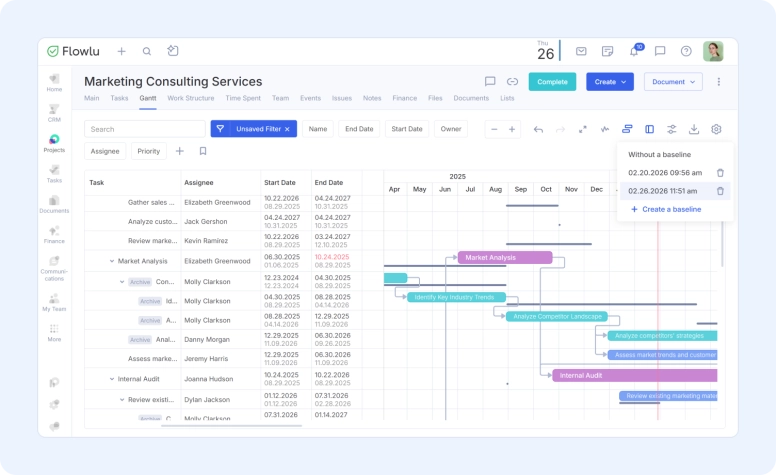
You can now create and track Baselines in Flowlu’s Gantt chart to see how your project is progressing against the original plan. A Baseline captures task start and due dates at a specific point in time, helping you quickly spot delays and schedule changes.
In the Gantt chart, click the Baseline icon and select Create Baseline — Flowlu saves the current task dates and names the baseline automatically by date and time.
Once activated, the baseline appears directly on the Gantt chart (including milestones), letting you compare planned vs. actual timelines. You can create multiple baselines and switch between them at any time.
Available on Advanced and Ultimate plans (plus legacy Professional + Enterprise).
Convert existing tasks into templates
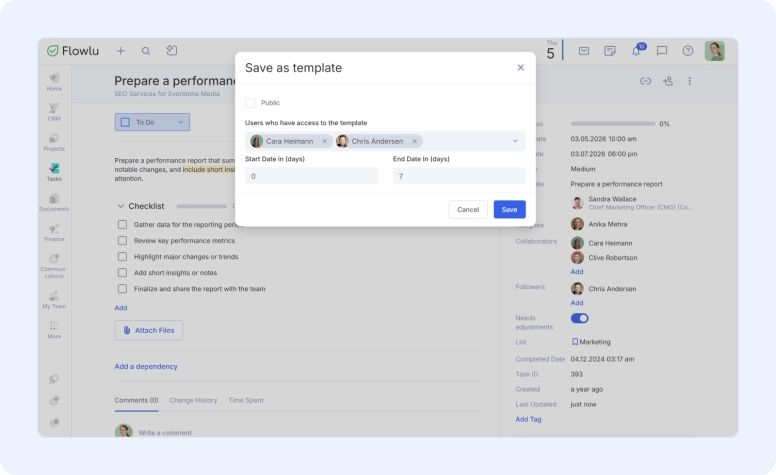
You can now create task templates directly from existing tasks in Flowlu. If you’ve already built a task with the right structure, you no longer need to recreate it again and again.
Simply open any task you’ve created, click the three-dot menu in the top right corner, and select Create template. From there, you can decide whether the template should be public or available only to specific users. You can also set the start and end timing in the template so deadlines are automatically calculated when the task is created.
Instead of rebuilding tasks each time, you can capture a proven setup once and reuse it whenever you need it—for example, for campaign launches or recurring operations.
Stacked column charts in Tasks widgets
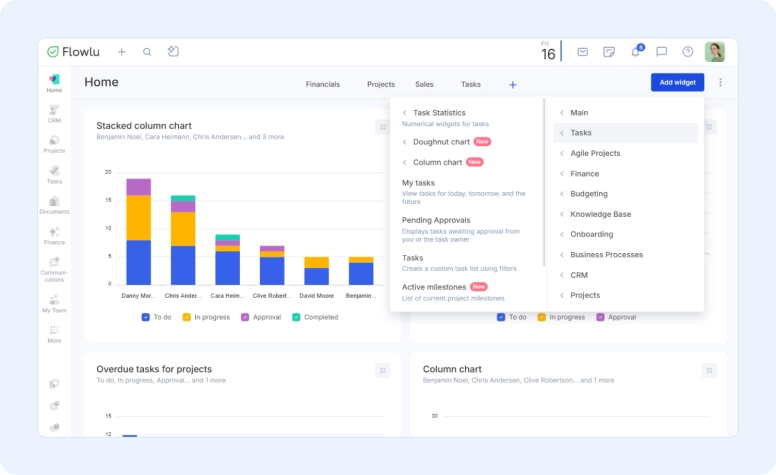
Use new stacked column charts in task widgets to see how work is distributed and progressing across your workspace.
This update helps you see a shared snapshot of tasks across the portal, monitor workload and execution by employee, and track project progress without opening individual projects or reports.
We’ve added two ready-made presets — Overdue tasks by projects and Active tasks by assignees — so you can get value immediately. If you need something more specific, you can build your own chart using customizable filters and show data only for selected teams or employees, projects or clients, tags, date ranges, etc.
Utilize stacked column charts when you need clear structure and progress, not another task list.
Feel free to check the step-by-step instructions in our Knowledge base.
Send the WhatsApp messages automatically
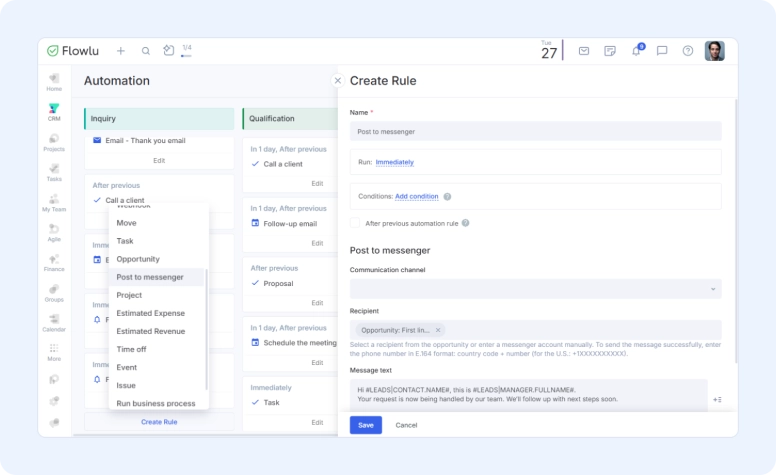
The Communications module now supports automated WhatsApp messages, so clients receive the first message without manual follow-up.
What’s included:
- Trigger messages based on opportunity stages and conditions
- Send messages to clients, opportunity participants, or a specific phone number
- Configure timing, conditions, bot, and message content like any other automation
Respond faster (even outside business hours), never miss first contact, keep messaging consistent, and reduce manual follow-ups across all opportunities.
You can find step-by-step instructions in the Help Center.
Variables in Project Workflows
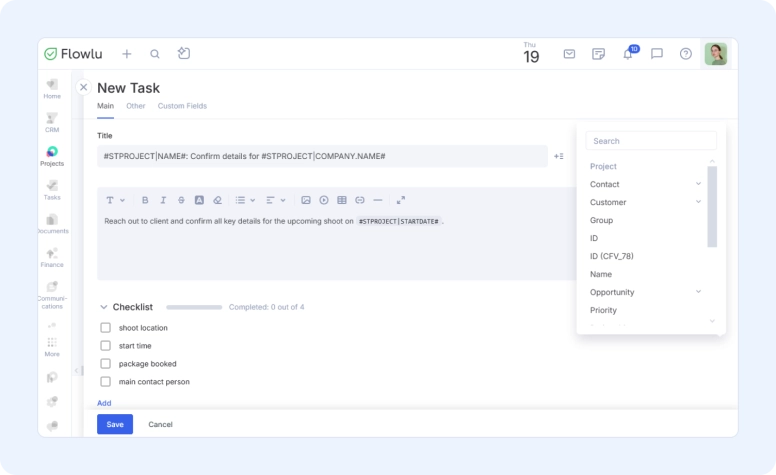
You can now use variables in project templates—including tasks, subtasks, checklists and milestones.
This removes the need to create multiple identical tasks and makes project setups more flexible and easier to manage.
What’s new
- Variables in tasks: Dynamically populate task titles and descriptions based on project data.
- Variables in subtasks: Apply the same logic to nested tasks for more consistent structure.
- Variables in milestones: Automatically adjust milestone names without duplicating templates.
- Aligned with automation variables: Uses the same variables available in task creation automations (except stage-related variables).
Instead of creating generic or repetitive task names, you can generate context-specific tasks for each project. For example, task names can include the project name, client, or other key details—automatically. This keeps templates reusable while making each project clearer and easier to navigate.
Markdown support across the editor
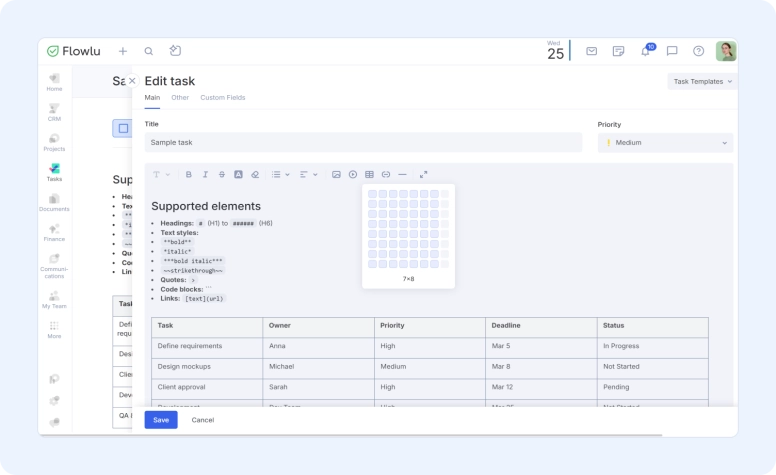
You can now use Markdown while typing, and it will automatically convert into formatted text, even in comments and areas without a formatting toolbar.
Headings, text styles, quotes, code blocks, and links are supported.
This is especially useful if you draft content in Markdown before pasting into Flowlu, copy structured output from AI tools, or prefer keyboard-first formatting. When you paste Markdown content, it’s automatically converted into clean, formatted text, no manual cleanup required.
The Help Center includes full instructions and examples.
Expanded activity tracking in Opportunity Feed
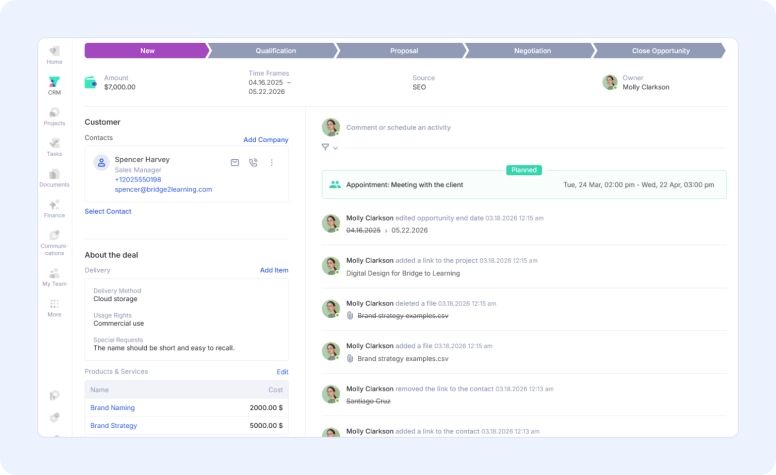
We’ve added more detailed history to the Sales Opportunity feed, giving your team better visibility into what’s happening at every stage.
You can now track:
- Files attached or removed from an opportunity
- CRM account linked or unlinked from an opportunity
- Changes to opportunity timelines (start and end dates)
- New project associations added to an opportunity
These updates make it easier to audit changes, stay aligned across teams, and quickly understand the full context of each opportunity.
Improved tables in the editor
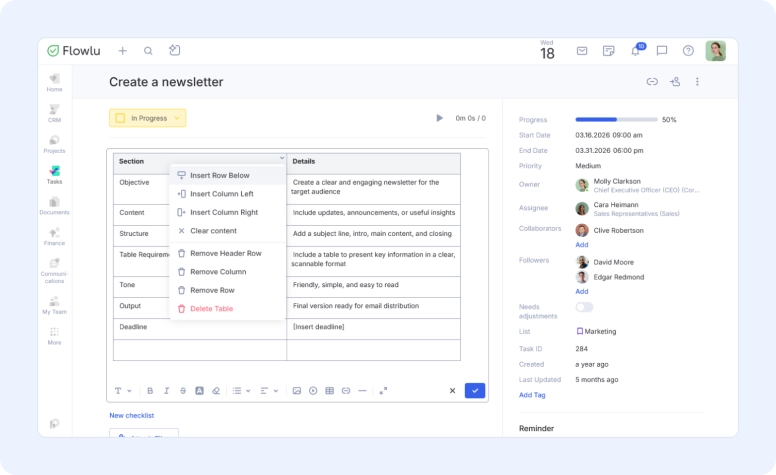
Tables in Flowlu are now faster to create and easier to manage directly in the editor.
Improvements
- Visual table sizing: Choose the number of rows and columns by dragging your cursor when inserting a table.
- Faster row and column addition: Add rows or columns in one click using inline controls inside the table.
- Editing controls where you need them: Access table settings from any cell or from the table toolbar.
- Selection-based structure changes: Add or remove rows and columns based on the selected cells.
- Cell merge and split: Adjust table layout without rebuilding it.
- Header rows and content clearing: Add headers and quickly clear cell contents when needed.
These improvements are available across Flowlu wherever the text editor is used, except for the Knowledge Base and email editor (support for those is in progress).
This update simplifies working with structured content such as project plans, comparisons, meeting notes, and internal documentation.
Inline editing in Gantt & Timeline views
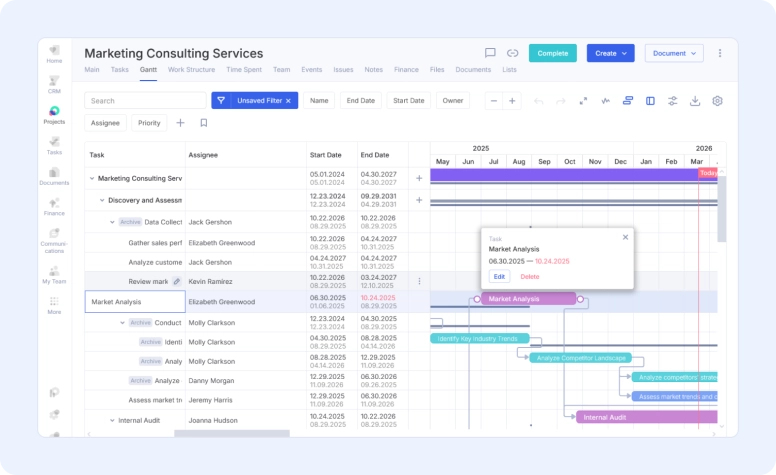
We’ve introduced inline editing across Tasks and Projects in Timeline and Gantt views—so you can update work directly in the table without opening each item.
Improved task name interaction
- Single click on a task row → centers the task in the Gantt chart
- Click on the task name → opens the task side panel
- Click on the pencil icon → enables inline editing of the task name
- Selected task is highlighted for clarity
One-click editing for other fields
- Fields like assignee, dates, and stage can now be edited with a single click
- No need to open the task panel for routine updates
Editable fields
You can now edit the following directly in the table:
- Name
- Assignee
- Owner
- Collaborators
- Followers
- Start date
- Due date
- Stage
(Some fields remain read-only to preserve data integrity.)
Where this works
- Tasks → Timeline
- Project → Gantt
- Projects → All Projects → Gantt
Fixed assets
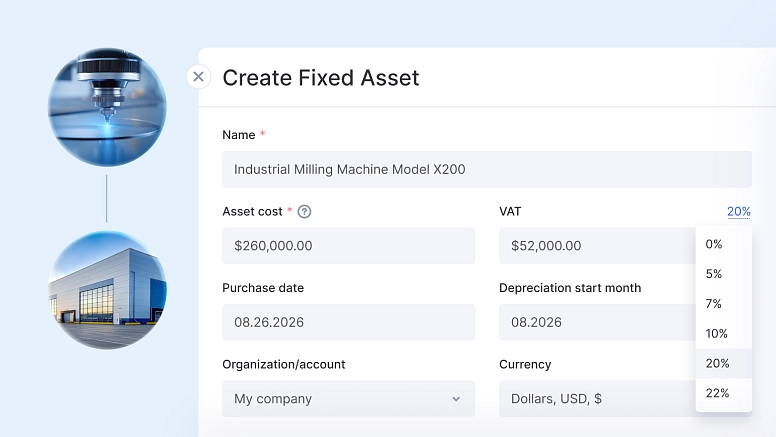
Flowlu now includes a Fixed Assets module to help you account for equipment and intangible assets in a more accurate, structured way.
Large purchases shouldn’t hit your P&L all at once. This update ensures those costs are recognized over time, so your financial reports reflect ongoing operations, not one-time spend.
What’s included
- Support for two asset types: Track both fixed assets and intangible assets in a single system.
- Automatic depreciation: Enter cost and useful life (in months), and Flowlu calculates monthly depreciation and posts it to your P&L.
- Cost allocation by business area: Split depreciation across teams, departments, or cost centers using percentage rules.
- Clean handling of disposals and sales: When you sell or write off an asset, Flowlu calculates residual value and records the gain or loss automatically.
- Installment tracking: Link multiple payments to an asset and track outstanding balances in accounts payable.
- Real-time asset value visibility: See the current book value of each asset at any point—no external spreadsheets or manual tracking.
If you purchase equipment for $100,000 with a 5-year useful life, Flowlu records about $1,667 in monthly depreciation instead of expensing the full amount upfront.
This keeps your margins consistent and your reporting aligned with how the asset is actually used.
You’ll find more guidance in the Knowledge base.
Payables & receivables
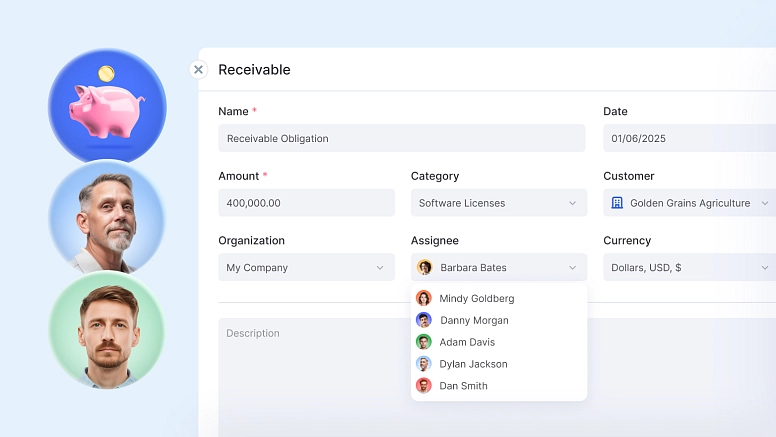
Flowlu now includes a Payables & Receivables module for tracking revenue and expenses based on when they occur, not when cash is received or paid.
This gives you a more accurate view of performance and outstanding obligations.
What’s included
- Accrual-based accounting: Record revenue when it’s earned and expenses when they’re incurred. Payments are tracked separately as settlements.
- Consistent P&L reporting: Revenue and expenses appear in the correct period, regardless of payment timing.
- Centralized view of balances: Track all receivables, payables, advances, and unpaid invoices in one place.
- Clear handling of prepayments: Customer deposits and vendor prepayments are recorded as liabilities or assets until they’re applied, so they don’t affect profit prematurely.
You deliver $50,000 worth of goods in March with payment due in April.
In Flowlu, you record the receivable dated March 31. The revenue is included in March results. When payment arrives in April, it closes the balance without affecting April’s profit.
This keeps your financials aligned with actual activity and makes month-to-month reporting more reliable.
Complete documentation is available in the Help Center.
Borrowed and issued loans
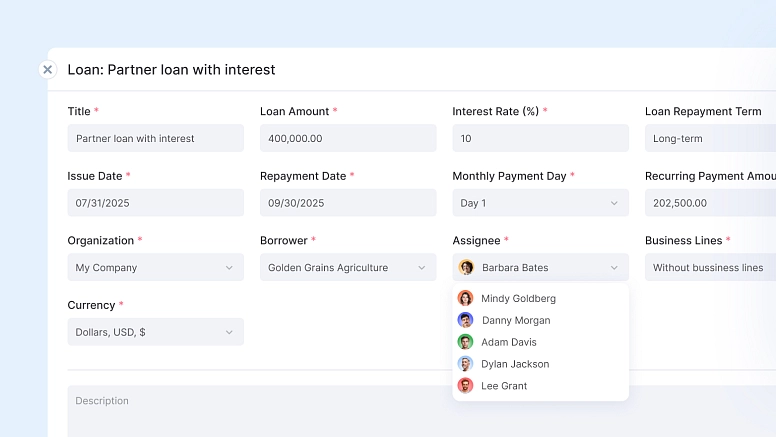
Flowlu now includes a Loans module for managing both borrowed funds and loans you issue to others.
It gives you a structured way to track balances, payments, and interest—without mixing everything into general cash flow.
Two loan types:
- Borrowed funds (loans/credits): money your business receives and repays
- Issued loans: money you lend to partners or other counterparties
It also includes:
- Principal and interest tracking: Each payment is automatically split into principal and interest, so your reports stay accurate.
- Up-to-date balances: See remaining debt, payment schedules, and current obligations at any time.
- Payment schedule and forecasting: Upcoming payments are reflected in your cash flow calendar, helping with short-term planning.
- Accurate financial reporting: Loan principal impacts cash flow, while interest is recorded as an expense or income in your P&L.
When you record a loan payment, Flowlu automatically separates the amount into principal and interest.
Principal reduces the outstanding balance and appears in your cash flow. Interest is recorded separately and included in your profit and loss statement.
The same logic applies to issued loans: repayments reduce the balance, while interest is recognized as income.
This keeps your liabilities, receivables, and financial results clearly structured and easy to track.
For more details, see the Help Center.
API: multiple contacts per opportunity
We’ve updated the API to support linking multiple contacts to a single opportunity.
This change affects integrations only. Backward compatibility is not supported, so API users should switch to the new API behavior.
If you don’t use the API, no action is required.
Learn more in the blog post.
Other updates
Export Gantt charts to PNG
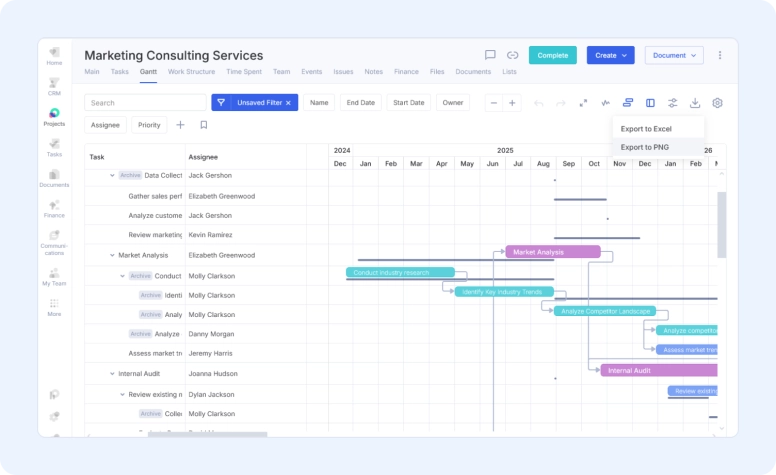
You can now export Gantt charts as PNG files, including applied filters and selected columns. This makes it easier to share timelines in reports, presentations, or printouts.
Time off in workload charts
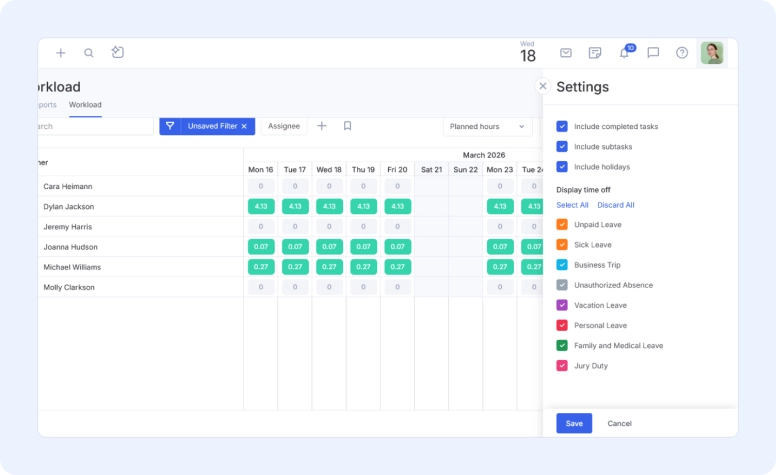
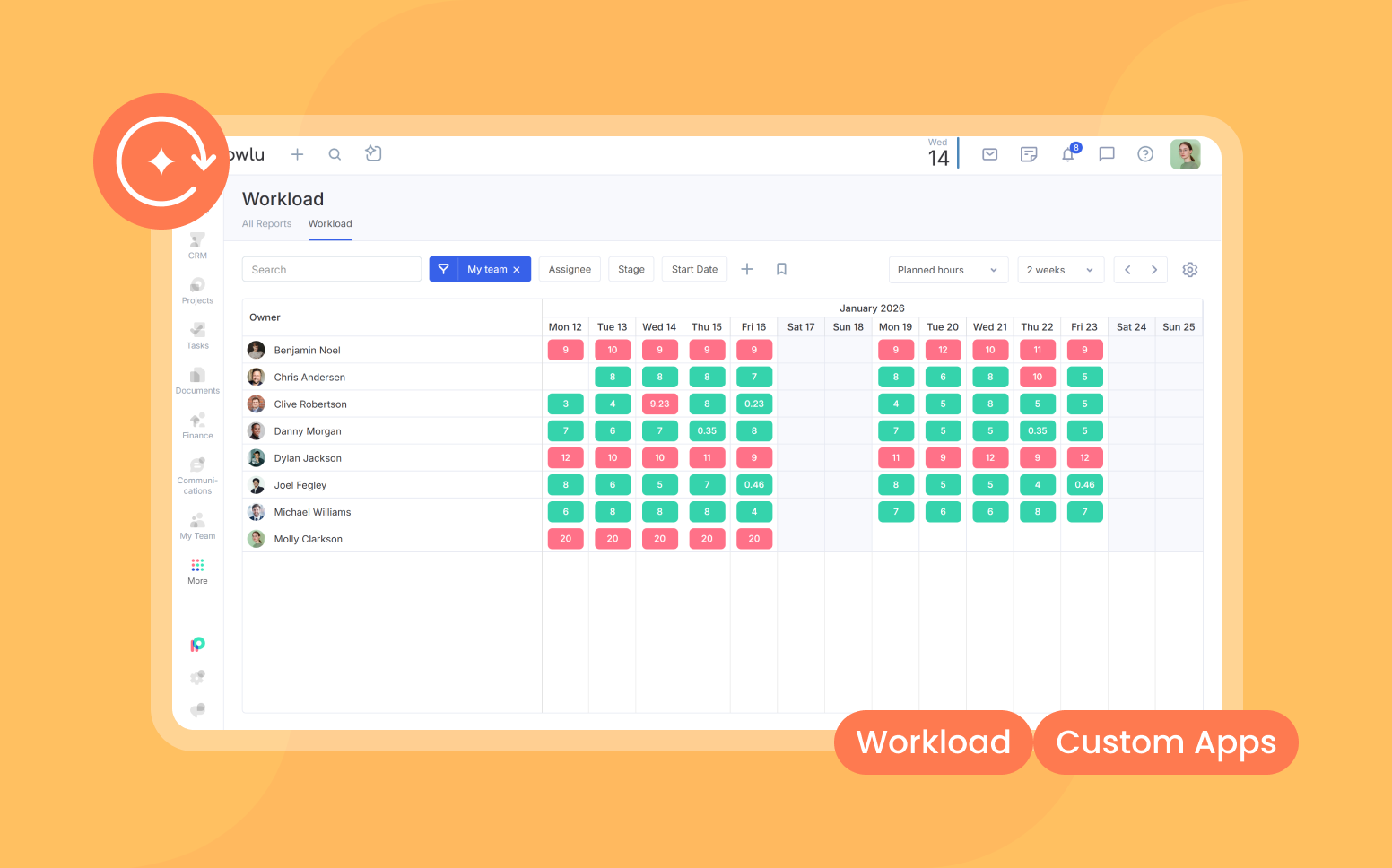
Vacations and sick leave are now reflected in workload charts. This helps you identify when tasks are assigned to unavailable team members and adjust plans accordingly.
Marketplace reviews
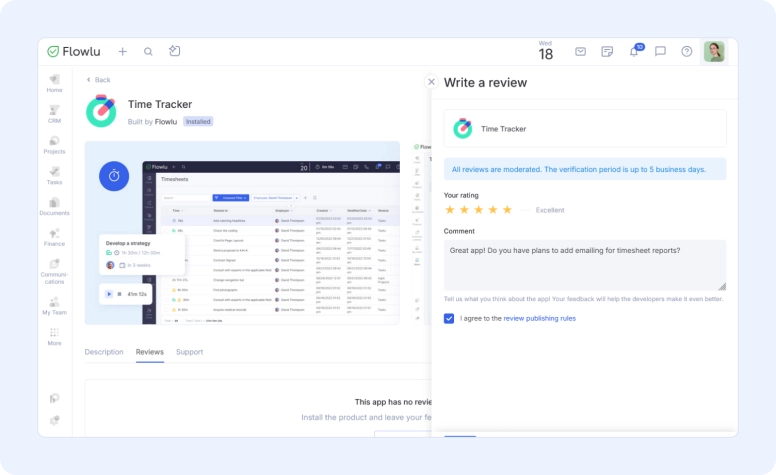
You can now leave reviews and ask questions about apps in the Flowlu Marketplace. This gives teams more context when selecting integrations.
Tags for project portfolios
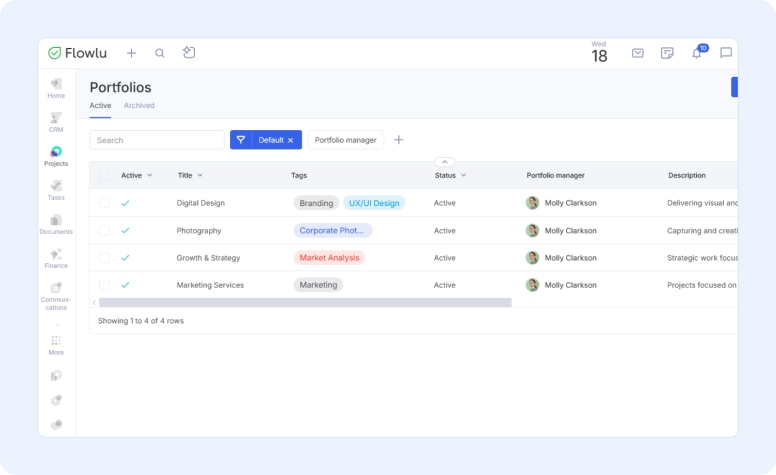
Project portfolios now support tags. Add tags to a portfolio and use them to filter and organize your portfolio list.
Tax settings in Finance
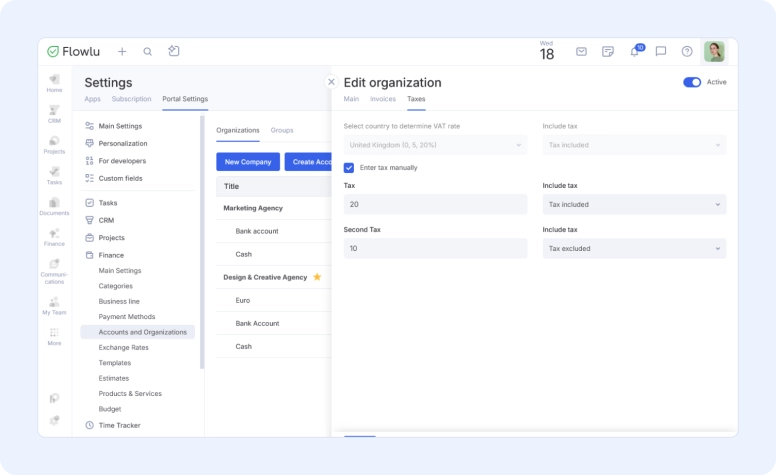
A dedicated Taxes tab is now available in Finance settings (Portal Settings → Finance → Accounts and Organizations → Edit Organization). You can select a country to apply default tax rates or configure taxes manually.
Sprint goal visibility in Kanban
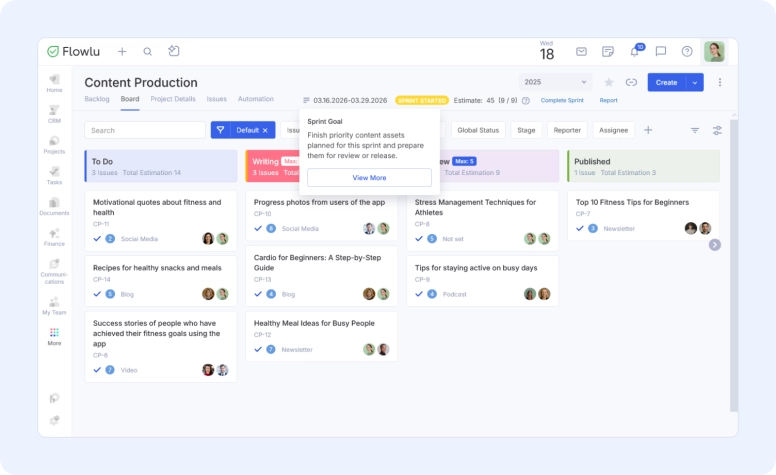
In Agile projects, sprint goals are now visible directly on the Kanban board, so the team can stay aligned without switching views.
Optional opportunity creation from communication channels
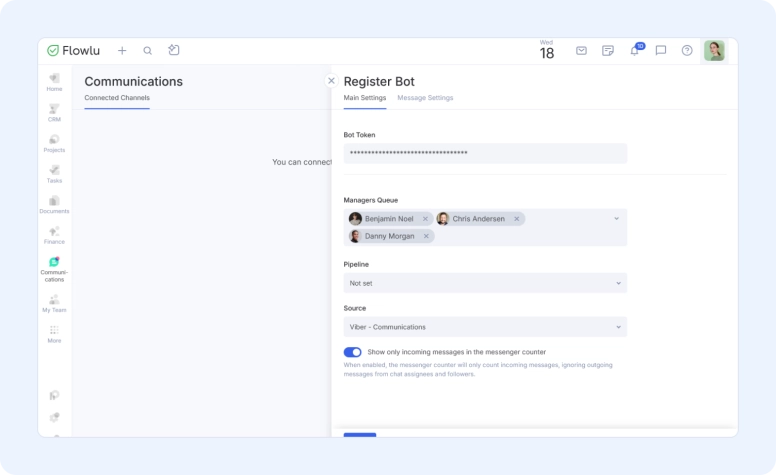
When setting up a communication channel, you can now choose not to link it to a sales pipeline. If no pipeline is selected, opportunities won’t be created automatically from incoming messages. Opportunities can still be created manually from conversations when needed.
Flowlu Recognized by Capterra for Best Value (2026)

Flowlu has received multiple “Best Value” badges from Capterra across categories such as CRM, Project Management, Invoicing, Knowledge Management, and more.
These awards are based on verified user reviews and highlight the overall value teams get from using Flowlu as an all-in-one platform. They reflect both the breadth of features and the practical return on investment customers experience in day-to-day work.
As more companies look to consolidate tools and simplify operations, this recognition reinforces Flowlu’s position as a unified solution for managing projects, sales, finances, and internal knowledge in one place.
Wrapping up
We’re continuing to build in the same direction: fewer gaps in data, less manual work, and more flexibility in how you set things up.
Next on the roadmap: mentions in chat, new integrations, an AI assistant, improvements to timesheets, and more updates across core workflows.
If you’re building on top of Flowlu, you can already create your own apps and integrations through the Marketplace. If you’d like to publish them for other users, reach out to our support team at [email protected], we’ll help you get it live.
As always, your feedback shapes what we build next. If something feels off or you’re missing a feature, let us know.
P.S. This is the last product update I’ll be sharing at Flowlu. After almost 7 years, I’m stepping away. A big part of this journey was shaped by your feedback, your questions, and the way you use the product every day. I’m grateful I got to be part of that. — Daria
Flowlu’s January–March updates include required fields across CRM, Markdown support in the editor, variables in project workflows, baseline view in Gantt charts, inline editing in Gantt and Timeline views, stacked column charts in task widgets, WhatsApp automation, and new financial modules for fixed assets, payables and receivables, and loans.
Flowlu now lets admins make system and custom fields required for Opportunities, Contacts, and Organizations. For opportunities, required fields can be set by pipeline and stage. Flowlu checks these fields when records are created, edited, moved to another stage, or closed, helping teams maintain cleaner and more consistent CRM data.
Flowlu now includes new financial modules for Fixed Assets, Payables & Receivables, and Borrowed and Issued Loans. These updates help businesses manage depreciation, track accrual-based revenue and expenses, monitor balances, separate principal from interest, and improve financial reporting accuracy.