







Best Mural Alternatives: 5 Tools for Visual Collaboration in 2026


With stickers and virtual pens, digital space is flexible and easy to use. But as projects grow in complexity, the dashboard can get too colorful and hard to navigate. When that happens, you need more powerful solutions that keep things running smoothly without slowdowns or noise. See how Flowlu and other alternatives combine creativity with a strong organizational structure.
TL;DR: Best alternatives
Businesses of all sizes and industries welcome creativity. But as projects grow, visuals alone aren't enough. In this review, we gathered tools that share Mural's one-size-fits-all approach and bring structure to creative work.
- Flowlu. A powerful project management platform that combines strong planning and reporting with UX simplicity and flexibility.
- Lucidspark. A solution that balances freedom with practical structure. Works well for both simple note-taking and SWOT analysis.
- Conceptboard. A digital task tracker with real-time collaboration and ISO-certified security — whether you run marketing campaigns or critical infrastructure.
- Coda. A powerful, flexible solution with especially convenient document handling. Departments from engineering to sales will find ready-to-go setups for their needs.
- Milanote. A digital space for creative teams to gather inspiration from notes, sketches, or the web.
Why do people look for software like Mural?
The product has built a loyal user base. A 4.6 rating on G2 and 4.5 on Capterra reflect its strong position in the market, but there's always room for improvement.
What it does well
Users especially appreciate the app for:
- Infinite canvas. Great for unrestricted collaboration and ideation.
- Extensive template library. Whether for presentations or Agile project planning.
- Brainstorming workshops. With structured mind mapping and prioritization.
- Voting and facilitation features. Keeping teammates engaged from the start.
- Integrations. With more than 40 apps, including Jira and Slack.
Why teams may switch from Mural
Recent reviews are generally positive, but two issues come up repeatedly:
Performance issues with large boards
“When I’m working with large files, the process can slow down noticeably.”—here.
Difficulty staying organized at scale
“Sometimes the dashboard becomes cluttered for no apparent reason, and occasionally the performance suffers as well.”—here.
More reasons to try something else
These aren't necessarily disadvantages of the platform. Rather, they are features that Mural doesn't focus on but that some users may find valuable:
- Advanced project organization
- Budgeting and financial tracking
- Reporting tools
Best apps similar to Mural
✓✓✓ = Strong
✓✓ = Good
✓ = Available/basic
Limited = Minimal functionality in this area
|
Criterion |
Mural |
Flowlu |
Lucidspark |
Conceptboard |
Coda |
Milanote |
|
Whiteboarding |
✓✓✓ |
✓ |
✓✓✓ |
✓✓✓ |
Limited |
✓✓ |
|
Brainstorming |
✓✓✓ |
✓ |
✓✓✓ |
✓✓ |
✓ |
✓✓✓ |
|
Project Management |
Limited |
✓✓✓ |
✓ |
✓ |
✓✓ |
Limited |
|
Task Tracking |
Limited |
✓✓✓ |
Limited |
✓ |
✓✓ |
Limited |
|
Team Collaboration |
✓✓✓ |
✓✓✓ |
✓✓✓ |
✓✓✓ |
✓✓✓ |
✓✓ |
|
Integrations |
130+ |
40+ |
100+ |
Moderate |
600+ |
Limited |
|
Cross-Device Access |
✓ |
✓ |
✓ |
✓ |
✓ |
✓ |
|
Free Plan |
✓ |
✓ |
✓ |
Trial only |
✓ |
✓ |
|
Pricing From (user/month) |
$9.99 |
$9 |
$7.95 |
$6 |
$10 |
$9.99 |
|
Best Use Case |
Workshops, idea generation |
Business operations, CRM, and project delivery |
Workshops, idea generation, |
Remote and asynchronous work |
Documentation, project organization, and knowledge sharing |
Design, content creation, and planning |
App alternatives in details
Flowlu
Ratings:
Capterra—4.8
G2—4.7
Fits: Anyone who wants to keep all business processes in one place.
A strong platform for organizing work from a single environment. Designed as a project management + CRM tool, Flowlu offers native functionality for team collaboration, file storage, invoicing, reporting, and process automation.
What to try:
- Project builder. Work with traditional frameworks or try Agile. Set up workflows that fit your habits and industry.
- Reliable CRM. Manage client relationships, track interactions, and close deals efficiently with automations.
- Multiple task views. Monitor progress with interactive Kanban and Gantt charts. Familiar formats like To-Do lists and Calendar are also available.
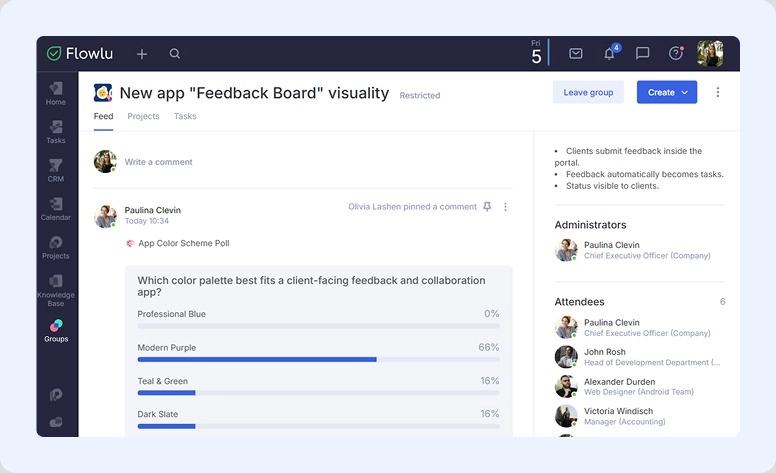
- Groups. Bring together people from different departments to collaborate and discuss specific activities. Start polls and link files and tasks.
- Client Portal. Make clients part of your workflow. Invited users can track progress and leave comments, helping you deliver better results.
- Reporting dashboards. Build a set of widgets to display the metrics you need in real time. Share dashboards with colleagues via link or let them create their own.
- Knowledge base. Don't let ideas slip away. Document everything important, from onboarding programs to help center instructions and more.
- Mind maps. Turn thoughts into plans, discuss them with your colleagues, and update elements together.
| Pros: | Cons: |
|
|
Pricing:
Use for free or buy subscriptions that start at $9 per member per month.
Verdict:
It's a great fit for managing project delivery, sales processes, and internal team collaboration from a single workspace. With all the essential business tools included, there's little need to look elsewhere. If you find something that could be improved, you can even build your own solution and publish it on the Flowlu Marketplace.

Lucidspark
Ratings:
Capterra—4.7
G2—4.5
Fits: Hybrid teams that rely on idea generation and meeting facilitation as a core part of their workflow.
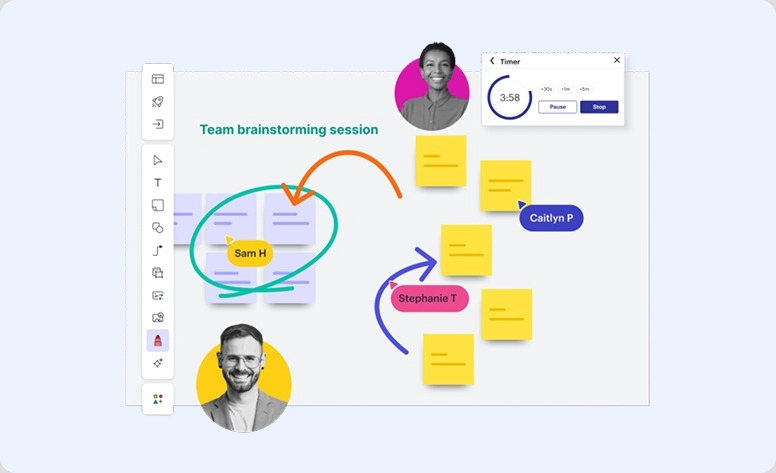
This virtual whiteboard combines sticky notes, freehand drawing, and color-coded cursors. Lucidspark describes itself as a product for "freestyle" collaboration. Its unlimited canvas works equally well for workshops and collaborative sessions.
What to try:
- Note panel
- Stickers
- Timer
- Voting
- Mind maps
| Pros: | Cons: |
|
|
Pricing:
Free is available. Individual Plan starts at $7.95 and Team Bundle at $9.
Verdict:
Great choice if you want to visualize your planning process. It's easy to get started, and the wide range of tools makes it a natural space for sharing and developing ideas. If you need diagramming as well, you can build a more complete suite with Lucidchart, another product from the same developer.
Conceptboard
Ratings:
Capterra—4.5
G2—4.6
Fits: Distributed teams that also need to work asynchronously.
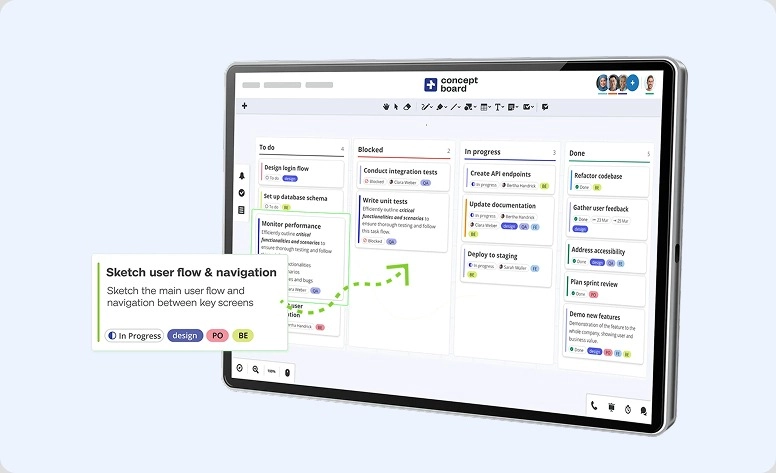
It's a GDPR-compliant online whiteboard where you can not only collaborate with colleagues but also manage tasks and projects. Its structured roadmapping functionality helps support progress through each stage.
What to try:
- Timelines
- Kanban templates
- Presentations
- Limitless canvas
- Comments and feedback
- Agile framework
| Pros: | Cons: |
|
|
Pricing:
You can try it free only during the 30-day trial. Paid plans start at $6 per seat per month.
Verdict:
A solid option for remote interaction. It helps team members stay on the same page during discussions and collaborative sessions. While it isn't a full project solution, it provides everything needed for productive group work.
Coda
Ratings:
Capterra—4.6
G2—4.6
Fits: Small businesses, startups and enterprises.
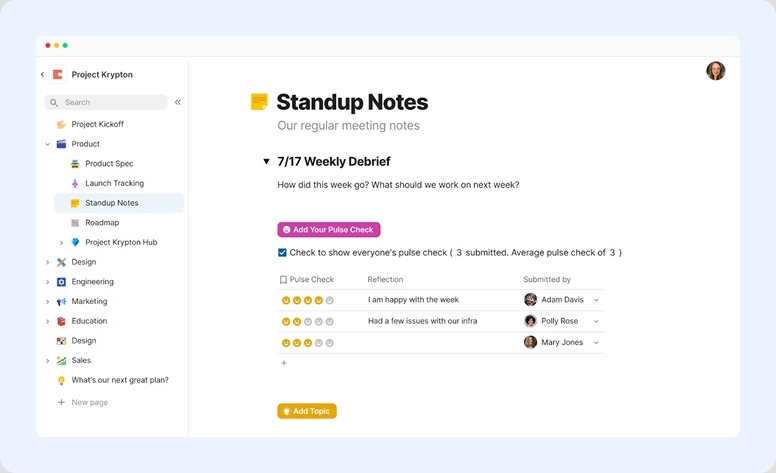
It's something like Google Docs, but more powerful and flexible. Coda blends the familiar document interface, spreadsheet structure, application-like capabilities, and AI.
What to try:
- Meeting notes
- Tasks and timelines
- Knowledge base
- Trackers
- AI chat
| Pros: | Cons: |
|
|
Pricing:
Anyone can get started at no cost. Premium subscriptions start at $10.
Verdict:
Strong for collaboration and project organization. Since it combines the functionality of multiple tools in one place, it may take some time to learn and fully adopt.
Milanote
Ratings:
Capterra—4.7
G2—4.5
Fits: Professionals working with content, design, and multimedia assets.
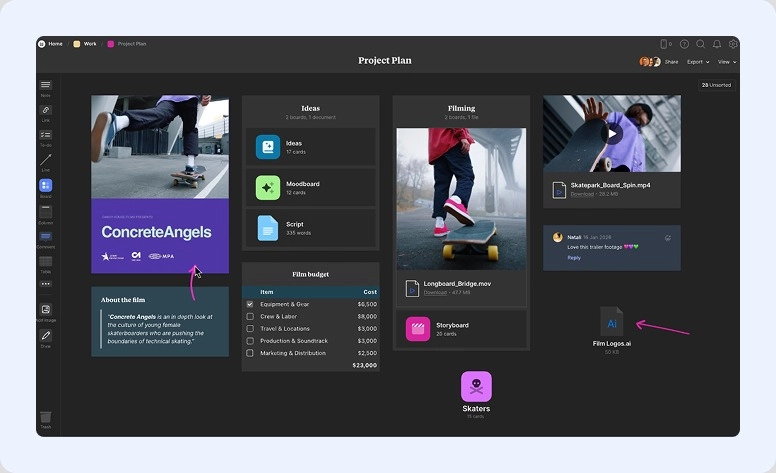
An aesthetic app built for visual thinking. Milanote combines moodboarding and storyboarding with content storage and strategic mapping, helping ideas evolve from inspiration to execution.
What to try:
- Note-taking
- Web Clipper
- Story structure
- Comment threads and mentions
- Collage maker
| Pros: | Cons: |
|
|
Pricing:
Start for free. Paid subscriptions begin at $9.99 per month.
Verdict:
A strong choice for design, photography, filmmaking, game development, and other visually driven fields. However, if your work doesn't rely heavily on these, you may find other software more practical.
Choose the right alternative
Fast checklist to evaluate options and find the best replacement for Mural while keeping its strongest productivity capabilities.
Ease of use
A friendly interface doesn't always guarantee an easy start. Even a beautiful workspace can leave users wondering where to begin. Most alternatives offer a free plan or trial, so take advantage of it. Test the experience yourself or read reviews before committing to a paid subscription.
Canvas & whiteboarding
Make sure the solution gives you enough space to think and grow. This is especially important in creative fields. However, if you work in a more data-driven environment, basic whiteboarding may be all you need.
Templates
Starter layouts can significantly speed up onboarding. Even if you're new to the software, they help bridge the gap between understanding the features and putting them into practice.
Project and task tracking
Generating ideas is only part of the process. You'll also need a way to organize and execute them. Check whether the platform includes Kanban or Gantt views, or at least basic task lists.
Collaboration
Smooth coordination is essential for both in-office and remote work. Comments, real-time editing, activity feeds, and built-in communication features can make a major difference in day-to-day work.
Final verdict: when creativity meets structure
Even if you work in industries like insurance or law, creativity still plays an important role. The key is striking the right balance between structured execution and flexible planning.
Among the solutions covered above are options for everything from brainstorming to running full-scale projects. Choose the one that matches your requirements and get started today.

FAQ
Yes. Most of the solutions reviewed offer a free plan or no-cost functionality. The only exception is Conceptboard, which provides a free trial instead.
From our list, Flowlu and Coda offer the strongest dedicated capabilities.
The best alternative depends on whether your priority is ideation, coordination, or end-to-end execution.
- Lucidspark is a strong choice for brainstorming and workshops.
- Conceptboard stands out for asynchronous collaboration.
- Flowlu is a great option if you need project management + CRM.
- Coda is a compelling choice for document-centric workflows.
