







Top Apps Like Nuclino Compared: Best Alternatives in 2026


Nuclino's approach is clear from the first visit to its homepage. The monochromatic palette and minimal design signal a product that aims to be straightforward and intuitive.
So what draws users to such an understated product, and why do some eventually look elsewhere? Let's break it down.
What Nuclino Is and Why Teams Use It
The developers built the product around one idea—to provide teams with a collective digital brain. The result is an app where all members can interact and keep ideas to construct an internal wiki—a knowledge base.
Users appreciate the developers' work on simultaneous collaboration. It lets you link pages to each other, so related information stays connected and easy to navigate.
People also note multiple visualization options—you can view tasks as a Kanban board, list, or graph.
Small and mid-sized companies love it for its easy-to-use interface and all necessary features to manage simple operations from one place.
With all these strengths, Nuclino might seem to be a universal fit. But it has its limits, and users are vocal about a few gaps.
3 Reasons to Look for Nuclino Alternatives
Studying user reviews, we found that the platform has very few things that can be complained about. For example, there are mostly 4- and 5-star reviews on G2.
Still, there are a few pain points users mention:
Security
“…a bit more options for user security would be helpful.”
—notice this G2 comment.
Concerns like this aren't entirely fair, because the app provides a wide range of standard protection: encryption, two-factor authentication, and backups.
But what's really behind this feedback is that they want greater control: access flexibility or more secure link sharing.
Usability & Adoption Issues
“Some of our users struggled with finding some of the information in the way it got sorted within the app. For everyday use regarding project management, it was a little less intuitive than other potential tools.”
—one user shares the pain point here.
Although the super-friendly UX is a calling card of the app, some people struggle with onboarding difficulty, the learning curve and slow adoption.
The comment also raises a question about navigation and information architecture.
Complex Project Control
It’s not a disadvantage of the app, but just a reason to consider something more powerful. Nuclino doesn't make promises about advanced features, as it is designed as a simple solution for small and mid-sized teams
So, if you're only at the growth stage, the basic functionality is enough for you. But for the future, we advise exploring something more appropriate. Below is a checklist that helps you evaluate any alternative effectively.
What Makes a Strong Nuclino Alternative
If you are curious to try something similar to this "digital brain," here is a checklist of the main features you should consider.
Easy-to-use Interface
Sometimes it's enough to visit the homepage of a product to understand if the platform is a good choice. An easy-to-navigate and clear web resource reflects the developers' attitude toward their platform.
After reviewing the information, try the free version or trial. Pay attention to the app's onboarding. Beginner-oriented tips from the first steps indicate that your future interaction with the system will be pleasant and stress-free.
Strong Security, Access Control and Permissions
Reliable companies explain their protection methods on a dedicated page on their website. Basic security typically includes:
- Standard Transport Layer Security
- Single Sign-On (SSO)
- Industry-standard AES encryption
You may also want to verify that the system logs activity history and stores backups. Once you've confirmed these basics, explore the software's access controls:
- Does it have role-based access control?
- Can you, as an admin, customize access roles and permissions?
- How do you set up two-factor authentication?
Rich Integrations and API Flexibility
Since Nuclino and similar present essential but limited features, integrations allow you to fill the gaps and create workspaces precisely adapted to your needs.
It's worth spending time exploring what third-party platforms include. A list of fewer than 10 options is quite limited. However, if the system has an open API, this limitation becomes less problematic. Ensure the software offers connections with tools that provide:
- Communication
- File management
- Activity planning (calendars)
Collaboration
Nuclino is focused on collaboration. So if you want a suitable alternative, understand how the system supports teamwork.
Regarding communication, check for:
- Comments
- Internal chat
- Feeds
Regarding collaboration, check if the app allows:
- File sharing
- Simultaneous document editing
- Comments and annotations
- Live editing
- Task and subtask creation
- Progress tracking
Document and Knowledge Management
The brain stores vast amounts of experience and knowledge. Nuclino's digital brain is a team knowledge base. Check how other solutions can:
- Store files
- Log activity history
- Generate new files and save templates
- Search and retrieve necessary information
- Edit materials
- Customize content
With these criteria in mind, let’s see how one particular platform measures up.
Why Flowlu Is a Powerful Replacement: Key Advantages
Following the suggested plan, let us reveal Flowlu's potential as a worthy replacement.
Reason#1: Intuitive Interface and Quick Onboarding
Although Flowlu is positioned as an all-in-one solution, it doesn't burden users with interface complexity.
All the elements are clear and simple. They are structured according to familiar logic, so people can intuitively interact with buttons, menu, modules, and settings.
Designers in collaboration with devs worked on UX/UI to address the main beginner "nightmare": tapping something wrong, deleting data, or breaking the settings. The user-friendly environment allows you to make mistakes without the fear of losing or destroying everything.
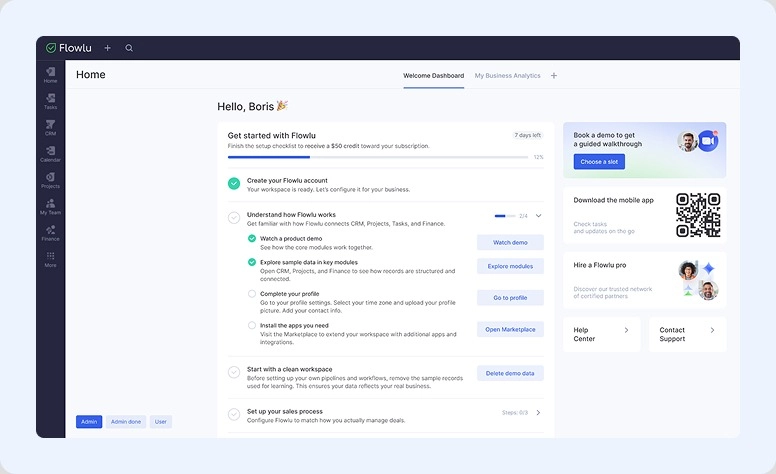
Moreover, recently we upgraded the onboarding. From the first step, Flowlu walks you through functionality and explains all system capabilities in a guided, gamified walkthrough.
In practice: See how the system guides your first steps in creating a workflow.
Reason#2: Built-in Collaboration Tools
This brings communication, task, client, and content management together.
See a closer look at the main features and how they work:
Communication. Presented through team chats, comments, and company feeds. Additionally, you may integrate popular messengers like WhatsApp, Viber, or Telegram.
Knowledge Base. Generate helpful content together. Here you can leave edits in comments or request responses from authors. This module also lets you capture knowledge with automated sourcing.
Task & Projects. Track progress in real-time, discuss certain activities, and share details. Access rights keep interaction limited to selected employees or clients.
Opportunities & Invoices. Sales reps can comment, track, and approve deals and payment papers in one place.
More options:
- Client Portal
- Shared Schedule
- Focus Groups
- iOS and Android app
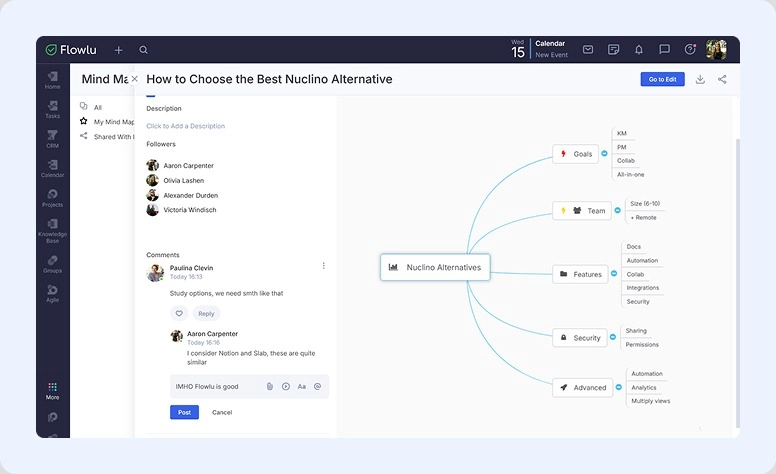
- Mind Maps
In practice: Involve your entire team in discussing the best alternatives through a mind map. Everyone can comment and edit instantly.
Reason#3: Advanced Document and Knowledge Management
Flowlu provides a space for doc generation. Apart from ready-made templates, you can fill your base with unique examples of emails, delivery service agreements, invoices, estimates, quotes, and any types of business documents you need.
Where its power lies:
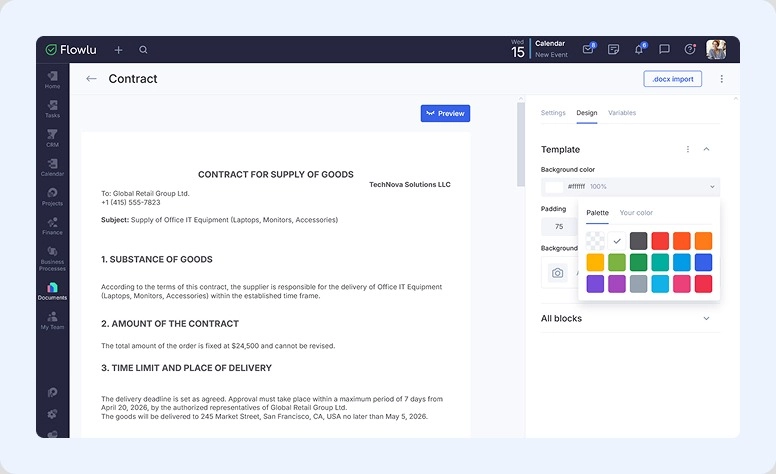
- Rich customization. Make your message personalized with fonts, colors, and even background images. All blocks are adjustable, and all parameters are customized to your brand.
- Connection with CRM. All the materials you create are linked with a certain deal or contact. Automated data entry saves time and reduces errors.
- Email integration. Connect Gmail and send messages right from the app.
In practice: You need to write a custom contract for supplying goods. Go to Documents and start personalizing your agreement.
Reason#4: Strong Security and Granular Access Control
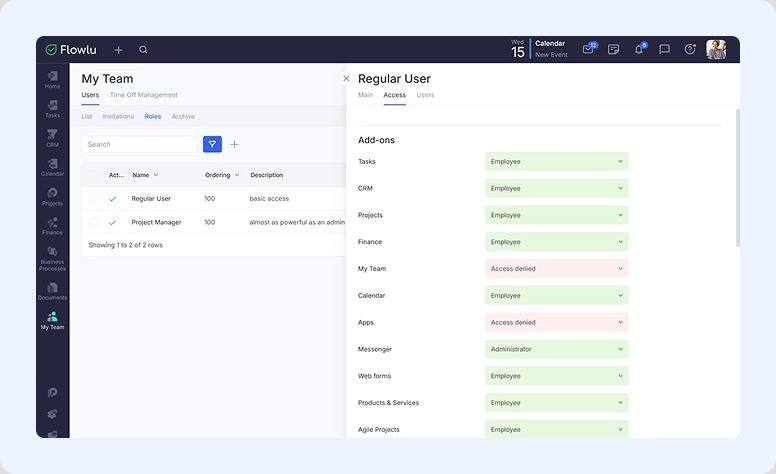
At Flowlu, all data is encrypted and backed up. As an administrator, you can set employee roles and access rights. User permissions are managed at:
- The system level, where users are either an Administrator or a regular user.
- The module level, where action restrictions can vary from full access to partial access, depending on the roles you set.
In practice: Go to the My Team module to set roles and the access levels you want.
Reason#5: Open API and Integrations
At Flowlu, you'll find more than 40 apps: built-in tools and popular services. Here are just a few examples:
Email: Gmail and Microsoft Outlook
Storage: Google Drive and Dropbox
Telephony: Twilio
Calendars: Google and Apple calendars
Social: Tilda and Mailchimp
See the full list on the website.
For those who want more, Flowlu provides open API documentation and clear instructions for implementation.
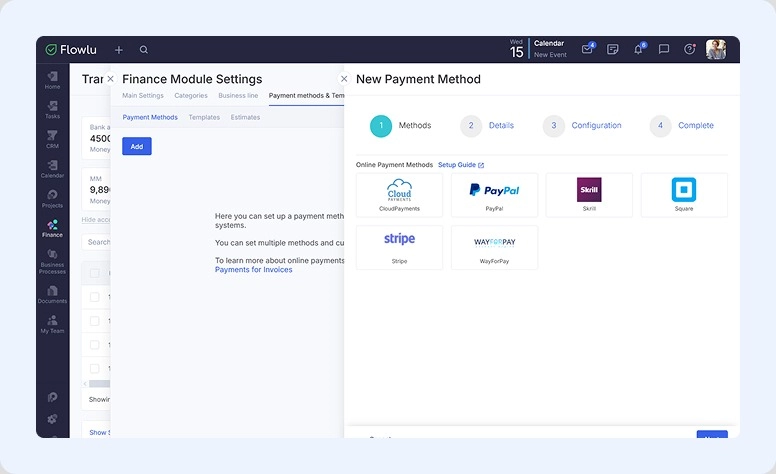
In practice: Your customer prefers the Skrill payment method. Go to Finance → Module Settings → Payment Method. Here you'll find all available integrations. Choose the necessary one and follow the installation instructions.
Flowlu is a strong contender, but not the only option. Continue reading to discover other alternatives, their advantages, and use cases.

5 Best Free Nuclino Alternatives in 2026
We studied user reviews and identified the solutions most often mentioned alongside the subject of our discussion. Here are five top options.
Notion
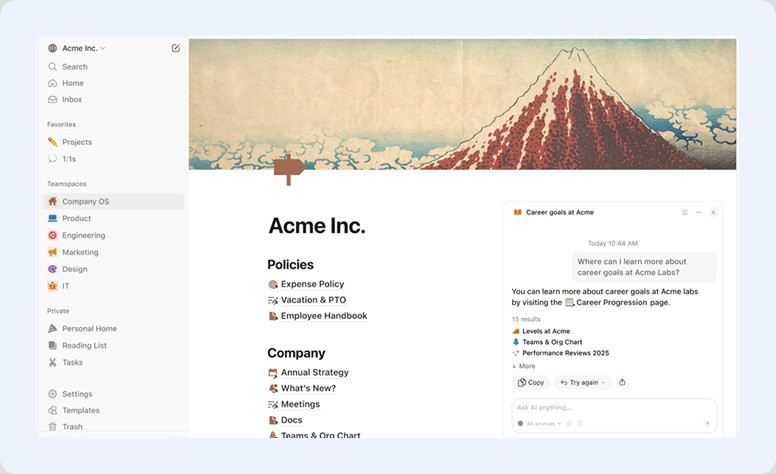
Try it if you: work solo or in a team. It is suitable for both small teams and growing companies.
Notion puts everything under one roof. Here you’ll find many opportunities to boost productivity, collaborate with colleagues, capture ideas, and manage workflows.
Set up and use:
- Comprehensive workspace with notes, docs, and tasks
- Databases with interactive structures (tables, Kanban boards)
- Calendars
- Instant collaboration with editing and comments
- Knowledge base with linked pages
- AI assistant
| People love it because they can: | What is disliked: |
|
|
Pricing:
A no-cost plan is available for individual use. Paid plans start at ~$10/user/month.
The verdict: what makes Notion a strong option
It is more flexible and customizable and, as an all-in-one solution, offers a wider range of capabilities for complex scenarios.
Fusebase
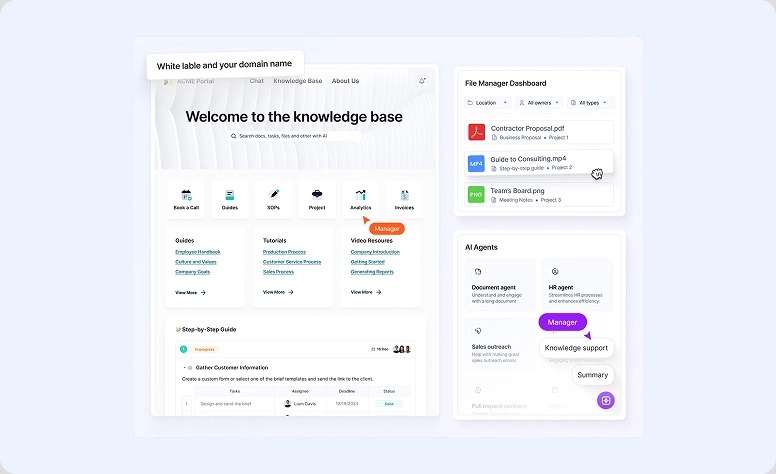
Try it if you: work with clients or in a team and need structured collaboration and knowledge sharing.
Fusebase is designed as a client-facing collaboration and knowledge management platform. It helps organize information, communicate with consumers, and manage processes in a centralized workspace.
Set up and use:
- Centralized storage for files, tasks, and communication
- Dedicated portals for external collaboration
- Knowledge base and internal documentation
- Task and project management
- Integrations with popular business platforms
- AI agent
| People love it because they can: | What is disliked: |
|
|
Pricing:
A free version is available with basic functionality. Paid plans start at ~$12/user/month.
The verdict: What makes Fusebase a strong option
It offers more structured collaboration, especially for client-facing workflows, combining knowledge management and communication tools in one platform.
Slab
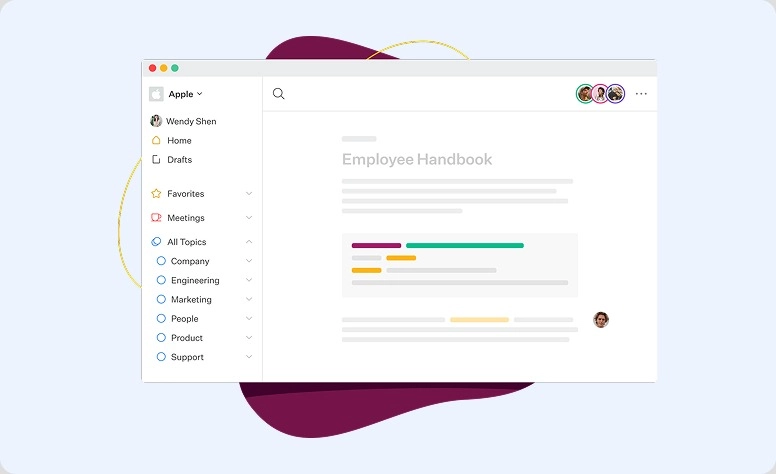
Try it if you: work with colleagues and need a clean, structured storage for all your content.
Slab encourages users to “build a culture of knowledge-sharing.” This tool is presented as a wiki creation helper. Here, you can not only capture insights, but also organize and share internal documentation. The developers promise simple, clear, and stable connections with other apps.
Set up and use:
- Centralized knowledge base
- Clean editor for writing and organizing content
- Search functionality for quick access to specific information
- Tools like Slack, Google Drive, GitHub
- User permissions and access control
| People love it because they can: | What is disliked: |
|
|
Pricing:
You can use the system for free, but with limited features. Paid plans start at ~$8/user/month.
The verdict: What makes Slab a strong option
With Slab, you get a structured and focused approach to managing information. It’s an ideal option for companies that prioritize clear and organized content over flexibility or all-in-one functionality.
Obsidian
Try it if you: prefer working solo and want full control over your own system for organizing private thoughts.
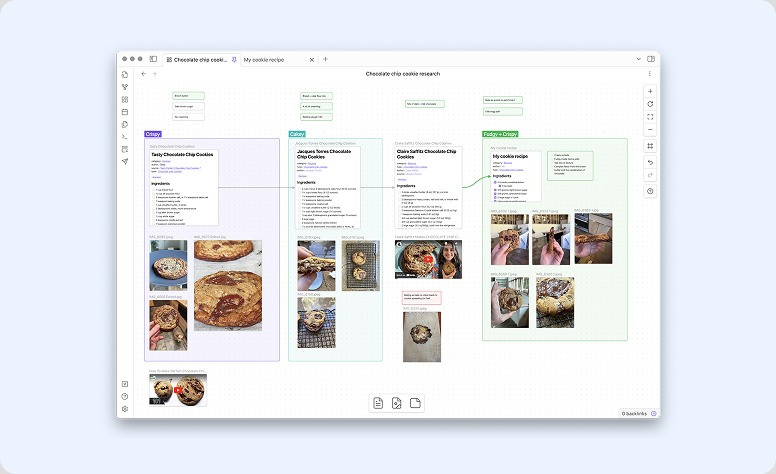
Obsidian is a powerful note-taking tool designed for individual use. Here you can organize a network of interconnected notes, structure ideas and build a personal knowledge base. Its graph view visualizes how your notes connect to each other, making it easy to see relationships between ideas.
Set up and use:
- Local storage (all files saved on your device)
- Markdown-based editor
- Bi-directional linking between notes
- Graph view for visualizing connections
- Plugins for extended functionality
| People love it because they can: | What is disliked: |
|
|
Pricing:
There is a no-cost plan for personal use. Paid add-ons (such as sync and publishing) start at ~$4–8/month.
The verdict: What makes Obsidian a strong option
It offers deeper personal organization and full data ownership. However, it lacks collaboration features, so it’s not a solution for co-work.
Confluence

Try it if you: want to build a structured space for files, seamless collaboration, and project knowledge for your company.
Confluence is Atlassian's powerful collaboration platform. It's designed to help organizations create, navigate, and share internal ideas. Companies implement it to build rich knowledge bases and manage project-related information.
Set up and use:
- Centralized workspace
- Page hierarchy for structured materials
- Real-time collaboration with comments and editing
- Templates for papers and project pages
- Whiteboards for ideas, diagrams, and flowcharts
- All Atlassian ecosystem tools like Jira
| People love it because they can: | What is disliked: |
|
|
Pricing:
Use free for small collectives. Paid plans start at ~$5.75/user/month.
The verdict: What makes Confluence a strong option
Here you’ll find robust structure and scalability—larger companies appreciate it for sure. Though it is less simple and intuitive.
Compare All Options
Each of these platforms offers something different. To help you compare them at a glance, here's a side-by-side breakdown of the team sizes, key features, and pricing.
|
Comparison |
Nuclino |
Flowlu |
Notion |
Fusebase |
Slab |
Obsidian |
Confluence |
|
Best for |
Small groups |
All-size businesses |
Solo & teams |
Client work, teams |
Teams |
Solo users |
Large companies |
|
Key focus |
Simple knowledge base |
All-in-one business management |
All-in-one workspace |
Client collaboration & portals |
Documentation & wiki |
Personal knowledge system |
Enterprise documentation |
|
Collaboration |
Good |
Strong |
Strong |
Strong |
Good |
None |
Strong |
|
Customization |
Limited |
High |
Very high |
Moderate |
Limited |
Very high |
Moderate |
|
Ease of use |
Very easy |
Moderate |
Medium |
Medium |
Easy |
Medium |
Complex |
|
Integrations |
Moderate |
Rich |
Rich |
Good |
Good |
Limited |
Rich |
|
Advanced features |
Basic |
Yes |
Yes |
Yes |
Limited |
Yes |
Yes |
|
Pricing (from)* |
~$5/user/mo |
~$9/user/mo |
~$10/user/mo |
~$12/user/mo |
~$8/user/mo |
~$4–8/mo |
~$5.75/user/mo |
*All the solutions offer a free version.
Choose the Right Nuclino Alternative: Check List
Here are four key points to help you match a tool to your specific requirements:
Work Solo or With Someone
All the solutions in our review are good for personal tasks. But if you’re going to invite more users, check whether they allow for growth.
Use Case on the Agenda
Do you just want to capture ideas or plan projects? Or maybe you need a platform to interact with customers? Jot down your main goal and check if all the necessary tools are available in the chosen solution.
Budget You’re Ready to Allocate
We think a free plan is perfect for evaluating any system. Even if you’re not limited in budget, start with no-cost options.
Favorites You Can’t Opt Out Of
Even when switching to another platform, we want our useful capabilities to stay with us. Explore the list of integrations the system supports.
When the Tool is a Teammate
The right tool should reduce complexity, not add to it. Each platform in this review takes a different approach to organizing team knowledge and workflows. Test the free tiers, compare what fits your team's actual needs, and don't settle until the tool feels like a natural part of how you work.

FAQ
It’s impossible to identify just one option as the best. If you want better collaboration tools—look at Confluence; if you need more for personal productivity—try Obsidian; if you search for an all-in-one solution with shared documents—choose Flowlu or Notion.
Yes, all the solutions in our review offer free plans with somewhat limited functionality, but they still include essential features like knowledge management, document creation, and basic collaboration. Free tiers are a good place to start and see if the platform is a good fit.
For team collaboration, the top choices are Flowlu, Notion, Fusebase, Slab, and Confluence. Flowlu and Notion stand out as universal solutions for businesses of all sizes with great document sharing and work management features. Slab is an excellent option for teams focused on internal knowledge sharing, while Confluence offers seamless integration with the broader Atlassian ecosystem, making it a strong pick for larger organizations.
In terms of the core experience, Notion and Slab are the closest alternatives. Both offer interactive workspaces powered by AI-assisted features. However, if you're looking for deeper customization, branded portals, or client-facing collaboration, Fusebase and Flowlu provide a broader range of capabilities, allowing you to scale beyond basic knowledge management.
