







Best Any.do Alternatives in 2026: Tools for Work and Personal Productivity


For those who aren't familiar with the platform yet—let’s explain what people use Any.do for.
This is dedicated software with the option of forever-free usage and an essential set of tools. Users appreciate it for its minimal and intuitive interface and note that they find a one-stop shop for personal and team productivity.
Although, like any solution, apart from pros, it has cons. Or, at least, functionality that just isn't presented as part of the product. We studied a lot of feedback on G2, Reddit, Capterra, and more to understand why people may consider looking for alternatives.
Here is our objective view.
Why Switch from Any.do to Another App: Top 5 Reasons
Digging through feedback, we highlighted some points that seem to be essential in the decision to try another product.
#1. Limited Features for Advanced Needs
“Some advanced customization options (views, automation depth, or reporting) are more limited compared to heavier task-management platforms.” — Capterra review.
To be honest, the basic set of tools is enough for personal needs and even small teams. But when businesses or projects scale, these limitations play a big role.
The difficulties lie in:
- Task dependencies
- Limited option for project view
- Custom workflow management
- In-depth collaboration
- Automation rules
- Reporting and tracking
Devs listen to the voice of customers and work on functionality. Although there are a few complaints about weak automation and flexibility.
For example, you can’t customize the repetition of activities (just daily, weekly, monthly, or yearly are available). Also, it’s impossible to have more than 1 tag.
#2. Missing Integrations and API Limitations
“Importing tasks from Jira or Google Tasks was hard, and a lot of manual work.”— Capterra review.
As Any.do is designed only as a to-do assistant, it offers many integrations with third-party platforms so users could build a convenient workspace.
Although the latest time devs improved additional integrations, we found that:
- Direct integrations with many business tools are missing (e.g., if you use HubSpot for sales, Any.do won't sync directly—you'd need to manually log completed actions back into your CRM.)
- Even when integrations exist (e.g., calendar), they’re not fully two-way or seamless.
#3. Pricing vs. Value Concerns
“Even “dark theme” used to be a paid feature.” - Google Play review.
Any.do's freemium model feels restrictive because core features are locked behind paywalls that expect to be included by default. The frustration isn't just about cost—it's about what gets monetized.
What users are experiencing:
- Basic features hidden behind paywalls. Recurring reminders—essential for anyone dealing with repeated duties—require a paid subscription.
- Cosmetic features charged as premium. Such a simple feature as calendar event colors remains locked, forcing you to choose between paying or managing monochrome tasks.
- The default tier feels like a demo, not a product. As one user put it, “The free version is great for basic lists, but you have to commit financially to unlock its full potential.” This creates a ceiling where everyone hits limitations quickly rather than gradually discovering premium value.
#4. Customer Support Issues
“When I asked for help, the customer service closed the help thread after 3 hours, even though they wrote I should be patient and they would reply within 7 days.” - Google Play review.
Any.do's support experience is unpredictable. Some clients report genuinely helpful responses, while others encounter closure and long waits that feel dismissive.
#5. Unreliable Cross-Device Sync
“I noticed delays or missing items after switching devices, which created uncertainty about whether all my tasks were safely saved.” — Capterra review
The problem isn't just slowness—it's missing features and lost data, which erodes trust in a tool designed to be your single source of truth.
What people complain at:
- Features disappear between devices. One user discovered this the hard way: “Grocery list on desktop allows subtasks, but you can't view them on mobile, so what's the point?”
- Data integrity issues create anxiety. A Capterra reviewer reported that he noticed delays or missing items after switching devices. This leads to logical worries about whether all activities are saved at all.
Side-by-Side: Flowlu Advantages vs Any.do
|
Problem |
Any.do |
Flowlu Solution |
|
Limited Capabilities |
No dependencies, weak automation, limited views |
✓ Advanced customization, conditional logic, multiple views |
|
Missing Integrations |
About 10–15, API limitation |
✓ 40+ integrations, full API, webhooks |
|
Pricing Limitations |
Recurring reminders, some colors and elements of customization are paid |
✓ Basic tools come included, with transparent plans |
|
Support Issues |
Inconsistent responses, long waits |
✓ Live 24/7 support, AI bot, comprehensive knowledge base |
|
Cross-Device Sync |
Missing features, delays, data loss uncertainty |
✓ Real-time sync across all devices, voice input |

How Flowlu Solves These Challenges + Practical Examples
#1. Automates Routine and Customizes Workflow
Even with a basic free version that is available for up to two members, you can use tools like Kanban board, create custom project & task workflows, opportunities, invoices, estimates, and try many formats for collaboration: chats, comments, company feed, and more.
With advanced solo use, you get almost full advanced opportunities: automation, reporting, Agile projects, robust CRM, documentation, and much more.
Let’s see how it boosts your productivity.
Example: You’re a freelancer and get an order to create a logo.
First, you may set up a custom workflow, like:
New → In Progress → Client Review → Revisions → Done
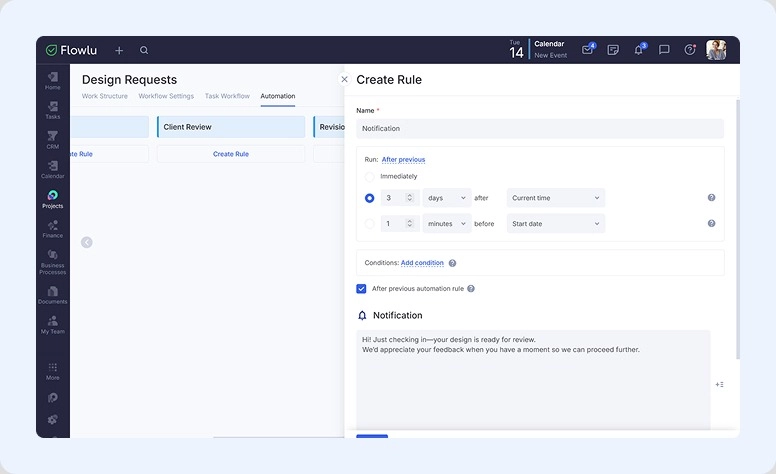
Now here's where automation kicks in:
-
Conditional logic automates routine. If a task sits in "Client Review" without movement, Flowlu automatically sends a notification to the client. No manual checking needed—just set a necessary condition.
-
Custom views show only what matters. Your Kanban board filters to show: items assigned to you + high-priority items + anything overdue. You see only actionable tasks instead of piles, reducing decision fatigue.
The system does the heavy lifting so you can focus on the work that truly matters to you—not on management.
#2. Offers Rich Integrations and API
Flowlu isn't just a project manager—it's a comprehensive platform that handles CRM, ERP, task tracking, document storage, approvals, and financial management in one system. Within this rich capabilities set, you get 40+ built-in integrations.
What integrates:
- Calendar & productivity: Apple Calendar, Google Drive, Dropbox
- Development: GitLab, BitBucket
- Activities & project management: Trello
- Communication: WhatsApp, Email, Telephony
- And 30+ more (Slack, Zapier, and custom tools)
For custom workflows:
- Detailed API documentation with full OpenAPI specification
- Webhooks to trigger automated actions across your tools
Example: When you close a deal in Flowlu, an outgoing webhook can instantly trigger a Mailchimp onboarding sequence. You update one app; the rest follows automatically.
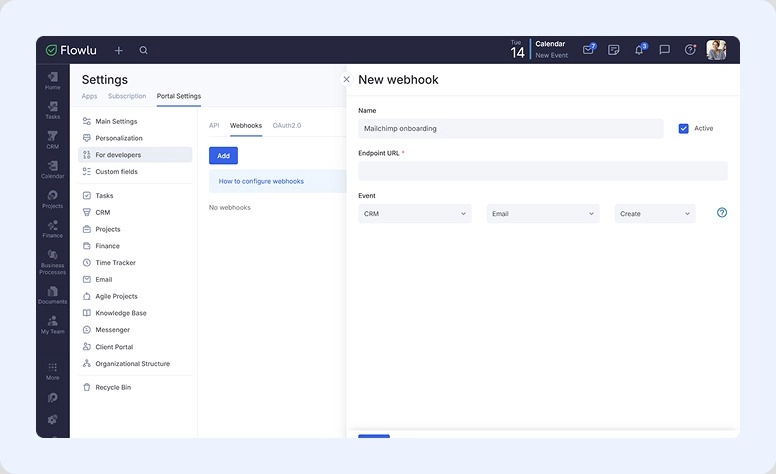
40+ integrations + webhooks + open API = a fully customizable environment for any needs.
#3. Sets Fair Pricing, No Hidden Fees
Flowlu's free plan is genuinely useful—you can create and manage an unlimited number of projects, build a knowledge base, and work from anywhere on a mobile app without paying a cent. But when you're ready to scale, the rates are transparent and reasonable.
The starting prices are really competitive. You can calculate the benefits and compare budgeting for any company size right on our homepage.
Example: With a team of 6, Flowlu Essential costs $648 annually versus Any.do Teams at roughly $360 annually ($5/member/month). While Any.do is significantly cheaper, Flowlu Essential provides superior business and workflow automation features, making it the preferred solution for teams needing comprehensive project management.
You invest in a tool that respects your budget, not one that monetizes every item you need to actually use it.
#4. Supports Users of All Tariffs
Whether you're on an entry-level plan or paying, our support has you covered—no one gets left behind.
Support tiers:
- Free: AI bot assistance 24/7 + access to full Knowledge Base
- Paid: Live chat support + AI bot + Knowledge Base + dedicated guidance
Before you commit, our sales person offers demos to help you evaluate Flowlu for your specific workflow.
Self-help resources:
- YouTube Video Guides—Visual tutorials for common workflows.
- Help Center—Comprehensive Knowledge Base with step-by-step screenshots and video guides.
Example: New to Flowlu and unsure how to invite a colleague? Instead of waiting for support, search the Knowledge Base for "invite users." You'll find four methods (full invite, quick invite, bulk invite, and by link) with screenshots for each. Solved in 2 minutes.
Multiple support paths mean you get help the way you need it—instantly via the Knowledge Base, or live communication when you want human advice.
#5. Stable, Real-Time Cross-Device Sync
Flowlu works seamlessly across all your devices:
- PC
- Mac
- Web app
- iPhone
- iPad
- Android
Every change syncs instantly. No delays. No missing changes. No uncertainty.
Example: You're out of the office when an urgent case appears. On your smartphone, you can create a fully structured task with AI by simply saying what needs to be done, when, and who’s responsible.
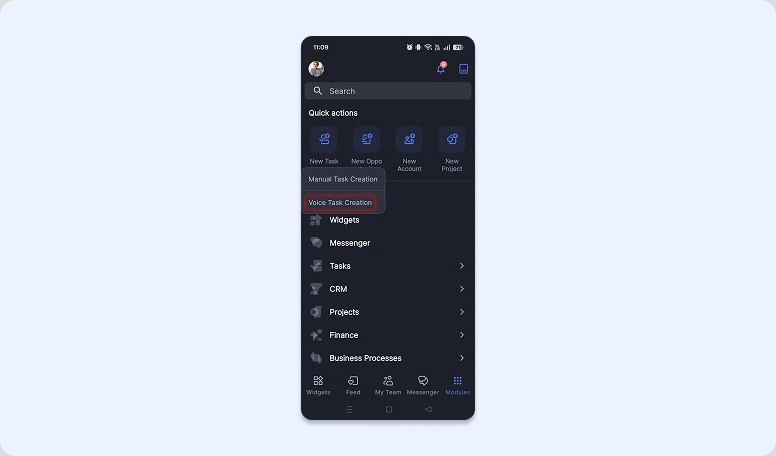
Switch to your desktop 30 seconds later—be sure, everything is already there, fully synced.
Real-time sync across all devices means your employees always work with current data, no matter where they are or what device they're using.
Best Any.do Alternatives in 2026
Top Apps Compared
|
Comparison |
Flowlu |
Any.do |
Todoist |
OmniFocus |
TickTick |
Toodledo |
Quire |
|
Free usage |
✅ Yes |
✅ Yes |
✅ Yes |
❌ Trial only |
✅ Yes |
✅ Yes |
✅ Yes |
|
Paid plan starts at (per user/month) |
$9 |
~$3–5 |
~$5 |
~$74.99 (one-time) |
~$3 |
~$3.99 |
~$7.65 |
|
Simple interface |
✅ Yes |
✅ Yes |
✅ Yes |
❌ No |
✅ Yes |
❌ No |
✅ Yes |
|
Available on Android, iOS, PC |
✅ Yes |
✅ Yes |
✅ Yes |
❌ Apple only |
✅ Yes |
✅ Yes |
✅ Yes |
|
Cross-platform sync |
✅ Yes |
✅ Yes |
✅ Good |
✅ Good (Apple only) |
⚠️ Sometimes lag |
⚠️ Moderate |
✅ Good |
|
Collaboration tools |
✅ Strong |
⚠️ Basic |
✅ Good |
❌ No |
⚠️ Limited |
⚠️ Basic |
✅ Strong |
|
Multiple views |
✅ Yes |
⚠️ Limited |
✅ Yes |
⚠️ Limited |
✅ Yes |
⚠️ Limited |
✅ Yes |
|
Integration |
✅ Rich |
⚠️ Weak |
✅ Rich |
⚠️ Moderate |
⚠️ Moderate |
⚠️ Weak |
⚠️ Moderate |
|
Advanced workflow |
✅ Yes |
❌ No |
⚠️ Moderate |
✅ Yes |
⚠️ Moderate |
✅ Yes |
✅ Yes |
|
Reporting / Analytics |
✅ Yes |
❌ No |
❌ No |
❌ No |
❌ No |
⚠️ Basic |
⚠️ Limited |
|
Main feature |
All-in-one business management |
Simplicity, daily planning |
Task organization |
GTD, deep structuring |
All-in-one (tasks + habits + Pomodoro) |
Customization, GTD |
Collaboration, hierarchical tasks |
Let’s see what other tools were designed with similar purposes and can be considered worthy opponents to Any.do.
1. Todoist
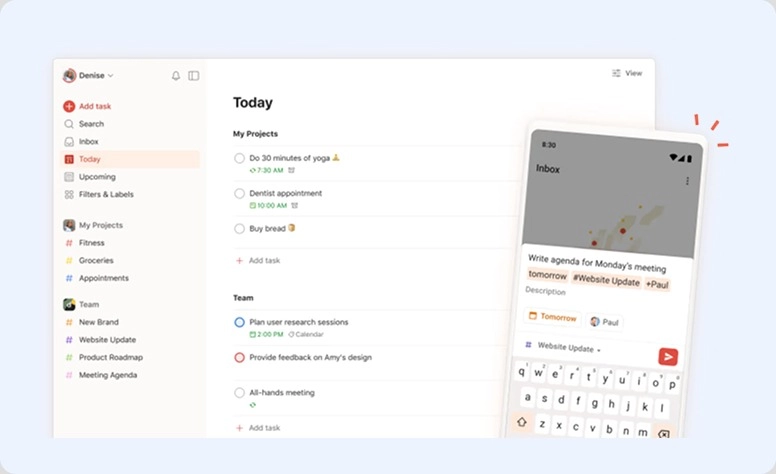
Best for: Solo users, small groups
A product with a long history on the market (19 years) and one of the preferred solutions among to-do list apps. Developers always dive into customers' experience and refine their platform to create a better extension not just for your device, but for your mind.
Main functionality:
- Management with projects, labels, and priorities
- Natural language input & AI assistant
- Collaboration (shared projects, comments)
| ✅ People appreciate it: | ❌ What is disliked: |
|
|
What differs from Any.do:
- More structured and scalable
- Better collaboration & integrations
- Fewer “lifestyle” features (no WhatsApp reminders, etc.)
Pricing:
Pro plan starts at approximately $5 per user per month.
2. OmniFocus
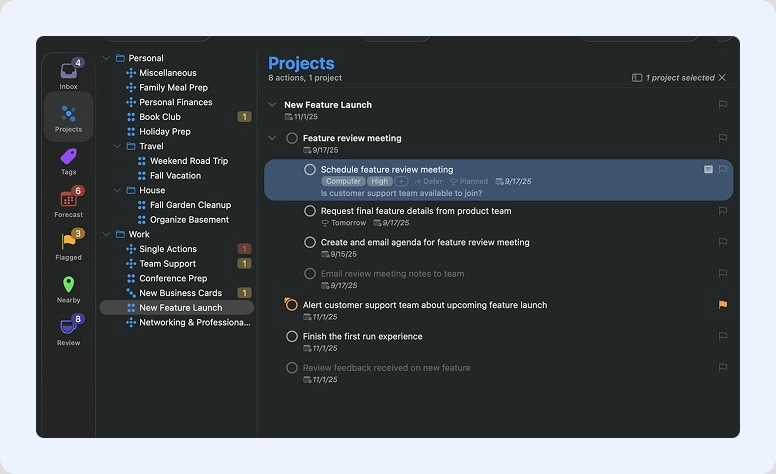
Best for: Solo professionals (especially within the Apple ecosystem)
Task management software for busy specialists. On the website, the creators underline that their product allows integration across Apple devices, so it may seem the app is a better solution for iOS users only.
Main functionality:
- Advanced organization (GTD methodology)
- Custom views (“Perspectives”)
- Deep project structuring
| ✅ People appreciate it: | ❌ What is disliked: |
|
|
What differs from Any.do:
- Much more powerful, but complex
- Almost no collaboration → not for teams
- Focused on personal productivity, not shared collaboration
Pricing:
There is a 14-day trial period available. OmniFocus 4 Perpetual License (standard) starts at $74.99 USD.
3. TickTick
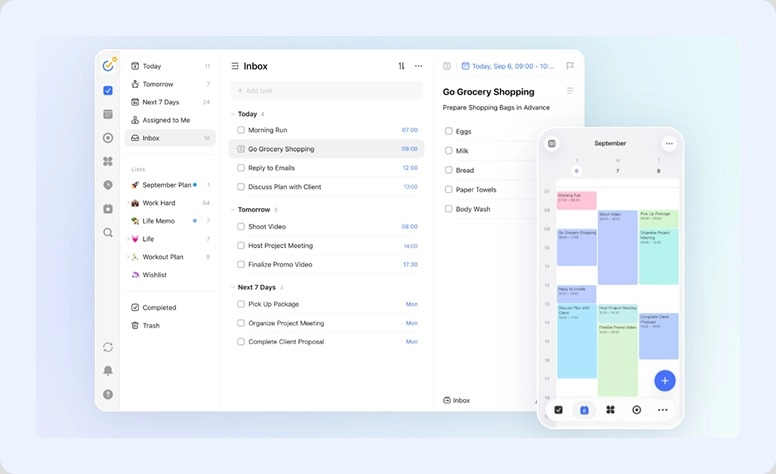
Best for: Solo users, freelancers
A simple but multifunctional solution that allows you to plan every moment of your life. Whether you want to organize your routine or adopt useful habits, TickTick creates a pleasant space for solo productivity with some collaboration opportunities.
Main functionality:
- Calendar + habit tracker + Pomodoro
- Multiple views (calendar, Kanban, Eisenhower matrix)
- Statistics (duration, habits log)
- Integration with apps like Notion.
| ✅ People appreciate it: | ❌ What is disliked: |
|
|
What differs from Any.do:
- Much more feature-rich
- Better value for money
- Less minimal and slightly more complex
Pricing:
The paid annual plan costs $35.99, which is less than $3 per month.
4. Toodledo
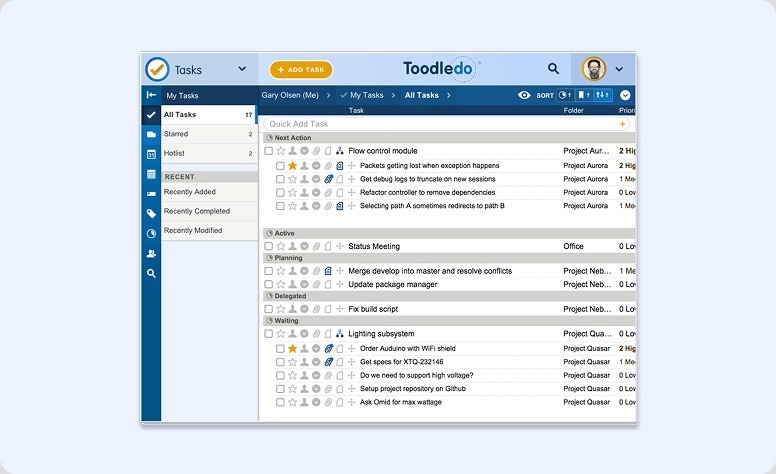
Best for: Power users, individuals, small collectives
Another popular solution for organizing your life. Toodledo allows people to share their plans with family, colleagues, and friends. The app gives the opportunity to work together and track progress.
Main functionality:
- Highly customizable task management
- Notes, habits, outlines
- Advanced properties & GTD support
| ✅ People appreciate it: | ❌ What is disliked: |
|
|
What differs from Any.do:
- Much more customizable
- Less modern UI
- Better for complex processes
Pricing:
The Standard plan starts at $3.99.
5. Quire
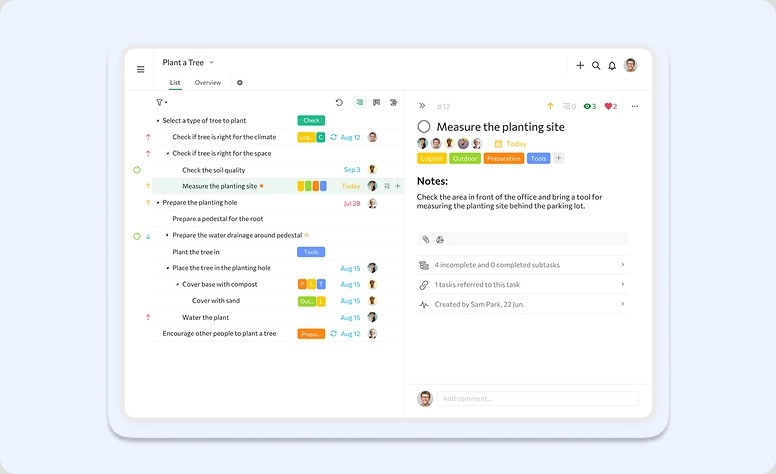
Best for: Teams, startups, small companies
The last platform in our review stands out from the previous ones with its focus on teamwork, not just personal scheduling. Another key difference is that Quire provides smart planning through data analysis, which can be calculated using custom formulas and visualized in tailored dashboards.
Main functionality:
- Hierarchical lists (break big tasks into subtasks)
- Kanban board, Gantt chart, timeline, collaboration
- Real-time teamwork & project tracking
| ✅ People appreciate it: | ❌ What is disliked: |
|
|
What differs from Any.do:
- Much stronger for collaboration
- More like a project management tool than a to-do list
- Better for structured workflows
Pricing:
The Professional option starts at $7.65.
5 Questions to Choose the Right Alternative
Here is a quick checklist with questions to help you pick solutions for deeper investigation.
Are the Tools Matched to Your Needs?
Study what products focus on. If the main pitch on the website homepage is about personal productivity, it’s highly possible that it’s not a good solution for teamwork. At the same time, products with many collaboration features may feel overwhelming for solo use.
What Integration Capabilities Are There?
If you're accustomed to working within the Microsoft or Google ecosystem, check whether a to-do platform is compatible with it. Don’t hurry to quit if there is no required integration. If a software product offers an open API, you can connect any tool on your own (or with the help of product support).
Will It Run on My Device?
Of course, modern developers adapt their products to multiple operating systems and devices. But checking compatibility is never unnecessary.
Is the Pricing Reasonable for the Offered Features?
Don't be tempted by low-cost or free options. Although a product may not require fees, it may also offer only a few features. On the other hand, this way you can test basic capabilities. If the platform doesn’t offer a basic plan, request a trial before paying.
For a smart comparison, first make a list of essential features and check how expensive or affordable each platform is.
Am I Going to Scale?
Think about the future. There is no point in buying an annual license for a solo plan if you’re planning to expand your processes and include someone else in your management.
Leverage the Most Convenient Tool
To-do list apps have become irreplaceable in our professional and personal lives. They help us plan the day, adopt useful habits, organize activities, schedule important meetings with colleagues, and never miss precious moments with family. They’re virtual assistants that take care of routine management and allow us to focus on what really matters.
All the platforms in our review are good options. With their dedicated features, despite some disadvantages, they are definitely worth trying.
But if you need more advanced capabilities for enterprise business management, you may consider high-rating platforms like ClickUp, Monday.com, Asana, or Trello. Not to mention that Flowlu can also become a reliable assistant.

FAQ
From our review, the apps with free plans are Flowlu, Todoist, TickTick, Toodledo, and Quire.From our review, the apps with free plans are Flowlu, Todoist, TickTick, Toodledo, and Quire.
Toodledo and TickTick offer the lowest prices, but they are also very limited.
To use the strongest tools for real-time team interaction, choose Flowlu or Quire.
Todoist, OmniFocus, TickTick, and Flowlu don’t require a stable connection to work. They will update all data right after the connection is restored.
To manage complex projects, it’s better to use Flowlu, ClickUp, or Monday.com.
