




How to Build a Department or Multi-Team Budget Template


If this sounds like your organization, don’t worry. Disorganized multi-team budgets make it hard to reconcile different accounting methodologies and formats, but there are steps you can take now to avoid this issue down the line.
In this article, we’ll explore how you can move toward a unified financial framework by creating your own department budget template. Establishing a standardized budget template helps ensure your executive leaders have clear visibility into team-level revenue and expense tracking.
Follow these steps to improve organization-wide communication and financial decision-making with a strong budget template aligned with your unique financial goals.
1. Define your core revenue streams and operational expenses
First, establish a financial baseline for your entire organization. Before you break down budgets for each department, outline predictable cash flows and expected costs for the organization as a whole. This way, you’ll create a secure environment where individual departments can request budgets safely, knowing their spending won’t create financial strain for the organization.

To create a foundation for per-team projections, categorize your organization’s baseline income and fixed expenses into these core areas:
- Recurring revenue channels: List your guaranteed funding sources, whether that’s commercial contracts, government grants, or capital campaign contributions. For example, an environmental conservation group can finalize its list of secured wildlife grants and committed corporate sponsorships before they start calculating flexible program funds.
- Fixed overhead costs: Outline existing operational commitments, such as rent for your office, software licensing fees, administrative payroll, or CFO outsourcing. Designate funds for these core costs immediately to prevent individual managers from accidentally dipping into funds you need for essential infrastructure.
Beyond simply categorizing costs, consider implementing a rolling revenue forecast that updates these baseline figures monthly. This proactive step allows leadership to adjust allocations smoothly in case of significant budget changes, such as a major contract falling through or a substantial new grant.
2. Standardize line items across teams
Using different accounting terms within different teams is bound to create confusion. When marketing logs an expense as digital promotion while development calls it donor outreach, for example, central finance teams are forced to spend hours manually untangling and reclassifying expenditures.
This is why it’s essential to clarify your terminology up front and provide accessible documentation for all teams or departments to use.
Specifically, use your budget template to standardize chart-of-accounts terms and classifications like:
-
Expense codes: Create a set of standard codes for shared costs and line items, such as professional development, travel, and vendor contracting.
Flowlu, for example, lets you build nested finance categories — say, Products broken into Office Supplies, Paper, and Furniture — so every team records expenses the same way instead of improvising labels.
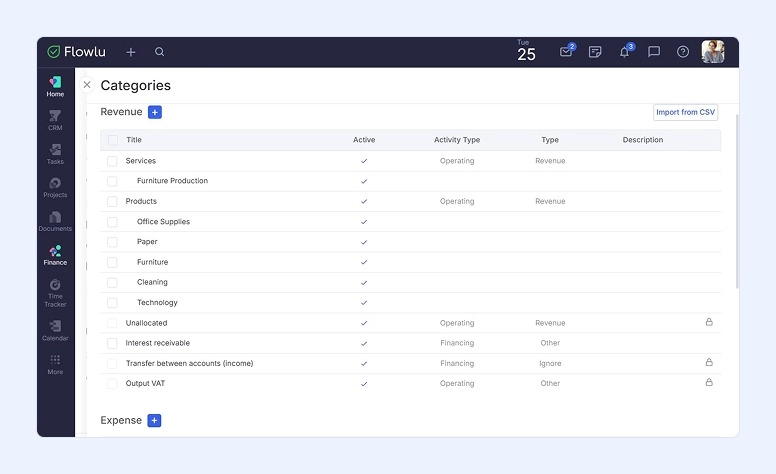

Implementing a numbered coding system helps ensure that cross-functional or joint expenses will be easily understood in the master ledger.
- Personnel vs. program costs: Differentiate staffing expenditures from program delivery costs to maintain clarity during financial reviews. A nonprofit’s global health initiative, for instance, might classify field nurse salaries differently from the actual medical supplies they distribute to beneficiaries.
- Multi-entity tagging: If you have managers responsible for multiple teams, make it easy for them to attribute specific line items to distinct funding sources or regional teams. Create specific tags in your accounting and fundraising platforms, and ensure that they stay consistent across your software stack.
- Restricted vs. unrestricted revenue: If your organization receives restricted donor funds, track them separately from unrestricted revenue. Align all teams and departments on the importance of these distinctions, even if they don’t interact directly with donors.
To make it easier to use these terms, embed data validation rules directly into your budget template so it rejects or flags unrecognized expense categories. By having team members select from pre-approved dropdown menus, you’ll avoid surprise line items later that don’t align with your official terms.
3. Make your department budget template flexible
Static financial plans don’t last long. To be truly useful to your teams, your department budget template must not only record initial predictions, but also measure actual expenses and income against your expectations.
Build more flexibility into your budget template with calculations that continuously compare projections to actual costs. You can do this by incorporating:
- Automated formula columns: Calculate dollar and percentage variances automatically to flag any overages to leadership as soon as they appear. Use visual indicators, like conditional formatting that highlights cells when a line item exceeds a 5% deviation.
- Custom threshold triggers: Establish clear benchmarks that require formal departmental explanation whenever expenditures deviate beyond planned margins. This way, teams will be able to explain any inconsistencies early, before they become bigger problems.
- Modeled scenarios: Allow department heads or team leads to simulate best-case and conservative financial scenarios to prepare for multiple possibilities. For instance, a software company might use this feature to model potential supply chain disruptions and create contingency plans within its budget.
Take variance tracking a step further by integrating predictive trend analysis to forecast your total annual spending based on current spending rates. This forward-looking visibility helps your teams think proactively to prevent future issues.
4. Establish cross-team review workflows
Your department budget template will only be effective if it’s reviewed and approved regularly. Without consistent oversight, even the best templates risk data entry mistakes and misaligned spending priorities.
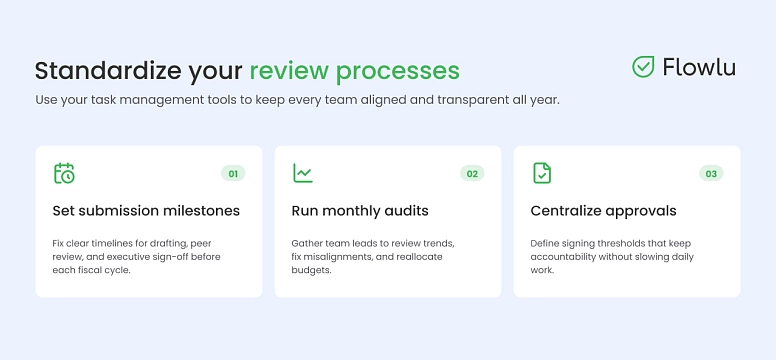
Align all of your teams on standardized review processes that ensure transparency throughout the year. Use your task management tools to keep everyone on the same page, taking steps like:
- Designating regular submission milestones. Set clear timelines for initial drafting, peer review, and final executive sign-off prior to fiscal cycle launches.
- Conducting monthly audits. Gather team leads regularly to analyze financial trends, adjust misalignments, and reallocate budgets as needed. If the marketing department underspends its quarterly allocation, for example, this audit allows leadership to reroute those funds to another department that’s over-budget.
- Centralizing approval authorization. Define clear signing thresholds for expense approvals to preserve accountability without slowing teams’ day-to-day work.
To streamline and oversee these workflows, consider designating a cross-departmental financial liaison to maintain the monthly review process. This team member can bridge the communication gap between accounting controllers, team leads, and department heads.
5. Document rollout protocols and team training guidelines
After you create your department budget template, team leads will need clear instructions on how to use it. If anyone misunderstands the data entry requirements, you could end up with wildly inaccurate projections.
To avoid issues down the line, create a comprehensive guide for using the budget template that’s accessible across teams. In this document, list all your standard line item definitions, approval hierarchies, and rules for data entry. You might also include an FAQ so team members can easily find the answers to common questions.
Host training sessions after you publish this documentation to walk team members through how to use the budget template. Make sure these training sessions are repeatable, so you can host one each time you have a newly appointed team lead. Consider recording these sessions and building a video library to use as an evergreen resource.
As you roll out your budget template, make sure managers have a designated feedback channel to suggest improvements. Evolving the tool based on how team members actually use it helps you ensure that it remains a valuable financial resource long-term.
Putting your budget template to work
Building an adaptable multi-team budget template transforms financial planning from a periodic administrative burden into a regular, simplified process. With these tips, leaders can work toward long-term stability and sustainable organizational growth. To maximize the impact of your new template, audit its structural formulas annually to guarantee they still align with your organization’s needs.
If you'd rather not stitch this together across separate spreadsheets and project tools, Flowlu lets you standardize expense categories and tag line items to business lines. For organizations that need to go further, the Ultimate plan adds a dedicated budgeting module, with a simple mode for single-account planning and an advanced mode for managing multiple business lines, organizations, and transfers across different bank accounts and currencies.

FAQ
Operational budgets should undergo monthly reconciliation against actual expenses, alongside quarterly re-forecasting to adapt to emerging organizational needs. Regular updates prevent minor tracking errors from spiraling into larger issues.
Commercial models focus primarily on profit margins and cost centers, while nonprofit budget templates incorporate restricted fund accounting and donor allocation tracking alongside operational costs. Nonprofits prioritize exact dollar-for-dollar compliance, especially when grants require a more granular reporting.
Organizations typically start with structured spreadsheet tools, eventually transitioning to dedicated project management and specialized financial management software as their budget’s complexity increases. Advanced platforms offer automated data synchronization, eliminating the need for manual copy-pasting between separate department tabs.