




How to Manage Business Expenses and Control Your Budget


Quick answer
It's always important to keep in mind that expense management should happen throughout the year, not just during tax season. Managers need to keep monitoring project budgets, handling approval requests, and categorizing receipts without breaks. Only this way can you successfully plan future spending, approve costs, and compare actuals with budget.
This article will help you move from the definitions of business expense and budget management into a more practical look at how you can actually control and track them. We'll show you how to use variance analysis, improve your real-time financial visibility, set reimbursement policies, and bring it all together with a tool like Flowlu. Let's get started.

Business expense management basics
Good business expense management helps you in three key ways:
- Ensures tax compliance
- Prevents cash flow leaks
- Maintains financial control across teams

However, to do so, you need to know some basics first:
#1: Expense categories
It's crucial that you divide your expenses into different categories.
The most common ones follow IRS (Internal Revenue Service) guidance, so management can spot patterns more easily.
Some examples of these categories include cost of goods sold, travel & entertainment, operating expenses, and capital expenditures.
#2: Receipts
As a rule of thumb, you should keep all the receipts, even the ones below $75. These help prevent fraud.
All the receipts you keep need to include the date of the transaction, the amount spent, the location and vendor name, what was purchased, and why. In addition, you should upload a photo of the receipt in real time using a mobile app.
Use dedicated receipt-scanning apps that rely on OCR (optical character recognition) to read the text on a photographed receipt and automatically pull out the date, vendor, and amount, so you don't have to type them in by hand. Tools like Expensify and QuickBooks work this way, storing everything in a searchable digital archive.
#3: Approvals
While approvals may take some time, the truth is they're necessary for budget control.
So, one option is to set up an approval workflow.
For example, an employee submits an expense, which is then checked for budget and policy compliance by their direct manager. When they approve, it goes to the accounting or finance department, where they verify the receipts, add categorization, and apply GL (general ledger) coding before the payment is finally executed.
Instead of this manual process, you can set up rules so small transactions are approved automatically. For example, you might set transactions under $20 to be auto-approved and route transactions over $1,000 directly to the CFO.
#4: Reimbursements
How money leaves your business directly affects processing costs and reconciliation speed. And this can happen in several ways:
- Reimbursement SLA (Service Level Agreement): In this option, you commit to pay the employee within a specific timeframe, for example, within 7–10 business days of approval.
- ACH (Automated Clearing House) direct deposit: This is a great option to decrease processing costs. After all, you eliminate physical checks.
- Corporate cards with soft caps: When you offer these to employees, you'll be able to track expenses in real time, and employee stress will decrease exponentially.
#5: Policies
When you have a clear expense policy, it will be easier for both employees and managers since it eliminates guesswork. Here are some of the things you can include in your policies:
- Spending limits: You may set spending limits based on role level. As you can easily understand, employees will have lower caps while directors will have higher ones.
- Daily spending: Instead of asking for receipts for reimbursement, you may simply set daily allowances for things like travel meals.
- Non-reimbursable items: You should have a list of prohibited expenses. These will obviously vary, but some of the most common ones include alcohol, upgraded travel, or personal entertainment.
- Preferred vendors: You should include a list of your preferred services and platforms — the ones you usually have pre-negotiated rates with.
Budget management process
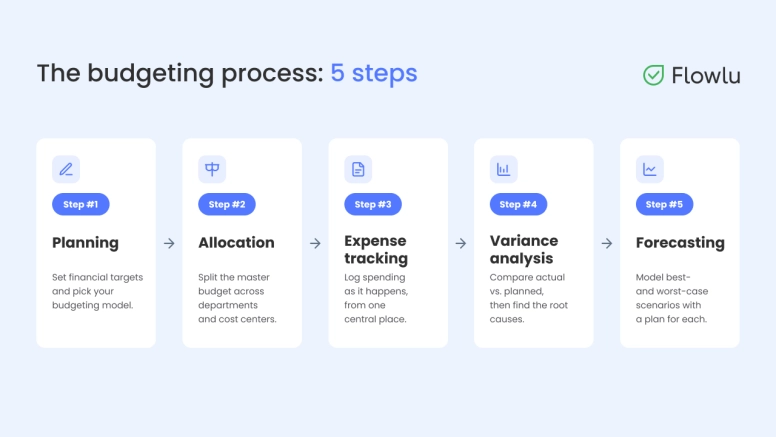
As we already mentioned above, business expense management is a process, not a one-time event. Therefore,it's important that you follow a strict plan to help with daily spend management.
Step 1: Planning
Begin with a well-defined plan before you even assign numbers. You need to set financial targets based on growth projections, historical performance, and strategic priorities.
With this in mind, choose the budgeting model that makes the most sense for your business.
You may opt for one of these types of budgeting:
- Zero-based. Each department starts at $0 every period and needs to justify every expense.
- Incremental. The budget is adjusted from last year's budget, for example, by a set percentage to account for expected growth.
- Value-proposition. Funds are allocated only based on the value that each expense generates.
Step 2: Allocation
Once you've defined the master budget, you'll need to allocate it across departments. But not all of them need the same exact spending plan — after all, some require a higher allowance than others. With this in mind, you have several options:
- Fixed vs. variable expenses: Make sure you create a clear separation between the two. Fixed expenses include things like rent and salaries, while variable ones may include shipping or payment processing fees.
- Capital reserves: It's always a good idea to have a contingency plan. So you may opt to set aside 5–10% of your working capital and leave it unallocated. It'll be your safety net in case you need to deal with operational emergencies or unexpected market shifts.
- Cost center assignment: You should add GL codes to each department to ensure that all expenses are posted directly to the right ledger.
Step 3: Expense tracking
Business expense tracking works best when you keep track of all expenses as they happen, instead of waiting until the end of the week or month. This doesn't only make the task easier and less prone to mistakes, but it also prevents overspending.
To keep up with real-time tracking, log purchase orders the moment they're executed. It's also a good idea to have all your information (payroll, corporate cards, and accounting software) centralized in one place.
Step 4: Variance analysis
Compare your actual spending with your planned budget on a regular basis to ensure that there aren’t any discrepancies.
You can do this with variance analysis, which is basically subtracting the actual amount spent from the budgeted amount. Then look at the result:
Positive → means you’re spending less than what you predicted.
Negative → means you’re spending more than what was on your budget.
But you shouldn’t simply look at these numbers. You need to determine the root causes
Step 5: Forecasting
The truth is, having a static budget isn't the norm anymore. Why? Because it's fairly easy for it to become outdated. Nowadays, more and more companies are using forecasts that let them constantly adapt.
What you can do is create a few scenarios and an action plan for each one.
For example, imagine you set a best-case scenario where you beat your revenue by 20%. Here, you may want to increase hiring and spend more on marketing. On the other hand, you may define a worst-case scenario where you miss revenue by 20%. In this situation, your plan may include freezing hiring and cutting all discretionary spending.
Expense tracking vs budget control
While we keep using these two terms as if they meant the same thing, business expense tracking and budget control actually have different meanings in business finance. The first refers to what happened; the second relates to what will happen. Let's take a closer look at both to see their actual differences:
|
Expense tracking |
Budget control |
|
|
Main focus |
Capture, record, and reconcile each transaction. |
Direct, optimize, and constrain capital allocation. |
|
Time horizon |
You look to the past, at "what happened”. |
See in the future, at “what will happen”. |
|
Main activity |
Collecting receipts, categorizing codes, and approving reimbursements. |
Doing variance analysis, forecasting, and adjusting caps within departments. |
|
Primary owner |
Employees and managers. |
CFOs, controllers, and department heads. |
|
Key metrics |
Submission speed, accuracy, and audit compliance rate. |
Burn rate, variance percentage, and the operating margin. |
Tools, metrics, and best practices
When you think about managing business expenses nowadays, you need to think about structured approval workflows, rigorous performance tracking, and real-time visibility. So make sure you use the right expense management software for your business, and at the same time, avoid the most common mistakes.
KPI metrics you should use
To help you keep your costs and spending under control, select a couple of KPI metrics.
Most companies tend to use:
- Budget variance percentage — the difference between what you planned and what you actually spent.
- Burn rate — how fast you spend through your cash reserves.
- Expense-to-revenue ratio — the percentage of your revenue that's spent on keeping the company running.
- Processing cycle time — the total time needed to complete a task from start to finish, including any waiting periods.
However, you're free to use other metrics you prefer, or just a few of the ones mentioned here.
Automated workflows and centralized dashboards
Even if you’re looking for budget control for small business, it is worth studying the platforms that allow you to have all your data in just one place. These are the systems where you can keep track of all spendings, reports, and even approvals in real-time. It’s much more updating than keeping using the old static spreadsheets that come with many errors and create severe visibility gaps.
With modern tools you can simplify your finance control by:
- Creating an automated route for approvals. This prevents bottlenecks and, at the same time, makes sure that each department has its own spending limit.
- Using one single dashboard. Convenient visibility allows you to see not only your aggregate income but also active project costs and operational expenses. This software that you use should allow you to get simple, clear reports.
What this looks like in Flowlu
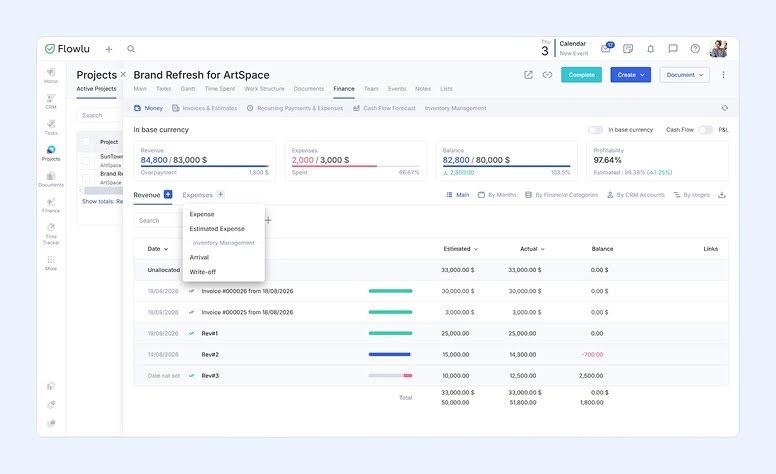
One option that covers these needs is Flowlu — a business management solution that lets you handle all your financial functions from one place. With Flowlu, you can:
- Log expenses in real time — right within each project's Finance tab, alongside revenue, with estimated vs. actual amounts and balance calculated automatically.
- Track live profitability — see a real-time profitability percentage for each project, so you always know where you stand.
- Get a company-wide view — zoom out with the Revenue and Expenses dashboard, which shows the same data across your whole business, by month or quarter.
- Pull clear financial reports — access Cash Flow and P&L reports whenever you need the bigger picture.
If you're looking for financial-only options, try dedicated financial management tools like FreshBooks or Expensify.
4 Common mistakes you can prevent
#1: Static budget
In the old days, companies used to work with a static budget — that doesn't fly anymore, since everyone now has to deal with unexpected market shifts.
A better solution: use forecasts and review performance on a monthly basis.
#2: Maverick spending
This usually leads to employees making purchases outside your approved process, with no tracking or oversight.
To prevent this: require purchase orders and use corporate cards with a spending cap.
#3: Delayed expense submissions
When you submit expenses months after they were made, you'll see discrepancies — and costs may show up as spikes in later quarters, even though that's not when the spending actually happened.
To fix this: set a rule that all receipts must be submitted right after purchase.
#4: Cash flow vs. profitability
You may be running a profitable business on paper and still run into cash problems, if there are significant gaps between when you pay vendors and when clients pay you.
How to avoid it: track your cash flow with the same attention you give your P&L statements.
Making it work for your business
Managing business expenses and budgets doesn't need to be difficult. You just need to follow a few strict rules to prevent errors and, especially, bad financial decisions.
When you clearly define spending caps and expense categories, and automate approval workflows, everything runs a lot smoother, with much less friction.
It's important to keep in mind that static budgeting doesn't work anymore, and neither does asking for approvals manually. Your company needs to constantly adapt to market changes and shifts, and the only way to do that properly is by using forecasting and real-time tracking.
Using the best financial tools on the market, like Flowlu, should always be on the table, and seen as an investment. After all, you'll finally have just one place to see all your expense tracking, reporting, and even project management.

FAQ
This simply refers to the process of tracking, controlling, and processing all expenses and purchases made by a company. It includes setting up policies, categorizing expenses, and approving purchase requests and reimbursements.
Most businesses use more than one way to track their expenses. They typically rely on corporate credit cards with spending limits, centralized software, and apps for digital receipt capture.
This is a process that includes several steps: planning, department allocation, and financial monitoring.
To compare your actual expenses with the budget you previously defined, you can use variance analysis, which is calculated by subtracting the actual amount spent from the budgeted amount. You should then analyze the results and identify the causes behind them.
Most businesses use a mix of expense management software, accounting platforms, and dedicated tools for approvals and reimbursements. Options like Flowlu combine expense tracking with project budgets and reporting in one place, while tools like Ramp or Zoho Expense focus specifically on financial tracking and spend controls.