What Productivity Apps for iPhone Are the Best in 2026


There are multiple reasons why you should start using efficiency platforms. These resources not only help you stay organized with both personal and work activity but also allow you to set goals, track progress, and even create schedules.
Are you ready to discover the nuances of the top-rated apps for your iPhone? Just keep reading to find out.
What to Look for in the Best iPhone Productivity Apps
According to the user's opinion, one of the great things about Apple products is their design. Take a moment to picture the device in your mind. iPhones feature clean, simple lines. Unsurprisingly, their stores tend to follow the same approach.
If you want the app you choose really helps you in personal work, it should:
- Be intuitive
- Support the taps and swipes you’re already used to
- Be stable and receive regular, consistent updates
- Be user-friendly, with an attractive and clean interface
- Offer essential solutions such as calendar, note-taking, file storage, notifications, and more
- Have a strong security policy.
For business teams, it’s better to focus on variants that offer:
- Remote collaboration with high-quality video and audio calls
- Solutions for team and client communication: email, chats, feeds, and comments
- Customizable workspace visual elements: dashboards and widgets
- Reporting and analytics
- Many tools for management and workflow control
- Finance tracking
- Automation for routine operations
- Integration with useful external resources and services
- Smart assistant support.
5 Reasons Why You Should Use Apple Productivity Apps
There are many advantages to using iOS apps, but the biggest reasons people keep all their workflow on their iPhone are simple:
#1. Always With You
It literally is. So, no matter if you want to update a to-do, check a note or schedule, just look in your pocket. You don’t even have to sit at your desk and check your computer.
#2. It Gives Powerful Insights
Insights can be priceless since they may assist you in discovering bottlenecks and things you can improve and optimize. Some of the solutions that we’ll show you offer both analytics and reports.
#3. No More Missing Deadlines
Since your iPhone is always with you, just check notifications to make sure tasks and due dates are on track.
#4. Team Collaboration Is Improved
The best Apple apps also have the ability to improve collaboration since they allow you to share documents, to-do lists, images, photos, other content, group calendars and even add comments.
#5. You Get iOS Automation
There’s no question that automation is a plus. And with Apple, you get Siri with its shortcuts, third-party service connections, and recurring reminders.
The 10 Best iPhone Apps for Productivity
Now that you know why using a solution for iPhone matters, we’ve done the research for you. Check out our top picks below:
#1. Flowlu
Recommended for: Teams and individuals who want to have an all-in-one hub on iOS.
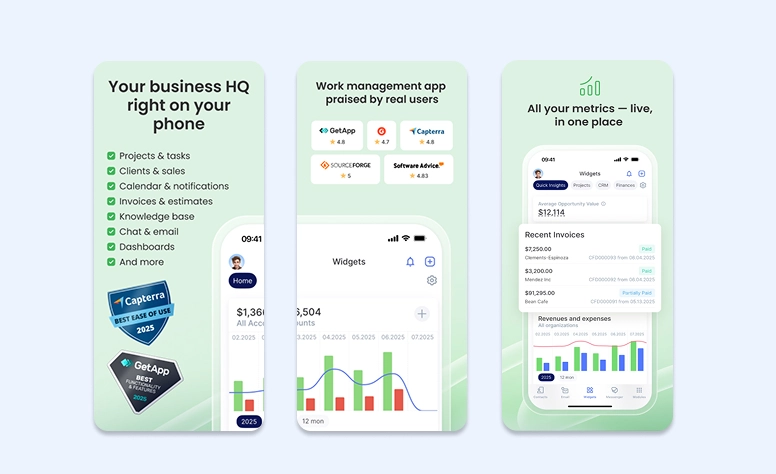
Flowlu is a powerful iOS productivity platform. Developers designed it for users who want more than just task management. It combines projects, CRM, finances, and team collaboration into a single mobile workspace. Flowlu isn’t a typical online tool because it helps you manage both daily work and long-term business processes. You can track every aspect of the team’s activity from one place, even when you’re on the go.

Core Functions:
- Comprehensive management with deadlines and priorities
- Built-in CRM for managing leads, contacts, and clients
- Activity monitoring and workload management
- Invoicing, expenses, and financial tracking
- Team chat, comments, and collaboration
- Dashboards for keeping an eye on progress and performance.
Pros:
- Truly all-in-one solution (projects, CRM, and finances)
- Great for freelancers, startups, and small teams
- Strong collaboration and communication features
- Clean, professional interface on iOS
- Reduces reliance on multiple separate systems
Cons:
- Can feel complex for users who only require simple item tracking
- Some advanced features are better on desktop than mobile
- Setup takes a while to fully customize workflows
#2. Todoist
Recommended for: Teams and individuals who seek strong collaboration features and flexible management.
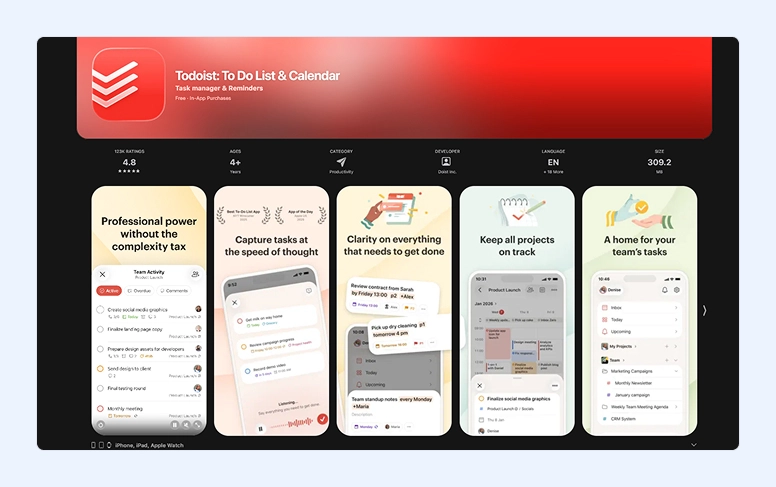
The Todoist app is a powerful tool that allows you to stay on top of your projects. After all, you can use the to-do manager that includes labels, due dates, and reminders. Collaboration is also possible, and you can even get notifications.
It allows multiple integrations with Slack and Google Calendar, which can be helpful to increase your effectiveness.
Core Functions:
- Create, view, edit, and manage workflow
- Set labels, due dates, and priorities
- Use integrations and widgets with Apple Watch, Siri, and others
- Sync instantly across devices (Android, web, desktop).
Pros:
- Intuitive creation of assignments
- Great labels and filters to support you with your organization
- Collaboration in place.
Cons:
- No time tracking
- Some features are only available with higher subscriptions
- There is some learning curve.
#3. Toggl Track
Recommended for: Teams, consultants, and freelancers who want detailed reporting and working hours tracking.
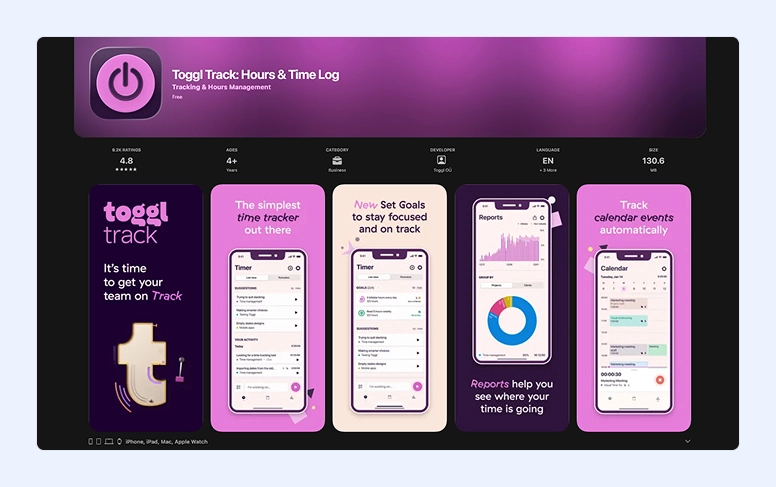
Toggl Track is a powerful iPhone development that makes it easy to track time spent on clients, operations, and projects. To start tracking, simply tap the start and stop timers—it couldn’t be easier.
You’ll also be glad to know that Toggl Track integrates with popular platforms like Jira, Trello, and Asana. Detailed reports guide you to optimize workflows and improve results.
Core Functions:
- Start, stop, and edit to-do entries on both iPhone and iPad
- Set goals, calendar views and Pomodoro timers
- Track work offline and have it sync later
- Try Siri shortcuts or widgets to start and stop timers without using the device
- Sync across platforms (Android, web, desktop)
- Connect the hours you worked to invoices.
Pros:
- Tap to start or stop timers
- Detailed reports by client, user, or project
- Offline mode available to track time.
Cons:
- You may have to do some manual entry categorization.
- The free version is a bit limited, especially the reports.
#4. Routine
Recommended for: Individuals who benefit from a focused daily view.
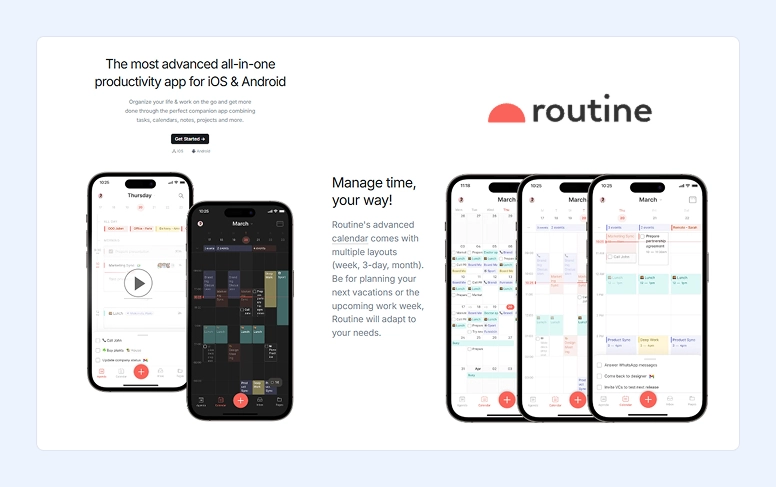
Routine is another great choice available for iOS that can help you with your efficiency. No matter if you’re looking to be more organized personally or professionally, this app comes with planning, AI assistance, and you can take notes and create docs.
Core Functions:
- Unified planner: It combines notes, to-dos, and schedule events in just one place.
- AI power: Get meetings summarized and receive assistance with your research and writing by using smart assistants.
- Quick Capture: Easily capture links, emails, or thoughts quickly using mobile UI or hotkeys.
- Integrations: It integrates with plenty of other softwares, including Outlook, Google Calendar, and more.
- Organization: Add tags or labels and custom views to see your activity, combine it with recurring events and reminders, and use the focus and timers built-in.
Pros:
- Clean and intuitive UI
- All-in-one workflow (notes, and schedule in the same workplace)
- Intelligent automation to save time
- Powerful capture capabilities
- Cross-platform sync (Android, iOS, and desktop).
Cons:
- The platform is a bit limited when you compare it with its desktop version
- The features described may not be fully available yet.
#5. ChatGPT
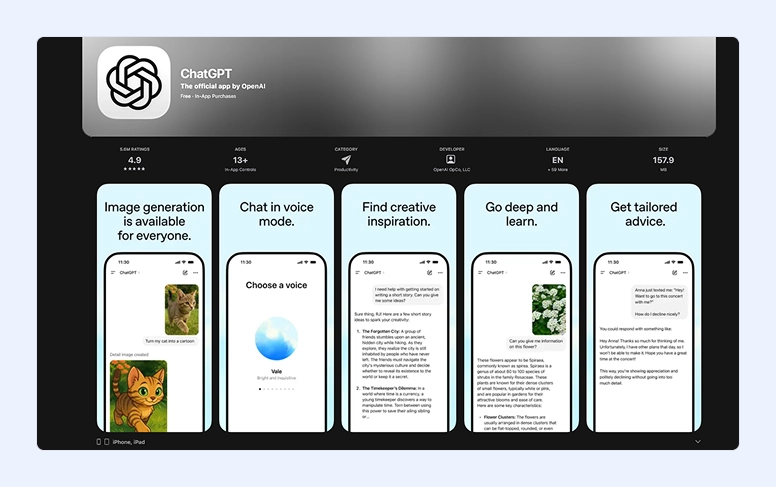
Recommended for: Users who want support for research, are looking for creative brainstorming, and AI-powered writing assistance.
ChatGPT is one of the most popular digital assistants on the iPhone. After all, it delivers so much, and it’s incredibly easy to use.
Here, you can ask for automated intelligence to answer questions, summarize a text, draft emails, and brainstorm ideas. You may also try it to extract key points or translate a text into another language.
Core Functions:
- Text and voice chat
- Sync messages across devices
- Works on both iPhone and iPad
- Generates images.
Pros:
- Easy integration with iOS shortcuts
- Supports multiple languages
- Immediate AI responses.
Cons:
- When it works offline, it has a lot of limitations
- You should be careful with sensitive information due to data privacy issues
- If you want the advanced mode, a subscription is necessary.
#6. Me+ Lifestyle Routine
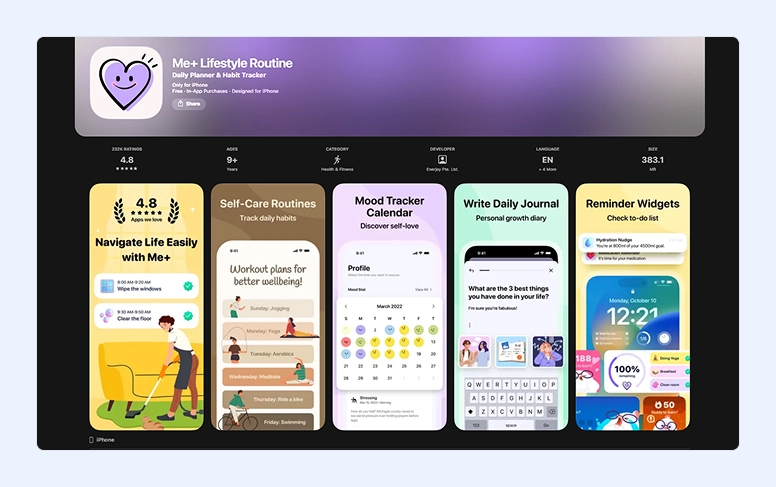
Recommended for: Those who want to improve their habits and routines.
The Me+ Lifestyle Routine is another popular example. Its aim is to enable you to change habits and routines and make them healthier. With this platform, users can create and plan new daily activities and keep track of them along with mood. The Me+ Lifestyle Routine also allows you to add reminders so you’re alerted for some scheduled steps.
Core Functions:
- Ready-made routines with full customization
- Habit logging with progress reports
- Smart daily and weekly reminders
- Integration with wearables and health trackers
- Motivational guidance, rewards, and streak-based encouragement.
Pros:
- Constantly tracks habits
- Encourages positive behavior changes
- Easy routine personalization
- Motivational rewards and streaks.
Cons:
- More focused on lifestyle than task management
- Basic reporting
- Some features require a paid subscription
- Limited collaboration.
#7. Akiflow
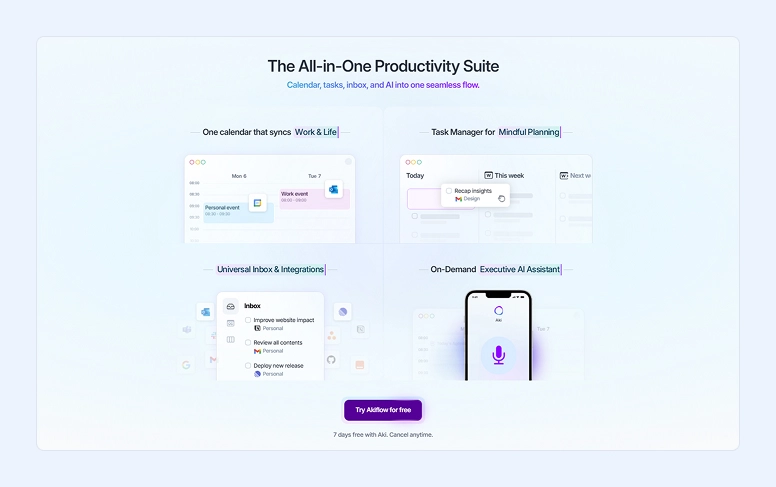
Recommended for: Busy people looking for a way to consolidate assignments from anywhere.
Akiflow is one of the best 2026 iOS solutions for people who want to plan their day on an hourly basis. It offers a perfect combination between task management and schedule blocking, and also allows you to easily integrate reminders and events.
Core Functions:
- Drag and drop feature for scheduling
- Focus mode
- Notifications and reminders
- View daily plans in a single workspace
- Integration with popular platforms like Slack, Outlook, and Google Calendar.
Pros:
- Delivers structure even if you have a busy schedule
- Perfect for planning work
- Great UI
- Aki, the smart digital assistant, can organize your day for you.
- Frequent updates.
Cons:
- Learning curve
- May be overwhelming
- You have to be truly committed to planning blocks.
- The cost is high when compared with other options.
#8. Things 3
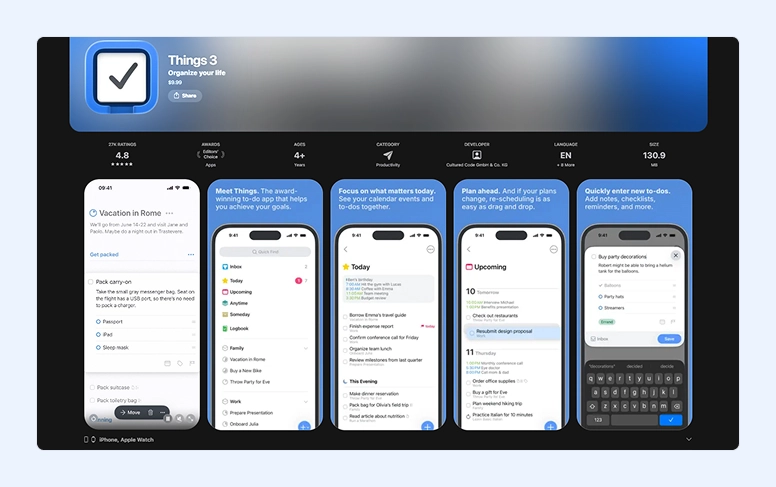
Recommended for: Apple users and fans who need an elegant task manager.
When most people think about the best iOS ideas for getting things done, they immediately think about Things 3.
This solution is designed for those who seek flexible planning for both reminders and projects. With a clear and easy-to-use interface, this app is clearly optimized for well-organized work.
Core Functions:
- Workflow organization with areas and tags
- Quick assignment creation
- Checklists, reminders, and deadlines
- Integration with event view
- Sync across Mac, iPad, and iPhone.
Pros:
- Clean, beautiful and friendly design
- Distraction-free interface
- Good filtering and search options
- Can deal with more complex workflows and processes.
Cons:
- No collaboration resources
- No automation or intelligent assistance
- Limited to Apple ecosystem
- Manual input may be required
- Expensive compared with other options.
#9. Productive — Habit & Routine Tracker
Recommended for: Users who want to develop better habits.
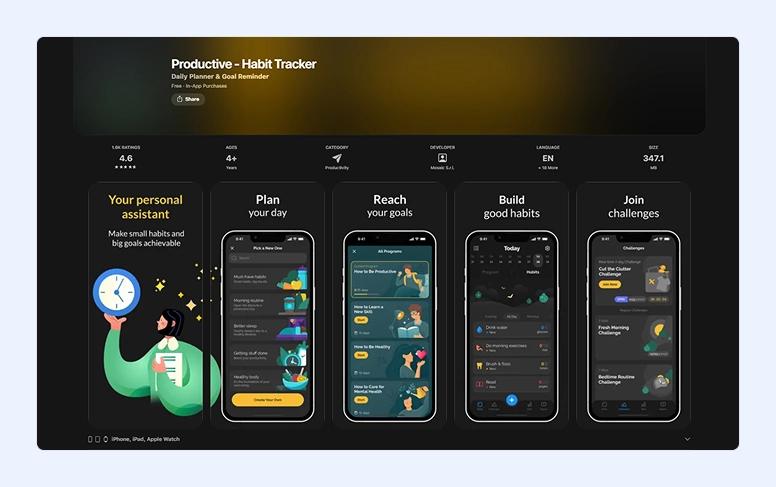
Many people feel that their lack of effectiveness comes down to not having good habits. If this is your case, check out the Productive app. Its main purpose is to help you not only build but also maintain good and healthy habits and routines.
This software is completely focused on goal tracking achieved with the inclusion of daily habits. It also offers streak management to make sure people are motivated and continue their path.
Core Functions:
- Custom habit or routine creation
- Follow progress with reports
- Integrates with different health trackers.
Pros:
- Simple and easy-to-navigate interface
- Customizable habits and goals
- Encourages the building of long-term habits
- Streak monitoring motivates users.
Cons:
- Too basic for professional planning
- No team or collaboration resources
- Task dependencies aren’t supported
- Detailed recordkeeping only works with manual entry
- The free version is limited.
#10. Structured
Recommended for: Employees who want hourly planning.
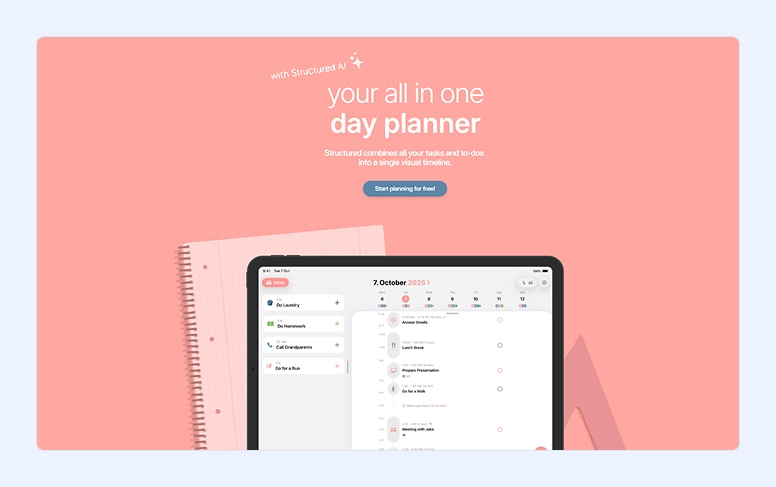
Structured is a visual daily planner that helps you organize your day hour by hour. The app breaks activities into clear time blocks and gives you an at-a-glance overview of your schedule. With this clear picture, anyone can see what to focus on next.
Structured is distinguished by digital organizer syncing, customizable reminders, and a minimalist, distraction-free design. These peculiarities allow people to easily manage routines, appointments, and work without feeling overwhelmed.
Are you studying, working, or balancing a busy personal schedule? Structured is a great solution to stay focused and organized.
Core Functions:
- Hourly blocks for precise daily planning
- Synchronization for events and appointments
- Customizable reminders and notifications
- Multiple color themes and layout options
- Focus mode to minimize distractions.
Pros:
- Simple and intuitive visual planner
- Excellent for building and maintaining daily routine
- Clear structure that supports sustained focus
- Seamless event integration
- Clean, distraction-free experience.
Cons:
- Not suited for long-term or complex management
- Limited collaboration capabilities
- Few third-party integrations
- No advanced analytics or reporting tools
- Full customization requires a premium subscription
- Basic offline functionality
- Lacks support for complex workflows or tagging systems.
App Comparison at a Glance
|
Platform |
Perfect for |
OS |
Starting Pricing |
Key Feature |
|
Flowlu |
Teams & individuals needing an all-in-one workspace |
iOS, Android, Web |
No-cost plan, paid tiers |
Projects, tasks, CRM, finances, and collaboration in one app |
|
Todoist |
Individuals & teams focused on task organization |
iOS, Android, Web, Desktop |
Starter plan, paid tiers |
Powerful task management with labels, priorities, and integrations |
|
Toggl Track |
Freelancers, consultants & teams tracking time |
iOS, Android, Web, Desktop |
Free plan, paid tiers |
One-tap time tracking with detailed reports |
|
Routine |
Individuals who want a good daily planner |
iOS, Android, Desktop |
Basic plan, paid tiers |
Unified planner with notes, calendar, and AI |
|
ChatGPT |
Everyone needing AI for writing, research & ideas |
iOS, Web |
Free plan, paid tiers |
AI-powered text, voice chat, and image generation |
|
Me+ Lifestyle Routine |
People building healthy habits & routines |
iOS, Android |
Basic plan, paid tiers |
Habit tracking with reminders, streaks, and motivation |
|
Akiflow |
Busy professionals using time blocking |
iOS, Desktop |
Paid |
Task consolidation with calendar-based planning |
|
Things 3 |
Apple users wanting elegant task management |
iOS, macOS, iPadOS |
One-time purchase |
Beautiful, distraction-free activities and project planning |
|
Productive |
People focused on habit formation |
iOS |
Starter plan, paid tiers |
Habit and routine oversight with streaks |
|
Structured |
Those who plan their day hour by hour |
iOS |
No-cost plan, paid tiers |
Visual daily planner with time blocks |
How to Build Your Own iPhone Productivity Setup
Understanding which digital helper you need isn’t complicated. Think about which processes cause the most difficulties or take up too much time.
Forget important information or ideas? — Download note-taking variants.
Miss deadlines? — Set up an hours tracker or task management tool.
Have too many deals and your spreadsheets can’t keep up? — Look for a comprehensive project management system or CRM.
For solopreneurs, 2–4 tools are usually enough. It’s an optimal number that supports key operational areas like time management, note-taking, tracking, and document handling without overloading you.
If your team grows, it’s your responsibility as a manager to keep employees organized and on track. In this case, it’s better to choose an all-in-one solution that provides a shared space for communication and collaboration.
Bottom Line
With so many different tools for iPhones on the market, you can find it hard to choose the top ones. To save you time, we handpicked the leading options worth trying.
With the best iPhone platforms for work management right there in your pocket, you’ll become more focused on your work. From calendar to time tracking, reading, AI assistance, and task management, each one of the apps we chose has its own strengths. So, it’s up to you to determine what you need to try.
It doesn't matter if you’re an entrepreneur trying to build your business from scratch, a professional running multiple projects at the same time, or a student managing academic deadlines. You can be sure that you’ll find the solution that fits your requirements from the list above.
Instead of relying on just one tool, you’ll likely get better results by combining two or three of them. For example, project managers may find Flowlu a great fit for planning and tracking work, while adding assistance like ChatGPT can help with writing and ideation. Together, they create a more balanced and practical efficiency setup.

These kinds of apps can benefit you in numerous ways. The best iPhone tools allow you to create reminders, set priorities, and organize tasks. But they don’t stop here. These softs allow you to monitor progress and ensure you don’t miss a deadline again.
These kinds of tools are a great option for anyone who wants to optimize their time.
While we mentioned different types of solutions above, they all have some points in common: they’re all easy to use, have a good UI, and can help you optimize your time.
Many of the apps we’ve mentioned above include time-tracking capabilities. Use them to determine your productivity patterns and find ways to improve your productivity.