Flowlu MCP Server: Connect Your Workspace to Any AI Assistant

You're updating a deal in Flowlu, then switching to AI chat to draft notes, then back to Flowlu to log a task, then over to your project board to check a deadline. Four tabs, three copy-pastes, and five minutes gone for something that should take ten seconds.
That loop ends today.
We're launching Flowlu's MCP server, a direct connection between your Flowlu workspace and the AI tools you already use. Ask your AI assistant to do something in Flowlu, and it just does it. No tab switching. No copy-pasting. No code.
What is MCP?
MCP (Model Context Protocol) is an open standard that's becoming the universal way AI assistants connect to business tools. Backed by Anthropic, OpenAI, Google, Microsoft, and now governed by the Linux Foundation, MCP lets AI models like Claude, GPT, and Gemini interact with external platforms like Flowlu through a single, secure protocol.
Instead of building custom integrations for every AI tool, Flowlu's MCP server works with any compatible client out of the box. One connection, every AI assistant.
What can you actually do with Flowlu MCP?
The Flowlu MCP server covers all the core modules you use every day: full read and write access to CRM, Projects, Tasks, Agile, and Time Tracking, plus read access to Finance, Products, Calendar, and Custom Fields.
This is what it looks like when you stop switching tabs.
Create deals, tasks, and records by talking
Got off a call with GreenTech. They're interested in the API integration package. Create a company, link a deal for $25,000, add Maria Torres as the contact, log a note about their interest in the API module, and set me a follow-up task for Friday at 2 PM.
One prompt. Five records created in Flowlu. The AI builds the company, the deal, the contact, the note, and the task. Before writing anything, it shows you a preview of exactly what it's about to create. You confirm, then it goes live. No accidental entries.
Get answers without building reports
Which deals in my pipeline have been stuck in 'Negotiation' for more than two weeks? Show me the contact and deal value for each.
The AI pulls live data from your CRM and gives you a structured answer in seconds. No filters to set, no report to configure, no dashboard to build first.
How many tasks are overdue on the Wilkins Website Redesign project, and who's responsible for each?
Your project status, summarized in one sentence, without opening a single Flowlu tab.
Search across your entire workspace
Do we have a contact with the email [email protected]? If so, what deals are they associated with?
The AI searches your CRM and returns the result immediately. No manual search, no scrolling through contact lists.
Manage agile sprints from your IDE
If you're a developer working in Cursor, Windsurf, or VS Code, you can query your Flowlu Agile board without leaving your editor:
Find all issues tagged 'critical' in the current sprint, group them by assignee, and tell me which ones don't have an estimate yet.
Your sprint data appears right where you code. No context switching needed.
Add comments, check files, log time
Add a comment to the GreenTech deal saying the legal review is complete and we're waiting on their signature.
Check if there are any files attached to the 'Wilkins Website Redesign' project.
Log 2.5 hours for me on the 'Homepage layout revisions' task today.
You can also log time, check attached files on any record or review comment history, all through conversation. It's like having a Flowlu power user sitting next to you, ready to answer anything.
Your data, your rules
Every action the AI performs goes through your personal API key and respects your Flowlu permissions. The AI can't see or do anything your account doesn't allow.
- Permission-scoped access. The MCP server inherits your account's role and access settings. If you can't see a project in Flowlu, the AI can't see it either. No extra access is ever granted.
- Preview before every write. Before creating or updating any record, the AI shows you exactly what it plans to do, field by field. Nothing gets written until you explicitly confirm. This protects against accidental changes.
- No data stored outside Flowlu. The MCP server is a pass-through. Your data flows between the AI client and Flowlu's API, and nothing is cached or stored by the MCP layer.
- Controlled API keys. API keys are created in your Flowlu account settings and can be revoked at any time. You stay in full control.
Get connected
You'll need two things from your Flowlu account:
- Your API key, found in your Flowlu account settings
- Your account code, the subdomain you use to log in (e.g., yourcompany from yourcompany.flowlu.com)
With these two pieces, you can connect Flowlu to any MCP-compatible AI tool.
A step-by-step setup guide is available in our Help Center.
Flowlu MCP is available on all paid plans, and during a free trial.
Supported tools
Flowlu MCP works with any AI client that supports the MCP protocol over HTTP.
These are the clients we've tested and confirmed:
|
Tool |
Company |
Type |
|---|---|---|
|
Anthropic |
Desktop app |
|
|
Anthropic |
CLI |
|
|
Anysphere |
AI code editor |
|
|
Codeium |
AI code editor |
|
|
OpenAI |
CLI + IDE extension |
|
|
Microsoft |
IDE extension |
|
|
Open source |
IDE extension (VS Code / JetBrains) |
|
|
Open source |
IDE extension (VS Code) |
If your preferred AI tool supports MCP and isn't listed here, it should still work. The connection uses standard HTTP with Bearer token auth, no OAuth flow required.
Note: The web version of Claude at claude.ai does not support MCP connections. Use the desktop app or Claude Code instead.
How different teams use Flowlu MCP
Different roles can use Flowlu MCP in their daily work:
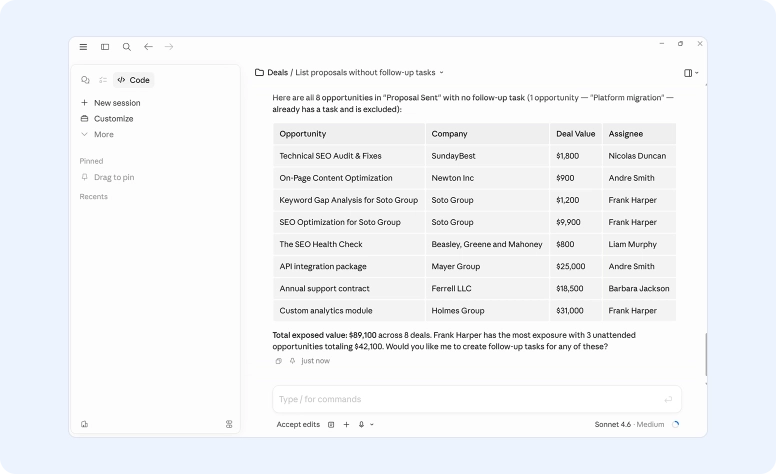
Show me all deals that moved to 'Proposal Sent' last week but don't have a follow-up task yet. For each one, create a task assigned to me: 'Follow up on proposal, check decision timeline', due this Wednesday.
The AI finds the gaps in your pipeline and fills them.
Give me a summary of the Wilkins Website Redesign project: how many tasks are in progress, how many are overdue, and who has the most open items right now?
No more opening the project, switching views, and counting manually.
Pull all invoices for Bright Solutions from this year. Show me the total billed, how much has been paid, and what's still outstanding.
The AI queries your Finance module and gives you a clean summary.
Finished the auth module refactor. Update issue FIT-247 to 'Done' and add a comment: 'Refactored OAuth flow, added refresh token handling. Ready for QA.'
Your Agile board stays updated without leaving the IDE.
Good to know
MCP works best when paired with the platform itself. Bulk operations, complex automations, visual Kanban board management, and detailed permission settings are still better handled in the Flowlu interface.
Think of MCP as your fast lane for everyday tasks: quick lookups, record creation, status checks, and cross-module queries that would otherwise take a dozen clicks.
Tell us how you use it
Whether you automate your morning pipeline review, speed up sprint planning, or build something we haven't imagined yet, we want to know. Drop us a message at [email protected]
Head to your account settings to grab your API key and get started with Flowlu MCP today.
Don't have a Flowlu account yet?

FAQ
No. If you can type a sentence, you can use Flowlu MCP. The setup takes a few minutes and involves pasting a config block into your AI tool's settings. After that, you just talk to the AI in plain language. No coding, no API calls, no terminal commands needed on your part.
The MCP server itself is available to all Flowlu users at no extra cost. You do need a paid Flowlu account, and the AI tool you connect with (Claude, Cursor, etc.) may have its own pricing.
All paid plans and a free 7-day trial include API access. If you’re on a Free plan, upgrade to Essential (or higher) and start using Flowlu MCP today.
No. The MCP server supports creating, reading, and updating records. Delete operations are not available through MCP. Every write operation requires your explicit confirmation through the preview mechanism. The AI shows you exactly what it plans to do before making any changes.
Each team member connects with their own API key. Their permissions in Flowlu carry over to the MCP connection, so everyone only sees and modifies what their account allows. Multiple people can be connected at the same time.