CRM Industry Trends 2026 and Industry-Specific CRM


Quick Answer
Diverse workflows require a new approach to CRM development. Nowadays, companies are looking for something more specific. And that can be challenging. With these new market demands, software developers are doing their best to create better solutions for any type and size of business.
This is where trends are happening. Beyond unique offerings, let's see what's on the agenda for CRM industries in 2026.
What Is Changing in the CRM Industry in 2026?
When this type of software was first designed, it was presented as a powerful solution. It allowed you to store all your data in one place where everyone in your business could easily access it.
As we enter 2026, this tool becomes even more important: it works not only as storage but also as a place where you can orchestrate your information.
To make this happen, there are two main requirements:
#1. From General Tools to Workflow Fit
Until now, companies looked for solutions with essential functionality. But that's changing. When searching for a new tool, you want something that fits your unique processes—not just one that packs in features.
Here are some practical examples:
- Admin days are over. Systems need to auto-capture different data—LinkedIn interactions, meeting notes, emails—without manual entry.
- Integration matters more. They need to connect not just contacts but your entire funnel.
- Specialized CRMs are on the rise. Businesses want solutions already customized and built for their sector.
An industry-tailored service is also known as a vertical. Recent studies predict that demand for such services will grow by more than 10% over the next 10 years.
#2. The Implementation of AI
You may be wondering why we're considering this requirement. Let us explain. Most systems already have some form of automation. But the new trend in 2026 is looking for digital power that can execute tasks—not just write text.
Here are some use cases advice:
- When asked to analyze a call, agents should do more than summarize it. It should update the deal stage, create a follow-up email with all necessary documents, and set a reminder for the B2B sales rep to check the contract before it expires.
- A digital assistant needs to explain why it assigned a certain score.
- Personalization is key.

Why CRM Needs Differ by Industry
Most systems available on the market today were general. But since the start of this year, we're seeing more and more companies turn to specialized ones.
Each company operates differently. Here are some simple examples.
- Legal or consulting. Your product is time. Features like billable hours and project milestones should be built in, not added later or customized on request.
- SaaS. You need software that notifies you when a user's activity drops by a specific percentage. That way, you can be proactive and help them keep using your product instead of canceling at renewal.
- Manufacturing. A deal isn't closed when the contract is signed. It continues to be managed through inventory levels and shipping logistics.
But What Makes an Industry Specific CRM Different?
There are 3 main things that make the difference between a universal system and a dedicated one:
Pre-Configured Data
When you're using an all-in-one solution, you'll spend countless hours creating custom objects. With specialized ones, they are already included as native features.
For example, in healthcare, you'll immediately have access to insurance providers and patient records.
In real estate, you'll have access to floor plans, properties, and escrow status.
Regulatory Specifics
Each company must follow certain laws and criteria to operate without restrictions. With a universal product, you'll need to set these up yourself—usually requiring an expensive additional app or plugin. With a dedicated one, you have everything built in, no customization required.
More Integration
Most solutions offer many third-party apps. Slack and Gmail are popular examples. But businesses often need tools used only in their area—like CAD software in construction or RFID inventory trackers in retail. This kind of connection is only possible with purpose-built products.
Industry-Specific CRM’s Advantages and Disadvantages
|
Pros |
Cons |
|
|
Consider using an especially designed platform when:
- Your business has strict compliance requirements
- Your team needs to get up and running fast with minimal training
- Your sales process is very rigid
6 Industries That Benefit Most from CRM
Long-Cycle & Relationship-Driven
Deals in these sectors may take several months to close (usually between 6 to 18 months) and often involve more than 10 stakeholders.
#1. Real Estate
Solutions need to be predictive. They shouldn’t only store listings. They need to take a step forward and use artificial intelligence to analyze different patterns (financial readiness, school needs, commute patterns).
#2. Finance
These platforms need to immediately flag when a portfolio recommendation doesn't match the client's risk profile. But beyond that, they should also create personalized explanations to send to the client.
#3. Professional Services (Legal)
Using specially designed systems, managers can assign cases to specific lawyers to ensure they don't compete for the same client, for example.
Operational & Service-Heavy
The main goal is to keep things moving, not just manage conversations.
#4. Manufacturing
The platform should immediately check if a salesperson has all available resources when entering a deal. If not, it should automatically alert all affected customers.
#5. Distribution
A key challenge here is low margins on high volume. The tool should use smart agents to provide sales reps with real-time "Price-to-Win" guidance to ensure they don't make discounts that turn deals into losses.
#6. Service Businesses
Just think of a plumbing business. The system needs to handle every step from the Google search through to service completion.
Top CRM Industries Trends in 2026
1. More AI & More Automation
This isn't the same digital helper you've been using until now. This new artificial intelligence is more of an executor than a predictor. It should help update your pipeline and handle the complete process—finding leads, qualifying them, and booking meetings with sales reps.

2. Reporting
It shouldn't just answer "What happened last month?" It also needs to give an answer to "What will happen if we do A? And if we do B?"
3. Stronger Retention Focus
General CRMs include a generic dashboard. Specialized ones offer tailored analytics based on the concrete business model.
Let’s take the ecommerce and retail for a second. Instead of the old and traditional “We miss you” emails, the trend is to actually determine when a customer will run out of a specific product and alert him to reorder by SMS with 2 or 3 days in advance.
4. Personalization
Try using multimodal content like AI-cloned voice or video.
Flowlu aligns with all these trends. It lets you automate routine tasks, tap into your favorite AI tools through MCP servers, gather analytics, and customize your workflow structure. You'll get a complete ecosystem built for lead management.

Industry-Specific vs General-Purpose CRM
|
Features |
General |
Specific |
|
Setup Speed |
Slow: It may take nearly a year to have everything working as you want. |
Fast: You’ll be ready in less than a month. |
|
Sector Fit |
Very Broad: You need to prepare a huge mapping to ensure that it fits as many niche processes as it can. |
Native: Everything, including compliance, workflows, process fit, and terminology, is built from the first day. |
|
Flexibility |
High: You can build whatever you want, but you are responsible for doing so. |
Low: It may be somewhat difficult to make changes if your business model transforms. |
|
Integrations |
Many: Most include thousands of different apps. |
Exclusive: To a certain specialization. |
|
Reporting Depth |
Horizontal: This means it works very well for general sales metrics |
Native: Reporting on specific KPIs |
|
Long-Term Scalability |
Infinite: No matter if you have 1 or 10,000 users, it will work. |
Limited: It will only work if you scale within the same sector. |
All-in-one solutions often have one more advantage—simpler adoption.
How to Evaluate CRM Software by Industry in 2026
What to Compare Before Making a Choice
#1. Terminology
Do you want to keep renaming objects or accounts over several months, or do you need the right terminology in place from day 1?
#2. Compliance
Some sectors require minimal regulatory requirements while others need extensive ones. Which applies to yours?
#3. Revenue Model
Does your tool give you revenue visibility whether you use a unique model like high-volume retail or milestone-based construction, or follow a general approach?
#4. Specific Integrations
Does the system let you easily integrate with the tools you already use?
#5. Artificial Intelligence Support
Although different statistics show that about 90% of modern companies implement AI in their products, check whether the service:
- Corresponds to data freshness: Does it operate in real-time?
- Has auto-correction: If you notice it made an incorrect update to a deal, can you check the log to see why?
- Uses signals: Make sure agents can trigger actions based on specific activity, not just answer prompts.
- Support multimodal inputs: Can it use a voice recording of a meeting and automatically populate relevant fields?
Step-by-Step Selection Process
Step #1: Find Out Bottleneck
Map your most painful points.
In real estate, it might be leads going cold because reps spend too much time showing houses to follow up.
In manufacturing, it could be taking a week to get a quote from Sales.
Step #2: Define Success Metrics
Center them on process speed. Evaluate aspects like manual customer data entry (which should drop significantly), forecast accuracy, and lead response time.
Step #3: Evaluate the Different Options
Look at the products you shortlisted and compare them against your criteria.
Step #4: Start Free Trial
Use free trials to test the app before buying. Make sure you actually test everything.
4 Common Mistakes When Choosing CRM by Industry
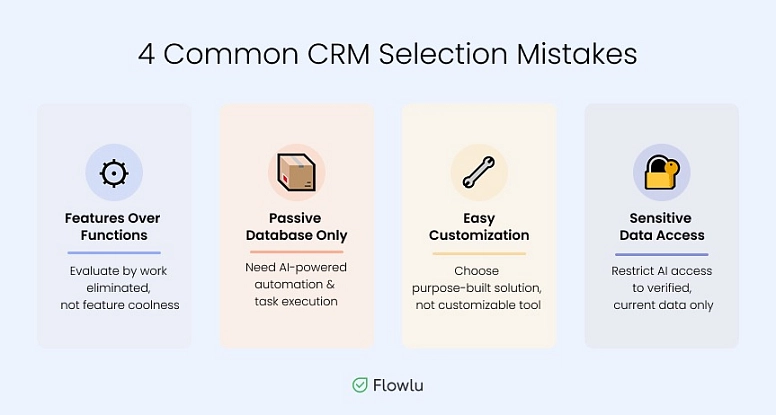
Features Over Functions
A platform might have the most amazing chatbot you've ever seen. But how does it actually work? That's what matters most.
Make sure you evaluate a system based on how many manual steps it can eliminate.
Passive Database Only
CRMs in 2026 should be proactive, not just storage. Look for one that can execute tasks.
When testing the free plan, ask for the reasoning log. If the digital assistant took an action it can't justify, it's not the right fit for you.
Easy Customization
One of the most common features. But this also means the software may not be ready to use—you'll need to customize it first.
This affects you in two ways: time and cost. Customizable universal products tend to be far more expensive than purpose-built solutions, which are ready to use out of the box.
Sensitive Data
Never allow a smart agent access to sensitive information or outdated contact logs. These can create serious problems and steep fines. Data quality matters—ensure your AI works only with current, verified information.
Check if the solution:
- Lets you restrict what the digital helper can see
- Supports streaming data
Keep CRM on Your Agenda
Client relationship management systems are changing rapidly, and your team needs to adapt quickly. New trends—shifting toward AI-driven platforms and industry-specific tools—aren't just technical upgrades. They're crucial to how you generate revenue.
That said, what works for others may not work for you. And what fits best depends on many different factors. Even though dedicated products are in higher demand, universal solutions aren't a poor choice. Many successful all-in-one platforms have strong user bases—ClickUp, Monday, Asana—to name a few.
Flowlu also offers multifunctional power and can be a worthwhile investment for any team. Whether you manage projects in engineering or build a freelance brand, you'll find all the essential capabilities to create a custom workflow.

FAQ
There are 3 main directions:
- Preferring business-specific CRMs
- Using AI for operations
- Eliminating manual text entry
It's a solution built for your specific needs. It should include relevant terminology, legal requirements, and integrations tailored to your sector.
Five sectors can't operate effectively without specialized tools:
- Tech
- Manufacturing
- Healthcare
- Finance
- Insurance
It is no longer static. It should become a proactive agent that doesn't just predict but acts. It can create assignments for you, send emails, generate document templates, gather stats, and more.
Switch to dedicated offerings when compliance is required, time to value matters, and your processes are standardized.