Time Tracking for Small Business: How to Track Hours, Costs, and Productivity


Quick answer
The reality is that for most, the only option is to rely on memory. However, this can be tricky — and your clients may not find it all that reassuring. Clients want to see exact numbers and reports from tracking software to make sure they're not overpaying.
Small business time tracking has multiple goals. With this simple approach, you can finally determine who your most profitable customers are, learn to maximize billable hours, and even streamline your payroll.
Why small businesses need time tracking
It's not easy to be a small business owner. And with so many things already on your plate, you don't need the extra pressure of guessing how many hours you worked for a client. You need a structured system that lets you stay on top of logged hours — which is exactly what time tracking software for small business is built for. Why?
#1: Maximize billable hours
As a small business owner, you need to maximize profits while keeping costs as low as possible. So you can certainly see why a business time tracker is a solid investment — it helps you capture every billable hour.
When you don't use any tracking app for small business, you're running two risks at once:
- Your clients will ask for a record of hours worked, and you won't have one to show them.
- Your employees may forget to log short phone calls or troubleshooting sessions as billable work.
In Flowlu, you can track billable hours. There's a dedicated Time Tracking module for that — just set your hourly rates and start tracking time on whichever tasks you need. You can also customize rates per employee or per project.

#2: Streamline payroll
It's usually a headache for small business owners. That's where employee time tracking small business solutions help — making sure payroll isn't only accurate but also compliant, and that the whole process is cleaner and more transparent as a result.
#3: Client billing
When creating invoices, you need your data to be clear and precise. Don't rely on memory. Keep logs of hours worked alongside a list of completed tasks.
One thing many small business owners struggle with is late or missed customer payments. That's a serious problem. But when you're using a timesheet tool for small business, you'll see more on-time payouts — because people act on accurate, transparent data.
#4: Boost productivity
Employee time tracking small business owners rely on does more than log hours. It gives you a clearer picture of how your specialists are actually working. It's much easier to spot if someone is spending too many hours on administrative work. That same data can also help prevent burnout — you might be overloading one employee without even realizing it.
#5: Control project costs
If you don't have real data, how can you control project costs? You'll have no way of knowing whether you're using more resources than a project calls for, or how long it's actually going to take.
What to track and how to organize it
Now you understand why a small business tracking tool matters. The next step is practical: you need to determine not only what you'll be tracking but also how you'll organize everything.
Projects
Keep track of every detail about each job — starting with the scope, like a website redesign, for example.
Tasks
Monitor all the activities involved: meetings, phone calls, emails, and the actual work itself.
Clients
Make sure you're logging all billable hours per customer.
Employees
Divide your employees into groups based on permission level, role, or department — whichever makes more sense for your setup.
On the topic of roles and permissions: only managers should be able to view and edit logs. Regular employees should only log their own hours.
Also keep an eye on workload distribution — make sure some specialists aren't buried while others have very little on their plate. Setting a weekly standard of 40 hours is a good benchmark. As you review the data, it becomes easier to spot who might need some help.
Hourly rates
Not all hours are equal, so stay clear on the distinctions you make. The most important one: billable vs. non-billable. The first ones are those spent working directly for the customer; the second ones cover everything else — administrative work, training, internal meetings, and so on.
You'll also need to set billing rates, either by employee or by role, depending on the engagement and your preferences. Don't overlook cost rates either — how much each employee actually costs you per hour, including salary and benefits.
Special tools allow you to manage all of this in one place. For example, in Flowlu, go to the Time Tracker, open Rate Management, and set billing and cost rates per employee — so every hour logged is accounted for correctly.
Approvals
Like any other critical process in your business, make sure there are no mistakes in payroll or billing. Set a fixed day and hour to lock the week's logs (end of Friday works well) then have approved invoices and pay runs automatically sent for processing. Managers should review timesheets each week to catch any errors before that happens.
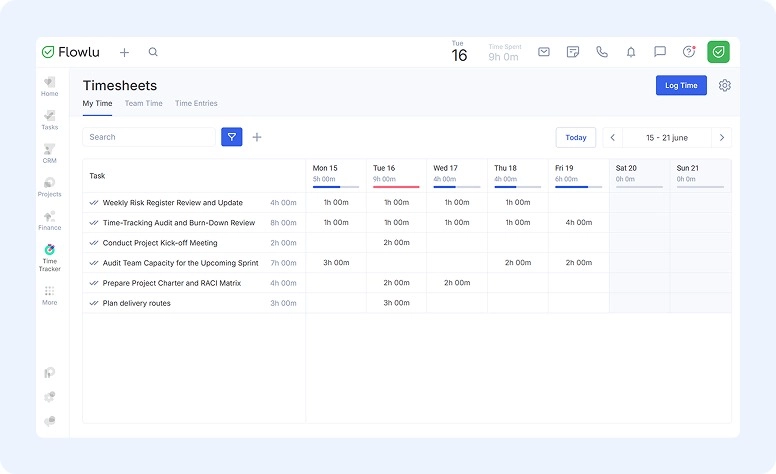
In Flowlu, we recently updated timesheets, so now users can get a weekly view of all tasks, and see the full team's logged hours in one place.
Reports
You may have a lot of data regarding your business, but it won't be useful unless you put it into action. That's what reports are for.
Use your tracking software to pull 3 main report types:
- Project Profitability Report: Shows whether you're making or losing money on an engagement, weighing billable work against internal labor costs and the overall budget.
- Utilization Rate Report: Breaks down how employee hours are actually being spent — on client work, internal projects, or administrative tasks.
- Client Summary Report: Gives you a clear, full picture of all hours logged for a specific client.
Manual timesheets vs time tracking software
Looking for time tracking software for small business, you may have realized there are plenty of options — and you're probably even a little confused. And we're not talking about a variety of software; we're talking about entirely different categories of tools, each with a wide range of options.
Ultimately, you can divide these tools into two categories:
- Manual timesheets
- Tracking software
Let's look at their differences across the most important features they need to cover. Hopefully, this helps you choose the right employee tracking tool for your business.
#1. Data entry & timers
With manual timesheets, you and your employees will mostly be relying on memory — timesheet software for small business removes that guesswork.
With a digital tool, it's just a click to start and stop a timer.
#2. Mobile accessibility

A time tracking app for small business owners makes this easier. Most dedicated platforms already come with their own app for logging hours on the go. Filling in a spreadsheet on your phone is still frustrating — no matter how much devices have evolved.
#3. Approvals & workflow
Managing approvals is a lot harder when a business still runs on manual logs. Team or department leaders end up having to chase employees just to get their logs filled out.With purpose-built software, managers can set automatic reminders, use one-click submissions, and handle instant digital approvals.
#4. Automation
Automation is becoming standard across all business tools. It makes everyone's life easier by handling a large portion of repetitive tasks without constant human involvement.
#5. Accuracy
With paper-based tracking, logged hours tend to get rounded — which isn't fair to you or your clients. Dedicated platforms offer more transparency and precise data
5 best practices for accurate time tracking
Set clear rules
Consistency is everything when it comes to your data — it should always be the ultimate goal. Make sure your employees know what to log and when. Walk them through it in detail and allow a few days to experiment so they get the hang of it.
Don’t forget privacy
Strike a balance, especially around privacy. The last thing you want is for your employees to feel constantly watched. Some research notes that constant surveillance can increase workers' stress and anxiety levels. So, trust your team and focus on outcomes. Also think about why you're starting to log hours now and what prompted the change.
Prepare reports
Having a clear picture of what's happening is crucial — it helps you see whether anything needs to change.
Avoid common mistakes
It's easy to compromise your data integrity without realizing it, especially without timesheet software for small business in place. Here's what to watch out for:
- Don't expect every employee to declare 8 hours of billable work every single day. People have other tasks that aren't directly client-related.
- Don't punish slower workers. Sometimes an employee struggled with a task; other times, you underestimated how long it would take. Either way, use these situations to learn — not to penalize.
- Review timesheets weekly. It's much easier to catch mistakes before they pile up.
Leverage project management tools like Flowlu
When tracking employee hours, look for the simplest option that delivers the most. Flowlu is a great example. This cloud-based app is easy to use and surprisingly powerful:
-
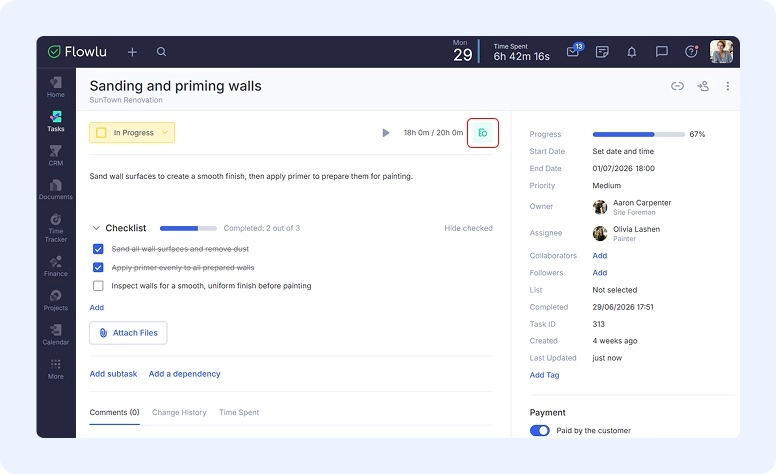
Employees can start the timer directly from the task card and mark it as billable.
-
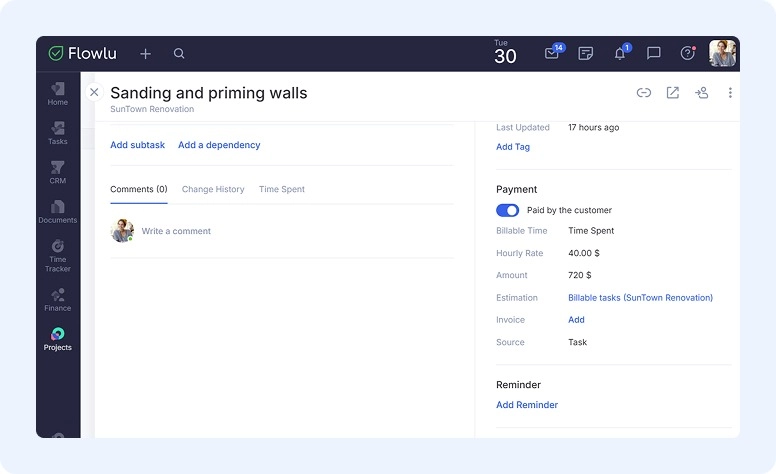
Once a task is completed, billable tasks show up in the project's invoicing options. You can create an invoice for the time spent in one click. The system calculates everything automatically, based on hourly rates and hours logged.
-
The system also gathers data and gives you updated reports. All logged time is saved for each project, and in the "Time Spent" tab you can monitor total task time, billable time, and which of those haven't been invoiced yet.
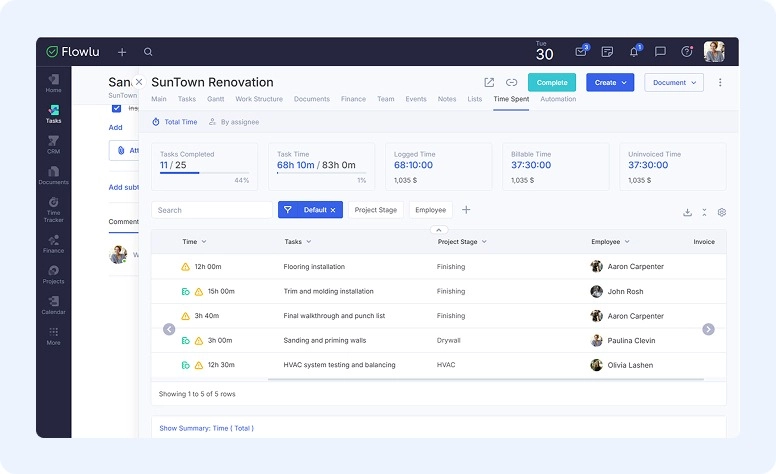
Flowlu's task tracking keeps timing, billing, and reporting tied together in one place, so you always know where a project's hours and invoices stand without having to piece it together yourself.
Know your numbers
As a business owner used to doing everything on your own, moving from a manual timesheet to small business time tracking software can feel like a big, daunting change. But it's worth keeping in mind that this is what will finally show you how much you're making per project, how many hours you're actually charging clients, and a lot more. Ultimately, it's one of the best ways to maximize profits and keep costs under control.
Your employees won't be able to dedicate 100% of their hours to client work — administrative duties are part of the job. But you can find a better balance between the two, and that's only possible when you have a tool like Flowlu in your corner.

FAQ
As a small business owner, you need to know exactly how much of your employees' working hours go toward tasks, projects, and specific clients — and how much goes toward emails, phone calls, and other administrative work.
Most of them use either manual timesheets or dedicated time tracking software for small business.
If you work alone or as a team of two, a manual timesheet is probably enough — as long as you make sure every billable hour gets logged. For larger teams, an automated solution is the better call.
It ensures clients are paying for all billable time, helps you spot when a project is profitable or losing money, and makes future estimates a lot more accurate.