When Free Tools Stop Working: All in One Business Management Software


That’s when all in one business management software becomes worth considering. Below, I’ll show you how to spot the right time to upgrade and make the transition without throwing your agency’s day-to-day work into chaos.
What is all in one business management software?
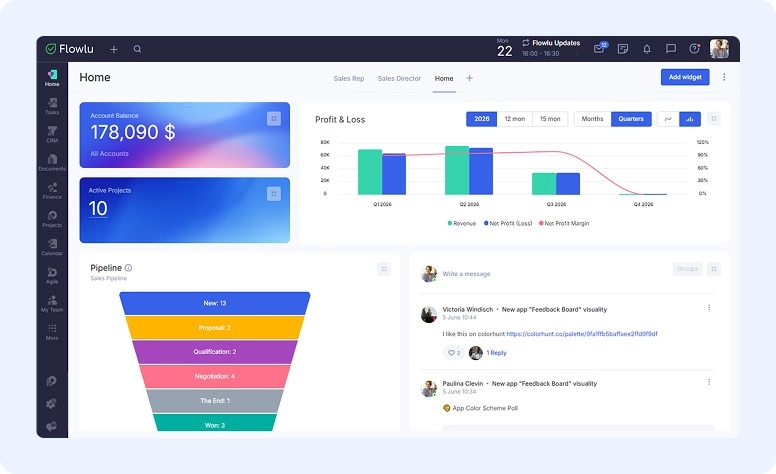
All in one business management software gives you a central place to manage projects, clients, finances, and team collaboration as you scale.
For example, Flowlu includes project management features, customer relationship management (CRM), expense tracking, and team chats under one roof.

Benefits of using all in one business management software
All in one business management software makes managing your business more efficient.
As an agency owner, you can:
- Have a central home for your standard operating procedures (SOPs)
- Keep client information, files, and conversations in one place
- Get a high-level overview of projects, clients, and finances
- Create more consistent processes as your agency grows
- Improve team collaboration and communication
- Onboard contractors and employees faster
- Automate repetitive tasks and workflows
- Reduce app-switching and tool sprawl
When to stop using free tools when transitioning from freelancer to agency
Here are some clear signs it’s time to move away from free, standalone tools.
You’re getting lost in a sea of spreadsheets
Google Sheets worked fine when you only had a few sheets to manage. But now that you’ve grown your client base, you’re spending most of your energy managing spreadsheets. You often get lost searching for the data you need — and you’re actually worried you’ll lose an important file.
As your freelance business grows into an agency, you need a clear view of what’s happening across the business. Without it, you’re making decisions with an incomplete picture of your business. Important details about your projects, clients, finances, and team can easily slip through the cracks.
You feel like you’re constantly context-switching
You’re bouncing around between a lot of tools.
You started with a free CRM and an invoice management tool. Now you’re also using a team collaboration tool, a revenue forecasting tool, and a knowledge base tool. (Not including other random apps.) Reconciling data and switching between these tools is eating up way too much of your time.
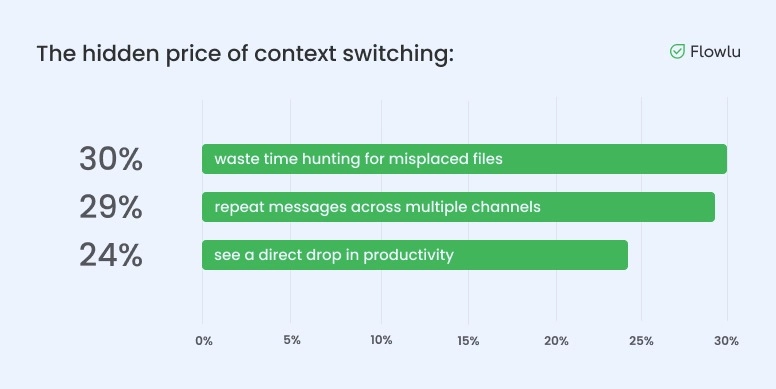
A Slack-commissioned survey of 2,000 U.S. small business owners found that 17% considered context switching between apps and tools a productivity killer. The average respondent used four digital tools each day, while nearly a third used five or more.
Training new contractors or team members feels like a full-time job
When you need to train new team members, it can take a long time for them to get up to speed with all your tools.
Even 30 days in, they’re still asking you questions, locking themselves out of your password vault, or breaking a workflow.
The larger your team gets, the less practical it becomes to personally guide every new hire through your systems and workflows.
You’re making more money, and you need better visibility into your finances
Your agency is packed.
You’re grateful for your new clients, but you’re constantly reconciling your finances and eyeing your cash flow.
As freelancers grow into agency owners, getting clear financial insights is a must. Growing businesses need software that provides real-time reporting, cash flow tracking, budgeting, and performance analytics.
It’s much easier to make decisions about pricing, hiring, client profitability, and growth when you can see exactly what’s happening inside your business.
You’re outgrowing your current tools, and upgrading is expensive
Free plans are free for a reason … they’re capped. At some point, free features no longer provide what you need.
Upgrading one tool may not seem like a big expense. But when you’re paying for five to 10 upgraded tools, the costs add up quickly.
It’s funny how we patch together tools, hoping to save money … only to find that one mid-priced tool was way cheaper and built for scale all along.
How to transition from free tools to real business software
Did you find yourself nodding along to the reasons above? Then you’re in the right place.
Keep reading for seven straightforward steps to help you transition from scattered tools to real business software.
Step 1. Audit your current tool stack
Before you start researching software, audit the tools you’re already using.
Ask yourself:
- Where do I keep SOPs and company knowledge?
- How do I handle invoicing and expense tracking?
- What tools does my team use to communicate?
- How am I managing projects and tasks?
- Where do I store client information?
Once you’ve answered these questions, look for the tools that are creating extra work, costing too much, or no longer giving your team what it needs. Whether they’re in the form of Chrome extensions for bloggers or some more advanced tools with exceptional features, make sure to choose the ones you’ll benefit from.
Then add up what your current setup is really costing you. Include paid subscriptions, the hours you lose switching between tools, and the time spent fixing duplicate or missing information. Compare that total with the cost of a new platform, including setup, migration, and training.
Step 2. Research potential all in one tools that could fill in the gaps
Now it’s time to research your options.
Read comparison guides, browse Capterra and G2 reviews, search Reddit threads, and ask other agency owners what they’re using.
As you evaluate tools, look for features that support your biggest pain points. For most agencies, that includes project management, CRM, invoicing, workflow automation, team collaboration, financial tracking, and knowledge management.
Check out options like Flowlu, ClickUp, Monday.com, HoneyBook, Basecamp, and Asana.
Step 3. Trial your shortlisted tools
Try out the new software options you’re seriously considering. Many all-in-one business management platforms offer a free trial, so take advantage of it.
Create a sample project, add a few tasks, send a test invoice, and experiment with your most important workflows. Don’t worry about testing every feature. Focus on determining whether the software supports how your agency operates.
Step 4. Decide what software to transition to and start onboarding
After testing, choose your favorite all in one business management software.
For example, Flowlu is a solid option for agencies that want to manage projects, clients, finances, company knowledge, and workflows in one place.
But don’t choose it, or any other platform, based on the feature list alone. Go back to the problems you found in Step 1 and check how well each tool handles the workflows your team uses every day.
Once you’ve made your decision, back up your current data and decide what needs to move first. Import a small batch of client records and documents, check that everything transferred correctly, and fix any issues before moving the rest.
Then invite your team and give each person the right level of access.
Step 5. Set up workflows inside your new business software
Put your new software to work. Store your standard operating procedures, processes, and company knowledge.
Then create workflows for the tasks your agency handles every day.
For example, create workflows that help your agency:
- Manage projects with tasks, deadlines, and progress tracking
- Handle invoicing, expenses, and financial reporting
- Track leads and clients through your sales pipeline
- Communicate and collaborate with your team
Set up your client portals, too, and let your customers know how to access them when they’re ready. The more repetitive work you can systemize, the easier your agency will be to manage as it grows.
Step 6. Fill any remaining gaps in your software stack
Test the new workflows you created and look for gaps. Is there something missing that your new business software can’t help with?
If so, look for a specialized tool.
Even the best business software can’t replace every tool in your stack.
For example, some agencies use employee productivity software to gain deeper insights into team workloads, capacity, and performance trends. Tools like these help agency owners understand how work is distributed, which tasks consume the most time, and where bottlenecks slow delivery.
Some other examples of specialized tools (not included in all in one business management software) include:
- SEO software for keyword research, rank tracking, and site audits
- Graphic design and creative production software
- Social media scheduling and management tools
- Content creation and editing tools
- Video creation and editing tools
Step 7. Test and implement your workflows team-wide
Before rolling out your new system across the entire agency, run a small test.
Ask a few team members to use the new workflows and document any issues they encounter. Take their notes and make adjustments where needed. Once everything is working smoothly, train the rest of your team on your business software and supporting tools, and officially make the switch.
Make sure everyone knows where to find information, how your workflows work, and what’s expected of them moving forward.
Audit your workflows quarterly to check that they’re still working optimally. Update, delete, and create new ones as your agency grows and learns what works best.
Common mistakes to avoid during your transition
Avoid these common mistakes when transitioning from standalone apps to business software.
Trying to move everything at once
You don’t need to migrate every workflow, document, client, and process in a single week. It’s exhausting, and you’re just asking for something to break.
Instead, start with the essentials. Get your team comfortable with the new system, then gradually move the rest over. A phased rollout is less stressful than a big-bang migration.
Choosing software based only on features
Feature lists can be deceiving.
The software with the longest feature list isn’t necessarily the best fit. Focus on how your agency actually operates day-to-day before finalizing your pick.
Over-customizing from day one
Many agency owners spend weeks building the “perfect” setup before anyone has used the software.
Start simple. Let real usage reveal what needs more customization.
Skipping team training
Expecting team members to use a new system without training is a recipe for disaster. Every tool has a learning curve — and you don’t want your team learning on the job in the middle of an important campaign.
Make sure everyone understands where information lives, how workflows work, and what you’re expecting from them … BEFORE implementing your new system.
Keeping one foot in the old system
This one trips up a lot of agency owners.
Once the new system has passed your test, choose a cutover date and tell your team which old tools will become read-only. Keep an archive for reference, but stop updating both systems. Otherwise, no one will know which version of the information is current.
Once you’re confident the new system works, commit to it. And let the other tools go.
It’s time to audit your tool stack
Free tools can help you get a business off the ground.
But once you’re managing multiple clients, projects, contractors, and workflows, they often create more problems than they solve.
Start by looking at where your time and money are going. If you’re losing too much of either to scattered tools, it may be time to invest in all in one business management software.
And my top pick is: Flowlu.
Ready to simplify your operations? Explore Flowlu and see how it can help you manage projects, clients, finances, and workflows from a single platform.

FAQ
In many cases, yes, all in one software can replace multiple tools.
Most all in one business management platforms combine project management, team collaboration, and workflow automation in one place.
That said, you may still need a few specialized tools depending on your agency’s services and processes. For example, you may need employee productivity software, SEO tools, and content creation apps.
Look for features that solve your biggest operational challenges.
For most agencies, the features that matter most include project management, workflow automation, client portals, team collaboration, and a central repository for SOPs and company knowledge.
Often, yes, paid software is worth the investment.
While free tools can work when you’re freelancing, growing agencies need better visibility, automation, and organization. The time you can save through streamlined workflows can quickly outweigh the cost of the software itself.
To figure out if your current tools are holding you back, ask yourself how much time you’re spending switching between apps, searching for information, updating spreadsheets, and training new team members.
If managing your tools feels like a job on its own, you’ve probably outgrown your current setup.
Neither option is universally better.
Most agencies benefit from using an all-in-one platform as their operational hub while keeping a handful of specialized tools for tasks such as SEO, social media management, design, and employee productivity tracking.
Yes, software can help you scale your agency.
The right software won’t magically grow your agency for you. But it can help you create repeatable processes, improve visibility, reduce manual work, and make it easier to manage a larger team and client base.