RACI Chart: What It Is and How to Use It to Manage a Project

In project management, a RACI chart is a practical way to define ownership, clarify decision-making authority, and prevent responsibility gaps before they affect project deliverables.
The RACI framework is designed to solve exactly this problem. In this article, we’ll cover:
- what the RACI responsibility matrix shows in practice;
- why managers and team leads rely on it;
- how to assign roles using a real-world example;
- common RACI mistakes and how to avoid them.
What Is a RACI Chart?
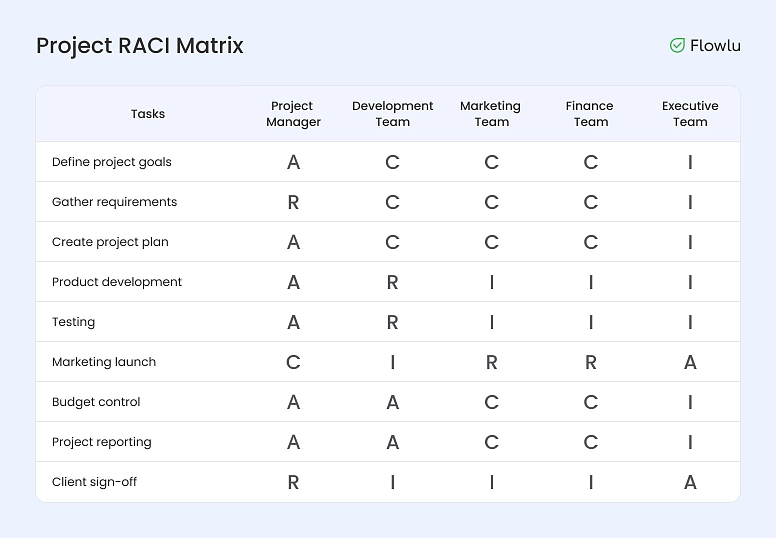
The RACI chart definition describes how roles and responsibilities are assigned to tasks so everyone knows who is responsible, accountable, consulted, and informed.
Every project involves roles, tasks, and expectations. When these aren’t clearly defined or understood by the team, confusion sets in. Team members start shifting responsibility, tasks fall through the cracks, and people lose sight of how their work contributes to the outcome.
Managers face their own challenges in this situation. Planning becomes harder, resources are misallocated, and performance is difficult to assess. From the outside, it’s often impossible to tell who owns which decisions, who is expected to deliver results, and who is simply present without real accountability.
The RACI matrix addresses this problem directly. It’s a simple table that maps project tasks to specific roles, showing how responsibility is distributed across the team. The framework makes it explicit who is responsible, who is accountable, who should be consulted, and who needs to be kept informed at each stage of the project.
RACI matrices are typically created during the planning phase and used as a reference throughout the project lifecycle. When applied consistently, they reduce ambiguity, improve coordination, and make responsibility visible—both for the team and for leadership.
RACI Chart Components Explained
In a RACI chart, the acronym stands for Responsible, Accountable, Consulted, and Informed. Let’s take a closer look at the RACI acronym and what each role represents in a project.
|
Letter |
Role |
Meaning |
What They Do |
How Many per Task |
Communication Style |
|
R |
Responsible |
Executor |
Performs the actual work and completes the task |
At least 1 |
Two-way: receives and provides information |
|
A |
Accountable |
Owner |
Approves the work, oversees execution, and is ultimately responsible for the outcome |
Exactly 1 |
Two-way: receives and provides information |
|
C |
Consulted |
Advisor |
Provides input, expertise, or feedback but does not execute the work or own the result |
Any number |
Two-way: receives and provides information |
|
I |
Informed |
Observer |
Is kept up to date on progress but does not participate in execution or approval |
Any number |
One-way: receives information |
This section explains the RACI chart meaning in practical terms, not just as a theoretical responsibility model.
The RACI model includes just four roles. One person can take on a single role or combine several at once—for example, acting as both Responsible and Accountable for a task. If someone doesn’t have a role in the RACI matrix, they’re not actually part of the project.
This often leads to an unexpected insight. A project team might formally include eight people, but once responsibilities are mapped in a RACI chart, it becomes clear that six are enough. In that sense, the responsibility matrix isn’t only about assigning tasks—it’s also a tool for optimizing processes and team structure. It helps teams simplify work that might otherwise drag on for days or even weeks due to excessive coordination, approvals, and revisions.
When building a project plan, RACI doesn’t have to stand alone. It works well alongside other project management tools, such as:
- Kerzner’s Triangle to balance scope, timeline, and cost;
- task decomposition to break complex work into manageable units;
- a roadmap to define milestones and sequence activities;
- a Gantt chart to visualize tasks and track progress over time.
Why Use a RACI Chart? Key Benefits
Clear responsibility matters to everyone involved in a project—not just the manager. It affects day-to-day work for individual contributors, decision-making for team leads, and visibility for stakeholders. Still, the RACI model is usually created by the person leading the work: a project manager, department head, or the leader of a self-organizing team.
In practice, a RACI matrix helps managers:
- deliver projects on time;
- prevent tasks from being left without an owner;
- clearly define roles and responsibilities across the team;
- get results from a single Accountable owner;
- speed up decision-making;
- optimize internal processes;
- balance workloads more effectively;
- improve communication within the team.
Because the RACI matrix is both a planning and control tool, it’s useful at every stage of a project. Forgot who owns a task? Check the RACI table and look for the Responsible role. Not sure who approved the latest changes? The matrix will show whether that input came from someone Accountable or Consulted.
To illustrate how this works in practice, consider a sports analogy. Imagine two games: hot potato and volleyball. In both cases, players hit or pass a ball—but the similarities end there.
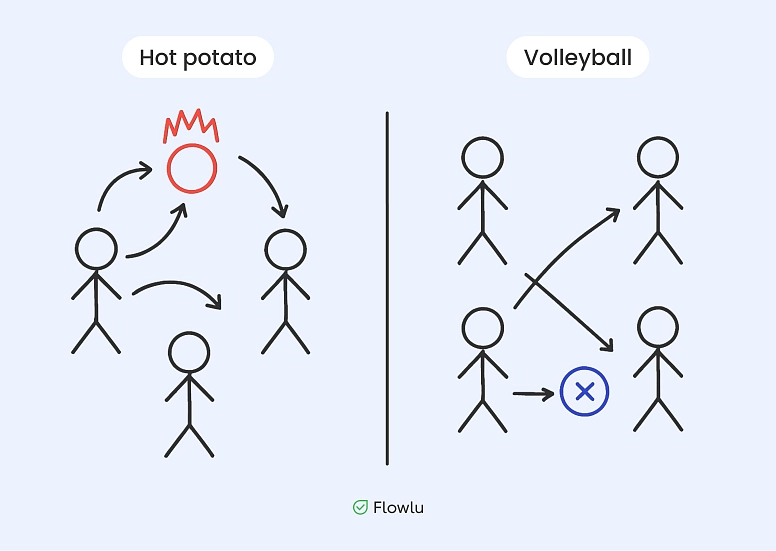
In hot potato, everything is chaotic. The ball lands wherever it happens to land, and whoever catches it is suddenly responsible. That’s what poorly structured projects look like: tasks are passed around randomly, skipped entirely, or handled in isolation. If a task ends up in your hands, you’re on your own.
Volleyball works differently. Roles are defined in advance. Each player knows their position and responsibility on the court. Together, they function as a coordinated team, and the result belongs to everyone.
That’s why companies use the RACI matrix: to run projects like a professional team, not like a pickup game in the yard.
RACI vs. Other Responsibility Models
RACI isn’t the only way to define roles and accountability in a project. Depending on how decisions are made, how teams collaborate, and how work is tracked, other models may be a better fit—or a useful complement. Below is a practical comparison of RACI with several commonly used frameworks.
RACI vs. DACI
DACI is often used in decision-heavy environments, especially in product and executive teams. While RACI focuses on task ownership and execution, DACI is designed specifically for decision-making.
The key difference lies in emphasis. RACI clarifies who does the work and who owns the result. DACI clarifies who drives a decision and who has the final say. In practice, DACI is useful when decisions stall or ownership is unclear at the approval stage, while RACI works better for ongoing project execution.
Many teams use both: DACI for major decisions, and RACI for day-to-day task responsibility.
RACI vs. RASCI
RASCI is an extension of RACI that adds a Support role. This role represents people who actively help complete the work but are not responsible for delivering the outcome.
The advantage of RASCI is greater precision in complex or cross-functional projects, where support work is significant and needs to be acknowledged explicitly. The downside is added complexity. If overused, the extra role can blur responsibilities rather than clarify them.
For smaller teams or straightforward projects, classic RACI is usually sufficient. RASCI makes more sense when support contributions are substantial and recurring.
RACI vs. RAM (Responsibility Assignment Matrix)
RACI is, technically, a specific type of Responsibility Assignment Matrix. A RAM is a broader concept that refers to any table mapping tasks to roles or people.
The difference is structure. RACI provides a standardized set of roles with clear rules, which makes it easier to align expectations across teams. A generic RAM offers more flexibility but less consistency, and its effectiveness depends heavily on how well the roles are defined.
Teams that need a common language around responsibility often prefer RACI, while highly customized workflows may rely on a more tailored RAM.
RACI vs. Gantt Chart
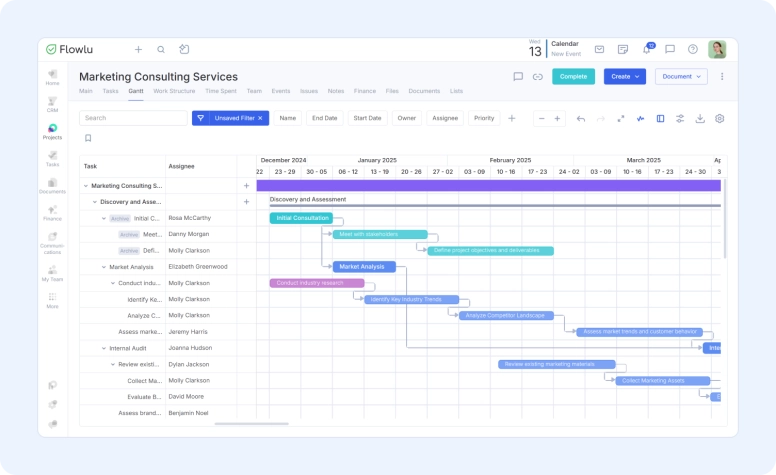
A Gantt chart and a RACI matrix solve different problems. A Gantt chart shows when work happens and how tasks depend on each other. A RACI matrix shows who is responsible for each task.
Used alone, a Gantt chart can leave ownership unclear. Used alone, a RACI matrix doesn’t show timelines or dependencies. Together, they complement each other: the Gantt chart provides structure and timing, while RACI ensures accountability.
That’s why many teams use both—one to manage schedules, the other to manage responsibility.
How to Create a RACI Chart (Step-by-Step Guide)
Now to the practical part: building a RACI chart. At its core, it’s a simple table that almost any team can put together. That’s why the RACI framework is used both in large organizations and in small, short-term projects.
In practice, creating a RACI chart comes down to a few steps: defining tasks, identifying roles, assigning R/A/C/I, reviewing the matrix, and keeping it up to date as the project evolves.
This step-by-step guide shows how to make a RACI chart and how to fill out a RACI chart without overcomplicating the process.
Let’s start with the basic tools.
Excel or Google Sheets
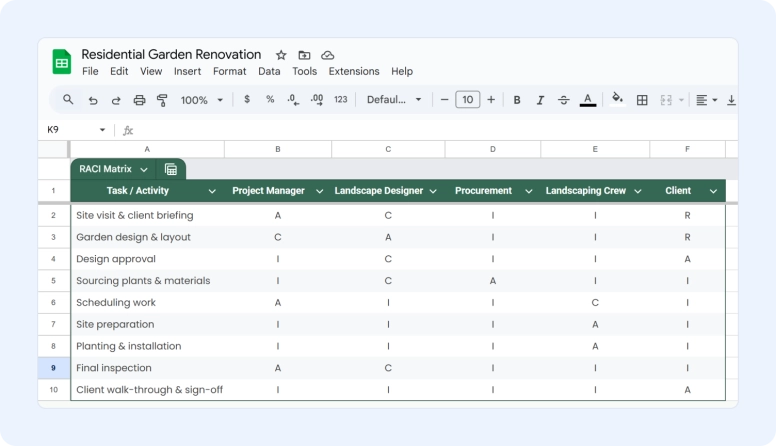
Many teams start with a simple RACI chart template in Excel or Google Sheets for project management and adapt it as the project evolves. This approach requires no special skills—and with Google Sheets, it’s free.
A RACI matrix is always a table. Team members go across the top, tasks run down the left side, and each intersection shows the assigned role. For example, a landscaping agency might use a RACI chart to map out who designs the plan, sources materials, plants greenery, and approves the final result.
One practical recommendation: whenever possible, assign roles to positions rather than individuals. If Alex, the gardener, goes on vacation, another gardener can take over the task. If the Informed role belongs to the client’s representative, the update can go to either the director or their deputy.
That said, for small teams or short projects where availability is predictable, assigning roles by name can be perfectly reasonable.
Two rules still apply:
- a task can have multiple Responsible roles;
- it must have only one Accountable owner.
Where Spreadsheets Fall Short
For large or long-running projects, RACI matrices in spreadsheets can become hard to manage:
- every task and role has to be entered manually;
- with many tasks or participants, the table quickly becomes unwieldy;
- the matrix only contains task names — detailed descriptions still live in a task tracker;
- as projects evolve, roles change, and updating the table can be time-consuming.
To avoid these limitations, teams often connect RACI logic to their existing workflows using dedicated software. That way, all project information lives in one place, and the team doesn’t have to switch constantly between documents, trackers, and communication tools.
For example, roles can be assigned at the task level in a project management system like Flowlu. To achieve this, you create a project, add team members, and set up tasks.
Each task allows you to define roles directly:
- Assignee and collaborators—team members who carry out the work. In RACI terms, these correspond to R and A;
- Followers—people who are interested in the outcome and may provide input or feedback. These map to I and C roles;
- Task owner—the person who can change roles, add participants, and adjust task settings.

If roles or ownership need to change mid-project, the system handles communication automatically. All participants are notified of updates, so there’s no need to message each person individually. Team members stay informed about progress in real time: when the task owner updates the status, the creator sees it immediately; when someone leaves a comment and mentions a colleague, that person receives a notification.
At any point, tasks can be filtered by role to see who is responsible for what across the project.
For day-to-day project work, Flowlu also includes tools like Gantt charts, templates, and budgeting features. This allows teams to track finances, timelines, resources, and responsibilities in one place—from planning through execution.

RACI Chart Examples
Examples help translate the RACI framework from theory into practice. Below are a few common scenarios showing how roles can be assigned depending on project type and team structure. Each RACI chart example below shows how responsibility can be assigned in different project management scenarios.
Simple RACI Chart Example
This example shows a small internal project with a limited number of participants. This example shows how the framework works in a small team with clearly defined roles.
Scenario: Preparing a company presentation
|
Task |
Manager |
Designer |
Analyst |
|
Define goals |
A |
C |
R |
|
Create slides |
C |
R |
I |
|
Review content |
A |
C |
R |
|
Final approval |
A |
I |
I |
This type of matrix works well for short projects where roles are clear and communication lines are short.
RACI for Project Management
In larger projects, responsibilities are often spread across multiple roles.
Scenario: Launching a new internal system
|
Task |
Project Manager |
Tech Lead |
Team |
Stakeholders |
|
Project planning |
A |
C |
I |
I |
|
System setup |
C |
A |
R |
I |
|
Testing |
I |
A |
R |
I |
|
Go-live decision |
A |
C |
I |
I |
Here, the RACI matrix helps avoid confusion during handoffs and decision points, especially when multiple teams are involved.
RACI for Product or Software Teams
Product and software teams often deal with overlapping responsibilities and frequent collaboration.
Scenario: Releasing a new feature
|
Task |
Product Manager |
Developer |
QA |
Marketing |
|
Define requirements |
A |
C |
C |
I |
|
Development |
I |
A |
R |
I |
|
Testing |
I |
C |
A |
I |
|
Release communication |
C |
I |
I |
A |
In this case, RACI clarifies ownership without slowing down collaboration, which is especially important in fast-moving teams.
How to Use These Examples
These examples are not meant to be copied verbatim. Use them as a starting point:
- adjust roles to match your team structure;
- keep one Accountable owner per task;
- revisit the matrix as the project evolves.
A RACI chart should reflect how your team actually works—not how it looks on paper.
RACI Chart Best Practices
These RACI chart best practices help teams apply the framework consistently across projects. A RACI matrix doesn’t need to be complex to be effective. In practice, a few simple rules make the difference between a useful tool and a decorative table.
One Accountable per task
Every task should have exactly one Accountable owner. This isn’t about hierarchy—it’s about clarity. When ownership is shared, decisions slow down and responsibility becomes ambiguous. One owner keeps execution and outcomes aligned.
Don’t overload tasks with Responsible roles
Multiple Responsible roles make sense for straightforward, parallel work. For anything complex or creative, too many executors usually lead to coordination issues. If a task requires several contributors, it’s often better to split it into smaller steps with clear ownership.
Make the matrix easy to read
A RACI chart should be understandable at a glance. If the table is overloaded with roles, symbols, or participants, it stops serving its purpose. Clear structure and occasional empty cells are a sign of focus, not a lack of detail.
Automate where possible
Manually maintaining a RACI matrix works for small projects, but it becomes fragile as scope grows. When roles are linked directly to tasks in a project management system, updates, notifications, and visibility happen automatically. Tools like Flowlu allow teams to assign roles at the task level and keep responsibility aligned with real work—not static tables.

How to Avoid Common RACI Mistakes
For a RACI matrix to actually work, it’s important to avoid a few common pitfalls.
1. Too many Informed and Consulted roles
The more people involved in each task, the longer approvals and updates take. Everyone needs to be notified, feedback has to be collected, and decisions slow down. The result is unnecessary bureaucracy that consumes time without adding value.
2. More than one Accountable owner per task
When several people are accountable, responsibility becomes fragmented. Owners may disagree, priorities conflict, and executors don’t know whose direction to follow.
3. Team members without any R or A roles
If someone isn’t Responsible or Accountable for at least one task, it’s worth questioning whether they need to be part of the project team at all. This doesn’t apply to stakeholders—they may reasonably appear only as Consulted or Informed.
4. Too many executors on a single task
For simple, repetitive work—like unloading materials—this isn’t a problem. But for complex, multi-step, or creative tasks, too many executors create confusion. In these cases, it’s better to break the work into smaller tasks and assign clear responsibility for each stage.
5. R and A always assigned to the same person
Occasionally this makes sense: the person doing the work also owns the result. This approach works in very small teams of three or four people. In larger teams, separating execution and accountability usually leads to better coordination.
6. No empty cells in the matrix
A matrix filled entirely with roles is often a sign of overengineering. Excessive observers and advisors add noise without contributing meaningful progress.
7. Combining roles with Informed (I)
Roles like A/I, R/I, or C/I don’t work in practice. An Informed participant receives updates but doesn’t influence decisions or execution. Combining this role with others blurs its purpose.
RACI matrices are a practical project management tool. A basic version can be created in 5–10 minutes, and even a high-level view quickly shows who is overloaded and who is involved in only one or two tasks. Used consistently, a responsibility matrix helps teams plan, balance workloads, and always know who owns which part of the work.
Use a RACI chart when a project involves several people and responsibilities aren’t obvious. It’s especially useful when tasks are shared across teams, approvals take time, or decisions tend to get stuck. For very small or one-person projects, a RACI chart is usually unnecessary.
The Responsible role does the work. The Accountable role owns the result. There can be several people responsible for completing a task, but there should always be only one accountable owner. This makes it clear who has the final say and who answers for the outcome.
A RACI chart should be updated whenever something important changes: project scope, priorities, team members, or decision-making authority. It’s not a one-time document. Treat it as a reference that evolves along with the project, not something you create once and forget. In short, a RACI matrix chart is most effective when it stays connected to real project work and is reviewed regularly.