Pasley Commercial Interiors is a woman-owned, NCIDQ-certified commercial interior design firm that pairs business branding with turnkey design. One of their projects, Story Coffee Company, was featured in Architectural Digest’s 2018 roundup of the most beautiful coffee shops in the U.S., which reflects the level of their work.
Their clients are Colorado entrepreneurs and closely-held businesses. They are often growth-focused owners in industries like Medical Aesthetics, Hospitality, and F&B.
That pairing of brand and physical space creates a special kind of complexity: clients need to make high-stakes decisions quickly, without being design experts. They also need help visualizing outcomes and staying confident in choices.
So Pasley Commercial Interiors’s job is not only designing spaces. It is guiding decision-making, communicating clearly, and keeping many moving parts aligned.
The problem: too many moving parts and no single place to look
Before Flowlu, Pasley Commercial Interiors ran operations across separate tools for project management, client communication, and design collaboration. The setup did the job, but it required constant switching and extra follow-up to keep everything aligned.
As the firm grew, a few friction points kept showing up:
Multiple projects running at the same time
Client communication spread across different channels
Proposals and invoicing that needed tighter coordination with delivery
A team that needed a clear next step, without hunting through several apps
As H.B. Pasley, Chief Operations and Branding Officer at Pasley Commercial Interiors, put it, using several separate tools made it harder to keep work in one place and clearly see how projects were moving.
What they needed: one place for pipelines, projects, and SOPs
Pasley Commercial Interiors evaluated several project management tools, and none checked the right boxes for them.
Some platforms felt too complex for the team to use consistently. Others did not match how their projects actually run. And most platforms treated SOPs as “something separate,” not something the team can use inside tasks while work is happening.
So they kept the checklist simple:
Sales pipelines and project delivery in one place
Ease of use for the whole team
Team communication built in
Gantt-style planning for managing multiple projects
Scalability as the firm grows
SOP and playbook support inside the same system
The selection process involved the CEO, the Sales Team, and the Project Managers.
Why Flowlu: one place beat a long feature list
Flowlu won for one simple reason. It let them bring their operation back into one system.
That meant leaving behind tools that had become “parts of the process” instead of the process itself:
Dropbox Paper for SOPs
Slack for internal messaging
Pipedrive, which felt expensive and complicated for their needs
Flowlu gave them one home for pipelines, project work, team communication, and their knowledge base. Flowlu also solved a key need for them: transactional emails through their IMAP email servers, so key client communication could live in the same place as the work. Pasley Commercial Interiors also called out Flowlu support as a real differentiator, especially the hands-on help during migration.
They were very generous in helping us migrate, and this is one of the best parts of Flowlu: you can reach humans. They really will help you. It doesn’t feel like talking to a support team separated from the product team. It’s more boutique.
H.B. PasleyChief Operations and Branding Officer at Pasley Commercial Interiors
Over time, they found one more thing Flowlu could handle for them. It turned out that they could move their annual and quarterly goal system into Flowlu’s Agile module and track weekly progress there.
Implementation: a careful rollout
H.B. Pasley shared that they moved into Flowlu in stages, not all at once.
Data migration: It took several months to get their old CRM data showing up correctly in Flowlu. A lot of it had to be handled manually, and the Flowlu team helped them through it.
Adoption: The team got comfortable with the core features in a couple of months. The team found Flowlu interface easy to get around, and the onboarding materials helped them get up to speed. They intentionally kept the pace slow so they would not overwhelm everyone by changing everything at once.
Approach: They rolled Flowlu out one department at a time, which gave people room to learn and kept the transition calm.
That pace was intentional. Speed was not the priority. It was stability.
During implementation, we worked closely with H.B. on the end goal and migration plan. Most of the work went into transferring client and company data and setting up the fields they needed. We also shared recommendations for email setup and automations to support their workflow.
EugeneFlowlu Customer Success
What changed: easier to see what’s happening and what’s next
After adopting Flowlu, their main workflows lived in one place, and the team felt the difference in everyday work.
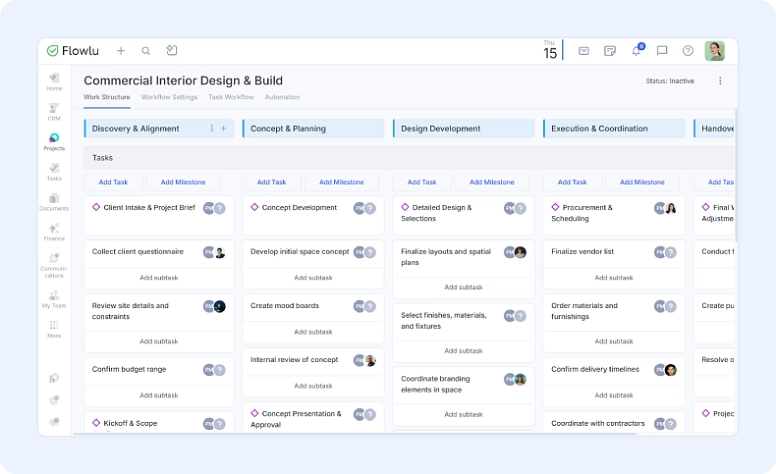
Projects became easier to follow, with a clearer structure and better progress tracking. Team conversations stopped living in a bunch of different places. Client communication stayed more consistent across a long, multistep process. And the team had a clearer view of deadlines and deliverables, without needing to chase updates.
They are also continuing to expand how they use Flowlu. After three quarters in Flowlu, they are planning a broader rollout of Documents for client-facing proposals and contracts
The real key for us is that Flowlu is helping us focus on our main priority: offering a seamless customer experience without gaps and hiccups in our very long sales and service process.
H.B. PasleyChief Operations and Branding Officer at Pasley Commercial Interiors
What they use in Flowlu today
Sales Pipelines and Contacts: Keeps leads, follow-ups, and client details in one place from first call to signed work.
Project Workflows: Runs each design project with clear stages, tasks, milestones, owners, and next steps.
Workflow Automation: Handles routine handoffs and reminders so nothing slips during long projects.
Task Tracking: Breaks work into clear tasks with due dates, notes, and responsibility.
Knowledge Base: Stores SOPs, checklists, and standards the team uses while delivering projects.
Team Chat: Keeps internal questions and updates tied to the work, instead of scattered across apps.
Dashboards and Reports: Gives quick visibility into project status, workload, and what needs attention.
Advice from Pasley Commercial Interiors
If you are planning a move to Flowlu, these are the three steps Pasley Commercial Interiors recommends to keep the rollout calm and organized.
Plan the migration with support first: Book 1:1 sessions before you move data. Map out what goes where, then migrate with a clear plan.
Train regularly in the first 90 days: Schedule recurring sessions with support for hands-on training. It is much easier to build good habits early than to fix them later.
Start with a simple sales or nurture pipeline: Set up the basics first. It helps you understand how Flowlu handles communication, tasks, automations, and reporting so everything else clicks faster.
Closing: the outcome they care about most
For Pasley Commercial Interiors, Flowlu helps keep their work organized in one place while they manage a long sales and delivery process. The team can see what needs to happen next, stay aligned internally, and keep client work moving without bouncing between tools.
Want to try Flowlu in your business for free? Create your Flowlu account, start your 7-day trial, and set up your first pipeline and project. And if you want a hand getting started, feel free to reach out and book an implementation session to speed up your data and workflow migration.