Online Project Task Tracking and Milestone Monitoring for Better Delivery


Quick answer
Scope creep and miscommunication are easy to run into on any complex job. One of the things that can help you pull it off is using a project tracker.
This tool is designed to keep the entire team on the same page, keep operations under control, and inform stakeholders about all the important steps. You'll be closely monitoring tasks and milestones to prevent the project from falling behind.
What project task tracking should show
The best tools work for both your team and your stakeholders. Keep in mind, though: your staff needs to see all the operational details, while stakeholders only need a broader overview.
To cover both on the same task tracking software, it needs to include these components:
#1. Owners
The software should clearly identify the person responsible for each task—this is the primary owner. Every item on the board needs one. You may then add collaborators or contributors where it makes sense.
#2. Due dates & timeframes
Each activity needs a start and end date, milestone indicators, and overdue alerts. Proper due dates are what turn a list into an actual plan.
#3. Statuses
This is what indicates operational progress. There are two types:
- Standard workflow: To Do, In Progress, In Review, Done.
- Custom ones: depending on your industry. For example: Blocked, On Hold, or Design Approved.
#4. Priorities
While priorities are sometimes obvious, defining them explicitly is important to make sure everyone knows what really matters. Use a clear hierarchy that's easy to follow, or visual coding if you prefer. It not only boosts productivity but also reduces team stress.
#5. Dependencies
It's rare to have a task that stands completely on its own—which is why tracking them matters. Dependencies help you prevent bottlenecks before they form.
Use tools like Gantt charts or a timeline to map them visually, or go with a finish-to-start model where task B can't start until task A is completed.
#6. Comments
When someone opens a task, they should see a comments section that supports @mentions and any discussion directly related to that work.
#7. Attachments
These may include requirements documents, design files, spreadsheets, copy text, or anything else you want to keep close to each task.
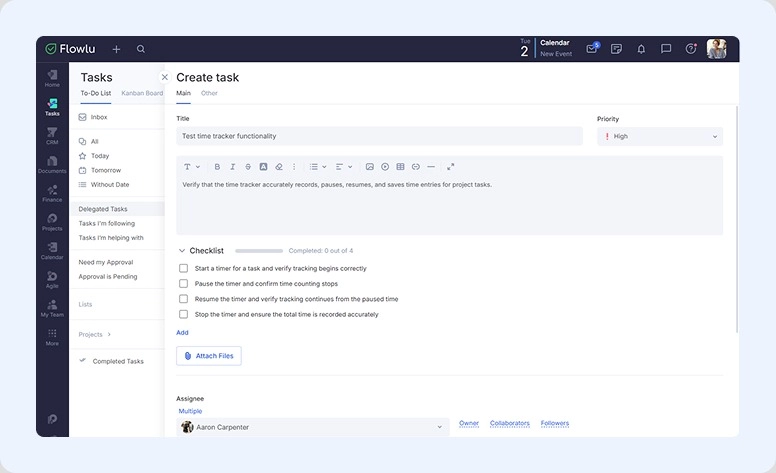
All these elements are included in Flowlu. On top of that, when creating a task you can add more details: write a description, apply a tag, set a specific time for completion in hours and minutes, add subtasks, and put together a checklist.

How milestone tracking helps control delivery
When looking for online task tracking software, make sure it supports milestones. They signal whether you're heading in the right direction or already falling behind.
Milestone logic
Think of project milestone monitoring as a zero-duration event that marks achievement. It usually signals the end of one major phase and the start of the next.

Measurable checkpoints
You can talk about percentage of completion for tasks, but not for milestones. They can only be hit or missed.
Early warning signs of delivery failure
Milestones are also your earliest signal that something's going wrong. If one isn't being hit because previous tasks keep slipping, that's your cue to check whether the team has the capacity to finish on time. Unresolved blockers at this stage are usually what quietly push a delivery off track—and they're much easier to deal with early than after the fact.
Delayed tasks
Sometimes a milestone is missed simply because of task delays. When that happens, figure out where to apply pressure.
Take a close look at what's delayed. Identify what's causing the holdup and what's preventing completion. Once you've pinpointed the issue, reassign or redistribute the work. Then bring stakeholders up to speed—together you can decide whether to extend the delivery window or scale back the requirements.
Online project tracker vs. spreadsheet tracking
So, what should you use for tracking?
|
Project tracker |
Spreadsheet |
|
|
Visibility |
Multidimensional—Calendar, Kanban, List, Gantt charts |
Flat and linear |
|
Updates |
Smooth, with safeguards against accidental data loss |
Easy to overwrite data and break formulas |
|
Collaboration |
Active—file attachments, @mentions, inline commenting |
Passive—even simultaneous editing has no contextual chat |
|
Automation |
Native and intuitive |
Complex and fragile—tends to break |
|
Reporting |
Dashboard with real-time updates |
Time-consuming—charts and pivot tables need manual setup and refreshing |
When a spreadsheet is actually enough
The table above may tempt you into ditching spreadsheets entirely. But there are situations where they're the right call:
#1. Your team is small
If it's just you or a team of two, a spreadsheet is a perfect fit. There's no learning curve.
#2. The project is short & linear
For something like an office move or a basic event checklist, a simple table is faster and easier.
#3. Your budget is zero
Spreadsheets are always more cost-effective than dedicated trackers.
#4. You need extreme financial customization
If you're doing financial modeling, working with custom formulas, or running complex budget calculations, spreadsheets still win here.
Best practices, checklist, and tools
How to set up your task tracker: 5 steps
Step #1: Set the task status
Most managers go with labels like "To Do," "Doing," and "Done." That works fine for most projects, but some will need more specific stages.
Flowlu lets you fully customize your workflow: add stages, rename them, use your own terminology or the defaults, go classical or switch to Agile.
Save your most-used setups as templates so you don't have to rebuild from scratch each time.
Step #2: Custom fields & parameters
The ability to customize data to fit your needs and your industry is one of the main advantages of using an online task tracking tool. Use what makes sense for your team—don't overcomplicate it.
Step #3: Build templates
Every project has repetitive processes. Identify them first, then build templates to automate the setup.
Step #4: Configure key automations
This is when you set up the simple "if/then" automations that free your team from manual busywork—things like automatic notifications when a task status changes or a due date is approaching.
Step #5: Onboard the team & set expectations
Invite everyone to the workspace and walk them through it. Also take time to align on the ground rules for communication and comments—this pays off quickly.
What a healthy tracking system looks like
A solid online task tracking system is a great foundation. But it won't run itself if you're not checking in on operations every week. To keep things on track, build these habits:
- Name tasks properly: Use a verb and a noun. Instead of "Budget," write "Draft Q2 marketing budget."
- No unscheduled work: Every activity needs a start and end date. Without one, it drifts in the backlog indefinitely.
- One owner: Avoid multiple assignees. Each task needs a single owner who's accountable.
- Centralize information: When someone opens a task, everything should be right there: attachments, reference links, relevant conversation history.
Selecting the right tool: Flowlu
There are plenty of solid options on the market, and Flowlu is one of them.
It covers all the steps above to keep team activities organized and trackable. The platform lets you:
- Customize your workflow with task status, priority, tags, description, assignee, followers, collaborators, timing, and more
- Add custom fields and parameters for opportunities, contacts, finances, and more
- Build templates for tasks and projects, or convert an existing project into a reusable template
- Set up automation rules: send notifications, create new tasks, add comments, archive items, and more
- Prepare onboarding materials in the Knowledge Base—your company's internal wiki
What's more:
With Flowlu you can handle all your tracking in one place, across multiple project views including Kanban boards and Gantt charts. It also comes with a full CRM, plus integrated finances, so you can create and send invoices, prepare estimates, track billable hours, and pull multiple reports, all without leaving the platform.
Get your project tracking right
When it comes to tracking tasks and delivery, the right tool genuinely makes a difference. But what matters most are the habits and accountability within your team.
Make sure the right people own each activity so work gets completed on time, with the right resources and everything delivered as planned.
When you have clear task ownership and measurable milestones, your tracker becomes more of a roadmap than a checklist. That's exactly what it should be. As the manager in charge, you take the information it surfaces and adjust resources to prevent bottlenecks and delays.
Pick the right tool for the job—something like Flowlu. With a wide range of features you can use as much or as little as you need, it works just as well as a simple online project tracker as it does a full-scale management platform.

FAQ
It's the process of continuously monitoring every aspect of what's being delivered. Using the right tool keeps the whole team on the same page and gives you a much better shot at a successful delivery.
Flowlu is a strong option for tracking milestones online. It lets you monitor everything across multiple views—Kanban boards, Gantt charts, and timelines.
It can be, but it depends on the work. For short, linear projects with small teams, it may be more than enough.
On a fast-moving project, you don't want to review them too frequently — that risks micromanaging. But waiting too long may leave you with no room to course-correct before the deadline.