Sprint Retrospective and Sprint Review: Meaning, Process, and Key Differences


Quick answer
You probably already know the retrospective as one of the Scrum framework ceremonies. Think of it as a space where the team reflects on how they're working together. This isn't about figuring out who is responsible for what; it's the moment to focus solely on what can be improved.
The review has a different purpose. It centered not on the team's growth, but on the product increment.
Both practices are a good way for Agile teams to constantly improve their processes. They help ensure that everyone enters the next sprint working more efficiently.
What a sprint retrospective is
This agile ceremony occurs every time a sprint ends, and it serves for the team to determine what they managed to do. Its main goal is to ensure that the next sprint goes better, smoother, and without any unexpected events.
Unlike what you may think, this meeting doesn't serve to point fingers. Actually, it is quite the opposite since pointing fingers won't do any good for the project or the team. The goal is to achieve continuous improvement.
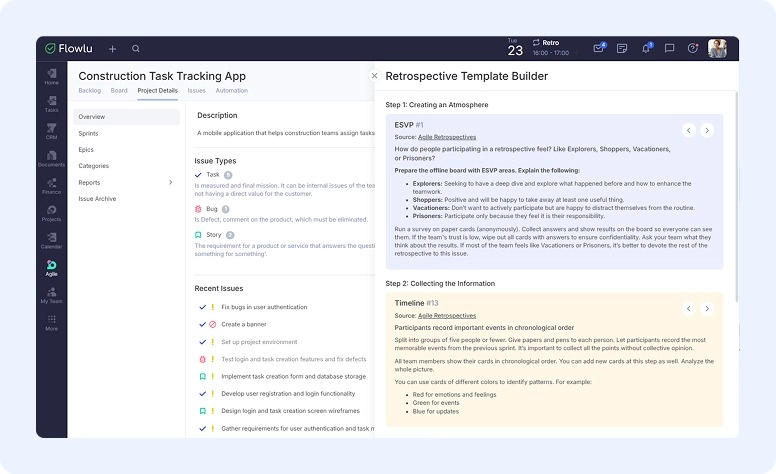
Running retrospectives consistently is what makes them effective. A project management tool like Flowlu can help you keep everything in one place — from tracking priorities to managing your next sprint. It also has a retrospective template builder where you can try a pre-made template to run a successful meeting.

The participants
#1: Scrum master
He is the person responsible for the meeting and maintaining it focused on improvement. In many teams, this role is also referred to as the facilitator.
#2: The developers
These are the main participants. They are the ones who will need to share their experiences regarding both what helped them succeed and what held them back.
#3: The product owner
This is the person responsible for stating how the collaboration went and clarifying the requirements.
The expected output
A retrospective meeting has the goal: when it ends, you come out with a list of action items that need to be improved in the next iteration. The last thing everyone wants is for this list to be vague. The output always needs to be actionable.
For example, instead of something like "Talk more on design," it should say something closer to "The product owner needs to add a link to all materials before the planning phase." (Owner: Peter).
Sprint review vs retrospective
Here’s a quick comparison:
|
Review |
Retrospective |
|
| Purpose |
"What"-focused. Checks the deliverable and collects feedback from stakeholders. |
"How"-centered. Looks at how the iteration went in terms of tools, processes, relationships, and people, and comes up with a plan for continuous improvement. |
| Audience |
Besides the scrum master, developers, and the product owner, participants also include management, customers, stakeholders, and users. |
Only core members participate in this ceremony. |
| Agenda |
The product owner starts by reviewing what was done, as the developers demonstrate the working product. Stakeholders are invited to give feedback, which the product owner takes into account for the next cycle. |
Everyone gathers and each member is asked what went well and what didn't. This gives the group material to brainstorm and decide on improvements for the next cycle. |
| Artifacts |
Product backlog → product owner. Sprint backlog → developers. Increment → Scrum team. |
A list of new priorities to kick off the next cycle. |
| Outcomes |
A new set of priorities for the next cycle to make it faster and smoother. |
A list of new actionable items to kick off the next cycle. |
| Examples |
Developing a guest checkout feature. During the sprint review process, developers show the screen and a demo. A stakeholder then states they need a newsletter opt-in checkbox before the user pays. Before the meeting ends, the product owner writes a new user story and adds it as a priority to the backlog. |
The meeting takes place later that afternoon. One developer mentions that while the demo went well, an issue with the API documentation cost the group two extra days. Another developer agrees and adds that they couldn't help at the time because they were occupied elsewhere. Everyone then works together on a new action plan based on these findings |
How to run an effective retrospective meeting
Step #1: Set context
Think of this step as a warmup — an icebreaker before the actual meeting. 5 to 10 minutes is usually enough to gauge the energy levels of all participants. You can either ask them directly or use an anonymous poll. Some also use fun retrospective games.
Step #2: Collect feedback
Ideally, this step takes between 10 to 15 minutes. Use it to gather feedback from everyone. There shouldn't be any analysis just yet.
You can use sticky notes if you prefer something physical, or a digital whiteboard like Miro. Make sure everyone uses the same format to share their feedback as part of the meeting agenda.
For example, the 4 Ls ("liked," "learned," "lacked," and "longed for") or the classic "what went well" and "what went wrong."
Step #3: Group insights
This is when you start identifying patterns. The step should take around 15 to 20 minutes. The goal is to spot trends across all the sticky notes collected. Cluster similar ideas together and let participants vote to surface the top 3 to 5 most pressing ones.
Step #4: Define actions
This is where the brainstorming happens. Keep in mind that you need to walk away with a list of actionable items. Not generic notes, but specific solutions to the problems you've discussed.
Step #5: Assign owners
The goal here is to make someone accountable so that nothing gets lost. 5 minutes should be more than enough to find a volunteer for each item.
Remind everyone that the person in charge isn't responsible for doing all the work — they're responsible for making sure the item doesn't get forgotten. Their job is to track it, push it forward, and report back at the next retrospective.
End the meeting with a written list of all actions and add them to your project management tool.
Questions, mistakes, and templates
Example sprint retrospective questions
Some teams just don't respond well to questions like "What went well?"
So, if your colleagues are like this, there are other ways to start a retrospective meeting.
Try asking other types of questions.
-
If you're looking to break the ice
Start with something like "Did you see anyone achieve a win this week? What was that?"
-
If you need to unblock questions related to processes
You may ask: "Can you tell me the most repetitive task you had to do in this sprint?"
-
If you're looking to discover risks you may run into in the future
Questions like "Did you take a shortcut in this sprint that you'll need to pay back later?" may be a good idea.
Common mistakes
#1: No real action
The main goal of retrospective meetings is to gather enough knowledge to come up with a clear list of improvements. So, don't spend the entire meeting focused on the problem; the vast majority of the time should be spent looking for and analyzing solutions.
#2: Pointing fingers
As we mentioned earlier, these meetings are meant to help teams keep improving team health. They're not meant to track who did what, when, or how long it took. So, just reframe questions to point at problems and not individuals.
#3: Too many actionable items
While the goal is clearly continuous improvement, you don't want to end the meeting with a list of 10 or 20 items. Make sure you leave with no more than 3 follow-ups.
#4: Not using the actionable items
To make sure they aren't forgotten, integrate these improvements into your workflow right away.
Your tracking checklist
The most important thing to do after a scrum retrospective is to add your new priorities to your project management software, so they aren't forgotten.
Follow the checklist below:
#1: Before you start
- Confirm whether the priorities from the previous meeting were completed and whether they fixed the problem.
- Use metrics such as escape defects, burndown charts, and velocity to determine what happened.
- Have the board ready to use (physical or digital).
#2: During the meeting
- Keep all discussions constructive.
- Assign each actionable item an owner and a due date.
#3: After you wrap up
- Add the action items to Flowlu (or your project management tool of choice).
- Review the action items in each daily standup.
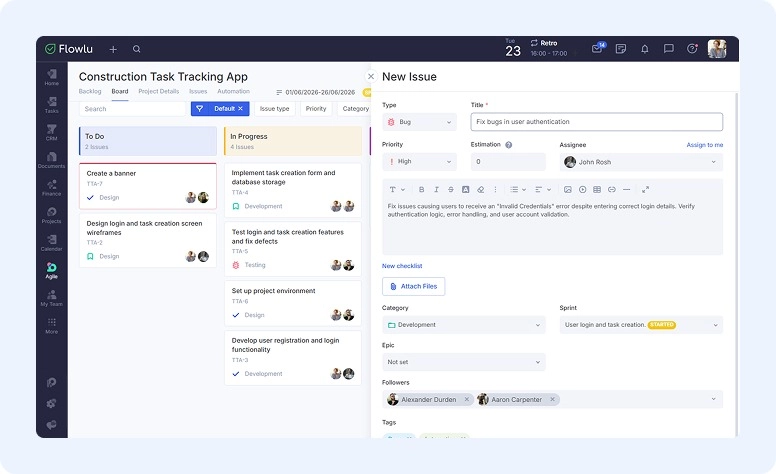
Flowlu is one of the strongest options for this. It has a purpose-built Agile environment where you can start sprints, schedule recurring retrospectives, and manage everything in one place. After the meeting, add your next steps, label each one by type — task, bug, or story — set a priority, and make them visible to the whole team. If the work spans more than one sprint, group it under an epic and link individual issues to it as you go.
As the sprint progresses, Flowlu automatically generates a Burndown Chart. This gives you a quick, clear picture of whether the team is on track to complete the sprint goal within the sprint timeframe.
Run sprints effectively
While a scrum retrospective is very important, you can't treat it as just a list of ideas jotted down and left to be forgotten. The whole point is to take what happened in the previous sprint and use it to improve the next one. If you don't execute, you're simply wasting time.
One of the most important things to remember about these meetings is that they are time-limited. Don't turn something that can be done in an hour into a 3 or 4 hour meeting. It won't be productive at all.

FAQ
It's an agile ceremony in Scrum. Its main goal is to understand what the team did well and wrong to improve in the next sprint.
It's conducted by the scrum master and the other participants include the developers and the product owner.
While there are different approaches you may take depending on your team, the most usual questions the employees will need to answer include:
- What went well?
- What went wrong?
- What can we do in the future?
In most cases (for an iteration that lasts 2 weeks), these meetings will take around 1.5 hours. However, the time they take depends on the number of days the sprint takes.
For example, if the sprint had 3 weeks, the meeting may last up to 2.25 hours. In the case the sprint only lasted 1 week, the retrospective should take 45 minutes max.