




Project Schedule Management for Teams That Need Predictable Delivery

Quick answer
In project management, it is not always easy to deal with time. Some keep thinking that it is a matter of lack of effort. But the reality is that preparing a schedule and running a timeline is difficult, and when you fail, you can’t point out one reason only.
Many teams also confuse these two frameworks. One helps with day-to-day work, while the other gives you control of the bigger picture.
In our article, we show how to:
- Define deliverables and milestones
- Break work into tasks
- Map dependencies
- Assign owners and resources
Read on to understand the key differences and learn how to turn setbacks into wins.
What makes a project schedule different from a timeline
Understanding timeline
It’s a visual tool that helps you get a macro view of the project. You may share it with executives, clients, and stakeholders since they only need to see the big picture.
This tool has very little detail. It focuses on the chronological sequence of tasks that need to be performed. That is why it is usually only a horizontal bar chart that is drawn and seen as a road.
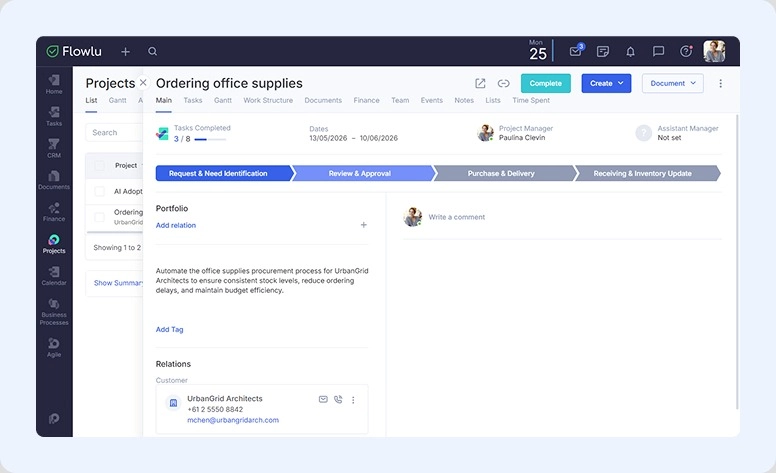
When you create a project in Flowlu, a horizontal bar gives you a one-glance view of all stages, overall timeline, and task progress.
Project schedule
Instead, it gets a micro view. You can see it as the backbone of your project because it details everything the team will need to do to complete it.
This is a very useful visualization for both the team and the manager. Here you can see execution, task dependencies, resource allocation, and tracking.
Because of its high level of detail, it’s usually represented by a Network Diagram, a Critical Path spreadsheet, or a Gantt chart.
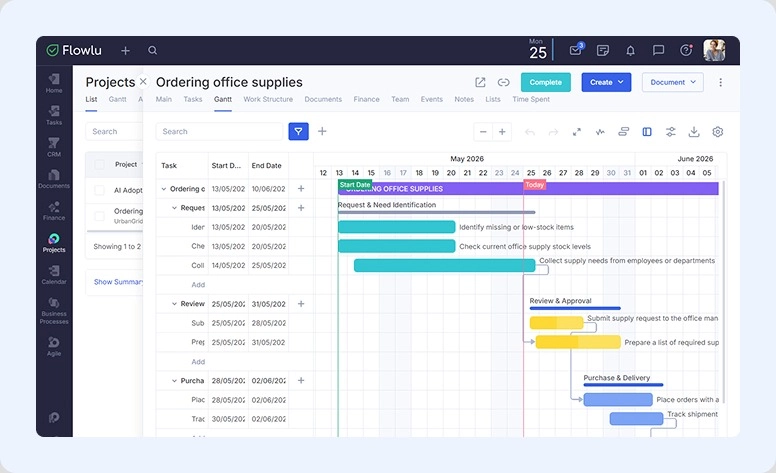
The same work but in detailed overview in Gant.
Why schedules may fail
There are five main reasons practice reveals:
#1. Effort is underestimated
When you ask your team to estimate the time a task will take, they usually tend to look at it as the “best-case scenario.” But the sad truth is that there are always unexpected things. Servers may crash, people get sick, or even a feedback loop may take longer than expected.
#2. Overlooking task dependencies
When this part is ignored, it is natural that a slight delay in A affects the beginning of B (that may not start until A is finished).
This can easily generate a domino effect where minutes of delay may turn into hours or even days as the project evolves.
#3. Overallocation of resources
While you might want someone on your team completely focused on a critical task, you can't expect them to juggle 2 or 3 critical tasks at once and maintain 100% efficiency.
#4. Scope creep without schedule adjustment
At some point, the client may want to add just a small feature. While the manager can accept it (and they usually do), they can’t forget to adjust the schedule.
#5. Set & forget
The project scheduling is a process. You can't simply use this document to plan and forget to keep updating it daily or weekly. If you don’t do this, the planner will be irrelevant.
All these issues can be prevented with dedicated platforms like Flowlu. You can quickly add and adjust dependencies, track them on visual charts, set priorities so specialists focus on the right tasks, and optimize workflows when unexpected issues arise.

Core elements of a realistic project schedule planner
This document combines what needs to be done with the different constraints, including human resources, time, and even logic.
To ensure that you don’t miss a thing, check the list below:
Foundational elements
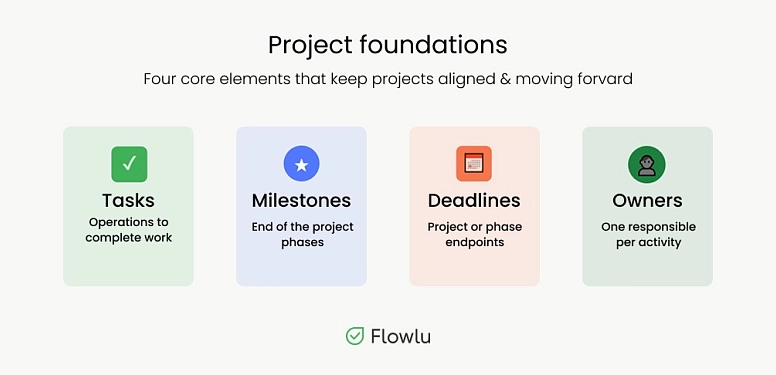
- Tasks: Also known as activities. They refer to all the operations employees need to do to complete the work.
- Milestones: These can either refer to major achievements or the end of a stage of your undertaking.
- Deadlines: The dates that are usually previously established. They can indicate the end of the whole project or a phase.
- Owners: Each activity has just one responsible person to avoid confusion.
The dynamic
- Dependencies: Tasks are usually dependent and related. Employees need to know which one to complete first so that another one may begin. For example, you can’t paint a wall (task B) if the wall isn’t built yet (task A).
- Critical path: It’s the longest sequence of operations that are dependent on a project and need to be completed to finish the job.
- Workload & resource leveling: Your team is made up of human beings, not machines. So if you expect someone to work 13 hours a day for two straight weeks just to hit deadlines, your schedule isn’t realistic.
The project schedule management process
Step #1: Define the activities
Not only pinpoint key assignments. Also identify the ones that can be broken down.
It helps you to measure, estimate, and track them properly.
Step #2: Set activity sequences
It’s quite rare to have independent operations that aren’t related to others. So, in this step, you’ll need to look at the project schedule dependencies and order them.
Step #3: Determine the resources & durations
Assign the responsible person. In addition, you’ll also need to determine how much time each stage will take.
Step #4: The schedule & the critical path
You already have all the tasks, dependencies, durations, and resources in hand. Finally, enter this data in your project management software. The goal is to identify the most important sequence of operations.
Step #5: Approve and baseline
Before you start doing anything, you should get this project schedule approved. It will serve as a reference point for measuring progress and delays.
All this project schedule management process is easy to implement in Flowlu:
- Create a project, for example, “AI Adoption”.
- Set up the structure by adding stages like “Research & Strategy,” “Implementation & Testing,” and “Rollout & Optimization.” You can add more or fewer stages depending on your workflow.
- Fill each stage with tasks (which you may turn into templates), checklists, and milestones.
- Check whether there is a most important sequence of activities. Open the project in the Gantt chart and click the corresponding button. If a task chain extends beyond the planned schedule, the system highlights it in bright pink.
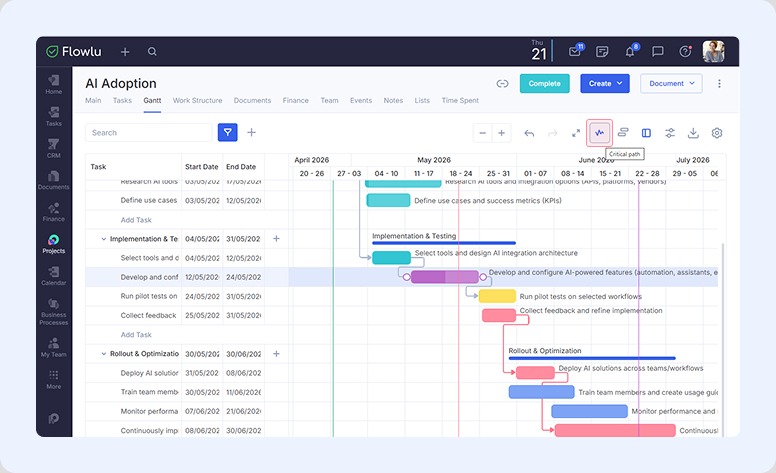
You can also require approval before a task is marked as completed and use automation rules.
How to keep the schedule realistic during execution
1. Use a strict change control process
Whenever a stakeholder or client asks for a “minor change,” don’t say yes immediately. Take the time to check your project schedule management document first to determine how exactly this change will affect the project schedule.
You may then present a trade-off to the client or stakeholder, stating that you may add the feature but it will delay the final delivery for XX days, for example.
Uncontrolled changes can waste resources and create business risks.
2. Keep the workload of the team on track
It’s important that you know, all the time, what each team member is doing and what is scheduled for them to do in the next few days. It’s common to discover that some employees are overloaded while others don’t have enough assigned work.
3. Keep track of what’s done
You can’t simply take the word of your team members. Some of them may tell you their work is almost done even if they’re only beginning it.
Make sure that you keep track of the actual progress. This will allow you to adjust the remaining schedule’s velocity.
Project schedule tools and online planners
What to look for in a project schedule planner
When you’re looking for a good online schedule maker, check if it delivers what you need:
Multiple views
Good software allows you to view your activities in different ways. These should include a Gantt chart, calendar view, list view, or Kanban board.
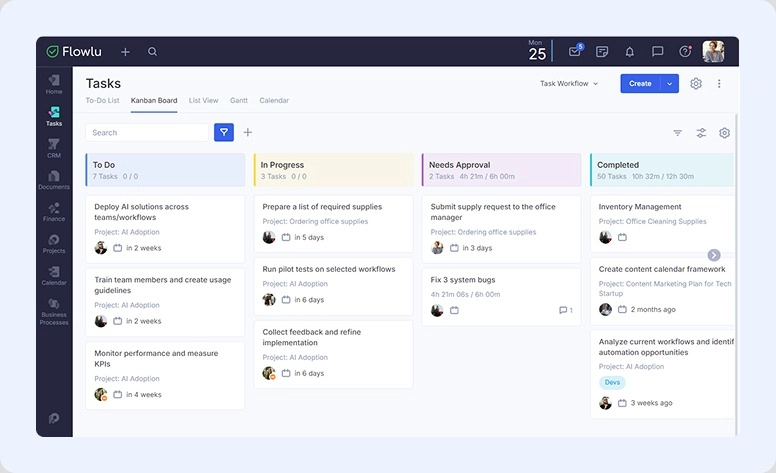
Establishing dependencies
It should have the capability to create dependencies.
Baseline capabilities
With a strong platform, you can capture a “snapshot” of the original schedule that you got approved so you can then compare it with the actual progress as the project advances.
Automated reminders & notifications
You should be automatically notified about:
- The other operations may begin after dependence is clear
- A deadline is approaching
- Any other event you may believe is necessary to be notified about.
Free online project schedule maker vs advanced scheduling software
Sometimes, you may not know exactly what to choose. The best thing you can do is to think about the project you have in hand:
Simple, small, linear
When you’re using a small team and it doesn’t have many dependencies, a simple platform may be just what you need. Besides the learning curve being low, you won’t be lost in features you won’t ever use.
Some examples of these tools include Todoist or Trello, and they’re usually a great option for internal team task tracking, simple product launches, event planning, and content calendars.
Complex, cross-functional, advanced
When you have a project that shares resources with others, includes sequential steps, and involves cross-functional teams, a simple system isn’t enough.
You need a tool that allows you to lock tasks behind mandatory approval workflows and flag when a team member is over-allocated. Also, it should automatically calculate the critical path.
Some examples of these online project schedule makers include Flowlu, Microsoft Project, Monday.com, or Asana. They’re tailored for portfolio management, construction, software development, enterprise-level campaigns, and complex integration workflows.
Common scheduling mistakes and how to avoid them
The 4 most common mistakes that cause project delays
1. The "100% resource capacity" myth
You can’t schedule staff to work 8 hours a day for 3 weeks in a row with full productivity. Keep in mind that everyone has other tasks in hand, such as answering emails, company meetings, administrative tasks, among others.
2. Underestimating testing, QA, and feedback loops
You should never allocate 3 weeks to complete the development and only one day for review and approval.
3. Relying on "the best" estimates
To determine how much a completion will take, you should ask the person responsible for it, but you shouldn’t totally rely on them. After all, they’ll usually give you a very positive estimate.
4. Vacations & national holidays
You just can’t forget about vacations and national holidays when you’re planning something.
Checklist for a healthier project schedule
Do a quick checkup before submitting:
- One owner per task: When it’s time to ask for a result, there should be a concrete person.
- The 80% rule: According to the Pareto principle, each employee involved should be scheduled for a maximum of 80% of their time daily. This ensures they can do all other routines as well without delaying the project.
- Clear predecessors: Map exactly what needs to be completed before the next step may begin. Don't forget to also look at float activities to see if you can fit them somewhere else.
- Review cycles: These show you whether everything is going as planned or not.
- Check the calendar: Include all holidays, events, or vacations in the schedule.
Deliver work on time
Well-organized projecting is crucial for a successful outcome. It’s not by chance that you achieve high results; it’s more a matter of keeping everything aligned and predictable.
Even though project planning is a very important tool, a schedule is what actually empowers your team to complete the work on time without burning out.
Remember that a schedule is never finished. It needs to be adapted as the project evolves.
With a specially designed platform like Flowlu, you can automate routine processes, simplify reporting, and always stay aware of progress achievements or unexpected twists in schedule management plans. Use modern technology’s power to run your business with minimal risks and maximum efficiency.

FAQ
It’s a document you create to organize and control all project-related activities and deadlines.
The first is a more useful tool for stakeholders and clients who don’t need to know all the details, while the second is a great tool for the manager and the team collaboration.
They allow you to know the order in which operations need to be completed. Besides, whenever there is a delay in a predecessor, it will automatically create a domino effect if you don't change or adapt the schedule.
Some of them include Flowlu, ClickUp, Asana, and TeamGantt. While simple free tools work well for basic planning, platforms like Flowlu are better suited for teams managing task dependencies, and complex project planning.