







CRM vs. Spreadsheets for Service Businesses: What Breaks First?


You know … It started innocently enough: a few leads, some client details, maybe a “next follow-up” column.
Then the business grew, and the CRM vs. spreadsheets trade-off started to matter.
Now there’s another sheet for active work. Someone made their own tracker. Client updates live in meeting notes. And AI has made it ridiculously easy to create even more spreadsheets whenever someone needs one.
None of them are necessarily broken. The cells still work.
The problem is how much work it now takes to keep them all telling the same story.
A CRM can fix that, but it can also introduce more process than you need.
So, forget which tool is “better.”
What breaks first as a service business grows — and which problems are worth switching systems to solve?
Let’s take a closer look at where spreadsheets tend to crack first, what a CRM should fix, and how to tell when it’s worth making the switch. ????
Highlights
- Spreadsheets work well until keeping them updated becomes a job in itself.
- AI can make spreadsheet sprawl worse, leaving client information spread across more places.
- Service businesses usually feel the strain at handoffs, especially when a client moves from sales into delivery.
- A CRM earns its keep when it connects the client relationship to the work that follows, rather than becoming another system to maintain.
CRM vs. spreadsheets: What’s the difference?
Both spreadsheets and CRMs can store customer information. The difference is what happens around it:
- A spreadsheet records the information.
- A CRM connects it to the people, conversations, follow-ups, sales stages, and workflows around it.
You can build a spreadsheet to track almost anything. The catch is that you have to make everything happen yourself.
Say Acme accepts a $12,000 proposal.
Somebody has to update the sheet, assign the work, schedule the follow-up, create the project, and tell everyone else what changed.
A CRM can connect or automate those steps as Acme moves from lead to paying client.
Here’s a comparison at a glance:
|
Item |
Spreadsheet |
CRM |
|
Customer records |
Yes |
Yes |
|
Sales pipeline |
Manual/custom |
Built in |
|
Follow-ups |
Manually tracked |
Reminders/automation |
|
Client communication |
Usually separate |
Connected to client |
|
Documents |
Managed manually |
Connected to records |
|
Reporting |
Requires setup |
Live reporting |
|
Multiple users |
Possible |
Designed for it |
|
Workflow automation |
Limited |
Built in |
With Flowlu, for example, you can capture leads using customizable web forms and track their journey through the sales pipeline until they become paying customers. Some of those deals might even turn into projects. But that's another story—and something Flowlu can help with, too.

Spreadsheets still work well for simple workflows
A freelance consultant with 12 active clients might be perfectly happy with a spreadsheet. So might a two-person agency with a simple pipeline or a contractor who handles every quote and job personally.
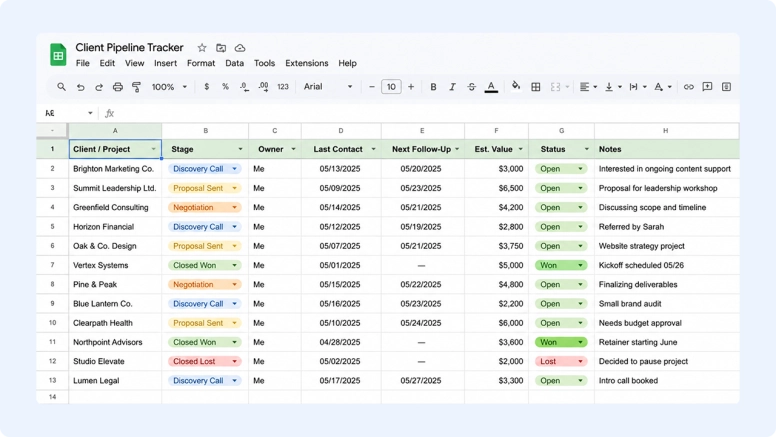
There’s a reason spreadsheets stick around.
They’re cheap, familiar, flexible, and easy to change. They’re also great for calculations, one-off analysis, and quickly sharing data with someone else.
The better test is who needs the information and what needs to happen next.
If you record a follow-up and you’re also the person who’ll make it, a spreadsheet makes that easy. You add the date, check the sheet, and get on with it.
It gets harder when five people need that information, different actions depend on it, and updates rely on manual work.
That’s the real breaking point: when maintaining the spreadsheet becomes a job in itself.
What breaks first when a service business relies on spreadsheets?
Here’s the annoying thing about spreadsheets. They won’t tell you when you’ve outgrown them. They keep opening. The formulas keep calculating. You can keep adding rows for as long as you like.
But as more people sell, manage, and deliver work for the same clients, making sure everything is correct and up to date becomes a never-ending task.
That’s where the cracks tend to show first.
1. Follow-up becomes a memory test
You send a proposal on Tuesday and add “follow up Friday” to the sheet. Friday gets busy. Nobody opens it. By Monday, the lead’s heard nothing.
The data was there. But nobody took action because it just sat in a cell.
Spreadsheets hold customer data well, but on their own, they usually rely on someone or an integration to trigger the next action.
There are increasingly sophisticated ways to solve that. For example, an agentic customer data platform can spot customer signals and act on them without someone babysitting every record.
But most agencies and consultancies don’t need to go that far. Often, you just need the system to say, “This lead hasn’t replied in five days. Sarah owns it. Here’s the next step.”
That’s the kind of gap a CRM is built to close.

It takes the information you’ve recorded and nudges the right person when it’s time to act.
2. The client record stops having one home
Tell me if this feels familiar …
You want to know what’s been agreed with a client, but every place you check tells you something slightly different.
- The AI meeting summary records two new deliverables the client requested.
- The account manager’s email confirms you’ve agreed to one of them.
- The project tracker lists one version of the scope.
- The signed proposal lists another.

You’ve captured every conversation. But how do you figure out which version of the project is current?
Somebody now has to piece that together, work out what’s still true, and update the spreadsheet before anyone else can confidently use it.
And somebody has to pay for all that piecing together. Usually, that’s you.
A 2026 PAC study commissioned by Unit4 found that 59% of professional-services organizations cited inconsistent data models as a reason teams work additional hours.
That means paying people to work overtime just to figure out what’s going on with the work you’re already delivering.
3. Shadow spreadsheets become almost frictionless to create
Shadow spreadsheets aren’t new. What’s changed is how ridiculously easy AI has made them to create.
Need a capacity tracker? Ask ChatGPT to build one.
Need somewhere to monitor retainer usage? Gemini can give you the columns, categories, and formulas in minutes.
Need to organize outstanding client requests? Microsoft Copilot can whip up a spreadsheet before you’ve finished your coffee.
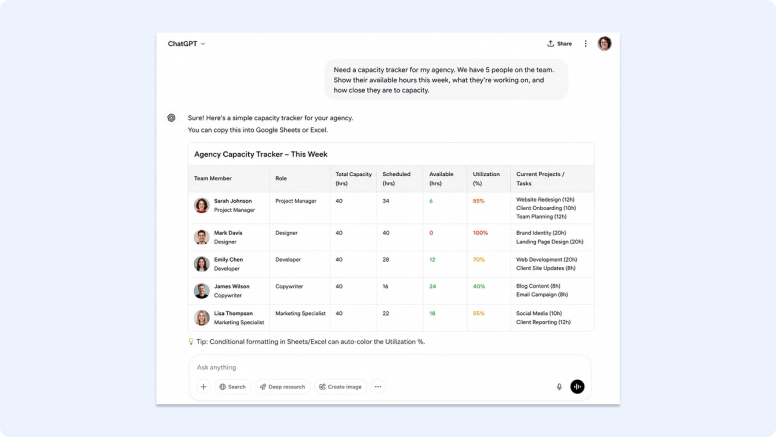
That’s genuinely handy.
But it also means creating another spreadsheet is often easier than checking whether the business already has a place for that information.
So sales has its lead spreadsheet, the account manager has an AI-built client sheet, and delivery has a capacity tracker.
They all work. But they might all contain different information.
4. Admin starts scaling with every job
For a contractor, marking a job as complete in a spreadsheet usually isn’t as simple as writing “done.”
They might also have to:
- Update the job status, list the completed works, and add the completion date.
- Record the work order, receipts, timesheets, and site photos that have come in.
- Mark the report as sent and flag the job as ready to invoice.
- Add links to the right documents in the right row.
They may also need to use a standalone tool to merge PDF documents into the client report before marking the report as sent.
None of those jobs is particularly difficult. That’s almost the problem.
Five minutes here and ten minutes there don’t feel like much until job volume scales and you repeat these tasks dozens of times every week.
For a service business, those hours cost money. You sell your people’s time.
Every hour they spend updating spreadsheets, chasing documents, and copying information between tools is an hour you’re paying for but can’t bill to a client.
Those hours add up.
As the 2026 PAC study commissioned by Unit4 found, 28% of client-facing professional-services specialists said they spend more than 30% of their working week on admin rather than core project delivery.
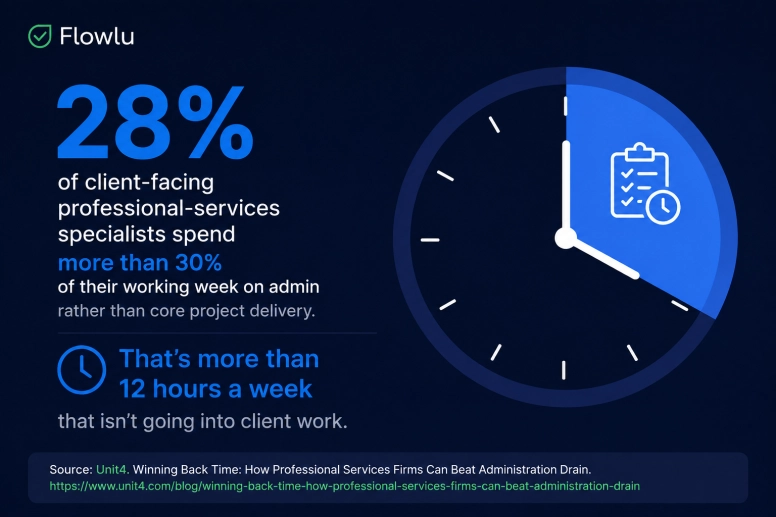
Spreadsheets aren’t responsible for all of that, of course. But they’re a good example of how the “quick” admin jobs add up.
5. You can’t answer a simple question without asking everyone first
Here’s a good test: how quickly can you answer these questions right now?
- Which leads haven’t heard back from you?
- Which completed projects need invoicing?
- How many proposals are outstanding?
- What’s likely to close this month?
The spreadsheet should have the answers.
But first, sales needs to update its leads. Account managers need to add the latest client changes. Delivery needs to mark what’s finished.
That’s when you notice just how much you’re relying on people’s manual work to keep the spreadsheet useful.
What should a CRM fix that your spreadsheets can’t?
If those problems sound familiar, moving to a CRM can make sense. But only if it actually removes the work your spreadsheets are creating.
At a minimum, it should give you one place to see:
- Client contact information
- Conversations
- Sales history
- Documents
- Next steps
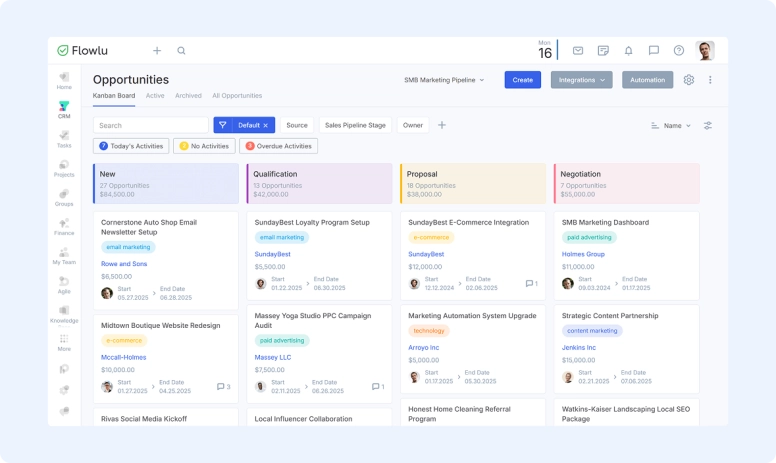
For service businesses, though, that’s only half the job.
Winning a client is only the beginning. Your process looks something like this:
- Consultancy: Lead → scope → engagement → delivery → recommendations → follow-on work
- Contractor: Enquiry → quote → scheduled job → completed work → documents → invoice
- Agency: Lead → proposal → project → deliverables → renewal
When you’re managing all this in spreadsheets, every arrow means another manual handoff.
That’s why moving just your sales pipeline into a CRM might not fix the problems we’ve just talked about.
If the CRM only gets the lead to “won” and stops there, delivery still needs its project spreadsheet. Finance still needs its invoicing tracker.
You haven’t replaced the messy process. You’ve just added a CRM to it.
For a service business, a CRM needs to make the whole client journey easier to manage. When one stage finishes, you should be able to automate what happens next — whether that’s creating the project, notifying delivery, generating paperwork, or telling finance it’s time to invoice.
How to move beyond spreadsheets without creating more admin
If your spreadsheets are starting to crack, don’t just copy them into a CRM and call it done.
Fix the workflow that made them difficult to manage in the first place.
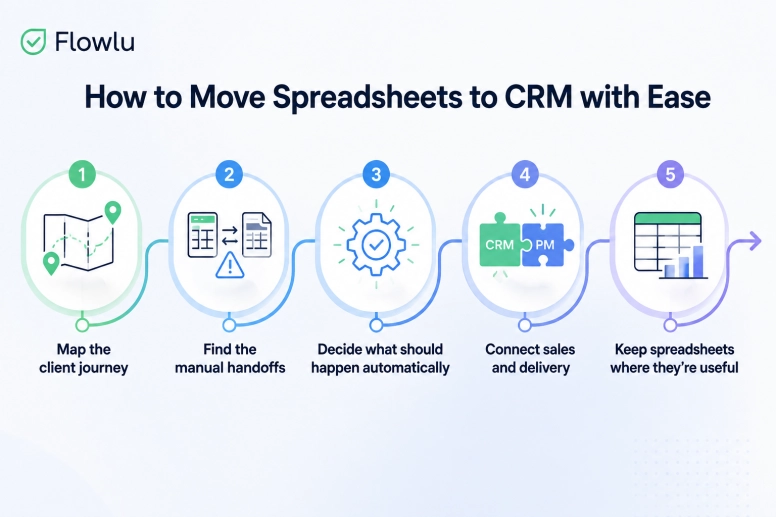
- Map the client journey: Start with lead → sale → delivery → invoice → renewal, then note what needs to happen at each stage.
- Find the manual handoffs: Look for any place where people have to copy information, update it by hand, send an internal message, or remember the next step.
- Decide what should happen automatically: Marking a deal as won might automatically create a project, assign delivery, carry over the client details, and trigger the next task.
- Connect sales and delivery: For service businesses especially, CRM and project management need to work together so the client doesn’t disappear into another spreadsheet after signing.
- Keep spreadsheets where they’re useful: They’re still great for calculations, scenarios, and one-off analysis.
Spreadsheets aren’t the enemy. But they’re not the right tool for holding your whole client workflow together.
Your CRM should be.
But CRMs break too: When a spreadsheet is the better choice
A CRM won’t automatically improve a messy process. In fact, if you use one before you need it, you can create more work than you remove.
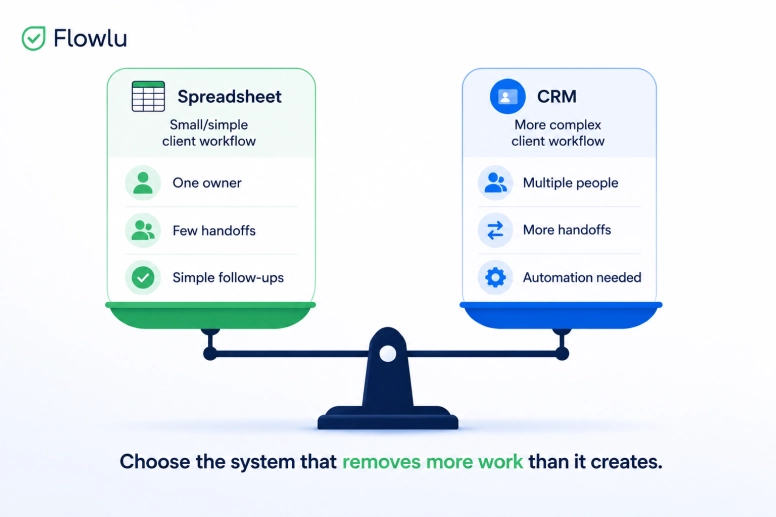
A solo consultant who manages 15 clients from first call to final invoice might be perfectly happy with a spreadsheet. Add a CRM, and now they have fields to fill in, stages to maintain, and another system to keep updated.
CRMs also start causing problems when you:
- Copy your spreadsheet into them. You can accidentally bring across every field and workaround instead of simplifying how the work happens.
- Only use them for sales. The lead reaches “won,” then everyone goes straight back to their project and invoicing spreadsheets.
- Expect people to update everything manually. You’ve changed the software without removing the admin.
There’s also more to undo when something goes wrong.
A bad spreadsheet edit might be one saved copy away from a fix. In a CRM, contacts, jobs, and invoices can all be linked, so recovery has to preserve those relationships.
Some CRMs deal with this well. For example, on Microsoft’s platform, Dynamics 365 backup tooling can restore linked parent and child records while leaving newer data alone. It’s worth finding out how your CRM handles that before you need to.
Moving to a CRM comes with its own admin and complexity. It only makes sense when what you gain outweighs what you’re adding.
CRM vs. spreadsheets: Which is better for your service business?
There’s no universal winner here. The better option is the one that makes your client workflow easier to manage.
If you’re still deciding, ask yourself:
- Can everyone find the client information they need?
- Does admin increase every time job volume does?
- Are follow-ups and handoffs happening reliably?
- Can you see what’s happening easily?
If spreadsheets still handle all that comfortably, keep them.
If they don’t, it’s probably time to look at a CRM. And for a service business, look beyond what happens before the sale. You need a tool that can carry your client into the work that comes next.
That’s exactly what Flowlu is built to do. It brings CRM and project management together, so you can manage the lead, turn a won opportunity into a project, and keep everything connected through delivery.

FAQ
Not always. If one person can easily manage clients, follow-ups, and work, a spreadsheet might be all you need. A CRM becomes more useful as the number of handoffs grows and keeping everyone updated starts creating work.
Mostly, you have to make everything happen yourself. You have to update records, remember follow-ups, pass information along, and keep different spreadsheets telling the same story.
When the spreadsheet starts creating work rather than saving it, that’s a sign. Missed follow-ups, duplicate data, messy handoffs, and requests for “everyone to update the sheet” before reporting are good clues that you’ve outgrown it.
