



How to Manage Online Projects in Distributed Teams More Effectively


Quick answer
From creeping scope to misaligned goals and lack of clarity, these are just some of the factors that can jeopardize your project's success. This is why it's so crucial nowadays to strike a clear balance between structure and the agility needed to adapt to an ever-changing world.
And showing you how to do this properly is the aim of this article. Let's take a look at strong project management practices — ones that give distributed teams clarity on goals, owners, deadlines, and communication. These project management tips work whether you're leading a five-person team or a fifty-person one.
Set clear goals, scope, and ownership
#1: The project charter
The project charter is a short text that aims to answer the questions of why you're building and what you're building. It needs to include:
- The vision: This should be summarized in just one sentence and needs to state its core. It should be something like "Build an xx tool to do yy."
- Business case: This is where you state what problems this tool or product will solve — mainly, the reason you're spending money on it.
- Success criteria: Use SMART goals.
#2: Define the project scope & deliverables
The main goal of clearly defining the project scope is to make sure you don't end up doing work that doesn't fit the primary goal. This means you need to clearly define the main deliverables, what's in scope, and what's out of scope.
Imagine your project is about upgrading an app. You might include features such as profile creation, user login, and checkout as in-scope, but state that subscription billing and multi-currency support are out of scope. You might also decide that the scope includes designing an app for iOS and Desktop, but an app for Android is out of scope.
This matters even more for distributed teams: without a shared office to catch a "wait, I thought that was included" conversation early, scope confusion tends to surface later — and cost more to fix.
#3: Ownership & roles (The RACI Matrix)
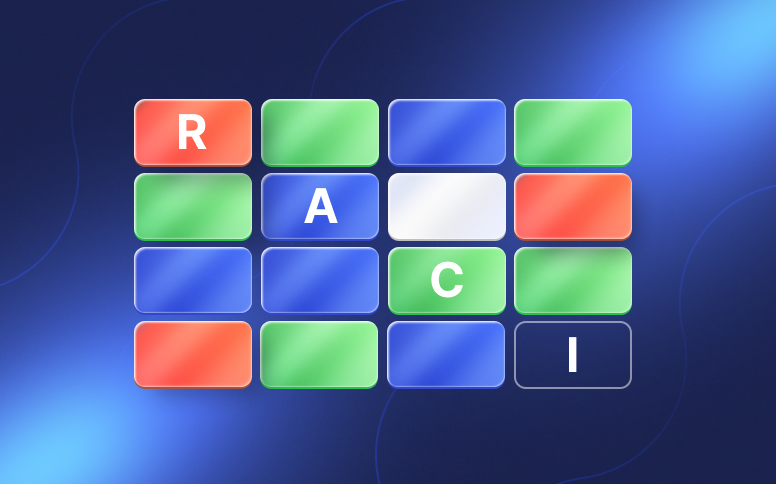
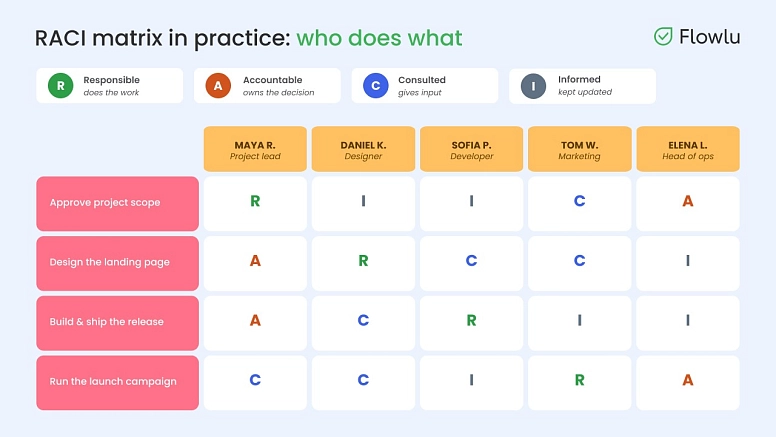
One of the things that always tends to delay projects — in office, or online — is not having someone in charge of making decisions and someone responsible for executing tasks. To keep this from happening to your business or projects, consider using the RACI matrix:
- R = Responsible: Refers to the person in charge of completing the task.
- A = Accountable: Refers to the only person who owns the responsibility of making decisions — especially important remotely, where decisions can otherwise stall waiting on people across different time zones.
- C = Consulted: Refers to individuals who are experts in the area and who might be consulted before and during a specific task.
- I = Informed: While stakeholders need to be regularly updated, they should never be directly involved.
#4: Project governance best practices
There are still two main things you need to have:
- A good communication plan
- Control over the entire process
For the communication plan, make sure everyone on your team — no matter their time zone — knows where to find the information they need, without having to wait on a live conversation to get it.
As for control over your project, you need to set a clear rule everyone knows for when stakeholders want to change the project's scope.
Plan work with tasks, milestones, and dependencies
Once you have the project scope and ownership established, it's time to bring it to life by adding tasks to the timeline. But before you start listing them, keep in mind that this job isn't simply adding dates here and there. It involves a lot more, such as spotting bottlenecks before they occur, mapping how tasks connect, and building in a buffer in case things don't go as planned.
#1: Work breakdown structure (WBS)
One of the most popular project management best practices is using a WBS to map out the hierarchy of your project. You should start with the bigger deliverables and break them down into actionable tasks and milestones.
#2: Manage task dependencies
It's pretty rare to have tasks that aren't related to others. That's why it's so important to see how they connect — it's what keeps the work moving smoothly. Make sure you define the dependencies you find (finish-to-start and start-to-start).
#3: Prioritization & risk planning
Don't forget that not all tasks are created equal — each one has a different impact on the overall outcome. Prioritization helps your team complete projects faster and with less stress.
Find out which tasks are essential for the process to be completed, and what happens if they fail or don't bring the necessary result. Tasks with high uncertainty also fall into this risk zone. This is where risk tracking comes in — anticipate possible hiccups and prepare alternative strategies that will help you quickly fix the workflow during the process.
#4: Operational visibility & tracking
Your plan should never be static; it needs to shift as the environment or variables change. Consider having a daily standup, for example — just 15 minutes or so to cover what you did yesterday, what you'll do today, and what's blocking you.
One of the simplest project workflow best practices is visual tracking — take advantage of Kanban boards, which immediately show you what's still to do, what's being worked on, what's being reviewed, and what's done.
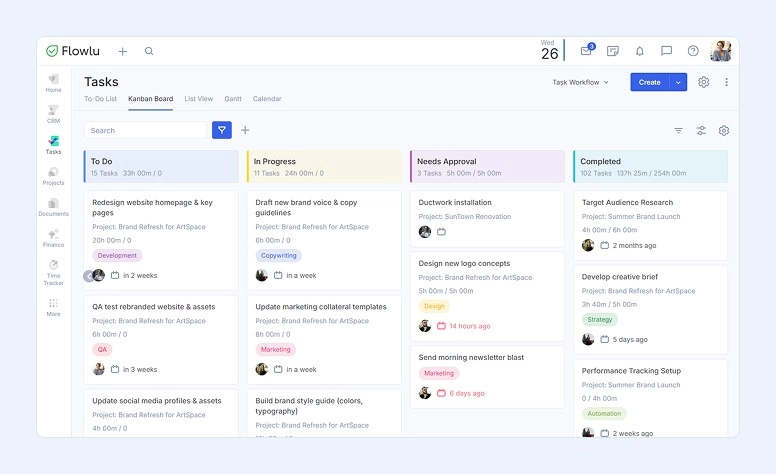
It also helps to use clear status hygiene so you can tell at a glance if things are on track with no roadblocks, if it's hit issues that could affect the schedule or scope if not resolved soon, or if it's blocked — meaning work can't move forward until something specific is resolved.
Bring all of this together in one tool, and you'll have a strong start for managing remote team projects. Flowlu is particularly well-suited for distributed teams — it gives you everything you need to build a custom project workflow, set clear roles so no one's waiting on a decision across time zones, keep communication flowing at every stage without relying on live conversations, and adjust the plan on the fly as things change.

Build communication and documentation habits
When looking for project management best practices, you just can't forget about the importance of communication and documentation. Without these, information ends up spread all over the place, communication breaks down, or you get endless meetings that could've simply been an email. Don't you agree that's a poor way to manage a distributed team?
Having good communication and documentation habits helps everyone in your company work from the same truth. There's only one version of the product, of the plan, of what needs to be done and when, by whom, and who's responsible for all of it.
Here’s how to create these good habits:
#1: Async communication
Async communication doesn't require an immediate reply, which makes it ideal for distributed teams working together.
When you need to update your team on something that's changing, your first instinct is usually to schedule a meeting. But if you can share what you need to say in a short video or a quick Slack message instead, that's often better — it saves everyone time.
If you're still holding weekly or daily meetings that amount to reading through a list of tasks people completed, it's time to drop them. Instead, create an editable async post where each employee can add their updates on a weekly or daily basis.
#2: Meetings
We're all for cutting most of the meetings that still clutter people's calendars. That said, when it comes to relationship-building, problem-solving, or complex brainstorming, meetings still earn their place. Just make sure they count and don't drag on. To do that:
- Send the meeting agenda to all participants 24 hours in advance.
- End every meeting with "ADD":
Actions: Write down the next steps that will be taken.
Decisions: Note the strategic directions the team agreed on.
Deferrals: Jot down the ideas to revisit at the next meeting.
#3: Searchable knowledge base
Having a good knowledge base is crucial, but making it searchable matters even more. After all, what's the point of storing all that information if no one can find it?
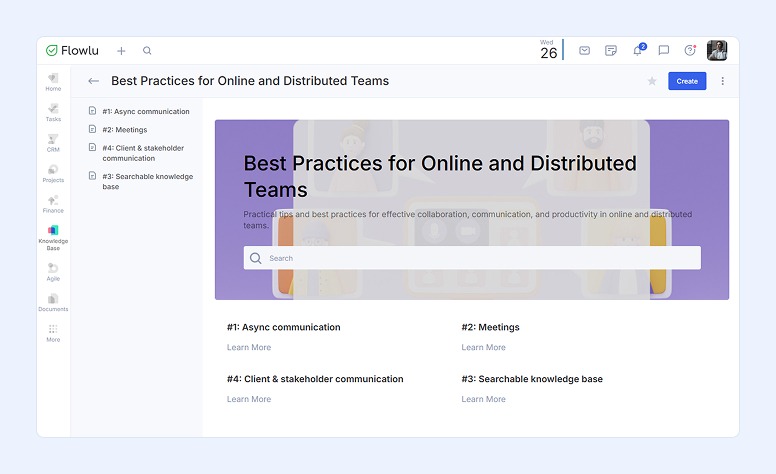
Learn something new at work and don't want to forget it? Record it and share it with your colleagues. In Flowlu's Knowledge Base, you can write down onboarding instructions, tips for post publishing, or these very best practices for online and distributed teams. Easy to edit, easy to add to, and easy to search.
#4: Client & Stakeholder сommunication
Stakeholders don’t like surprises and like to be updated as often as you can. The best thing you can do here is to specify a cadence where you will be sending a detailed report. Weekly and 2-week reports are the most frequent ones.
In case you notice that there may be a delay in a milestone, you should communicate it immediately along with a mitigation plan.
Track progress, risks, and team workload
#1: Dashboards
Managing project work well means staying on top of progress, risks, and workload — without drowning in reports.
One of the most reliable project work management best practices is keeping things simple: look at the dashboard and answer the question “Are we healthy?” in under 10 seconds.
This means that you shouldn't have to dig through a dozen fancy, overwhelming charts to get there. Focus on what really matters. For example, high-level operational metrics like sprint velocity, burn-up/burn-down charts, and cumulative flow diagrams.
#2: Track team workload
The timeline won’t tell you whether your team is reinvigorated or exhausted. However, knowing that is crucial if you want to prevent burnout. To do so, you may consider doing some capacity planning, use a WIP (Work In Progress) limit, or take advantage of some visual workload tools like Flowlu.
#3: The continuous review cadence
One of the most popular project workflow best practices that we can share with you is holding regular evaluations. Some examples include:
- Check the “"In Progress" column once a week to see the tasks that have been here for more than 2 days.
- When you hit a major checkpoint, you should compare the budget, quality, and stakeholder expectations before and now.
- At the end of a sprint, hold a quick meeting to determine what went well, what went wrong, and what can be improved for the next sprint.
3 Common project tracking mistakes to avoid
#1: The watermelon status
The name may sound a bit odd, but it's an easy way to remember this mistake. Sometimes a report looks perfect on the outside — green. But underneath, the situation is a clear red, and people are simply afraid to report the real issues until it's too late.
#2: Tracking activity instead of outcomes
It may be somewhat useful to track activity, but it's far more important to track real outcomes. Focus your time on deliverables completed or tangible features shipped.
#3: Ignoring "dark work"
Scope creep can be a huge problem, even in small projects. If you haven't clearly defined what's in scope and what's out, stakeholders are likely to keep asking you to do more — things that were never included. And when you say yes, you're not just delaying the delivery of the project; you're also draining your team's capacity.
Great project management works anywhere
The one thing that truly reflects project management best practices isn't how much information your charts pack in — it's the clarity of your process.
Whether you work with a remote team or a fully distributed one, you want a detailed, clear project charter, a map of tasks and their dependencies, and a solid communication plan. Ultimately, these project work management best practices exist to eliminate guesswork.
We don't need to tell you that when a team knows what needs to be done, by whom, by when, and who's responsible for it, everything runs smoothly. But we can tell you that with a tool like Flowlu, you can manage all of this easily and effectively.

FAQ
They include four different but important aspects:
- Define a clear scope
- Determine ownership
- Establish a single source of truth
- Build in a buffer for unexpected events
These project management tips apply whether your team is fully remote, hybrid, or in one office.
Remote teams do this by relying on async communication, keeping everything in writing, and tracking outcomes rather than hours.
There isn't just one answer — it depends on your audience. That said, a weekly team meeting works well for checking workload progress and addressing bottlenecks. For stakeholders, sending a report every one to two weeks is usually a good cadence.
There are plenty of tools out there, but we'll just mention Flowlu — it's remarkably complete and, at the same time, versatile, flexible, and adaptable to your needs.
With Flowlu, you can easily manage workload and tasks, but you also get a searchable knowledge base, a client portal, and invoicing — all in one platform.