April-June Updates: MCP, App Marketplace, Finances in CRM, Timesheets, and More

The second quarter was about giving you more control earlier in the process. You can now track revenue and expenses right inside an opportunity, before it ever becomes a project, and see your team's actual weekly workload with timesheets.
Two ecosystem pieces, the MCP server and the Flowlu Marketplace, are both live.
Alongside those, we opened up telephony and communications APIs, sped up project templates and business process automation, and shipped a handful of smaller improvements to dashboards, chat, and the knowledge base.
Let’s take a closer look at what's changed.
Flowlu MCP server: connect your workspace to AI assistants
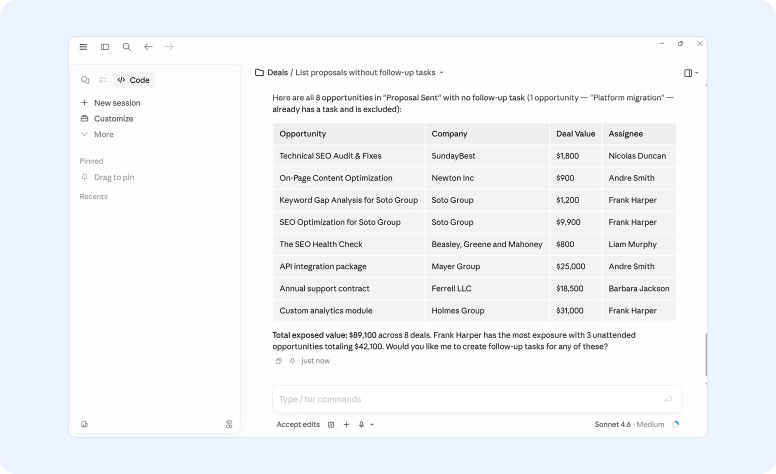
You can now connect Flowlu directly to the AI assistants you already use. Ask Claude to create an opportunity, log time, or pull a report, and it acts directly on your Flowlu workspace.
Access is scoped to your own permissions, and the AI shows you exactly what it plans to do before writing anything.
Read the full breakdown in our blog post.
The Flowlu Marketplace is open
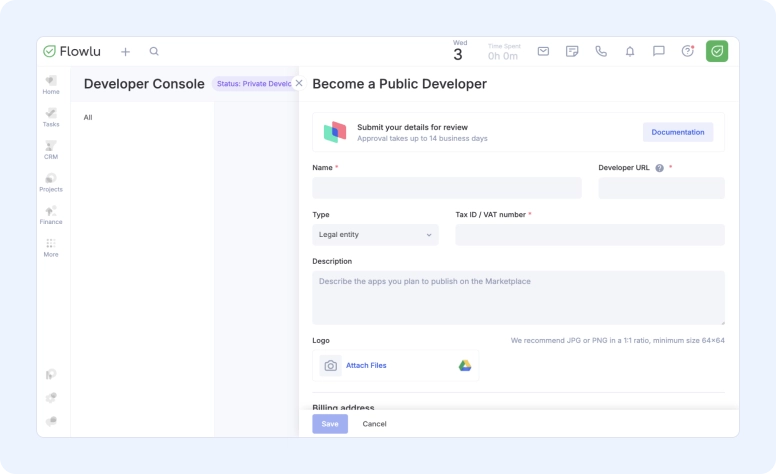
If you build software, you can now create apps that run directly inside a user's Flowlu Portal and publish them on the Flowlu Marketplace. The catalog just opened, so your app has a real shot at becoming the default choice for teams browsing it.
There's no fee to publish right now, and listings go through developer review via the Developer Console.
Full details on building and publishing are in the blog post.
Finances in Opportunities
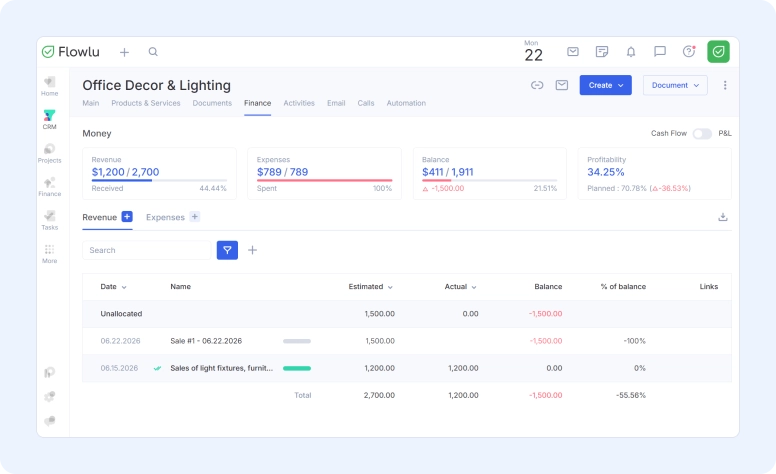
You can now track revenue and expenses directly inside an opportunity.
Previously, recording a planned payment, attaching an invoice, or linking a warehouse document to a deal meant creating a project, even if the deal hadn't reached that stage yet. That added an extra step and pulled sales reps away from the financial picture exactly when it mattered most.
What's new
- A Finance tab on every Opportunity: Works the same way it does in Projects, now available at the opportunity stage too.
- Fast finance insights: Revenue, Balance, Expenses, and Profitability widgets at the top of the tab, visible during negotiation, not just after the deal closes.
- Revenue and expense table: All payments in one place, with an Estimated vs. Actual indicator next to each one so you can see what was planned and what's actually come in or gone out.
- Cash Flow and Profit & Loss toggle: Cash Flow shows the money that's actually moved. Profit & Loss shows real margin once cost of goods and other factors are accounted for.
- Invoicing from the opportunity: Create an invoice directly from the opportunity record, without creating a project first.
- Filters and Excel export: Useful once an opportunity has a long list of payments and you need to pull a subset for a report.
All figures recalculate automatically when a linked document changes, so nothing needs manual updating.
Who it's for
- Sales reps, to see a deal's real profitability before it closes and invoice faster without creating extra records.
- Sales managers, to keep an eye on team-wide deal economics without digging into projects or separate finance reports.
- Finance teams, to see real margin at the opportunity stage instead of after the fact.
- Business owners, to get visibility into the money from the first conversation, without creating projects they don't need yet.
When to use it
Use Finances in Opportunities for quick, one-off sales. Move to a full Project once the work becomes longer-term.
Available on Essential plans and up.
Full setup instructions are available in the Help Center.
Timesheets: see your team's real workload
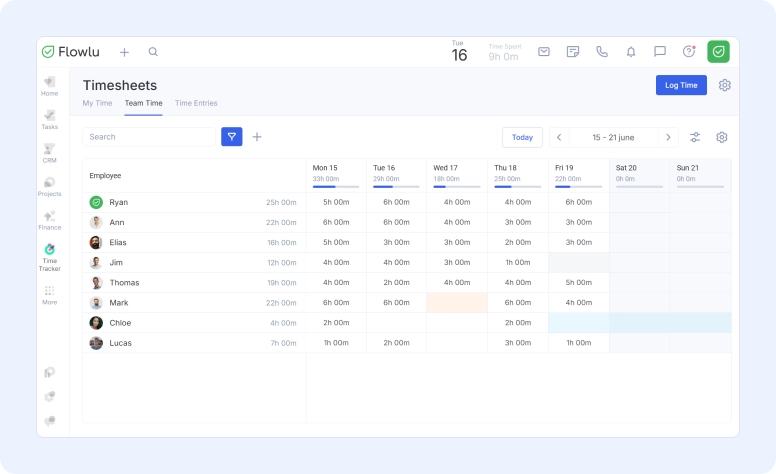
The Time Tracker module now includes Timesheets, a weekly view that shows exactly who worked on what, how much, and who was out, without opening a single task.
What's new
- My Time: A weekly calendar view of your own tasks and time entries. Log time inline by clicking a cell, or manually with the Log Time button, which lets you set the task, date, time, and a description.
- Team Time: Managers and admins see the whole team's week at a glance, grouped by assignee or by user, with color coding that flags overloads. Absence types can be turned on for the table from the settings.
- Time Entries: A complete, filterable list of every entry logged, by employee, project, rate, and other fields, for when the calendar view isn't enough.
Who it's for
- Employees, to show their real workload, track their own pace, and make an informed case if they're over or under capacity.
- Managers, to see real team workload instead of guessing, make hiring and reassignment decisions from actual numbers, and handle absences without back-and-forth.
Where this helps in practice
- Assigning an urgent task: Instead of asking who has room and getting answers shaped by who wants to say yes, check the grid and hand it to whoever actually has time.
- A task that consistently runs long: Timesheets show exactly where the hours go, whether that's a report that could be automated or a task that was underestimated from the start.
- Estimating new projects: A history of how long similar tasks actually took makes future estimates more reliable than guessing.
- Someone goes on leave: The grid shows the workload shift to the rest of the team immediately, so you can redistribute before anyone burns out.
- Growing team, falling efficiency: Instead of relying on a feeling that something's off, the weekly numbers show exactly where overtime crept in or tasks started stretching.
Timesheets are available on Advanced plans and up.
More details are available in the Help Center.
Open APIs for telephony and communications
You can now connect any telephony provider or any messenger to Flowlu, including ones without a pre-built integration.
- Telephony API: Configure settings inside Flowlu, calls link automatically to opportunities and contacts, and call recordings are stored directly on the record.
- Communications API: Messages from any connected channel land in a single conversation feed, you can reply without leaving Flowlu, and conversations link automatically to opportunities and contacts. Automations can send a templated message when an opportunity moves to a new stage.
Technical details are in the developer documentation: telephony and communications.
Faster ways to build Project Workflows
Three updates landed for Project Workflows that cut down on rebuilding the same structure repeatedly.
- Copy a whole workflow stage: Copying a stage now brings its tasks, milestones, and checklists with it, dropped in right after the original. Useful when you have near-identical stages.
- Insert Task Templates into Work Structure: While editing a task or milestone, you can select a saved template. Description, assignees, and custom fields populate automatically, while start and due dates stay untouched so the schedule doesn't shift.
- Duplicate tasks inside a workflow: Copy an existing template task instead of building one from scratch.
Business Process automation gets faster
Several updates landed for Business Processes, aimed at cutting down friction in everyday use.
- Run a process directly from a project: Launch a business process from the project card itself, as many times as needed. Every active instance and task now lives in a new Business Processes tab inside the project.
- Reassign instantly: Swap the assignee on a process step in one click, without restarting the instance. This works for group tasks too.
- Move several instances at once: Select multiple process instances and shift them to a new stage in a single action. Available to admins and users with process management permissions.
- API access for Business Processes: External systems can read and update process data. That covers reassigning a step when someone's out, adjusting automation timing when a key date changes, or triggering a process and sending completion notifications externally.
- Descriptions on the process card: The process description is now visible directly on the card, so nobody has to guess what it's for.
Business Processes are available on Advanced plans and up.
Other useful Flowlu updates
Share a dashboard with a teammate
Send a teammate a link to your dashboard and they get their own copy with the same widgets and filters, scoped to their own permissions.
How sharing works:
- Open the context menu on any dashboard and copy the link.
- Send it to a teammate in any messenger.
- They open it and a copy is automatically created for them.
@mentions in group chats
Type @ in any group chat to pull up the participant list, then select a person or use @all to ping everyone in the room. The alert lands even if they've muted the chat, so use it when something genuinely needs their attention. Not available in 1:1 chats, where you already have each other's full attention.
Reactions in chat
Add an emoji reaction to any message, on desktop and mobile.
Voice messages
Voice messages are now supported across all Communications module connectors, both incoming and outgoing. Internal chat also supports voice messages in private threads.
Autosave for drafts
A page refresh or accidental click no longer loses what you typed. Drafts autosave across tasks, events, projects, opportunities, contacts, organizations, and comments, and stay until you discard them.
Refreshed Knowledge Base editor
Now supports superscript and subscript, text highlighting, and inline image uploads. Enable it per knowledge base from the settings gear. New portals get it by default.
What shipped in Q2 2026
This quarter's through-line was visibility earlier in the process: financial data on the opportunity, workload data on the week, and the tools to act on both without jumping to a separate module or waiting until after the fact.
If you're building on top of Flowlu, the Marketplace is open and ready for your first app. The MCP server is also live if you want to connect your AI assistant directly to your workspace.
As always, if something doesn't work the way you'd expect or you're missing a feature, let us know at [email protected].
FAQ
The main releases this quarter are Finances in Opportunities, Timesheets, the Flowlu MCP server, and the public Flowlu Marketplace. Alongside those, open APIs landed for telephony and communications, project templates and Business Processes got several speed improvements, and a set of smaller updates shipped across dashboards, chat, and the Knowledge Base.
Finances in Opportunities lets you track revenue, expenses, and profitability directly on an opportunity record, without creating a project first. A Finance tab on every opportunity gives you a revenue and expense table with Estimated vs. Actual tracking, four top-line widgets (Revenue, Expenses, Balance, and Profitability), Cash Flow and Profit & Loss toggle, and the ability to create invoices directly from the record. It's available on Essential plans and up.
The Flowlu MCP server lets you connect Flowlu to AI assistants like Claude directly, so you can ask them to create opportunities, log time, or pull reports without switching tabs. Access is scoped to your own permissions, and the AI shows you what it plans to do before writing anything.
Timesheets is a new section in the Time Tracker module that shows weekly workload across your team in a calendar grid. It includes My Time for individual time entry, Team Time for managers to see the full team's week with absence tracking and load indicators, and Time Entries for a filterable log of everything logged. Available on Advanced plans and up.