



4 Steps to Prepare for Your Nonprofit CRM Migration


But once you’ve been using your first CRM for a while, you might find that it no longer fully meets your needs. In this case, you may consider migrating to a new CRM—a process that will most likely benefit your nonprofit in the long run but can be challenging to navigate as you get started.
Let’s discuss four steps to take before you initiate a CRM migration at your nonprofit to lay the groundwork for a successful process.
1. Plan out migration project logistics
Like any significant undertaking at your organization, CRM migrations are most successful when they begin with clear goals. Start by determining what you want to get out of your new platform, then refer back to your goals throughout the migration process to keep your activities on track.
After setting goals, your focus should shift to your migration’s logistics, including your:
- Timeline: By what date do you want to be up and running with your new CRM, and when do you need to complete other activities along the way to meet that deadline?
- Budget: How much can you spend on startup costs, implementation assistance, testing, and other aspects of your migration?
- Internal project management: Who on your team will assign task ownership and monitor progress as you migrate systems, and who will execute relevant activities?
- External support: Will your new CRM vendor assist with data migration, and would it be helpful to bring on a third-party consultant for any part of this process?
If you hire a consultant to support your CRM migration, make sure they specialize in nonprofit work and have experience with both your old CRM and your new one. It’s also useful to reach out to other organizations in your network who have recently conducted similar migrations to ask for consultant recommendations and to get a general idea of how the process went for them, so you understand what to expect.
For example, the Flowlu team has extensive experience with CRM migration for both nonprofit and commercial projects, so they know how to help users settle in and make the most of their new system.

2. Clean up your current database
A CRM migration provides the perfect opportunity to work on improving your nonprofit’s data quality. Clean, up-to-date data will help the migration process go more smoothly and make your new CRM more useful as you get up and running with it.
Review your existing database to pinpoint:
- Data that is no longer useful to you so you can archive it or exclude it from your migration.
- Duplicate records that you can either delete or merge with matching profiles and activities.
- Inaccurate or incomplete information—fill in gaps by integrating other data sources, conducting data appends, or asking supporters directly for updated details.
- Preferences and consent to make sure you preserve them during your migration, since these indicators protect donor privacy and trust.
In addition to individual records, review the broader structures in your current CRM (donor profile fields, supporter segments, information formatting standards, etc.) to determine what you should carry over, revise, or delete in your new system.
3. Map and convert your data
Data mapping defines where information from your current platform will live in your new CRM. Review both systems’ setup, then create a guide explaining how to:
- Match equivalent data fields: For instance, “Primary Address” in your old system might correspond to “Mailing Address” in your new one.
- Split, combine, or standardize data: Names are a common example here—you may need to divide a full name into first and last names or vice versa and reconfigure middle names and initials, titles, and suffixes to align with your new system.
- Translate record structures: Make sure segments, notes, and other custom data that is still useful to you can be preserved in your new system, and if so, determine how to format these elements.
Include examples of each of these elements in your guide, along with instructions for navigating data that won’t migrate. Before you fully migrate your data, run tests on smaller samples to verify that you’ve addressed these problem areas and adjust your approach as needed.
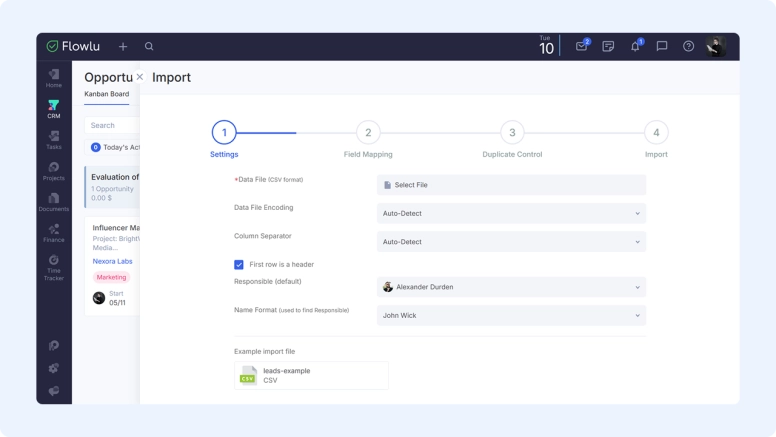
Even if your old and new CRMs use different names for the same fields, some systems let you match them before importing your data. For example, Flowlu has a dedicated Field Mapping step when importing accounts and opportunities from CSV files, so you can match the fields before completing the import.
4. Plan post-migration training
Your CRM implementation is more likely to achieve its goals if you consider the post-migration phase from the beginning. This way, you can jump right into staff training once your data is fully in your new system.
Your post-migration plans should cover:
- Training formats and timelines: Depending on how your staff members work best, you might schedule synchronous sessions over a few weeks or prepare asynchronous courses for each team member to work through by a specific deadline.
- Responsibilities: Some CRM vendors and third-party consultants provide staff training, while others leave it up to your team. Designate someone to either lead training internally or liaise with these external professionals during the process, who may or may not be the same person assigned to set user permissions and maintain your new system over time.
- Feedback collection: Set up a form, survey, or contact email where team members can share their thoughts on your new system as they start using it. Once they’ve submitted their concerns and ideas, implement the best and most common suggestions and communicate the changes you make over time so employees know you’ve taken their input seriously.
Planning in advance will make it much easier for your team to navigate its CRM migration efficiently and effectively and help you get more value from your new system sooner.
Find a better home for your nonprofit projects
CRM migration for nonprofit organizations has its own peculiarities compared to commercial projects. Although the process is quite similar—planning logistics, preparing essential data, and onboarding your team—nonprofit migration still requires an experienced approach.
It helps even more if your chosen CRM offers flexibility. With the right support, you can adapt client accounts into donor profiles, use financial tools to track donations, and turn billable hours tracking into a way to record volunteers' work.
Flowlu was designed to be exactly this kind of flexible system—one that works whether you're running a successful commercial business or starting meaningful nonprofit projects.

FAQ
The best nonprofit CRMs include robust donor profiles, segmentation capabilities, integrations with external solutions like marketing tools and accounting software, and comprehensive reporting and dashboards to help you analyze data effectively. Make sure to purchase a CRM solution or package that’s designed for nonprofits, not businesses, so you can track donations, memberships, pledges, grants, volunteering, events, and other activities specific to mission-driven organizations.
Migrating data between nonprofit CRMs involves extracting data from an old system, converting it into a format that is compatible with a new platform, and uploading it to that new solution. Testing small amounts of data first and adjusting processes as needed before fully moving your data into your new CRM helps smooth out the transition.
Nonprofit CRM migrations may take anywhere from six weeks to six months. Timelines vary depending on the amount and quality of data you plan to migrate, the complexity of your old and new systems, the number of integrations or custom processes you plan to leverage, and your organization’s capacity.