



July-September Updates: Personal Telegram Accounts, Zoom Integration, Advanced Filters, and More

While business slowed down over the summer, we were busy working on improvements to make your return to work in September smarter.
We covered three key areas:
Client interaction: From starting conversations with personal Telegram accounts, Instagram chats, and web forms to staying connected through Zoom meetings and client birthday reminders;
Fine-tuned workflows: From precise filtering with advanced filters to complex CRM automation with condition groups;
Project and task customization: From a clearer List View to easier project setup with task dependencies in templates and the option to create templates from your favorite existing projects.
Plus many smaller improvements. See how much easier and more pleasant your everyday business tasks have become.
Telegram now personal
Earlier, our users could already use this app, but only to create a bot. However, using a bot didn't give them the opportunity to write to a client first and under their own name.
The biggest benefit of the new feature
Now you don't need to guess whether the client will write to you at all. You can take the initiative.
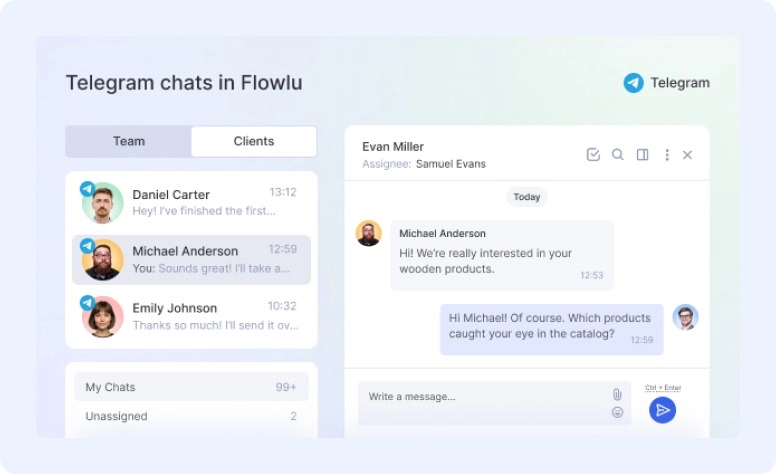
With Telegram connected, you can:
- Monitor all your Telegram chats in one place
- Message clients first
- Automate messaging with rules in your sales pipeline
- Work with more than one Telegram account simultaneously
You can use the integration for free for 7 days. After the trial, it costs $30/month.
Go to your apps, install Telegram, and start conversations that can lead to new opportunities.
Available for all plans.
See the full connection guide.
Meet your team in Zoom
Now you can start a video call right in Flowlu.
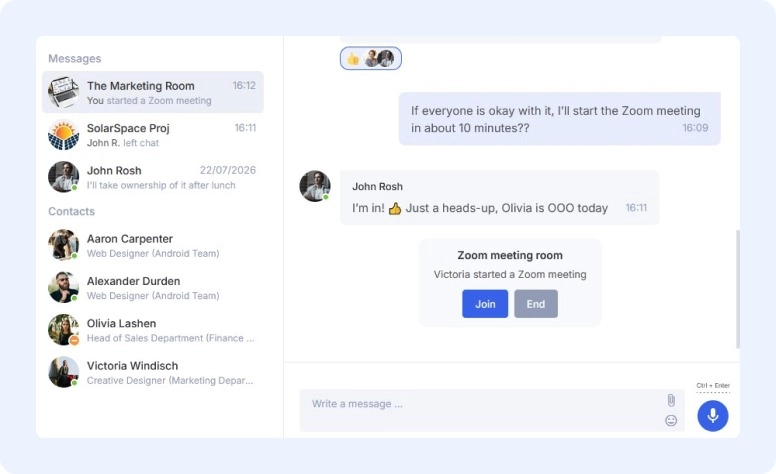
Once you install the app and connect your Zoom account, start a new chat and invite everyone to the call.
If you prefer to plan ahead, create an event in your calendar and add a Zoom conference. The system automatically generates a meeting link and adds it to the event card, so all attendees can see it.
What’s great about Zoom in Flowlu
You can invite not only your colleagues but clients as well. If the event is linked to a CRM contact or opportunity, they get the join link by email as soon as you start the call.
Want the event card to show the recording, transcript, and AI summary after the meeting? When creating one, select Zoom under Video conference and enable Meeting summary (Zoom AI). These features require Zoom Pro or higher, with cloud recording and Zoom AI Companion enabled.
You can download the transcription through the API and use an external AI assistant to analyze it. For example: "Review the calls with ArtSpace Company. Highlight the main directions and make a table: idea, assignee, deadlines, outcomes."
Flowlu may suggest tasks based on the AI summary. The system identifies key takeaways and turns them into action items, so you don't need to create them manually.
And one more convenient nuance: Attendees don’t need to have a Zoom account. Only meeting organizers need one.
Install Zoom from the Apps section, connect your account, and start right away.
On all plans, including Free.
Redesigned form builder
To start with, we created one place for all your forms. Just go to CRM → Web Forms.
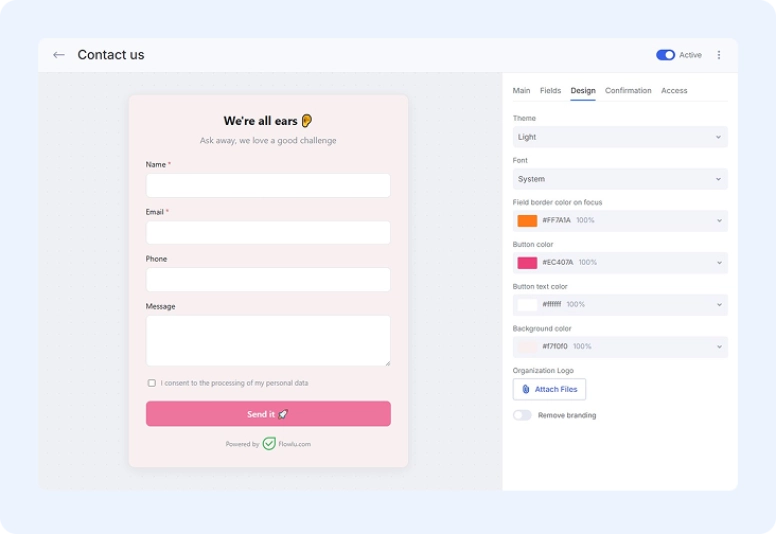
From here, you can see who created each form and when, which forms are already live, and which are still in draft.
How it’s different from the old version
The other big part is design. We’ve made it easier and more flexible, so you can create highly customized, colorful, and bright forms that reflect your style, tone of voice, and ideas. Choose a theme, font, button and field colors, and logo. Add any field type, such as phone, date, file, dropdown list, checkboxes, and more, in unlimited quantities. Finally, remove the “Powered by Flowlu.com” signature.
You can replace this signature with your organization’s branding only on a paid plan.
Share a form in two ways: with a direct link or an embed code for your website.
If you need to track it with UTM parameters, you can skip the extra setup here, too. Tags from the link are automatically pulled into the deal card, so you never lose the lead source.
Available on all plans.
Advanced filters
Now you can search more precisely.
The new filters are flexible enough to let you narrow down your search with exact details. They go beyond simple OR and AND logic: advanced filters let you combine conditions and condition groups in any way you like.
What’s new
You can check for two different conditions with a single filter.
Here’s an example: As a team leader, at the beginning of each new week, you need to check:
-
all tasks that started before the current week
OR -
if they are still stuck in the “Need approval” status and were received more than twice.
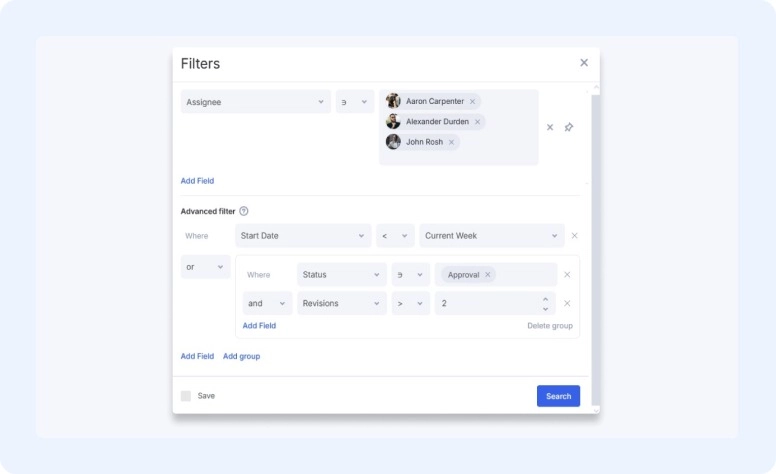
You’ll find the new feature under Filters at the top of any list or table, or when creating a custom filter.
Within a single group (or at the top level), all conditions must use the same operator — either all AND or all OR, not both. Need to mix logic? Add a separate group instead.
Available on all plans.
See how it works in more detail.
Conditional groups in automation
One more feature for more precise workflows.
When automating your pipeline with rules, you can now build complex combinations.
It’s a similar idea to the filters update
What previously required two separate rules can now be configured in one.
Here’s a practical example: You need to set up a deal transfer, and there are two sets of conditions that can trigger it:
- if the deal status is “Active” AND it has the tags “Design”, or ”Development”;
- OR if the Opportunity Start Date is 5 days or more in the past AND the Opportunity Amount is greater than 5,000.
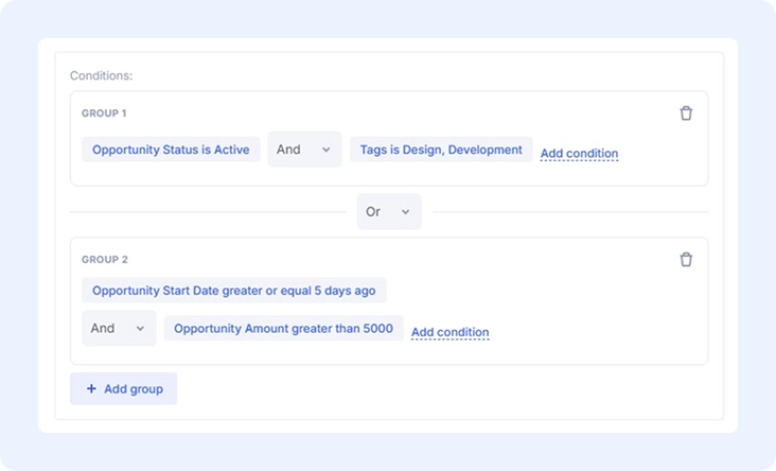
The deal is checked against these conditions, and the relevant action is triggered when they are met.
Build complex scenarios without duplicating automations.
Available on Advanced and higher.
Updated List View for tasks
We’ve made the familiar List View much more flexible.
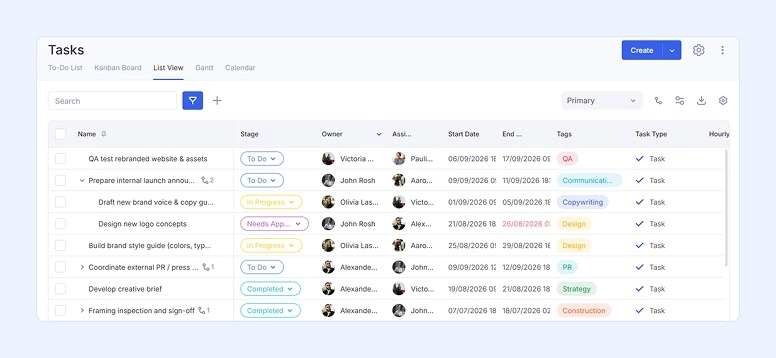
Structure:
- Rearrange the hierarchy with drag-and-drop
- See subtasks (up to three) collapsed, expanded, or as separate rows
- Set your own column order, pinning, width, sorting, grouping, and subtask mode (filters aren't saved in the custom view).
Grouping and filters:
- Group by status, project, and assignee in Tasks; by stage in Projects — the subtask hierarchy stays intact
- All your custom filters carry over from the old view to the new one.
Editing:
- Edit the title, stage, deadlines, assignees, collaborators, followers, planned time, and priority right from the list — no need to open the card
- Pin the columns you need and hide the rest, right here without digging through settings.
Set your preferred order.
Available on any plan.
Small but important refinements
Instagram via Wazzup
Manage Instagram chats right in Flowlu through Wazzup. Each chat can automatically become a CRM opportunity, with contact and deal details shown in the sidebar.
Set the Pipeline field to “Not set” to keep general inquiries out of your pipeline.
Available on Essential and higher.
Less routine with Project upgrades
#1. Task dependencies directly in the template
Previously, you had to link tasks manually in every project created from a template. Now you only need to set this up once — in the template itself — and the links will automatically appear in every project based on it.
Go to the project template → open the task editing form → set up the dependencies.
Available on Essential and higher.
#2. Template from an existing project in one click
You’ve created a perfect layout for your Marketing projects? Don’t just admire it — save it as a working template!
Go to the project whose structure you want to use as the basis for future projects, click the three dots in the top-right corner, and choose “Create Template from Project.”
Your perfect layout is now ready to reuse whenever you need it.
Available on all plans.
Happy birthday to your clients
With this new widget, you’ll never miss your clients’ birthdays.
Add it to the dashboard, and it shows what’s coming up in the next 7 days, with the closest birthdays at the top. Just click one to jump straight to the client’s card.
The person responsible for the client will get a nudge on the big day itself.
If you’d like, you can also set an earlier reminder for specific days. Do it in the CRM module settings.
You’ll only see clients you have access to. But if you want reminders for every client, add people like your sales lead so nothing slips through.
And if a few birthdays fall on the same day, you’ll get one notification instead of a pile of separate ones.
Available on all plans.
Pinned messages and chats
A familiar feature to help you keep important messages from getting lost:
- In private chats, pin a message and choose whether the other participant can see it.
- In group chats, only administrators can pin messages.
You can now also pin conversations in the overall chat list, and easily change their order by dragging and dropping.
The update is available on all portals.
Q3 2026 outcomes
Step by step, we’re bringing small improvements that add up to a bigger picture of a smoother, more fine-tuned workflow. More care for your clients, more visibility for your management, and more flexibility for your processes.
If you also want to be part of this, send us your ideas — whether you’re a developer with an app or a user with honest feedback.
Your ideas inspire us to create a better solution. We’re always open to your feedback at [email protected].
FAQ
This quarter, we focused on three main areas:
- New and expanded integrations: personal Telegram accounts, Zoom video calls, and Instagram chats via Wazzup.
- More powerful workflows: advanced filters, conditional groups in automations, an updated List View for tasks, and easier project setup with task dependencies in templates and templates created from existing projects.
- Better client relationships: a redesigned web form builder and a new client birthday widget.
You can start video calls with colleagues and clients right from Flowlu, or add a Zoom conference to a calendar event. With Zoom Pro or higher (with cloud recording and Zoom AI Companion enabled), the event card can show the recording, transcript, and AI summary, and Flowlu may suggest tasks based on that summary. Attendees don't need a Zoom account; only the organizer does.
The new filters go beyond simple AND/OR logic. You can combine conditions and condition groups in any way you like, so you can check for two different sets of conditions with a single filter.
Conditional groups let you combine several sets of conditions in one automation rule. For example, a deal can be moved if it matches one group of conditions or another, so what previously required two separate rules now takes one.